

Key takeaways
Here are the key insights from our website breakdown analysis of Bill.com.
Bill.com’s homepage quickly clarifies the category and bundle by positioning BILL as an “AI-powered financial operations platform” that unifies AP, AR, spend, and expense in one place, supported by a single, multi-action headline.
Conversion paths are built around sales-led CTAs, with prominent “Request a Demo” and “Get Started” placements, plus an in-page demo form that reduces the clicks needed to reach a salesperson.
The site does a strong job de-risking adoption for finance teams by repeatedly emphasizing accounting integrations and “one login” plus “automatic sync,” which directly addresses implementation anxiety.
Social proof is unusually concrete for this category, combining named customer stories with role titles and measurable outcomes like “67% faster close” and “90% faster payment processing.”
Bill.com’s pricing experience appears designed for segmentation, separating product lines (AP and AR vs Spend and Expense) and pushing higher-intent visitors toward demos, but it may leave some self-serve buyers wanting clearer all-in cost details.
Trust messaging is reinforced at multiple levels, including “BILL’s Bank-level Protection,” a dedicated Security entry in navigation, and extensive legal and entity disclosures in the footer that clarify which BILL entity provides which service.
Home
Bill.com’s homepage succeeds because it states the product category and bundle in a single pass: “Meet BILL. Your AI-powered financial operations platform,” followed by a clear list of jobs to be done (create and pay bills, send invoices, manage expenses, control budgets, access credit). That structure minimizes interpretation work for CFOs, controllers, and accounting firms evaluating AP automation and AR automation together.
Key homepage conversion mechanics are visible in the hero and above-the-fold layout:
- Dual CTAs appear in the header and hero area, including “Request a Demo” and “Get Started,” supporting both sales-led and faster-start intent.
- The navigation is segmented by persona and product line (Businesses and Firms, Spend and Expense, Accounting Firms, Solutions), which helps visitors self-identify without hunting.
- The page quickly reinforces platform cohesion with language like “all on one platform”, plus the promise of “One login” and “automatic sync” with accounting software.
Below the hero, the page uses modular product cards (Accounts Payable, Spend and Expense, Financial Operations Platform, Accountant Partner Program). Each module follows the same pattern: a benefit-led headline, a short explanation (for example “AI-enhanced AP automation”), and an action link like “Explore AP Automation.” This consistency makes scanning easy and supports multi-product expansion.
One caution visible in the excerpt is that a couple of placeholder blocks (“Heading 3… Lorem ipsum… Button Text”) would harm perceived polish if they appear in production. For a finance audience, small quality issues can reduce trust. Overall, the homepage is strongest when it ties AI-powered automation to concrete workflows and implementation details, rather than generic innovation language.
Pricing
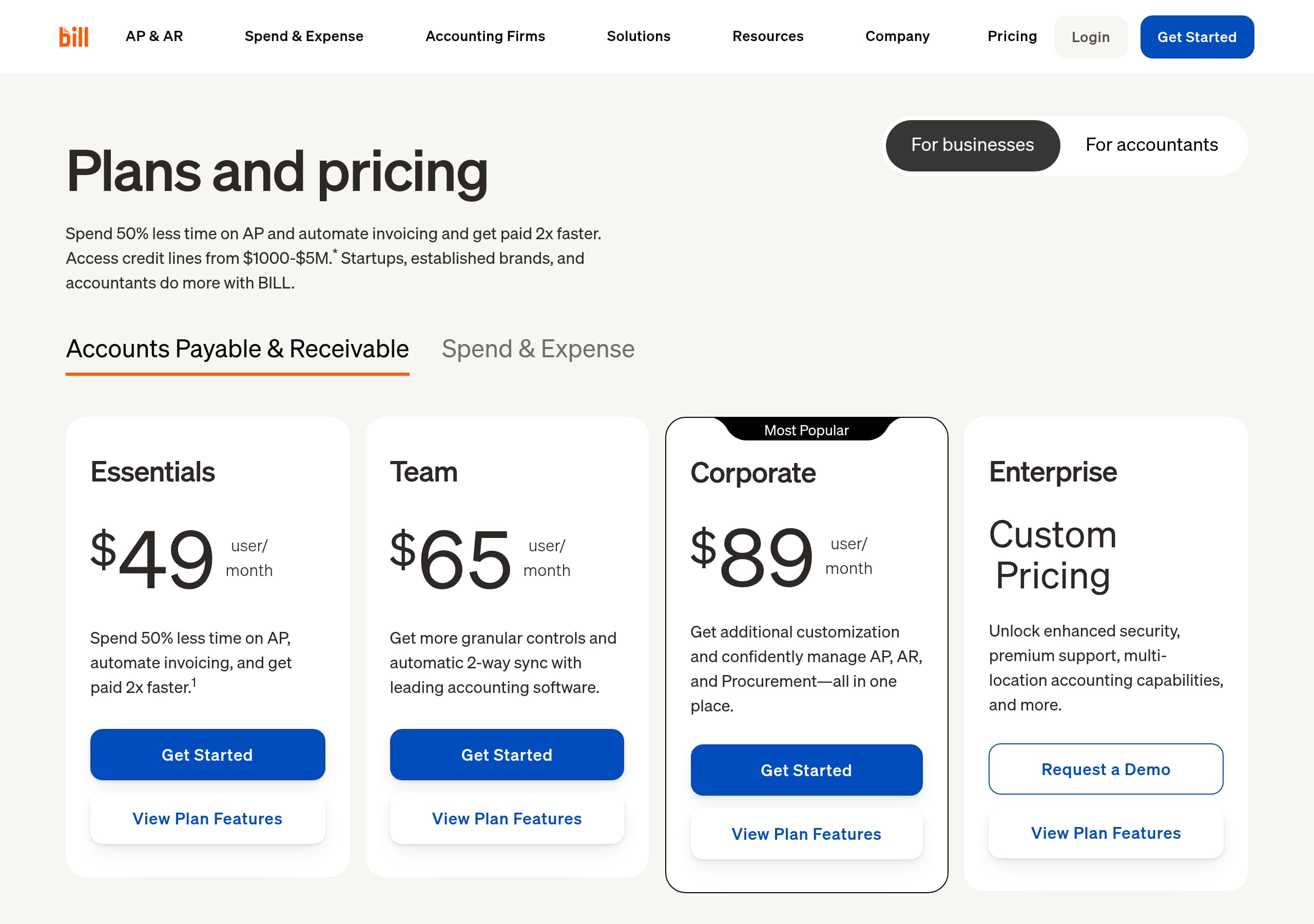
Bill.com’s pricing presentation is built for segmentation and sales conversations, not purely self-serve checkout. Even from the site structure, “Plans and Pricing” sits alongside product-level navigation (AP and AR, Spend and Expense), and the primary CTAs across the site frequently route to “Request a Demo” or “Get Started,” which typically indicates packaging that depends on business size, entities, approvals, or payment volume.
From the Pricing screenshot context and the page architecture, a few conversion patterns are likely at play:
- Pricing is framed as part of an integrated platform decision, not a single feature purchase. That matches the “Unify AP, AR, spend, and expense on one platform” message used on the homepage.
- The page likely separates BILL AP and AR from BILL Spend and Expense, which is reinforced by repeated product groupings in the footer and navigation. This reduces confusion about what you are buying.
- CTAs are designed to keep momentum: “Get Started” captures high-intent visitors, while demo-first funnels capture larger accounts that need procurement, IT review, and approvals.
Where Bill.com can lose some self-serve conversions is when pricing lacks an “all-in” view. The homepage includes important qualifiers for credit products, for example “Credit lines from $1000-$5M¹” plus footnotes about approval, and additional disclosures about the BILL Divvy Card being issued by bank partners. Those are responsible, but they also imply complexity, which makes transparent, itemized pricing even more important.
The best outcome for this pricing experience is when visitors can quickly answer three questions: what plan fits my team size, what features are included (approvals, procurement, invoicing, API), and what costs vary by usage (transactions, payments, card). Bill.com’s structure supports comparison, but it should ensure pricing clarity matches the site’s otherwise crisp platform story.
Features
Bill.com’s features are presented as outcome-led workflows rather than a long technical checklist, which is the right approach for finance operations buyers. The homepage feature story clusters around the platform promise: “create and pay bills, send invoices, manage expenses, control budgets, and access the credit your business needs,” then breaks into product modules like BILL Accounts Payable and BILL Spend and Expense.
Several concrete feature themes show up repeatedly across the navigation and modules:
- AP and AR depth: the header includes “Approvals,” “Procurement,” “Invoicing,” “AP Controls,” and “API,” indicating Bill.com supports both operational controls and developer integration.
- Payments breadth: “Pay By Card,” “ACH Payments,” and “Int’l Payments” are listed as first-class items, reducing perceived limitations for companies with diverse vendor bases.
- Implementation story: the homepage calls out “Easily sync with your accounting software” and later “simple integration into your tech stack,” plus explicit integration targets in the global nav like QuickBooks, Sage Intacct, Oracle NetSuite, Microsoft Dynamics, and Xero.
The Spend and Expense module is especially explicit about product boundaries and compliance wording: it mentions “free intelligent software” combined with “The BILL Divvy Card powered by Visa,” plus credit-line ranges ($1000 to $5M) and footnoted disclaimers. This is not just legal hygiene, it also sets correct expectations about underwriting and card issuance.
A notable strength is the “One login, an aggregated cash flow task list” line in the Financial Operations Platform card. That is a feature expressed as a daily operational benefit, not an abstract platform claim.
The main feature-page risk visible in the excerpt is quality control: placeholder “Lorem ipsum” blocks suggest a CMS component that may have shipped incomplete on some templates. For a product selling bank-level protection and finance controls, feature pages must feel precise and finished.
Signup
Bill.com’s signup experience is optimized for qualified, high-intent leads rather than pure self-serve onboarding. The homepage repeatedly routes visitors to “Request a Demo” and includes an embedded form area with clear system feedback states (“Thank you! Your submission has been received!” and an error message). That indicates the primary conversion event is a sales handoff, not immediate in-app activation.
There are multiple paths into the funnel, which is important for a platform that sells to both businesses and accounting firms:
- “Get a Demo with a Sales Expert” for buyers who expect a guided evaluation, procurement review, or multi-entity rollout.
- “Get Started” for visitors who are ready to move forward, likely routing to account creation or plan selection.
- Separate tracks for accounting firms via “Accountant Console,” “Accountant Partner Program,” and “Pricing for Accountants,” which reduces friction by aligning with firm workflows.
The on-page form language also includes compliance acknowledgments: “By continuing, you agree to BILL’s Terms of Service and acknowledge our Privacy Notice.” This is standard, but it is important for finance tools and sets expectations before submission.
What Bill.com does well here is pairing the demo motion with strong context. Visitors see product modules, integrations, and customer outcomes before being asked to submit details. That sequencing increases the likelihood that form submissions are informed and better qualified.
What is less clear from the homepage excerpt is the post-submit next step: whether users can immediately explore a sandbox, connect QuickBooks, or invite approvers. If Bill.com wants to increase self-serve conversion, it should make the “Get Started” path more explicit about time-to-value (for example, connect accounting system, upload first bill, route first approval). As-is, the funnel is a strong sales-led signup with good pre-form persuasion.
Trust
Bill.com’s trust posture is reinforced through repeated, concrete signals that match what finance teams look for: security positioning, controlled payments, and clear entity responsibility. The navigation includes “Security” as a first-class item, and the homepage calls out “BILL’s Bank-level Protection” with a “Read More” link, making trust information reachable without digging through legal pages.
Trust also shows up in the product framing itself:
- Controls-oriented features like “Approvals” and “AP Controls” are prominent in navigation, which signals governance, separation of duties, and audit readiness.
- Payments are broken into explicit rails (ACH, card, international), which implies Bill.com treats money movement as a core competency, not an add-on.
- The site repeatedly emphasizes integration and sync with accounting software, which matters for accuracy and audit trails, not just convenience.
A strong, often-overlooked trust builder here is the specificity around financial products. The Spend and Expense section includes underwriting disclaimers, issuer disclosures, and product boundary statements such as “The BILL Divvy Card may be issued by… bank partners” and that the card “is not a deposit product.” This detail reduces ambiguity and helps risk, compliance, and legal reviewers.
The network metrics also support trust indirectly: “8.3M network members” and “$345B in total payment volume” signal operational maturity and stability. Importantly, one metric includes a timestamp (“As of June 30, 2025”), which makes the claim easier to trust.
One improvement would be to surface more security specifics directly in-page (for example, SOC reports, encryption standards, or uptime commitments) if they exist on the Security page. Still, the current experience communicates enterprise-grade intent through security navigation, controls, and rigorous disclosures.
Footer
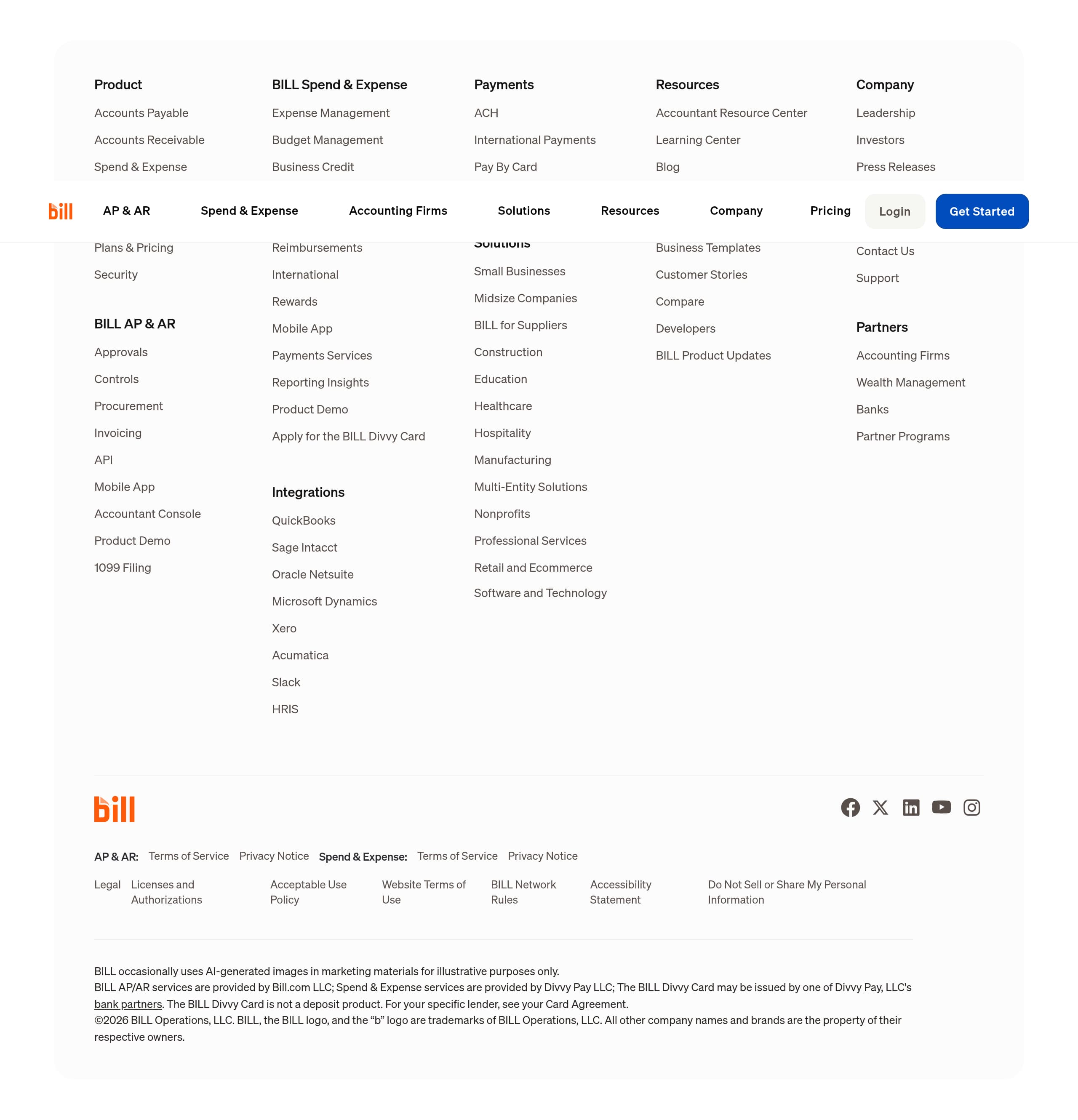
Bill.com’s footer is built for a regulated, multi-product financial platform: it is dense, highly structured, and explicit about legal terms and product entities. Instead of a minimal sitemap, the footer repeats core product groupings (BILL AP and AR, BILL Spend and Expense) and includes deep links like “1099 Filing,” “Accountant Console,” “API,” and “Security,” making it a functional navigation hub for returning visitors.
A few specific footer choices strengthen clarity and compliance:
- Separate Terms of Service and Privacy Notice links appear for AP and AR and for Spend and Expense, reflecting that these are distinct services with different providers and requirements. This is an important entity separation signal.
- The footer includes “Legal,” “Licenses and Authorizations,” “Acceptable Use Policy,” “BILL Network Rules,” and “Accessibility Statement,” which supports procurement and compliance checklists.
- It provides an explicit product-provider statement: “BILL AP/AR services are provided by Bill.com LLC; Spend and Expense services are provided by Divvy Pay LLC,” plus bank partner and card issuance disclosures.
From an SEO and AI visibility perspective, the footer also reinforces entities and relationships: named integrations (QuickBooks, Sage Intacct, Oracle NetSuite, Microsoft Dynamics, Xero, Acumatica, Slack, HRIS) and solutions by industry (construction, nonprofits, healthcare, retail and ecommerce). This helps search engines map Bill.com to specific use cases.
The main tradeoff is cognitive load. The footer is long and includes repeated blocks, which can feel heavy on mobile. However, in finance software, that density can be reassuring because it communicates permanence and operational maturity.
A final trust detail is the AI disclosure: “BILL occasionally uses AI-generated images in marketing materials for illustrative purposes only.” That is uncommon and improves transparency, reinforcing the broader trust-by-disclosure approach that runs through Bill.com’s site.
Detected tech stack
Tools and technologies we detected on Bill.com's site. Detection is best-effort and may be incomplete.
Scores
Our framework scores for Bill.com's website in terms of clarity, conversion, and trust. See our methodology for how we calculate these.
How clear the value prop and structure are.
How conversion-friendly signup and pricing are.
How well trust and compliance are surfaced.
FAQ
Bill.com leads with a clear category statement, calling itself an “AI-powered financial operations platform,” then immediately lists core workflows: paying bills, invoicing, expenses, budgets, and access to credit. The page uses clear module cards for Accounts Payable, Spend and Expense, and an integrated platform view, plus strong CTAs like “Request a Demo” and “Get Started.” Integration and sync messaging reduces implementation concerns.
Bill.com’s site structure suggests pricing is packaged by product line, with distinct areas for BILL AP and AR versus BILL Spend and Expense, and additional pricing context for accounting firms. The prominent “Request a Demo” path implies many buyers are guided into a sales conversation rather than completing a fully self-serve checkout. Footnotes and disclosures around credit and card issuance indicate some costs and eligibility depend on approval.
Bill.com combines scale claims with named customer outcomes. The site highlights “500K+ businesses” and uses customer story tiles that include measurable improvements like 20% efficiency increase, 67% faster close, and 90% faster payment processing. Testimonials include real names and job titles (CFO, COO, President) with options to read or watch the stories, which improves credibility during evaluation.
Bill.com emphasizes end-to-end financial operations: AP automation, invoicing and AR, spend and expense management, budgets, and payments. It repeatedly highlights approvals and controls, multiple payment rails (ACH, pay by card, international), and integrations with accounting systems like QuickBooks, Sage Intacct, Oracle NetSuite, Microsoft Dynamics, and Xero. The platform messaging focuses on one login and automatic sync.
Bill.com supports a sales-led conversion flow with “Get a Demo with a Sales Expert” and an embedded form that shows success and error states after submission. It also offers “Get Started” for faster-moving buyers. The form includes Terms of Service and Privacy Notice acknowledgments, which is typical for finance software. Separate navigation paths for accounting firms suggest tailored onboarding for firms versus operating businesses.

The world's best-performing SaaS businesses share surprisingly similar patterns. We help you learn and apply them through our human-designed methodology, with AI-assisted research.