
Key takeaways
Here are the key insights from our website breakdown analysis of Airtable.
Airtable’s homepage makes an enterprise AI positioning feel concrete by pairing a single, high-level promise (“AI workflows, apps & agents”) with four scannable pillars and immediate “Get started for free” / “Book demo” dual CTAs.
Navigation is designed for both buyers and builders: the menu cleanly separates Platform/Features/Integrations/Solutions/Resources while repeatedly reinforcing new AI lines (“AI App Building” and “AI Agents”).
Airtable uses specific, enterprise-grade proof points (HyperDB “hundreds of millions,” “tens of thousands of users,” model providers like OpenAI/Gemini/Llama/Anthropic) to reduce skepticism around scalability and AI credibility.
Pricing is structured to support a freemium-to-enterprise ladder with a prominent Free entry point and an Enterprise path that is consistently routed to sales via “Book demo,” reducing decision fatigue for large orgs.
Trust is treated as a product feature: ISO, HIPAA, SOC 2, AWS environment claims, no AI training on customer data, and residency options are spelled out in plain language that procurement teams look for.
Social proof is both broad and deep—“Trusted by 500,000 leading teams” plus named testimonials (e.g., eBay) and measurable customer outcomes (e.g., “saved more than 10,000 hours”).
Home
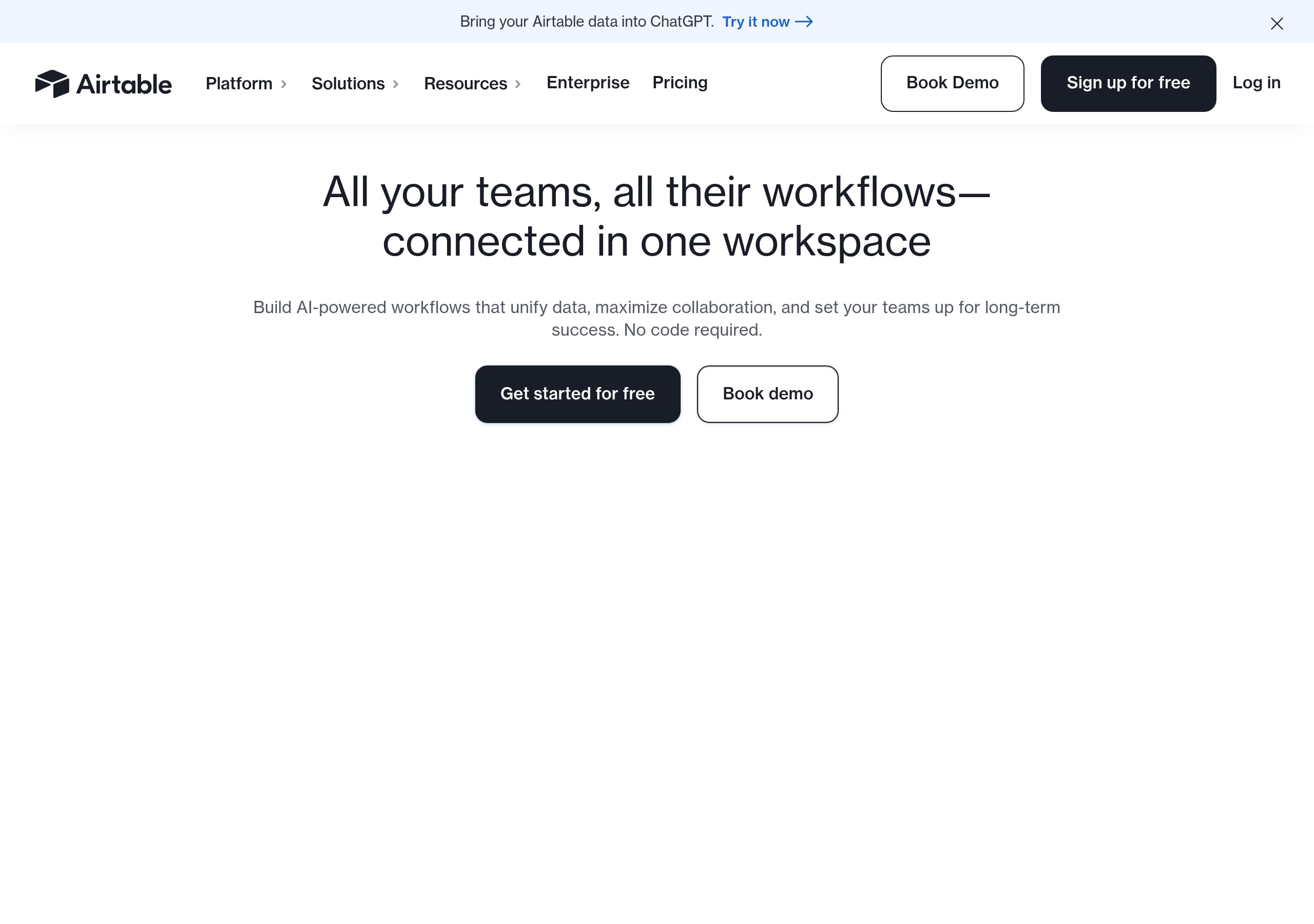
Airtable’s homepage communicates an enterprise AI platform story in one screen by combining a single-sentence value prop with dual conversion paths. The hero headline (“Build Enterprise-ready AI Workflows, Apps & Agents”) is immediately clarified by the subhead (“unify data, maximize collaboration… No code required”) and reinforced with two CTAs—Get started for free and Book demo—that map to self-serve and sales-led motions.
Key UI and messaging patterns visible in the excerpt and homepage screenshot:
- A persistent top nav with clear audience routes: Platform, Solutions, Resources, Enterprise, Pricing. This reduces bounce by letting buyers jump straight to evaluation content.
- A “Trusted by 500,000 leading teams” line positioned near the fold, acting as an early credibility anchor.
- A four-part “Sophisticated workflows in minutes, not months” module that pre-packages the product into digestible pillars: AI app building, Agents at Scale, Meet Omni, Enterprise capabilities. This is effective because it converts a broad platform into a memorable structure.
The page also uses concrete capability language instead of abstract benefits. “Production apps at prototype speed” and “deploy thousands of agents” are bold claims, but they’re paired with mechanisms (conversational building, no-code components) that make the claim feel testable.
Conversion is reinforced via repeated CTAs (“Get started for free” appears multiple times) and a mid-page customer story tease (Code and Theory saving 10,000 hours) plus a named quote (“Angela Yanes, eBay”). These elements collectively improve message clarity, keep enterprise buyers engaged, and maintain self-serve momentum without forcing an early commitment.
Pricing
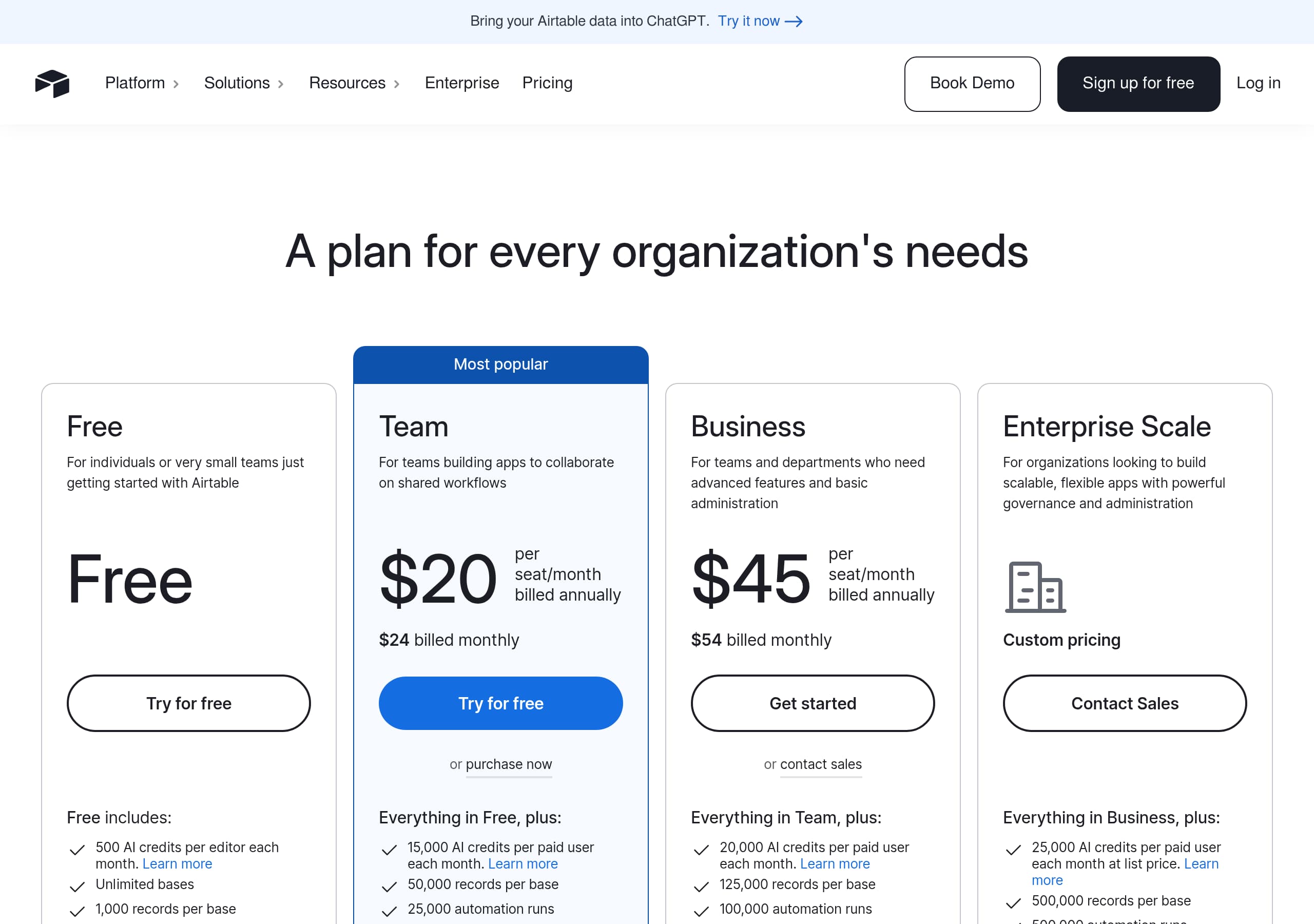
Airtable’s pricing approach is designed to support a freemium entry while clearly escalating to sales-assisted enterprise. The most conversion-effective pattern is that Airtable keeps a visible path to start without friction (“Sign up for free”) while reserving complex requirements (governance, AI controls, scale) for higher tiers where “Book demo” is the appropriate next step.
From the pricing screenshot and site-wide CTA conventions, you can infer several tactical choices:
- The pricing page is likely organized as a tiered grid (common for Airtable) with a Free plan as the left anchor and progressively more advanced tiers leading to Enterprise. This uses price anchoring to make mid tiers feel reasonable.
- Airtable consistently frames differentiation around platform capabilities that matter to teams: permissions, automations, integrations, and AI features—rather than only storage/rows. That aligns with the homepage narrative of “workflows, apps & agents.”
- Enterprise is positioned as an outcomes/security tier, not just “more limits.” The homepage calls out RBAC, IDP synced groups, EKM, audit logs, and data residency, so pricing can credibly route buyers who need those to sales.
What the site does well for evaluation is minimize ambiguity about who pricing is for:
- Self-serve users can trial quickly using Sign up for free.
- Larger organizations can qualify themselves through language like “tens of thousands of users” and “hundreds of millions of records,” then take the Book demo path.
A conversion improvement opportunity (common to enterprise SaaS) would be to add more explicit “which plan is right for X team” selectors on pricing (e.g., Marketing vs Operations) to shorten the cognitive path from use case to tier selection.
Features
Airtable’s features messaging works because it’s organized around buyer-relevant capabilities (apps, agents, scale, governance) rather than a long, undifferentiated checklist. On the homepage, the “Sophisticated workflows in minutes, not months” module acts like a feature framework: AI app building, Agents at Scale, Omni, and Enterprise capabilities. This structure makes a broad platform feel navigable and helps different stakeholders self-select what to read.
Several observable feature communication tactics stand out:
- Feature claims are paired with mechanisms: “Production apps at prototype speed” is supported by “conversational building” and “best-in-class no-code components.” This reduces skepticism.
- AI is presented as embedded, not bolted-on: “Embed intelligence into every workflow” and agents that “think dynamically across thousands of records and orchestrate actions.” That suggests a workflow engine plus data layer, not just a chat box.
- Scale is quantified using product naming and numbers: HyperDB with “record limits in the hundreds of millions,” and the ability to “scale workflows to tens of thousands of users.” These specifics are strong enterprise evaluators.
The global navigation reinforces feature discovery with a dedicated “Platform Features” grouping: Automations, Databases, Interfaces, Reporting, Views, plus Governance and Security and Airtable AI. This taxonomy matches how teams evaluate Airtable in real life (data model + UI + automation + control plane).
Integrations are treated as first-class features, with named examples (Slack, Google Drive, Salesforce, Jira, Zendesk). Listing recognizable systems reduces perceived switching cost and supports the “connected workspace” narrative.
A tactical improvement would be to include more “before/after” screenshots or mini demos per pillar (e.g., one Interface example, one Automation recipe) to turn abstract capabilities into immediately visualizable workflows for first-time visitors.
Signup
Airtable’s signup motion is optimized for speed while preserving an enterprise path that doesn’t force self-serve users into a sales funnel. The site repeatedly uses Sign up for free and Get started for free CTAs in the header and throughout the homepage, which indicates a low-friction entry point designed to capture intent at multiple scroll depths.
What’s conversion-effective in the observed flow design:
- Dual CTAs (“Get started for free” + “Book demo”) are consistently present, so users don’t have to hunt for the right next step based on company size.
- The headline and subhead explicitly reduce perceived complexity: “No code required.” This matters at signup because it lowers the fear of a long setup.
- The site frames immediate value around “workflows” and “apps,” which encourages users to start with a real use case rather than a blank database.
Based on Airtable’s positioning blocks (“Use cases and templates to activate AI in your workflows” and templates listed in navigation), the onboarding likely nudges new users toward:
- Selecting a template (e.g., Content Calendar, Product Roadmap).
- Connecting data sources via integrations.
- Enabling automations or exploring AI Plays.
This is a smart pattern: templates function as “guided setup,” shortening time-to-first-value and improving activation. The excerpt also shows repeated references to building inside “one workspace,” which implies the first-run experience likely creates a workspace and base quickly.
A potential friction point for enterprise-leaning buyers is uncertainty about what they’ll get in Free vs paid regarding AI agents, governance, and scale. Airtable mitigates this by keeping Book demo prominent and by placing enterprise capability details directly on the homepage.
If improving further, Airtable could add a clearer “estimated setup time” or a 3-step onboarding preview near the CTA to make the signup commitment feel even smaller.
Trust
Airtable’s trust messaging is unusually specific for a marketing homepage, which is exactly what enterprise buyers need. Instead of generic “secure and compliant,” Airtable lists concrete standards, controls, and AI data handling statements: ISO, HIPAA, SOC 2, “No customer data retained or used to train AI models,” and “Models run fully in Airtable’s AWS environment.” These are procurement-friendly claims because they map to real security questionnaires.
Trust is reinforced through three observable layers:
- Governance controls: “Admin roles, robust permissions, fine-grained RBAC,” “Programmatic provisioning and de-provisioning,” and “IDP synced groups.” This signals IT readiness and lifecycle management.
- Security operations: “EKM, data loss prevention, audit logs, e-discovery.” Mentioning e-discovery is a strong enterprise tell, especially for regulated industries.
- Residency and compliance footprint: “European and Australian data residency support,” plus explicit standards. This reduces barriers for global organizations.
Airtable also builds AI trust by naming model providers—OpenAI, Gemini, Llama, Anthropic—while emphasizing “leading providers” and flexible selection. That simultaneously conveys capability and control: customers aren’t locked into a single model.
Importantly, these trust statements are not buried in a separate security page; they appear directly in the product narrative section (“The power of AI with the industrial-grade platform your business demands”). That placement is conversion-positive because it addresses objections at the moment readers are excited about AI.
One area that could improve clarity is linking each claim to supporting artifacts (e.g., a Trust Center, SOC 2 report request flow, or status page) near the section. Airtable does include “Status” in the footer, but contextual links beside compliance bullets would further reduce friction for security reviewers.
Footer
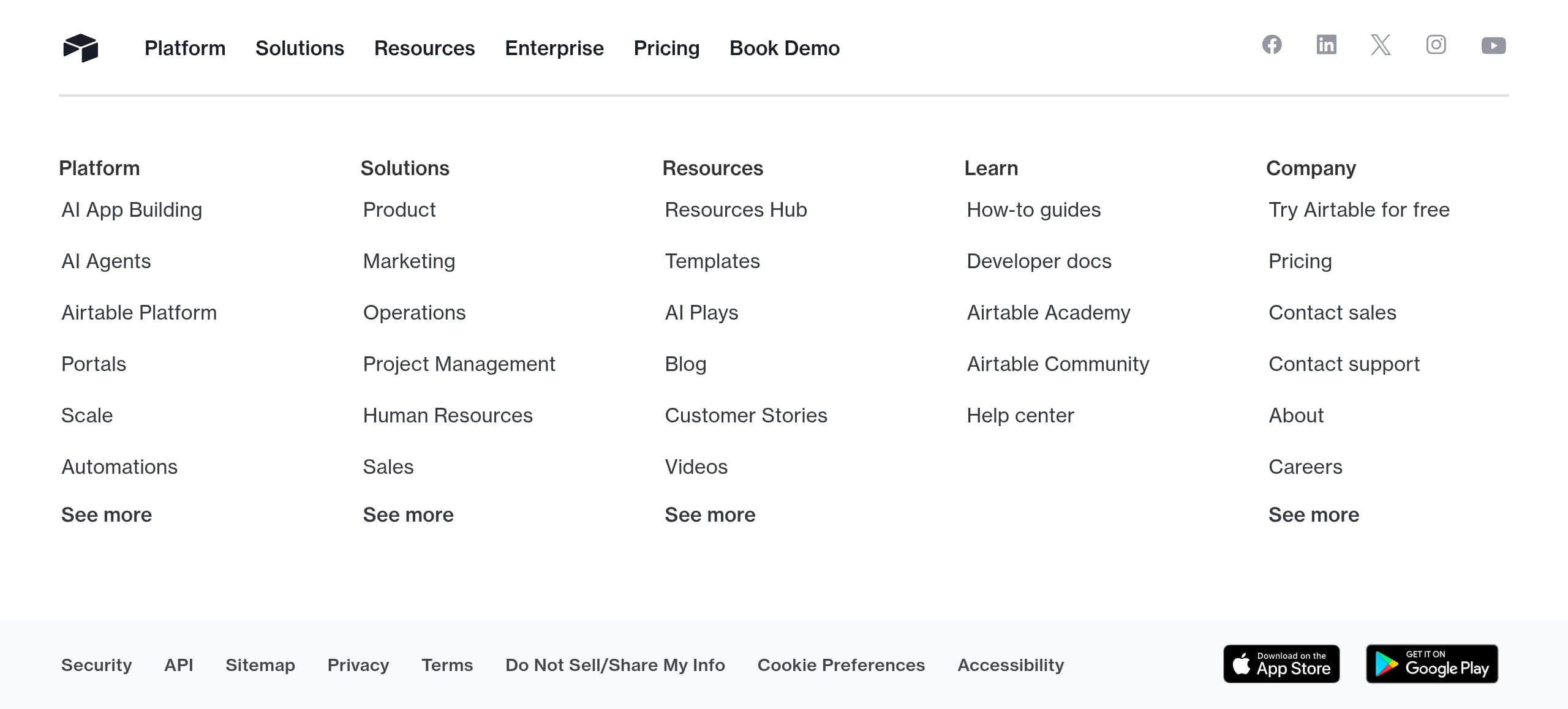
Airtable’s footer is built as a comprehensive navigation and risk-reduction hub rather than a minimal legal strip. From the footer screenshot and excerpt, it includes multi-column link groups for Platform, Solutions, Resources, Learn, and Company, plus direct conversion links (“Try Airtable for free,” Pricing, “Contact sales,” “Contact support”). This is a strong pattern for enterprise SaaS because late-stage evaluators often scroll for documentation, compliance, and support entry points.
Concrete footer elements that improve usability and trust:
- Dedicated governance and technical paths: “Security,” “API,” “Developer docs,” “Custom Extensions,” “Scripting,” and “Marketplace.” This signals extensibility and reduces fear of platform lock-in.
- Buyer-assurance links: “Status,” “Privacy,” “Terms,” “Do Not Sell/Share My Info,” “Cookie Preferences,” and “Accessibility.” These help with compliance checks and reduce procurement friction.
- Learning ecosystem links: “Airtable Academy,” “Airtable Community,” and “Help center.” This supports onboarding and ongoing adoption, which is critical for platform products.
The footer also reinforces omnichannel distribution with “Download on the App Store” and “Get it on Google Play,” which supports the “work moves in real-time” narrative and hints at mobile/desktop access.
From an information architecture standpoint, the footer mirrors the header taxonomy, which is good for consistency: users who didn’t find something up top can quickly re-route at the bottom without feeling lost.
A small conversion optimization would be to add a compact “Book demo” CTA in the footer’s conversion cluster (it’s present in the header) so enterprise evaluators who reach the bottom still have a sales-led next step. Otherwise, Airtable’s footer is doing the right job: it reduces uncertainty by exposing documentation, support, and legal surfaces in one place.
Detected tech stack
Tools and technologies we detected on Airtable's site. Detection is best-effort and may be incomplete.
Scores
Our framework scores for Airtable's website in terms of clarity, conversion, and trust. See our methodology for how we calculate these.
How clear the value prop and structure are.
How conversion-friendly signup and pricing are.
How well trust and compliance are surfaced.
FAQ
Airtable leads with a single, high-clarity promise—“Build Enterprise-ready AI Workflows, Apps & Agents”—and supports it with a no-code qualifier and dual CTAs (“Get started for free” and “Book demo”). The page then organizes the platform into four pillars (AI app building, Agents at Scale, Omni, Enterprise capabilities) and adds early credibility with “Trusted by 500,000 leading teams.”
Airtable supports both self-serve and enterprise buying by pairing a free entry point (“Sign up for free”) with a sales-assisted path (“Book demo”). The pricing presentation aligns with the site’s enterprise narrative by differentiating tiers around platform capabilities—governance, permissions, scale, and AI controls—rather than only basic usage limits. This makes it easier for larger organizations to route to the right plan quickly.
Airtable combines broad adoption proof (“Trusted by 500,000 leading teams”) with specific, high-authority references like a named testimonial from eBay and a quantified outcome from Code and Theory (“saved more than 10,000 hours”). It also supports credibility through educational assets like “Builders & Breakthroughs” hosted by CEO Howie Liu, which positions Airtable as an authority on modern workflows and AI.
Airtable lists concrete controls and standards directly in its core narrative: ISO, HIPAA, SOC 2, fine-grained RBAC, IDP synced groups, audit logs, e-discovery, EKM, and data loss prevention. For AI, it explicitly states that no customer data is retained or used to train AI models and that models run within Airtable’s AWS environment, which helps satisfy procurement and security reviews.
Airtable keeps signup conversion-friendly by repeatedly offering “Sign up for free” / “Get started for free” across the homepage and navigation, while maintaining “Book demo” for enterprise buyers. Onboarding is supported by templates and use-case starters (e.g., content calendar, product roadmap, campaign trackers) and by integration pathways (Slack, Google Drive, Salesforce, Jira), helping new teams reach first value faster.

The world's best-performing SaaS businesses share surprisingly similar patterns. We help you learn and apply them through our human-designed methodology, with AI-assisted research.