
Key takeaways
Here are the key insights from our website breakdown analysis of GitLab.
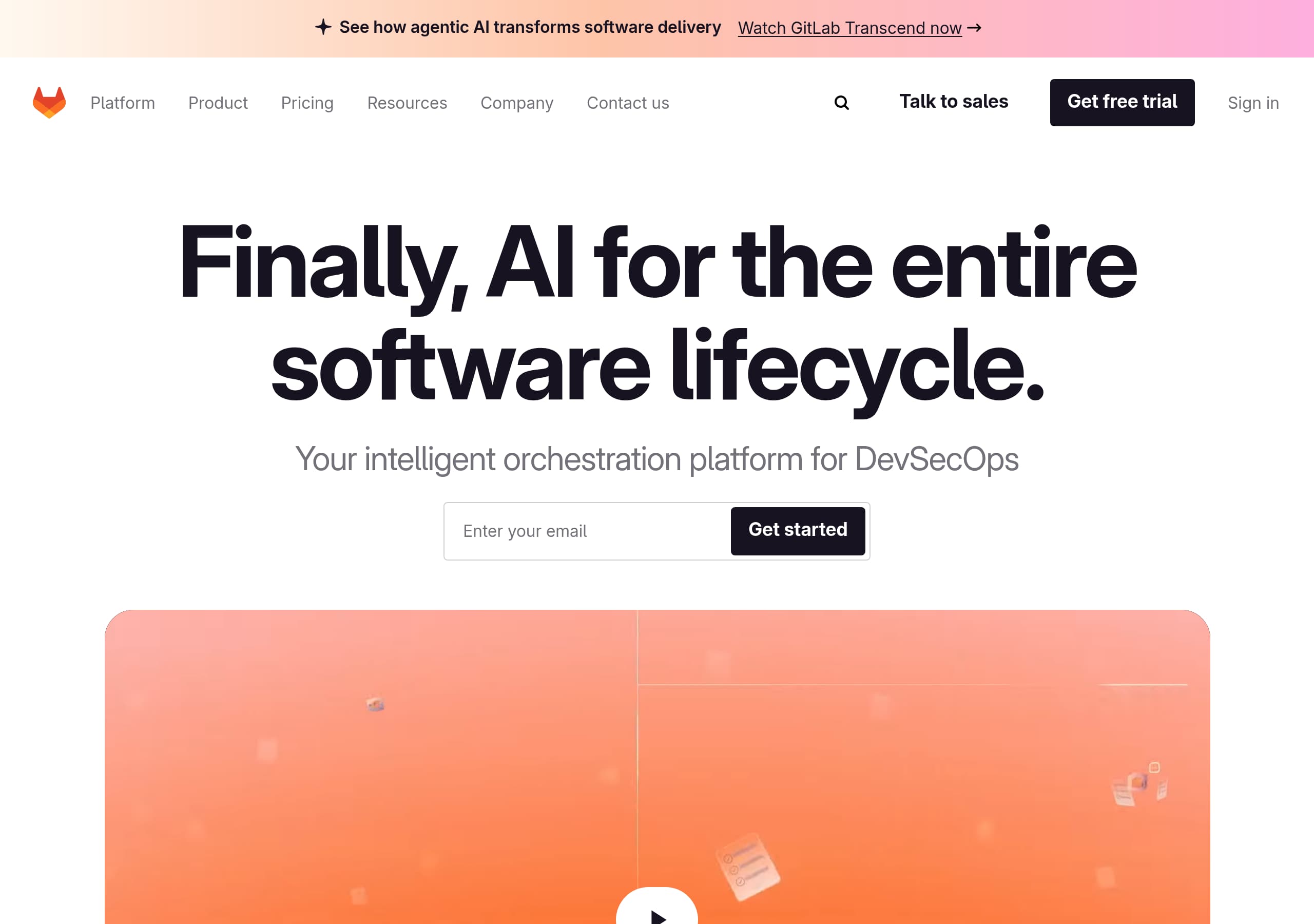
GitLab’s homepage leads with a clear, differentiated promise, “Finally, AI for the entire software lifecycle,” then immediately anchors it to a concrete category, “intelligent orchestration platform for DevSecOps,” which reduces ambiguity for enterprise buyers.
Conversion paths are intentionally redundant: the header repeats “Talk to sales,” “Get free trial,” and “Sign in,” while the hero pairs an email capture with a “Get started” CTA, giving both self-serve and sales-led users a fast next step.
The site explains AI in operational terms, not hype, using specific examples like agents turning issues into merge requests, remediating vulnerabilities, and reviewing code, while emphasizing guardrails and team control to address risk objections.
GitLab positions platform consolidation as the core ROI: “one platform,” “single data plane,” and security “built in, not bolted on,” which speaks directly to tool sprawl and governance pain in DevSecOps organizations.
Trust is reinforced through structural cues, not just claims: dedicated “Trust Center” and “AI Transparency Center” links are visible in global navigation and footer, signaling maturity for regulated industries.
Verticalized sections (Financial Services, Public Sector, Telecommunications, Automotive, Education, Aerospace) translate the platform value into compliance and deployment realities like air-gapped environments, audit trails, and SBOMs, improving relevance for enterprise evaluation.
Home
GitLab’s homepage is optimized for enterprise comprehension: it states the value proposition in one sentence and immediately clarifies the category and the mechanism behind it.
What the hero does well
The hero stacks two complementary messages: “Finally, AI for the entire software lifecycle.” plus “Your intelligent orchestration platform for DevSecOps.” That pairing reduces the common AI ambiguity by grounding it in a known buying center (DevSecOps). The hero also includes an email field with “Get started”, and nearby global CTAs like “Get free trial” and “Talk to sales”, creating a clear fork between self-serve and enterprise motion.
How the page builds understanding
Below the hero, the page explains agentic AI with operational examples: teams define rules and guardrails, then AI agents execute within them. The copy gets specific: “Your agents turn issues into merge requests, remediate vulnerabilities, and review code,” which is stronger than generic “boost productivity” language. A separate section positions the core platform as end-to-end—“From planning to source code management to CI/CD”—reinforced by the consolidation claim of “one platform” and “single data plane” as the source of truth.
How it handles objections
Security is treated as first-class: “Be proactive with security built in, not bolted on,” followed by a concrete scanner list—SAST, SCA, Secret Detection, and DAST—plus where findings show up (merge requests and IDEs). The page then adds industry tiles (Financial Services, Public Sector, etc.) that translate benefits into constraints like audit trails and air-gapped environments. Net effect: messaging stays broad, but the proof points feel implementation-adjacent rather than brand-only.
Pricing
GitLab’s homepage does not show actual plan prices in the provided excerpt, but it does a strong job of pre-qualifying pricing intent and routing visitors to the right pricing context.
How pricing is positioned
The global navigation includes “Pricing,” and the footer repeats it with “View plans,” plus plan-oriented links like “Why Premium?” and “Why Ultimate?”. This is a practical pattern for a product like GitLab where pricing often depends on team size, features, and deployment model. Instead of forcing a single pricing table into the homepage, GitLab keeps the homepage focused on platform value and uses dedicated entry points for evaluation.
What the site is signaling about packaging
Even without numbers shown, the information architecture implies a tiered model with at least Premium and Ultimate, and a path for regulated and large organizations via “Contact sales”. The presence of solutions navigation for “Enterprise,” “Small Business,” and “Public Sector” also suggests packaging is aligned to buyer type and procurement realities, not just feature checklists.
Conversion implications
GitLab repeatedly offers “Get free trial” and “Talk to sales”, which function as pricing alternatives: self-serve users can trial without immediately negotiating, while enterprise buyers can engage sales early. This dual pathway reduces drop-off from visitors who arrive with pricing anxiety.
What could be clearer on-page
Because the hero pushes “Try for free” and “Get started” with an email field, some users will expect a quick hint of what “free” means (time-limited trial vs. free tier). If the pricing page clarifies this, the architecture works, but the homepage itself does not set expectations. A small line near the hero CTA—for example, the trial length or whether a credit card is required—would reduce uncertainty without turning the homepage into a pricing page.
Features
GitLab communicates features by clustering them into outcomes and lifecycle stages, which fits a platform product that spans planning, SCM, CI/CD, and security.
Feature framing that matches how buyers evaluate
The page states “Your end-to-end DevOps process in one place,” then enumerates lifecycle scope: planning, source code management, and CI/CD. This prevents the common GitLab confusion of “Is this just a Git repository?” by positioning GitLab as the system of record for delivery. The feature argument is reinforced by the architectural claim of a “single data plane” where projects, releases, and code live together.
AI feature explanation with concrete behaviors
Instead of listing vague AI capabilities, GitLab describes the GitLab Duo Agent Platform in workflow terms: teams define rules and guardrails; agents execute repetitive tasks. It gives specific examples: issues becoming merge requests, vulnerability remediation, and code review. This is an effective “show the job to be done” pattern that helps engineering leaders visualize where AI fits into existing SDLC processes.
Security features are presented as platform consolidation
Security is framed as “built in, not bolted on,” with an explicit scanner list: SAST, SCA, Secret Detection, DAST. The placement detail—“findings appear directly in merge requests and IDEs”—is a high-quality feature proof because it describes integration points, not marketing labels. Compliance is also turned into a pipeline capability: “collect audit-ready evidence automatically in every pipeline.”
What to improve for faster scanning
The global navigation shows a broad product taxonomy (Automation, CI/CD, Source Code Management, Security, Compliance, Visibility and Measurement, Value Stream Management). On the homepage, that breadth is narrated well, but a compact feature grid with 6 to 8 tiles would help skimmers. The content is strong, but it reads more like guided storytelling than a fast comparison checklist.
Signup
GitLab’s signup experience is designed to minimize decision friction by offering multiple entry points and a clear self-serve path, while keeping enterprise help visible.
What the homepage does for signup
The hero contains an email field and a “Get started” CTA, which is a direct micro-commitment. In parallel, the header and body repeat “Get free trial” and “Talk to sales”, which covers both self-serve developers and procurement-led teams. This redundancy is intentional and useful on a high-intent homepage where visitors arrive with different goals.
Login and product entry clarity
The navigation includes “Sign in,” and the site search hint states, “To search repositories and projects, log in to gitlab.com.” That message sets an expectation that account access gates core actions, and it reduces confusion when users attempt to interact with repository-level content. The search suggestions also surface product entities like “GitLab Duo Agent Platform,” “Code Suggestions (AI),” and “CI/CD,” which helps users orient themselves before committing to signup.
Likely onboarding path implied by the page
While the excerpt does not show the actual form steps, GitLab strongly suggests a standard SaaS flow: email capture, trial initiation, then product exploration. The presence of “Install,” “Quick start guides,” and “Product documentation” in the Resources area implies GitLab anticipates both cloud and self-managed onboarding paths, and supports them with guided materials.
Where conversion could be tightened
The homepage uses “Get started,” “Try for free,” and “Get free trial” as parallel phrases. They are all understandable, but not perfectly consistent. Aligning hero CTA language with the global CTA—for example, using “Get free trial” everywhere—could reduce small cognitive friction. Also, adding one expectation-setting detail near the email field, like whether it creates a GitLab.com account or starts an evaluation, would make the first click feel more predictable.
Trust
GitLab emphasizes trust by foregrounding security and compliance as native platform capabilities, then backing that up with dedicated trust destinations in navigation and footer.
Security trust, expressed as workflow reality
The security section is explicit: “security built in, not bolted on.” It lists concrete capabilities—SAST, SCA, Secret Detection, DAST—and explains where results surface: “directly in merge requests and IDEs.” This UI placement detail is a trust builder because it signals the controls are integrated into developer workflow, not relegated to a separate dashboard nobody checks.
Compliance and audit posture
The copy states, “Apply controls for compliance and collect audit-ready evidence automatically in every pipeline.” That is a meaningful trust claim because it references continuous evidence generation, a core requirement for regulated enterprises. The industry section strengthens this by citing constraints like “maintain audit trails,” “access controls,” “federal security standards,” and air-gapped environments, all of which are common procurement objections.
Transparency signals
The global navigation includes a Trust Center and an AI Transparency Center. Those links act as governance cues: buyers evaluating AI features need clarity on how AI is used, data handling, and control boundaries. Even without the Trust Center content shown, the mere presence of these dedicated areas indicates GitLab expects scrutiny and has structured documentation to support it.
Operational trust and support pathways
The footer includes “Status,” “Support portal,” and “Customer portal,” which are strong operational trust signals for a DevSecOps platform. They imply formal support processes and service communication, which matter when GitLab becomes part of CI/CD and security control planes.
What could make trust even stronger on the homepage
The excerpt does not show certifications, uptime commitments, or specific compliance frameworks. If those exist in the Trust Center, pulling 2 to 3 visible trust badges or compliance shorthand onto the homepage would reduce clicks for auditors and security reviewers, and could improve enterprise conversion rates.
Footer
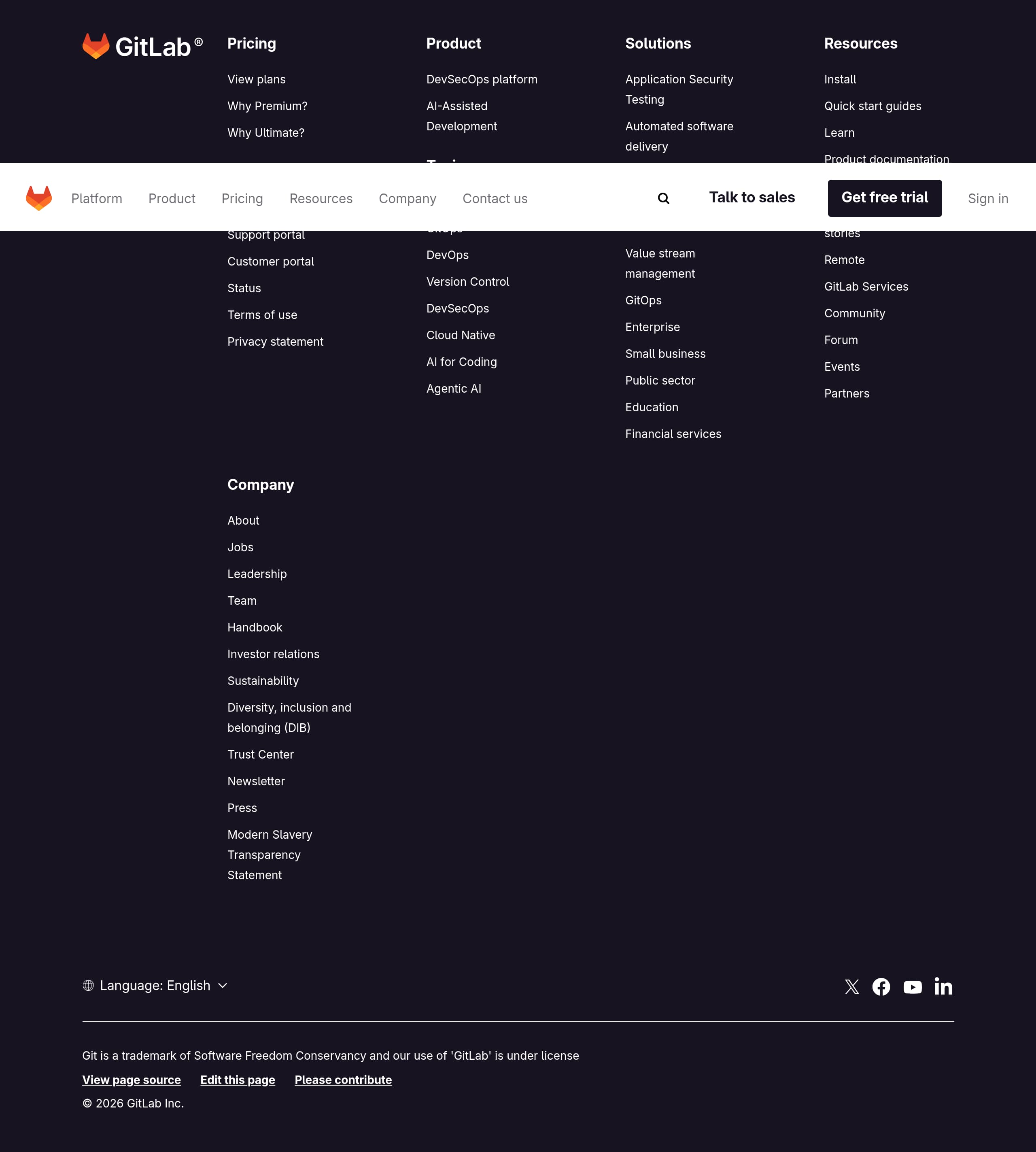
GitLab’s footer is built for enterprise evaluation and governance: it prioritizes plan navigation, support operations, legal, and trust documentation in a highly scannable layout.
What is visible in the footer
The footer includes multiple structured link columns: “Pricing” with “View plans,” plus “Why Premium?” and “Why Ultimate?” for packaging justification. It also provides direct commercial routes like “Contact sales,” alongside operational links like Support portal, Customer portal, and “Status.” This mix is a strong pattern for SaaS platforms that serve both self-serve users and procurement-led teams.
Trust and legal completeness
Legal and policy links are present and easy to find: “Terms of use,” “Privacy statement,” and a “Modern Slavery Transparency Statement.” For trust, the footer includes Trust Center, which reinforces that GitLab treats security and compliance as first-class concerns. The presence of “AI Transparency Center” in the main navigation complements this, creating a coherent governance story across the site.
Product discoverability and SEO structure
The footer repeats entity-rich product categories and topics: “DevSecOps platform,” “AI-Assisted Development,” “CICD,” “GitOps,” “Version Control,” “Cloud Native,” and “Agentic AI.” This is helpful for internal linking, crawl depth, and user discovery, especially for a large platform whose features map to many search intents.
Community and company credibility
GitLab highlights community and company resources: “Handbook,” “Investor relations,” “Leadership Team,” “Partners,” and “Community Forum.” The “Handbook” link is a distinctive GitLab credibility asset because it signals operational transparency and documentation culture.
Usability observations from the screenshot
The footer screenshot shows dense but organized columns, which is appropriate for GitLab’s breadth. The only risk is choice overload, but GitLab mitigates this by grouping links by intent: buying, support, product, resources, and company. Overall, it is a well-structured enterprise SaaS footer.
Detected tech stack
Tools and technologies we detected on GitLab's site. Detection is best-effort and may be incomplete.
Scores
Our framework scores for GitLab's website in terms of clarity, conversion, and trust. See our methodology for how we calculate these.
How clear the value prop and structure are.
How conversion-friendly signup and pricing are.
How well trust and compliance are surfaced.
FAQ
GitLab leads with a single, memorable promise, “Finally, AI for the entire software lifecycle,” then immediately clarifies the category as an “intelligent orchestration platform for DevSecOps.” It follows with concrete examples of what agents do, like turning issues into merge requests and remediating vulnerabilities, plus platform consolidation language like “one platform” and “single data plane.” This combination reduces ambiguity for enterprise buyers.
The homepage routes pricing intent through global navigation and the footer rather than showing prices inline. Visitors can click “Pricing” and “View plans,” and the footer includes plan-explainer links like “Why Premium?” and “Why Ultimate?” for tier differentiation. GitLab also keeps “Talk to sales” visible for enterprise procurement paths, while “Get free trial” supports self-serve evaluation.
GitLab offers multiple entry points: the hero includes an email field with “Get started,” and the header repeats “Get free trial” and “Sign in.” This supports both new users and returning users. The site also points to onboarding resources like “Install,” “Quick start guides,” and “Product documentation,” which suggests GitLab expects both cloud usage and more complex setups that require guided implementation materials.
GitLab explicitly frames security as native to the platform, “built in, not bolted on,” and lists scanners like SAST, SCA, Secret Detection, and DAST. It also states that findings appear in merge requests and IDEs, which is a credible workflow detail. For governance, GitLab links to a Trust Center and an AI Transparency Center, and it speaks to regulated needs like audit trails and air-gapped environments.
GitLab positions GitLab Duo Agent Platform for teams that need AI across the software lifecycle under defined rules and guardrails. The homepage language targets DevSecOps organizations that want orchestration, workflow customization, and control, with examples like agents reviewing code and remediating vulnerabilities. Industry sections for Financial Services, Public Sector, and Aerospace further indicate a focus on regulated, security-sensitive environments.

The world's best-performing SaaS businesses share surprisingly similar patterns. We help you learn and apply them through our human-designed methodology, with AI-assisted research.