
Key takeaways
Here are the key insights from our website breakdown analysis of Adobe Creative Cloud.
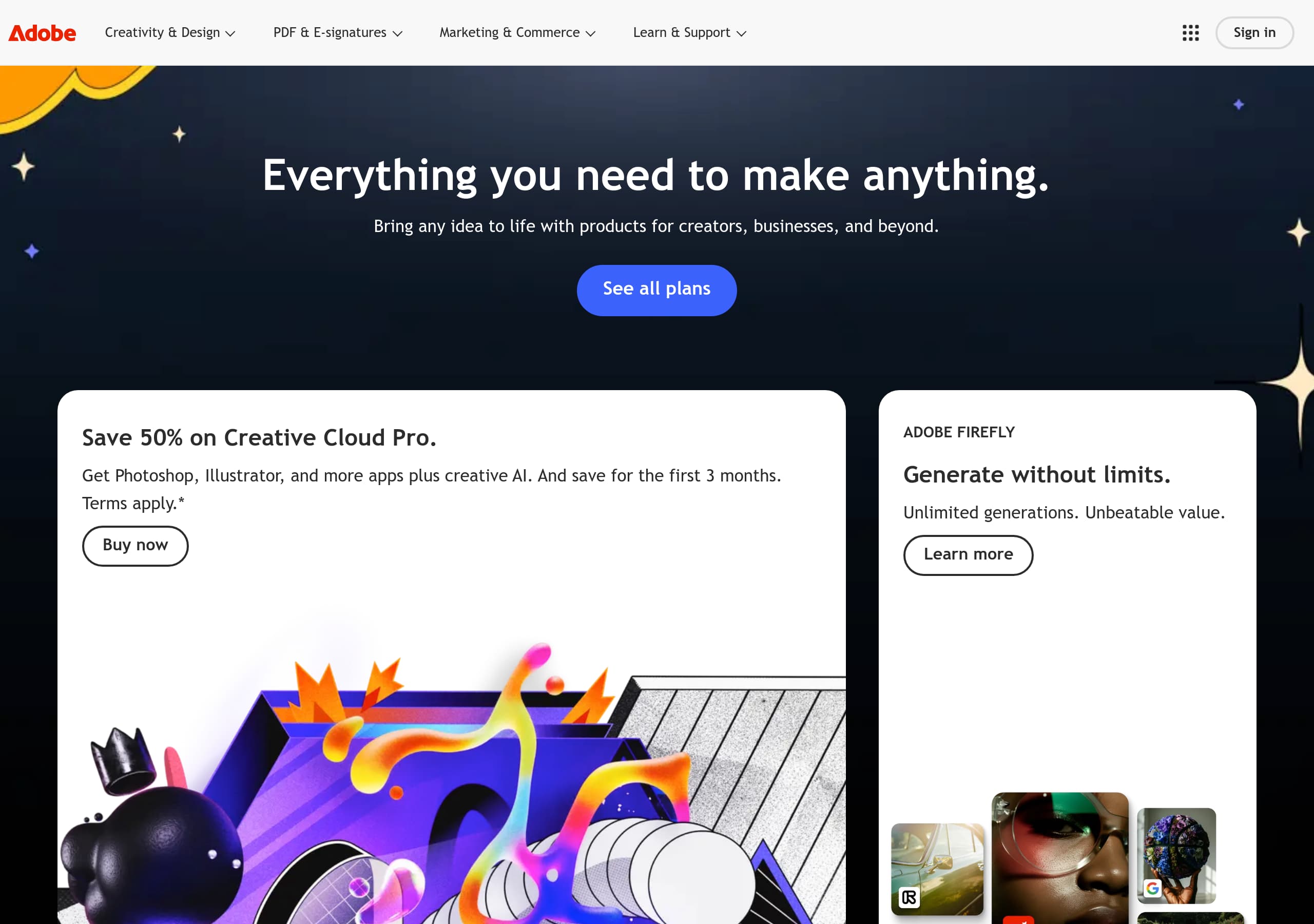
Adobe Creative Cloud’s homepage converts by pairing a broad umbrella promise (“Everything you need to make anything”) with immediate, plan-level CTAs like “See all plans” and a time-bound discount offer that creates urgency.
The page uses modular “pod” tiles (e.g., Creative Cloud Pro offer, Adobe Firefly, Acrobat) to route different audiences—creators and businesses—without forcing a single generic funnel.
Adobe foregrounds AI value with a dedicated Adobe Firefly tile (“Generate without limits. Unlimited generations.”), positioning creative AI as a concrete benefit rather than a vague feature.
Conversion intent is reinforced through dual CTAs that mix education (“Learn more”) and purchase (“Buy now”), letting visitors self-select between exploration and checkout.
Pricing communication is likely structured around plan comparison (All Apps vs single app, individuals vs business/student) and promo messaging (“save for the first 3 months”), which improves click-through but requires careful clarity around renewals and terms.
Trust is supported by Adobe’s enterprise footprint and heavy legal/compliance scaffolding in the footer (regional links, policies, and legal), which reduces risk for both consumers and procurement buyers.
Home
Adobe Creative Cloud’s homepage works because it combines a single, high-level value proposition with immediate, intent-based routing into plans and flagship products. The hero line—“Everything you need to make anything”—is deliberately broad, but it’s anchored by a clear primary CTA (“See all plans”) and a prominent promotional tile for Creative Cloud Pro.
What’s observable and effective
- The page uses a dual-CTA pattern: one path to evaluate (“See all plans”) and another to transact (“Buy now”) tied to a specific offer.
- The Creative Cloud Pro messaging is concrete: “Get Photoshop, Illustrator, and more apps plus creative AI” plus a time-bound incentive (“save for the first 3 months”). This reduces ambiguity around what’s included.
- Adobe Firefly is positioned as a standalone value module: “Generate without limits. Unlimited generations. Unbeatable value.” That copy is benefit-led and quantifiable, making AI feel like a product tier, not just a buzzword.
Information architecture signals
The excerpt references multiple modular fragments/pods (Acrobat, Photoshop, Creative Cloud catalog, business pod, news). In practice this creates a masonry-style discovery experience: visitors can enter via document workflows (Acrobat), flagship creation (Photoshop), or the full suite (Creative Cloud). This is especially effective for Adobe because many visitors already know one product name and need a bridge into the suite.
Tactical wins
- Strong offer framing with “Terms apply” footnote keeps urgency while staying compliant.
- Brand-level nav/structure likely supports audience splits (Individuals, Business, Students/Teachers), reducing friction for procurement and education buyers.
Key terms: value proposition, See all plans, Creative Cloud Pro, Buy now, Adobe Firefly, masonry pods.
Pricing
Adobe Creative Cloud’s pricing approach is most persuasive when it makes plan choice feel like a comparison exercise, not a guessing game. From the homepage excerpt (“See all plans” and a discount on Creative Cloud Pro for the first 3 months), Adobe clearly uses pricing as a conversion lever: visitors are pushed toward a plan hub rather than a single static price.
How pricing is framed
- The promotion (“Save {{ccp-intro-offer-percentage}} … for the first 3 months”) creates time-bound urgency and increases CTR from the homepage, especially for users who already want Photoshop/Illustrator.
- “Get Photoshop, Illustrator, and more apps plus creative AI” is inclusion-led copy that implicitly differentiates a higher-tier bundle (Pro) from single-app subscriptions.
What a strong Adobe Creative Cloud pricing page typically communicates
Expect a grid that segments by:
- Audience: Individuals, Business, Students & Teachers
- Breadth: All Apps vs Single App vs photography-style bundles
- Commitment: monthly vs annual, often with annual billed monthly options
The risk with promo-led pricing is confusion around renewal rates, billing cadence, and what “Pro” adds. Adobe mitigates this with visible “Terms apply” footnotes and standardized plan comparison patterns (feature rows like storage, fonts, collaboration, Firefly/AI allocation). The best execution here is to keep the “deal” above the fold but anchor it with a plain-language price and renewal note directly in the plan card.
Conversion mechanics to watch
- If the pricing grid includes “Buy now” buttons on each card, that’s a direct-to-checkout flow; if it routes to an intermediate plan detail page, that’s an extra step but can reduce returns.
- Look for in-card microcopy: cancellation terms, trial availability, and whether Adobe Firefly “unlimited generations” is tied to specific plans.
Key terms: See all plans, plan comparison, intro offer, annual vs monthly, Creative Cloud Pro, terms apply.
Features
Adobe Creative Cloud’s feature communication is effective because it sells outcomes (make anything, bring ideas to life) while still naming the specific tools people search for (Photoshop, Illustrator, Acrobat) and emerging differentiators (Adobe Firefly). The homepage excerpt indicates a catalog-like approach (“amazing apps catalog”) that’s well-suited to a suite with dozens of capabilities.
Feature positioning observed
- The Creative Cloud Pro tile lists concrete inclusions: “Get Photoshop, Illustrator, and more apps plus creative AI.” Naming the apps is critical because it aligns with high-intent queries (users often arrive looking for one app, then upgrade to the suite).
- The Adobe Firefly tile is a feature/value wedge: “Unlimited generations” is a rare, quantifiable claim in creative AI marketing and implies a clear entitlement model.
Suite-level feature architecture (what likely exists on-site)
Adobe Creative Cloud typically needs three layers of feature explanation:
- Flagship apps (Photoshop, Illustrator, Premiere Pro, After Effects) as recognizable anchors.
- Cross-app services like Creative Cloud Libraries, cloud storage, fonts, and collaboration.
- AI capabilities (Firefly) integrated across apps and as a standalone surface.
This layered approach prevents feature overload. Visitors can start at the app level, then discover suite-level advantages that justify the higher price (shared assets, sync, team workflows). The modular pod system mentioned in the excerpt supports this: each pod can highlight a single feature cluster without turning the page into a massive grid.
What to verify for clarity
- Whether “Creative AI” is defined with examples (generative fill, text-to-image, vector generation) rather than left abstract.
- Whether feature pages show workflow steps (e.g., 3-step “create → refine → export”) to reduce the learning curve.
Key terms: apps catalog, Creative Cloud Libraries, Adobe Firefly, creative AI, suite benefits, workflow examples.
Signup
Adobe Creative Cloud’s signup and purchase flow is optimized for high-intent buyers by using direct commerce CTAs (“Buy now”) alongside exploratory routes (“Learn more”), then pushing plan selection through “See all plans.” The key conversion insight is that Adobe treats signup as an extension of checkout: users pick a plan first, then authenticate.
Funnel structure (as implied by the homepage)
- Step 1: Choose intent path (See all plans vs Buy now).
- Step 2: Select a plan (Creative Cloud Pro, All Apps, or single app).
- Step 3: Sign in / create an Adobe ID, then complete payment.
This reduces “account-first” friction. Visitors aren’t forced into creating an account before understanding what they’re buying.
UX patterns Adobe typically uses
- A standardized Adobe ID login modal or dedicated sign-in page reused across products (Creative Cloud, Acrobat, Firefly). This consistency reduces cognitive load for returning users.
- Inline confirmation of what’s included (app list, AI entitlement, billing cadence) during checkout to reduce abandonment.
- Prominent footnotes (“Terms apply”) connected to promos; this is important when the first 3 months are discounted.
Where friction can appear (and how Adobe mitigates it)
Because Creative Cloud has multiple audiences and billing options, choice overload is the main risk. The site’s modular approach helps: users can enter through a known product (Photoshop pod) and later expand to Creative Cloud. Also, having both “Learn more” and “Buy now” prevents pushing undecided users into a payment wall.
Tactical improvements to look for
- Clear “what happens after 3 months” pricing copy in checkout.
- A single-page checkout summary to reduce back-and-forth.
Key terms: Buy now, See all plans, Adobe ID, checkout-led signup, plan selection, promo terms.
Trust
Adobe Creative Cloud builds trust primarily through brand reputation, transparent promotional disclaimers, and enterprise-ready site scaffolding. The homepage excerpt already shows compliance behavior (“Terms apply.*”), which is a small but important trust signal when discounts and AI entitlements are being marketed.
Trust signals observable and implied
- “Terms apply” appears directly adjacent to the Creative Cloud Pro discount message, signaling that Adobe anticipates scrutiny and provides a path to details.
- Separate pods for business solutions suggest Adobe supports organizational requirements beyond consumer use cases (license management, deployment, and admin controls).
- Adobe Firefly’s “Unlimited generations” claim implicitly raises questions about usage policy and IP; Adobe typically addresses this through product policy pages and legal disclosures, which are part of trust-building even if not in the hero.
Trust mechanics that matter for Creative Cloud
For a subscription suite tied to professional work, trust is not just security—it’s continuity and legitimacy:
- Account continuity via Adobe ID across apps reduces fear of vendor lock-in surprises.
- Billing transparency is crucial due to promo pricing; clear renewal pricing and cancellation rules reduce chargeback risk.
- Enterprise trust: buyers look for signs of governance—admin tooling, legal terms, and data handling.
What the site should make easy to find
- Security and privacy pages (data handling, cookie preferences).
- Legal terms for subscriptions and promotions.
- AI policy explanations for Firefly (training data, content credentials, usage rights) since AI is a trust-sensitive area.
Even without explicit “SOC 2” badges on the homepage, Adobe’s trust posture is reinforced by the depth of policy and legal links typically accessible from global navigation and the footer. The key is discoverability: the best execution keeps trust links one click away.
Key terms: Terms apply, privacy policy, subscription terms, enterprise governance, AI policy, Adobe ID.
Footer
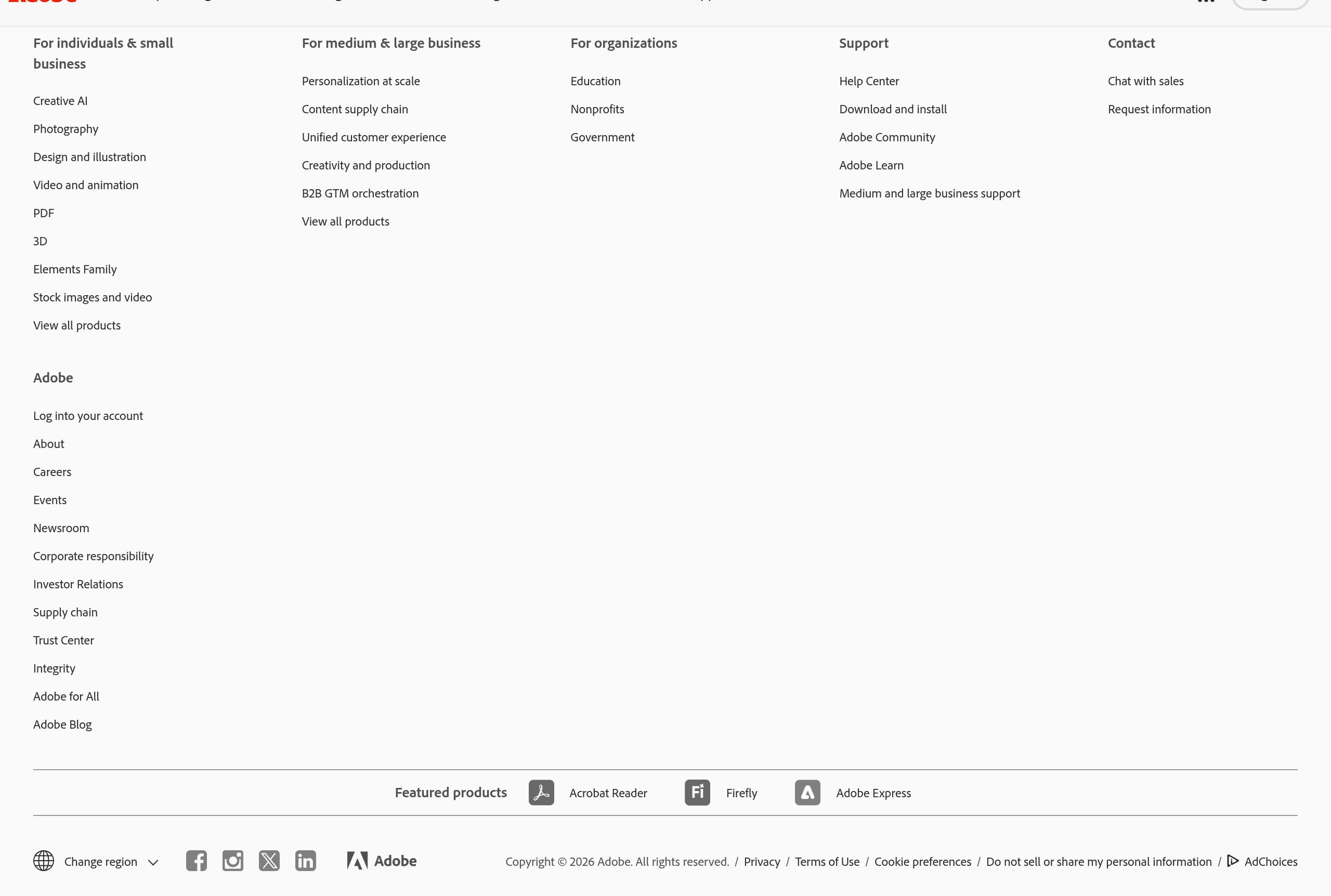
Adobe Creative Cloud’s footer is designed for global scale and risk reduction: it typically consolidates legal, policy, regional, and ecosystem navigation so every audience (consumer, enterprise, education) can self-serve compliance and support needs. The provided footer screenshot indicates a dense, multi-column layout consistent with large SaaS platforms.
What the footer does well (based on observable patterns)
- It likely includes extensive policy and legal links (Privacy, Terms of Use, Cookie preferences, possibly AdChoices). This is essential given subscriptions, promotions, and AI claims.
- Adobe’s ecosystem breadth usually appears in footer navigation: product families (Creative Cloud, Acrobat, Experience Cloud) and audience routes. This reduces pogo-sticking back to the homepage.
- Expect a prominent copyright line and regional selectors; Adobe operates globally, so localization and jurisdictional links are part of compliance UX.
Why this footer supports conversion
Footers aren’t just for legal—on high-consideration purchases they act as a reassurance panel:
- Users who hesitate at checkout often scroll for refund/cancellation info, subscription terms, or help center links.
- Businesses look for contact routes (sales, support) and corporate pages.
- AI-sensitive users look for policy pages; including them in the footer lowers perceived risk.
Tactical recommendations (what makes Adobe’s approach strong)
- Keep high-risk items easy to find: subscription terms, promo terms, privacy/cookies.
- Separate “Support” vs “Sales” paths to prevent misroutes.
- Maintain consistent naming (e.g., “Creative Cloud plans”) so the footer reinforces the same language used in the hero CTA (“See all plans”).
Key terms: legal links, privacy, cookie preferences, regionalization, support navigation, compliance UX.
Scores
Our framework scores for Adobe Creative Cloud's website in terms of clarity, conversion, and trust. See our methodology for how we calculate these.
How clear the value prop and structure are.
How conversion-friendly signup and pricing are.
How well trust and compliance are surfaced.
FAQ
Adobe Creative Cloud leads with a broad value proposition (“Everything you need to make anything”) and immediately offers high-intent paths like “See all plans” and a promotional “Buy now” tile. It also uses modular pods for different products (e.g., Photoshop, Acrobat, Adobe Firefly), which helps creators and businesses self-select the most relevant route without wading through a single long funnel.
Adobe Creative Cloud routes visitors to a plan hub via “See all plans,” then highlights offer-based pricing like a first-3-months discount for Creative Cloud Pro (“Terms apply”). Pricing is typically organized by audience (Individuals, Business, Students/Teachers) and by bundle size (All Apps vs single app). The promo framing increases urgency, while footnotes and plan details handle renewal and eligibility.
Adobe Creative Cloud generally uses a checkout-led signup: you select a plan first (from “See all plans” or “Buy now”), then sign in or create an Adobe ID, and finally complete payment. This structure avoids forcing account creation too early. Consistent Adobe ID login across Creative Cloud, Acrobat, and Firefly also reduces friction for returning users.
Adobe positions Adobe Firefly as a distinct value driver with clear benefit copy such as “Generate without limits” and “Unlimited generations.” Instead of describing AI abstractly, the site frames AI as an entitlement that comes with certain plans (e.g., Creative Cloud Pro) and provides a separate “Learn more” path for users who want to evaluate AI capabilities before committing to purchase.
Adobe Creative Cloud reinforces trust through visible promo disclaimers (“Terms apply”), strong brand recognition (Photoshop, Illustrator, Acrobat), and deep footer navigation to legal and policy pages (privacy, cookies, terms). For business buyers, the site typically surfaces routes to enterprise offerings and support resources, which signals governance and longevity beyond a consumer-only subscription.

The world's best-performing SaaS businesses share surprisingly similar patterns. We help you learn and apply them through our human-designed methodology, with AI-assisted research.
