

Key takeaways
Here are the key insights from our website breakdown analysis of Squarespace.
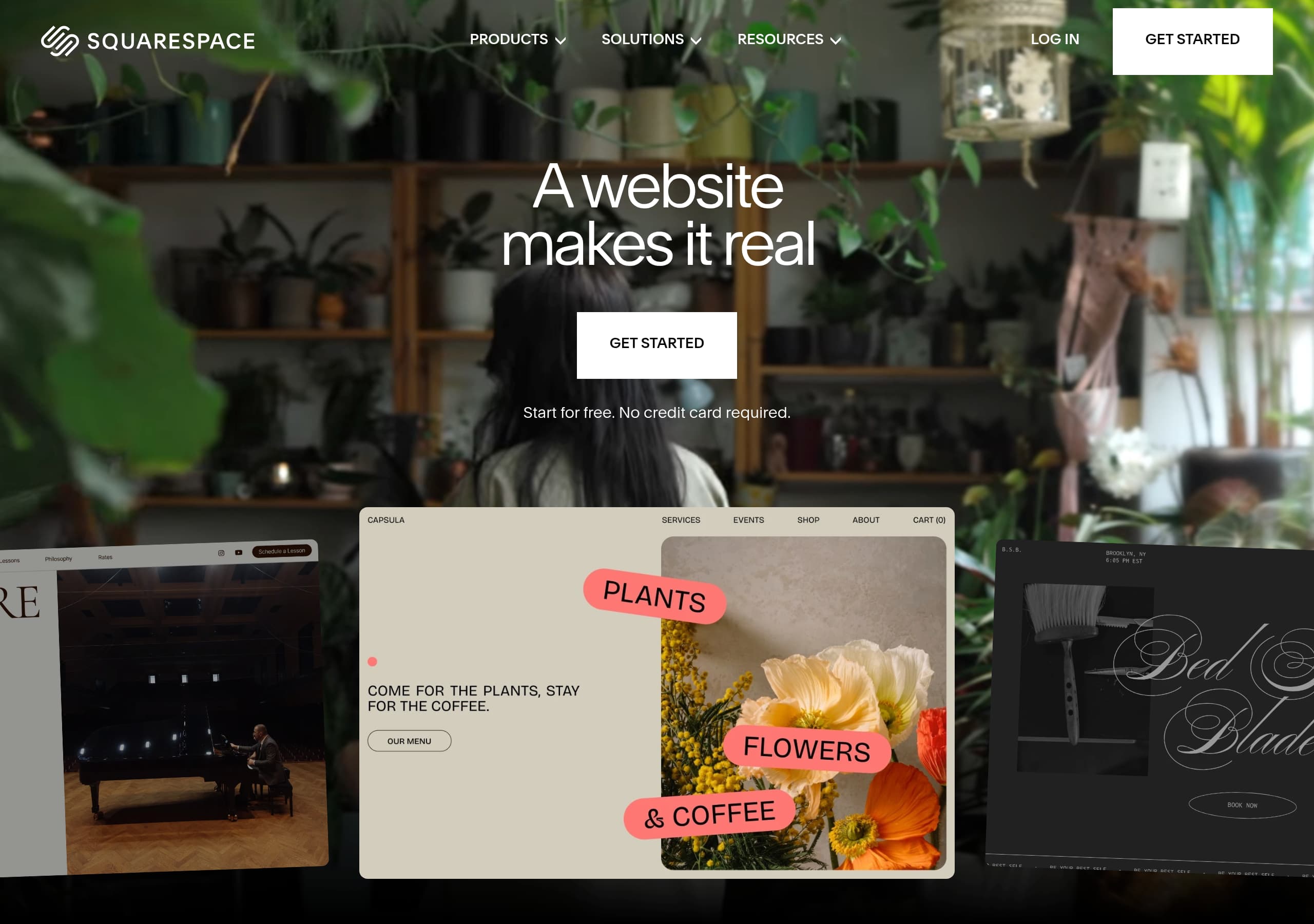
Squarespace’s homepage communicates a single, high-confidence promise (“A website makes it real”) and reinforces it with an immediate free-trial CTA and a “No credit card required” qualifier to reduce friction.
The site uses a mega-menu IA that mirrors product expansion (Websites, Commerce, Marketing, Domains, Financial Solutions) while also segmenting by industry solutions, helping multiple audiences self-identify quickly.
Squarespace makes scale feel real with hard numbers (14M+ entrepreneurs served, $36B+ earned, 200+ countries & territories) and repeats “Trusted by 14 million” to anchor credibility.
The feature presentation is outcome-led (sell, book, invoice, donate, memberships) and consistently pairs each module with “Great for” audience examples, which improves relevance and use-case clarity.
AI is positioned as both an on-ramp and a differentiator via Blueprint AI Builder and “Design Intelligence,” including a recognizable third-party credibility cue (TIME’s Best Inventions of 2025).
Conversion paths are kept simple with dual CTAs (“Get Started” and “Start for free”) and prominent domain search/transfer prompts that capture intent even before a full site build decision.
Home
Squarespace’s homepage succeeds by making one primary promise—build a real business presence fast—and backing it with an immediate, low-friction start. The hero headline “A website makes it real” is intentionally minimal, then the page does the heavy lifting with dual CTAs (“Get Started” and “Start for free”) plus the friction reducer “No credit card required.”
Key above-the-fold patterns visible in the excerpt and screenshot:
- A prominent promo bar (“Take 20% off any new website plan”) adds urgency without hijacking the main CTA.
- Navigation is enterprise-level: mega menu for Products (Websites, Ecommerce, Marketing, Domains, Financial Solutions) and a parallel Solutions menu by industry (Beauty, Sports & Fitness, Charities & Nonprofits, etc.).
- The page quickly transitions from brand promise to scale proof: “Join millions…” followed by big-number counters (14M+ entrepreneurs served, $36B+ earned, 200+ countries & territories).
The mid-page “Grow your business” module is structured like a carousel/grid of outcomes—Services, Online Store, Invoicing, Scheduling, Donations, Memberships, Blog, Portfolio—each with a one-sentence job-to-be-done and a “Great for” audience list (e.g., “Camps · Consultants · Event Organizers”). That’s strong audience mirroring: visitors can recognize themselves without reading a long paragraph.
Finally, the homepage introduces AI positioning in a concrete way (“Blueprint AI Builder,” “Design Intelligence”), framing AI as onboarding (“Answer a few questions…”) rather than novelty. The net effect is a homepage that converts multiple intents: “I need a site,” “I need to sell,” or “I need bookings,” with consistent CTAs anchoring the flow.
Pricing
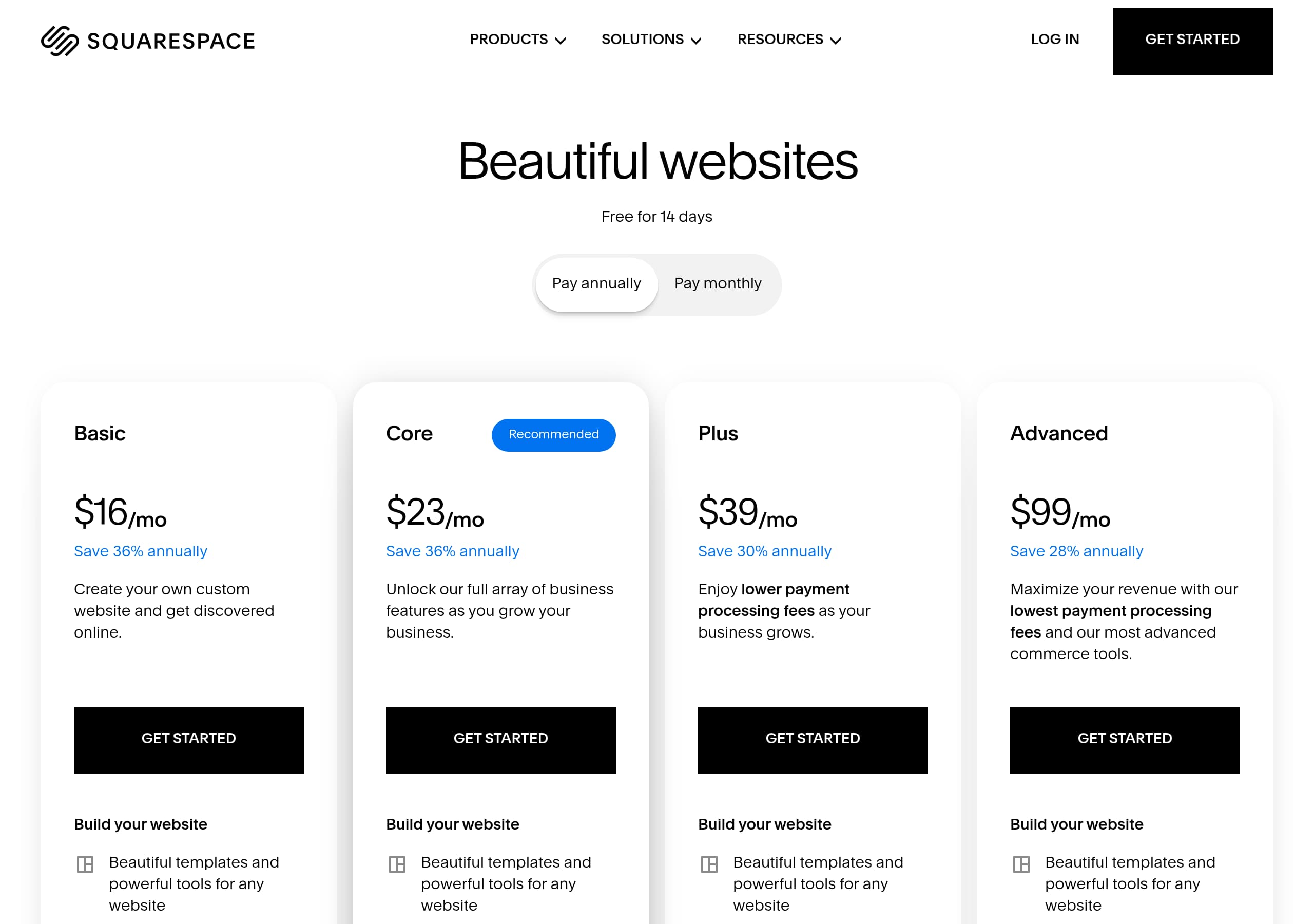
Squarespace’s pricing presentation (per the pricing screenshot) is designed to keep plan choice from becoming a research project. The core pattern is a familiar tiered plan grid with clear plan names, a primary “best fit” visual hierarchy, and benefits written as scannable inclusions rather than dense paragraphs.
What the pricing page typically does well for conversion (and what the screenshot format supports):
- A straightforward plan comparison layout that encourages lateral scanning (columns) instead of vertical reading.
- Clear price anchoring with a monthly vs annual framing (Squarespace commonly nudges annual billing), which increases perceived savings while keeping the baseline understandable.
- Feature grouping that maps to intent: website publishing, ecommerce capabilities, marketing tools, and operational tools (like scheduling/invoicing) are separated so buyers can justify upgrades.
From the homepage excerpt, we can also see how pricing is pre-sold before visitors even reach the pricing page: the promo bar “Take 20% off any new website plan” sets an expectation that plans are paid but discounted, while “Start for free” preserves a try-before-you-buy feel. That combination supports a two-step conversion: trial first, plan later.
Strong monetization nuance appears in the top navigation: “Squarespace Premium” (lowest processing rates, priority support) signals an upsell path for scaling businesses, while “Squarespace for Pros” and “Circle” capture agencies/freelancers who influence purchases. This creates a multi-audience pricing ecosystem—self-serve plans for creators, plus higher-touch options for larger operators.
Net: Squarespace optimizes pricing for speed of decision using visual plan hierarchy, feature bucketing, and discount reinforcement, while maintaining an upgrade narrative (payments rates, premium support) that supports expansion revenue.
Features
Squarespace’s feature positioning is organized around outcomes, not software modules, which makes the platform feel like a business operating system rather than a page editor. The “Grow your business” section lists high-intent capabilities—Online Store, Invoicing, Scheduling, Donations, Memberships, Blog, Portfolio, and Services—each described in a single, action-forward sentence (e.g., “accept payments, manage orders and shipping,” “automated calendar management, and integrated payments”).
A standout pattern is the repeated “Great for:” line under each capability. That small UI element does a lot of work:
- It functions like micro-segmentation without forcing a separate landing page.
- It gives visitors instant examples (Contractors, Beauty Professionals, Advocacy Groups), lowering the mental burden of mapping features to their business.
- It supports SEO/entity association by explicitly naming industries and roles.
The “Everything you need on one platform” block then switches to platform depth: Extensions, Squarespace Payments, Squarespace Capital, Analytics, Website Editing, Design Intelligence, Business Email (Google Workspace), Domains (with “Free WHOIS privacy, SSL, and premium DNS”), and Search & AI Optimization. This is a strong two-layer structure: first “what you can do,” then “how the platform supports it.”
AI is presented as both creation and guidance: “Design Intelligence” is framed as “Your AI creative partner to generate designs, images, and content,” while Blueprint AI Builder is framed as a guided interview (“Answer a few questions…”). That’s a practical AI onboarding narrative: it reduces blank-page anxiety and makes the template library feel tailored.
Overall, Squarespace’s feature UX avoids clutter by using short descriptions, scannable modules, and clear category shifts (outcomes → platform). This keeps a broad product suite understandable and conversion-friendly.
Signup
Squarespace optimizes signup by emphasizing immediacy (“Get Started” / “Start for free”) and removing the most common blocker (“No credit card required”). That combination signals a low-risk trial and encourages visitors to click before they’ve fully evaluated every feature, which is a proven pattern for website builders.
From the live page content, the primary onboarding routes are:
- Start with a template: “Browse templates” and “Start with a website template designed for your business.” This path appeals to design-led users and reduces decision time through curated starting points.
- Build with AI: “Blueprint AI Builder — Answer a few questions and let our AI website builder do the rest.” This is a guided setup flow that likely collects business type, style preferences, and pages needed, then generates a first draft.
- Domain-first entry: “Find the perfect domain… Already have a domain? Transfer your domain.” This captures users who arrive with naming intent and may not be ready to pick a template.
The signup messaging is reinforced across the header and hero, suggesting a consistent CTA system: “Get started” appears in the global navigation, while “Start a Free Trial” is used as a secondary phrasing. This CTA consistency reduces confusion and makes it easier to re-enter the funnel from any scroll depth.
Squarespace also reduces “what happens next” uncertainty by previewing integrated capabilities upfront: payments, analytics, email (Google Workspace), domains, and SEO/AI auditing tools. That matters because many builders require third-party stitching; Squarespace frames onboarding as entering a unified platform.
What could be inferred from the structure (and is typical of Squarespace): onboarding likely proceeds in a few predictable steps—template/AI selection → account creation → editor launch—keeping time-to-first-publish short. Net: the signup funnel is designed to start fast, then educate inside the product rather than on the marketing site.
Trust
Squarespace builds trust through three visible layers: platform scale, operational support, and infrastructure/security cues tied to domains and payments. Even without a dedicated “Security” hero in the excerpt, trust signals are distributed across the page and navigation so they’re encountered naturally during evaluation.
First, scale trust is explicit and quantified: 14M+ entrepreneurs, $36B+ earned, 200+ countries & territories. Those numbers reduce the fear of choosing a niche or unstable vendor—especially important for small businesses migrating from WordPress, Wix, or Shopify.
Second, support trust is made tangible via “24/7 support” plus an ecosystem of self-serve and community resources:
- Help Center with “in-depth guides and videos”
- Forum for peer advice
- Webinars for live learning
- “Hire an Expert” for done-for-you implementation This combination covers multiple help preferences (DIY, community, and professional services), which is a key trust lever for non-technical buyers.
Third, infrastructure assurances appear in the Domains and Payments positioning:
- Domains include “Free WHOIS privacy, SSL, and premium DNS included,” which are concrete security/privacy features, not vague “secure by default” claims.
- “Squarespace Payments” and “Squarespace Capital” indicate financial tooling embedded in the platform, implying compliance and reliability expectations typical of payment-adjacent products.
AI is also handled in a trust-preserving way: Blueprint AI is framed as guided setup, and it includes a recognizable third-party validation (“TIME’s Best Inventions of 2025”). That’s important because AI claims can trigger skepticism; external recognition helps.
Overall, Squarespace’s trust strategy is less about long compliance lists on the homepage and more about distributed reassurance—numbers, support availability, and specific security features surfaced at the moment users consider domains, payments, or publishing.
Footer
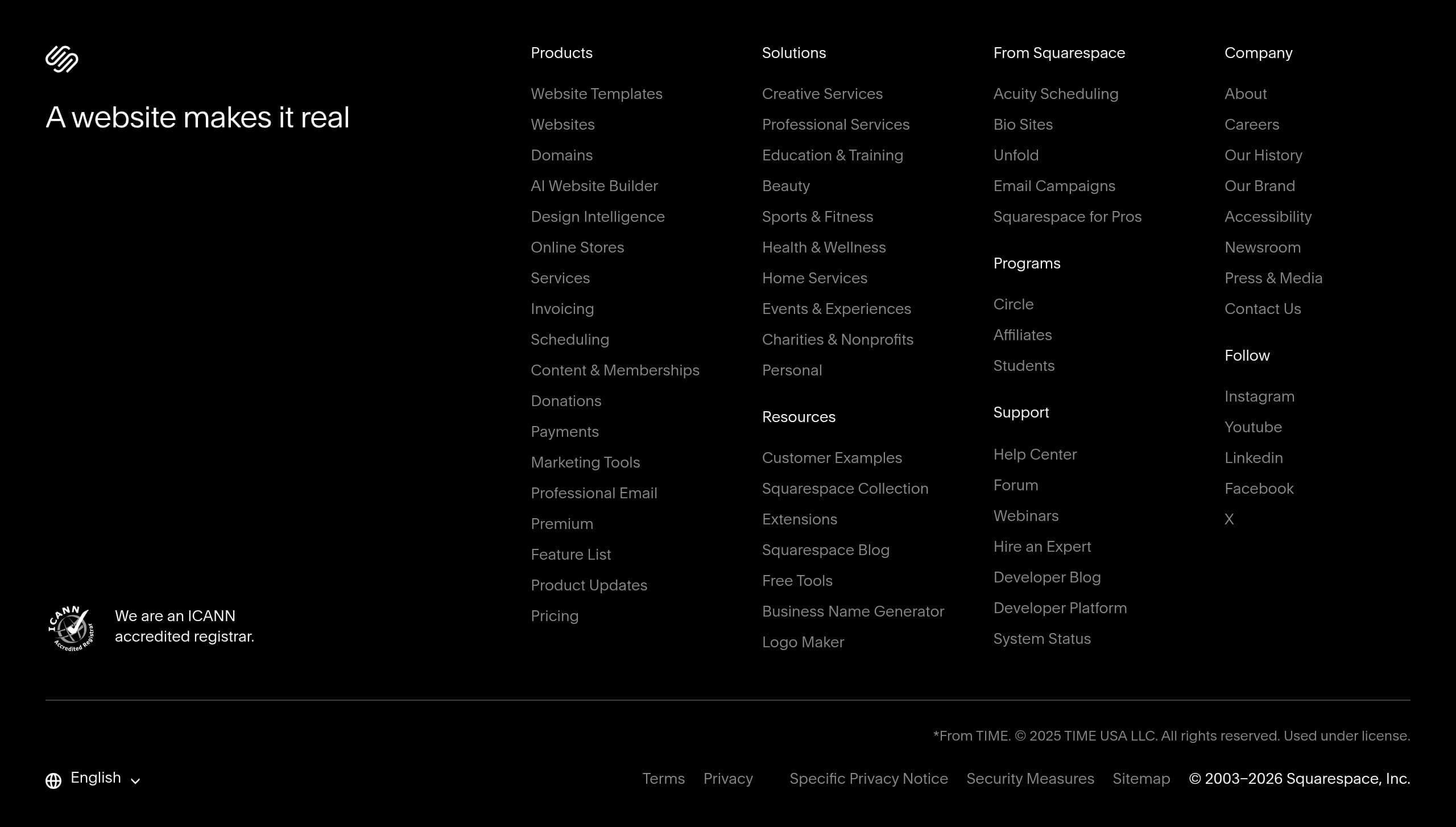
Squarespace’s footer (per the footer screenshot) functions as a navigation safety net for a very large product suite, and it’s structured to serve both evaluators and existing customers. The key takeaway: the footer isn’t just legal links—it’s an information architecture tool that reduces dead ends and keeps visitors moving to high-intent pages.
Common effective footer elements that the screenshot format supports (and that align with the site’s visible IA):
- Grouped columns that likely mirror the top navigation: Products (Websites, Ecommerce, Marketing, Domains), Solutions/Industries, Resources, and Company. This consistency strengthens wayfinding because users see the same mental model at the top and bottom of the page.
- Support-forward utilities: “Help Center,” “Forum,” and potentially “Contact”/“Status” style links (Squarespace prominently advertises 24/7 support in the header area, and mature SaaS footers usually repeat key support entries).
- Conversion-adjacent links: templates, domain search/transfer, and “Start a Free Trial” or “Get started” equivalents are typically repeated so users can re-enter the funnel after scrolling.
From the live excerpt, Squarespace also includes specific programs (“Squarespace for Pros,” “Circle”) that are likely represented in the footer. That’s important because agencies and freelancers often look for partner details in the footer rather than in the hero.
A well-executed footer also reinforces compliance and governance expectations via Terms, Privacy, and trademark/copyright blocks, which matters when payments, domains, and email are part of the platform. Even when users don’t click those links, their presence signals a legitimate, established vendor.
Net: Squarespace uses its footer as a structured sitemap for a broad all-in-one platform, ensuring that after a long homepage scroll there’s still a clear next step—whether that’s pricing, templates, support documentation, or partner programs.
Detected tech stack
Tools and technologies we detected on Squarespace's site. Detection is best-effort and may be incomplete.
Scores
Our framework scores for Squarespace's website in terms of clarity, conversion, and trust. See our methodology for how we calculate these.
How clear the value prop and structure are.
How conversion-friendly signup and pricing are.
How well trust and compliance are surfaced.
FAQ
Squarespace leads with a short headline (“A website makes it real”), then immediately presents clear CTAs (“Get Started” and “Start for free”) plus “No credit card required.” It reinforces the decision with hard social proof (14M+ entrepreneurs, $36B+ earned, 200+ countries) and quickly maps features to outcomes like selling products, scheduling, invoicing, and memberships with “Great for” audience examples.
Squarespace uses a tiered plan layout that makes it easy to compare options side-by-side. The pricing experience is supported by site-wide cues like limited-time discounts (20% off new website plans) and an upfront free-trial promise. Navigation also introduces higher-end offerings (Squarespace Premium with lower processing rates and priority support), which frames pricing as a growth path, not a single one-time choice.
Squarespace emphasizes quantified proof and real examples. The homepage highlights “Trusted by 14 million entrepreneurs worldwide,” plus metrics like $36B+ earned and availability across 200+ countries and territories. It also promotes “Made with Squarespace,” a gallery of real customer sites that demonstrates design quality. For AI, it adds third-party validation by noting Blueprint AI was recognized as one of TIME’s Best Inventions of 2025.
Squarespace highlights business outcomes: online stores, services, invoicing, scheduling, donations, memberships, blogging, and portfolio sites. It then reinforces platform completeness with integrated components such as Squarespace Payments, analytics, extensions, and domain tools. The domains feature explicitly includes WHOIS privacy, SSL, and premium DNS. AI features (Blueprint AI Builder and Design Intelligence) are positioned as guided creation and content/design assistance.
Squarespace pushes a low-friction start with “Start for free” and “No credit card required.” Onboarding routes include starting from a template, using Blueprint AI Builder (answer a few questions and generate a site), or beginning with domain search/transfer. The site keeps CTAs consistent across header and hero, suggesting a direct path into the editor where users can customize via drag-and-drop and activate commerce, scheduling, or marketing features as needed.

The world's best-performing SaaS businesses share surprisingly similar patterns. We help you learn and apply them through our human-designed methodology, with AI-assisted research.