
Key takeaways
Here are the key insights from our website breakdown analysis of Unbounce.
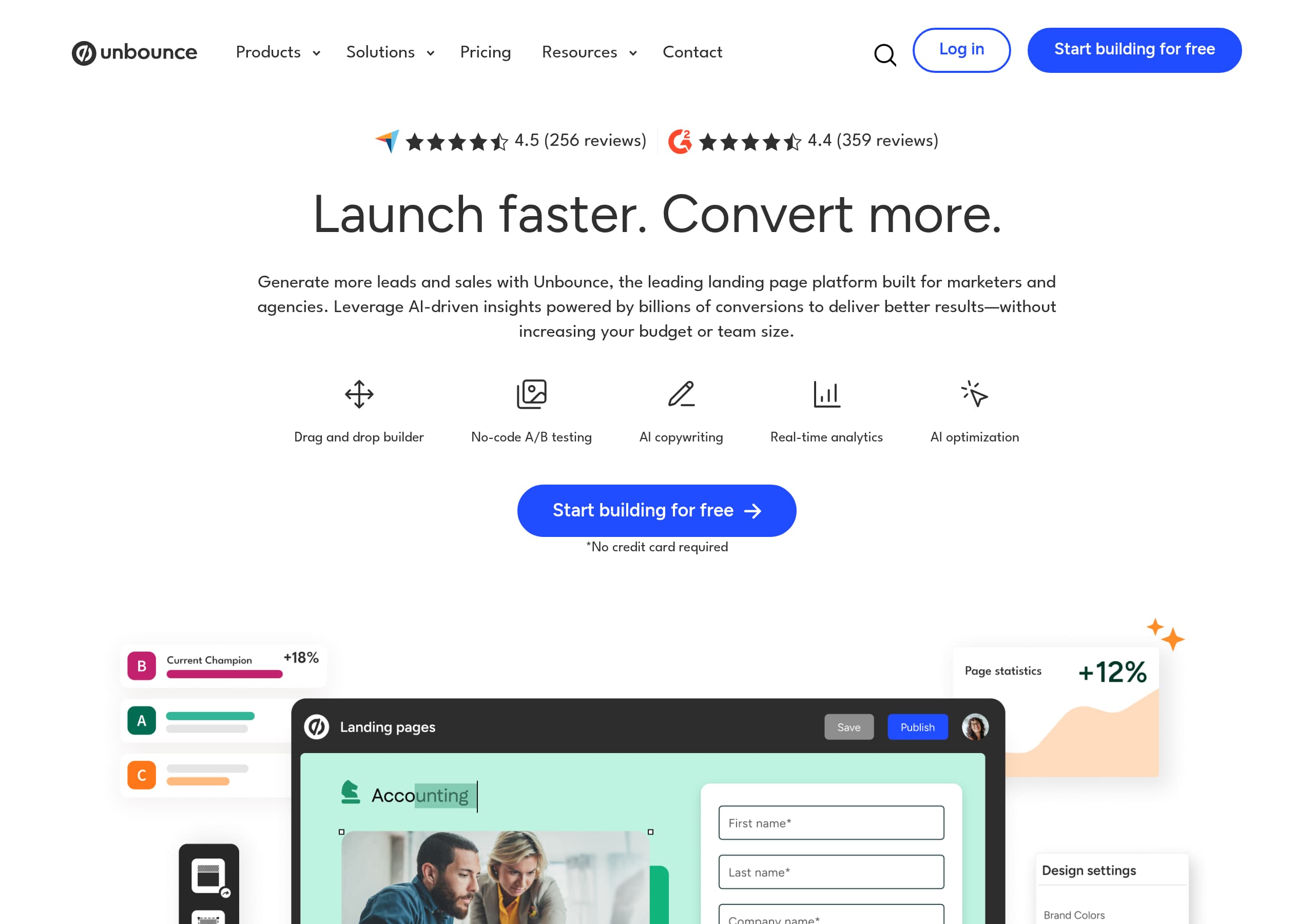
Unbounce’s homepage communicates a complete landing page and CRO workflow in one screen, using a clear hero headline, a short benefit-driven subhead, and a primary CTA that repeats consistently: “Start building for free.”
The site converts by matching CTAs to intent, offering both self-serve (“Start my free trial”) and sales-led (“Request a demo”) paths, plus a “Concierge plans” route for higher-volume buyers.
Feature messaging is organized around marketer outcomes, not technical specs, with dedicated sections for no-code building, A/B testing, and Smart Traffic (AI optimization) that each include an action CTA.
Unbounce builds credibility with specificity, referencing “over two billion conversions” powering AI insights and linking to a “Conversion benchmark report” based on “over 57 million landing page conversions.”
Integrations are made tangible by naming recognizable platforms (Salesforce, HubSpot, Zapier, Google Analytics, Mailchimp), which reduces perceived implementation risk and supports faster purchase decisions.
Pricing and packaging signal segmentation and scale, with standard plans and a clearly differentiated “Concierge” tier positioned around flexible limits, dedicated support, and conversion expertise.
Trust signals are present but could be surfaced earlier in the funnel, security, compliance, and “Product security” are accessible via navigation and footer, but the homepage emphasizes performance benefits more than governance details.
Home
Unbounce’s homepage works because it explains the product category, the buyer, and the outcome within the first scroll, then immediately shows how the platform delivers that outcome. The hero headline, “Launch faster. Convert more. Generate more leads and sales with Unbounce,” pairs with a concrete subhead about AI-driven insights and improving results “without increasing your budget or team size,” which is a direct objection handler for marketers.
The page uses a clean, marketer-first structure that turns broad positioning into specific capabilities:
- A compact capability row lists Drag and drop builder, No-code A/B testing, AI copywriting, Real-time analytics, and AI optimization, functioning like a “table stakes plus differentiator” checklist.
- The narrative is broken into three jobs-to-be-done sections, each with an action CTA: “Create your page,” “Start A/B testing,” and “Optimize effortlessly.” That sequencing mirrors how teams actually ship campaigns.
- Smart Traffic is explained in plain language, “send visitors to the page where they’re most likely to convert,” keeping the AI value proposition tied to conversion, not novelty.
Unbounce also reduces implementation anxiety through ecosystem cues. The integrations band explicitly names Salesforce, HubSpot, Zapier, and Google Analytics, and adds “+ many more,” which strengthens the stack compatibility story without forcing users into a long directory.
One improvement opportunity is above-the-fold proof. The homepage includes “Why marketers love Unbounce” and industry pathways (SaaS, ecommerce, agencies), but the hero area is mostly messaging and CTAs. Adding visible logos, a short testimonial, or a benchmark stat near the initial CTA could increase confidence for first-time visitors while keeping the start building for free path prominent.
Pricing
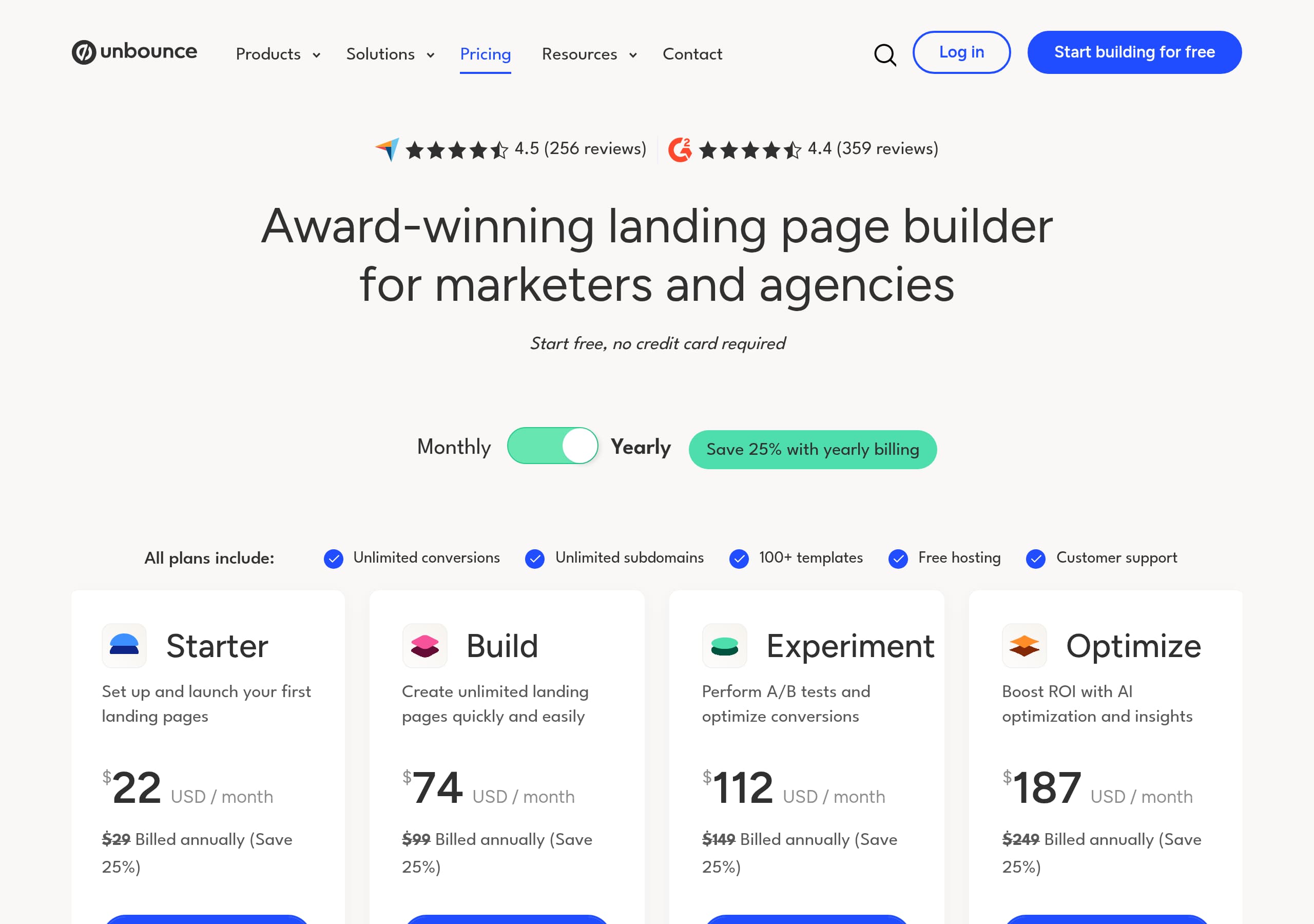
Unbounce’s pricing presentation, as shown in the pricing screenshot, is designed to segment buyers by scale and support needs, not just feature access. The page emphasizes plan comparison and a clear decision path, which is important for a product that sells to solo marketers, agencies, and performance teams with different traffic and conversion volumes.
What stands out is the packaging narrative that appears across the site and is reinforced on pricing:
- Plans are framed around building and optimizing, then scaling with “Concierge,” which is positioned elsewhere as “Flexible limits and extra support.” This creates a logical upgrade path from self-serve to higher-volume operations.
- The site repeatedly references limits in terms that matter to landing page buyers: number of pages, visitors, and conversions. Even when exact numbers vary by plan, the concept is consistent, which helps users self-qualify.
- Pricing CTAs align to intent: a self-serve motion (“Start my free trial,” “Start building for free”) and a sales motion (“Request a demo”) coexist without competing, because they map to different risk tolerances.
The pricing page benefits from Unbounce’s broader conversion narrative. Visitors who land on pricing have likely seen claims like “optimize with AI-powered insights” and “Smart Traffic,” so pricing reads as paying for CRO throughput, not just a page builder.
Where pricing could be stronger is in immediately answering “what do I lose if I choose the wrong plan?” If the comparison grid is dense, adding a short “recommended for” line per tier (for example: PPC teams, agencies, ecommerce) and repeating the 14-day trial terms near each plan would reduce hesitation. Also, a clear link to “Product security” near checkout-oriented actions would help teams with procurement requirements finalize faster.
Features
Unbounce’s feature presentation succeeds because it groups capabilities into complete workflows, then ties each workflow to a measurable conversion outcome. Instead of a single long feature grid, the homepage excerpt shows multiple feature clusters that align with how marketers execute campaigns.
The product is positioned as “Build, test, and optimize landing pages, all in one platform,” and the feature sections reinforce that promise:
- Build: The drag-and-drop editor is described with specificity, “customizable templates,” “custom scripts,” and “dynamic text replacement.” These are concrete mechanisms that performance marketers recognize as levers for relevance and speed.
- Test: The A/B testing section highlights one-click launch, “create as many variants as you want,” and “clear results,” lowering perceived experimentation cost for teams without developers.
- Optimize: Smart Traffic is explained as automatic routing to the “best-match landing page,” supported by “AI and ML” and attributes like “device and location.” That makes optimization sound operational, not magical.
Unbounce also expands the feature set beyond landing pages without diluting the message. The later section mentions “popups and sticky bars,” which signals broader conversion surfaces while staying within the CRO category. Smart Copy is positioned as AI copywriting, specifically “rewrite, expand, or summarize” landing page copy, which complements the builder rather than competing with it.
Integration features are presented as a capability, not an afterthought: “Zapier and webhooks” plus named tools. This is important for teams that need attribution and lead routing to work immediately.
A tactical improvement would be consolidating key differentiators into a tight comparison module. Unbounce has unique claims like Smart Traffic and benchmark insights. A short “Why Unbounce vs other landing page builders” block near the feature clusters would help buyers who are also evaluating Instapage, Leadpages, or Webflow landing pages. That would make AI optimization and no-code experimentation feel more defensible at decision time.
Signup
Unbounce’s signup experience is optimized around reducing time-to-first-page while still supporting multiple entry points. The header includes both “Log in” and “Start building for free,” and the homepage repeats trial CTAs like “Start my free trial,” making the self-serve path easy to find from several sections.
Key conversion mechanics visible in the excerpt:
- The trial is explicitly framed as “free 14-day trial” with “Cancel anytime,” which lowers perceived risk and addresses the common concern of being locked into a subscription.
- CTAs are consistent and action-based: “Start building for free,” “Start my free trial,” and task-specific actions like “Create your page” and “Start A/B testing.” This creates CTA continuity from interest to activation.
- There are parallel paths for different buyer types. Visitors can “Request a demo,” and higher-scale buyers are directed to “Concierge plans,” which implies sales support and expanded limits.
Unbounce also separates product entry for Smart Copy with “Log into Smart Copy,” which suggests the AI copywriting tool can be used independently. That is useful for acquisition, but it can fragment onboarding if users do not understand how Smart Copy relates to landing pages. A simple onboarding choice screen that clarifies “Build landing pages” vs “Use Smart Copy” would preserve the multi-product flexibility while preventing confusion.
From a CRO perspective, Unbounce’s signup positioning is strong, but it could further reduce friction by previewing what happens immediately after signup. For example, adding a short “After you start your trial: choose a template, connect a domain, publish” style checklist near the CTA would set expectations and increase completion rates. Since the site already highlights templates and integrations, a 3-step activation preview would feel credible and aligned with the platform’s no-code promise.
Trust
Unbounce’s trust posture is present and accessible, but it is positioned more as supporting information than as a primary conversion driver. The navigation and footer include “Product security,” “Security,” “Privacy Policy,” “Terms of Service,” “CCPA,” “GDPR,” and an “Accessibility statement,” which are important signals for regulated teams and agencies managing client data.
Trust is communicated through several observable patterns:
- Governance links are easy to find: “Product security” appears in the product navigation, and legal/compliance links are consolidated in the footer. This supports procurement workflows because evaluators can quickly locate policies.
- Data and attribution trust is reinforced indirectly through the integrations story. By naming tools like Salesforce, HubSpot, Google Analytics, and Zapier, Unbounce implies compatibility with established systems of record, which reduces fear of data silos.
- Expertise trust appears via services and support positioning. “Concierge plans” promise a “dedicated team of conversion experts,” and the site references an “award-winning customer success team,” a community, and educational resources, all of which increase confidence for teams without in-house CRO specialists.
Where trust could be strengthened is in making security assurances more concrete on high-intent pages. In the provided home and pricing visuals, performance claims and AI benefits lead, while security and compliance are mostly navigational. Adding a small trust module near pricing CTAs that links to product security, highlights compliance coverage (CCPA, GDPR), and clarifies data handling for AI features like Smart Traffic and Smart Copy would reduce last-mile churn.
Unbounce already uses large-scale conversion data as an authority cue. Pairing that with a brief explanation of how data is used, anonymized, or aggregated would help skeptical buyers accept AI optimization without worrying about privacy. This would make AI credibility and security credibility reinforce each other.
Footer
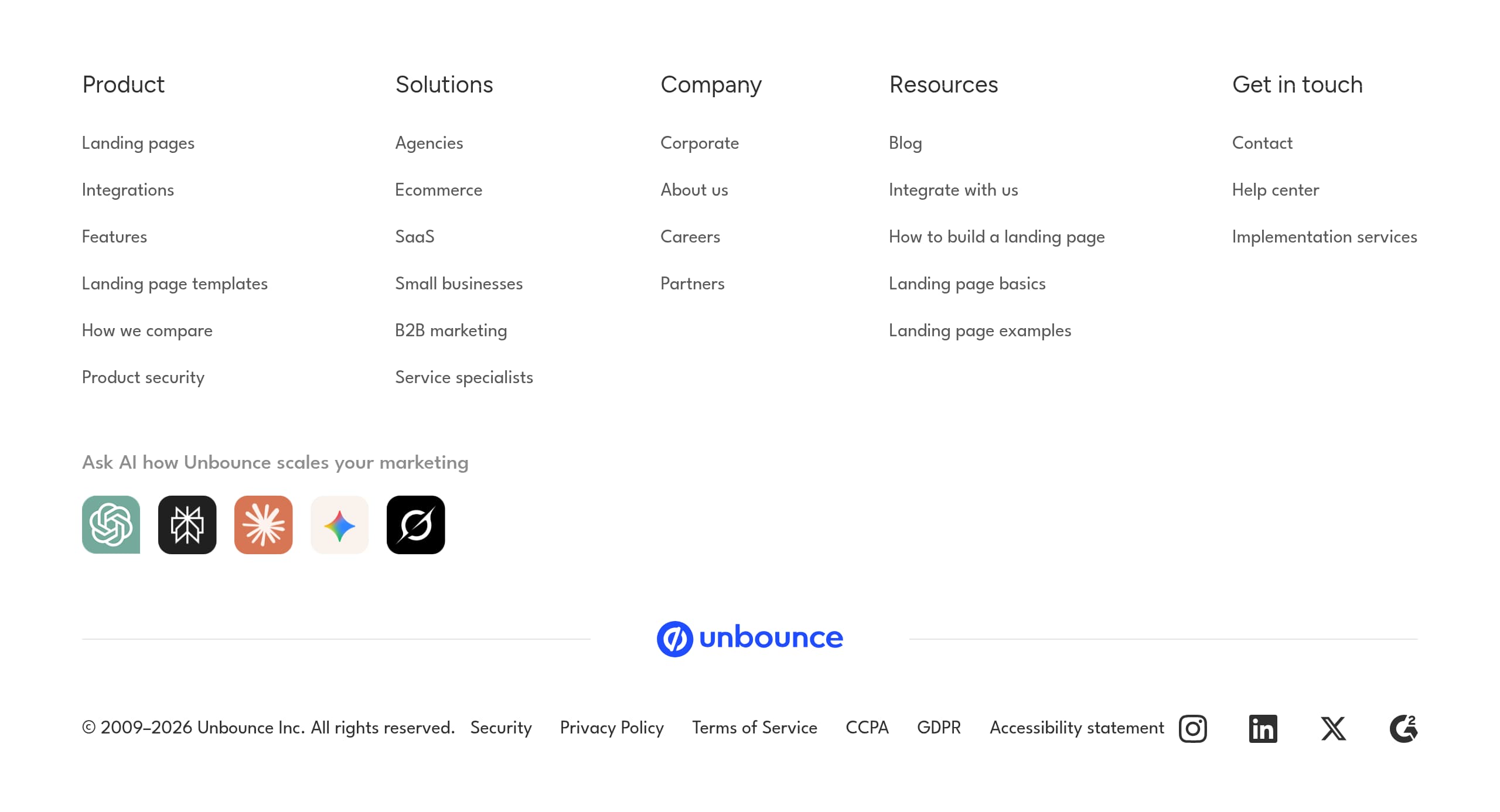
Unbounce’s footer is structured to support both conversion and due diligence, with clear link grouping across Product, Solutions, Company, and Resources. This matters for a mature SaaS brand because many evaluators use the footer to validate legitimacy and to find the exact page they need without navigating the top menu.
From the footer screenshot and excerpt, several elements stand out:
- Product discovery is comprehensive: Landing pages, Integrations, Features, Templates, “How we compare,” and “Product security” are all accessible. This is useful for competitive evaluation and for teams doing feature-by-feature checks.
- Solutions are segmented by audience and use case, including Agencies, Ecommerce, SaaS, Small businesses, B2B marketing, and Service specialists. This reinforces persona targeting and supports SEO pathways.
- Support and education are prominent: Help center, implementation services, and an “Ask AI how Unbounce scales your marketing” style entry point. Combined with blog and resource links, the footer functions as a self-serve enablement hub.
On the compliance side, the footer includes Security, Privacy Policy, Terms of Service, CCPA, GDPR, and an Accessibility statement, plus the corporate copyright line “2009–2026 Unbounce Inc.” These are standard but important trust markers that help buyers confirm the company’s operating history and legal readiness.
A tactical optimization would be adding direct links to key conversion pages in the first column, not only within product groupings. For example, repeating “Pricing,” “Start free trial,” and “Request a demo” as explicit footer CTAs can recover visitors who reach the bottom while still undecided. Another improvement is to clarify product relationships: Insightly CRM is listed as “More solutions by Unbounce,” so a short footer note explaining whether it is a separate product, bundle option, or sibling brand would reduce confusion and preserve Unbounce’s landing page platform focus.
Scores
Our framework scores for Unbounce's website in terms of clarity, conversion, and trust. See our methodology for how we calculate these.
How clear the value prop and structure are.
How conversion-friendly signup and pricing are.
How well trust and compliance are surfaced.
FAQ
Unbounce leads with a direct value proposition: “Launch faster. Convert more. Generate more leads and sales,” then supports it with a scannable capability list like drag-and-drop building, no-code A/B testing, AI copywriting, and AI optimization. The page also uses repeated CTAs such as “Start building for free” and task-based prompts like “Start A/B testing,” which keep the next step clear as users scroll.
Unbounce positions pricing around scaling needs and support level, with standard self-serve plans and a higher-touch “Concierge” option described as flexible limits and extra support. The site consistently frames limits in landing-page terms such as pages, visitors, and conversions, and it pairs pricing intent with the right CTA, including a free trial path for self-serve buyers and “Request a demo” for teams that need sales guidance.
Smart Traffic is Unbounce’s AI optimization feature that automatically routes visitors to the landing page variant where they are most likely to convert. The site explains it in outcome language, focusing on sending people to their “best-match landing page” and improving conversions without adding budget or headcount. It also references optimization based on attributes like device and location to make the behavior feel concrete.
Yes. Unbounce highlights that its landing pages connect with popular platforms like Salesforce and HubSpot, and it also supports Zapier and webhooks for broader connectivity. The homepage explicitly lists examples including Google Analytics, Mailchimp, Twilio, and Chili Piper. This integration-first messaging reduces setup risk for teams that need lead routing, attribution, and CRM sync to work quickly.
Unbounce exposes trust resources through navigation and the footer, including “Product security” and links to Security, Privacy Policy, Terms of Service, CCPA, GDPR, and an Accessibility statement. It also reinforces credibility through scale-based claims such as AI insights powered by over two billion conversions and a conversion benchmark report based on over 57 million conversions. These elements support both performance and procurement evaluation.

The world's best-performing SaaS businesses share surprisingly similar patterns. We help you learn and apply them through our human-designed methodology, with AI-assisted research.