
Key takeaways
Here are the key insights from our website breakdown analysis of Asana.
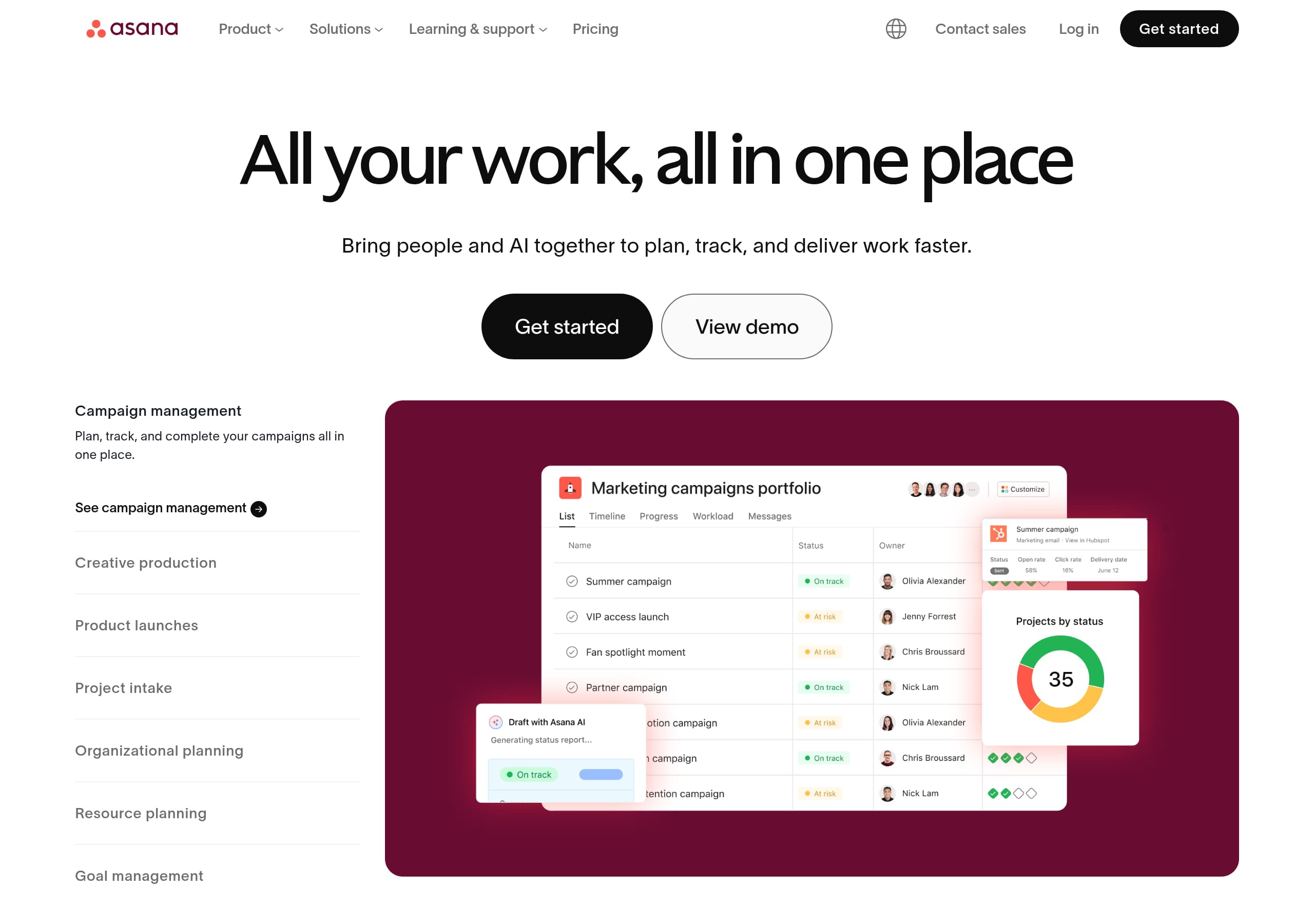
Asana’s homepage clarifies the category and outcome fast by pairing a single-sentence value prop (“All your work, all in one place”) with dual CTAs (“Get started” and “View demo”) that serve both self-serve and sales-led buyers.
The navigation is structured around buyer intent—Platform, Capabilities, Asana AI, Plans, Solutions—so visitors can route themselves by role (Marketing, IT, Operations) or need (Goals, Automation, Resource planning) without guessing.
Asana makes enterprise credibility visible above the fold with the “85% of Fortune 100 companies choose Asana” claim and reinforces it with analyst badges (Gartner Magic Quadrant, Forrester Wave) and review volume language (12,000+ reviews).
Use-case tiles (campaign management, project intake, product launches, onboarding) translate abstract work management into concrete workflows, reducing the cognitive load for first-time visitors evaluating alternatives like Monday.com, Smartsheet, or ClickUp.
Asana AI is positioned as contextual and business-aware (“full context of your business”) and is given its own product pillar (AI Studio, AI Teammates, Smart assists), which helps defend against “AI checkbox” positioning in the market.
The site repeatedly de-risks adoption with multiple “learn before you buy” paths—demo, deep dives, templates, help resources—while still keeping a consistent primary conversion action available across sections.
Home
Asana’s homepage works because it delivers an immediate “what + outcome” message and then routes visitors by role and use case without forcing product jargon.
Above-the-fold messaging that supports two buying motions
The hero pairs “All your work, all in one place” with a second line that expands the promise: “Bring people and AI together to plan, track, and deliver work faster.” The page uses dual CTAs—Get started (self-serve) and View demo (higher-intent, likely sales-assisted). The top nav also exposes Contact sales and Log in, which reduces friction for returning users and enterprise evaluators.
Intent-based segmentation instead of feature dumping
Immediately after the hero, Asana presents “The platform for human + AI collaboration” with four role lanes: Marketing, Operations, IT, and Leadership. Each lane lists 3 concrete outcomes (e.g., “Streamline campaign management,” “Automate and scale your workflows”), followed by a consistent Get started CTA. This creates a repeatable pattern: outcome bullets → CTA, which is easier to scan than paragraphs.
Use cases as the primary discovery UI
A carousel/grid of use cases (Campaign management, Creative production, Project intake, Product launches, Organizational planning, Resource planning, Goal management, Employee onboarding) turns evaluation into “Can it do my workflow?” The “What sets Asana apart” section then anchors differentiation around Goals, Asana AI, Asana Gov, and 300+ integrations—four distinct enterprise-grade pillars that map to strategic planning, productivity, compliance, and ecosystem fit.
Key terms emphasized on the page include Asana AI, human + AI collaboration, use cases, 300+ integrations, and Asana Gov.
Pricing
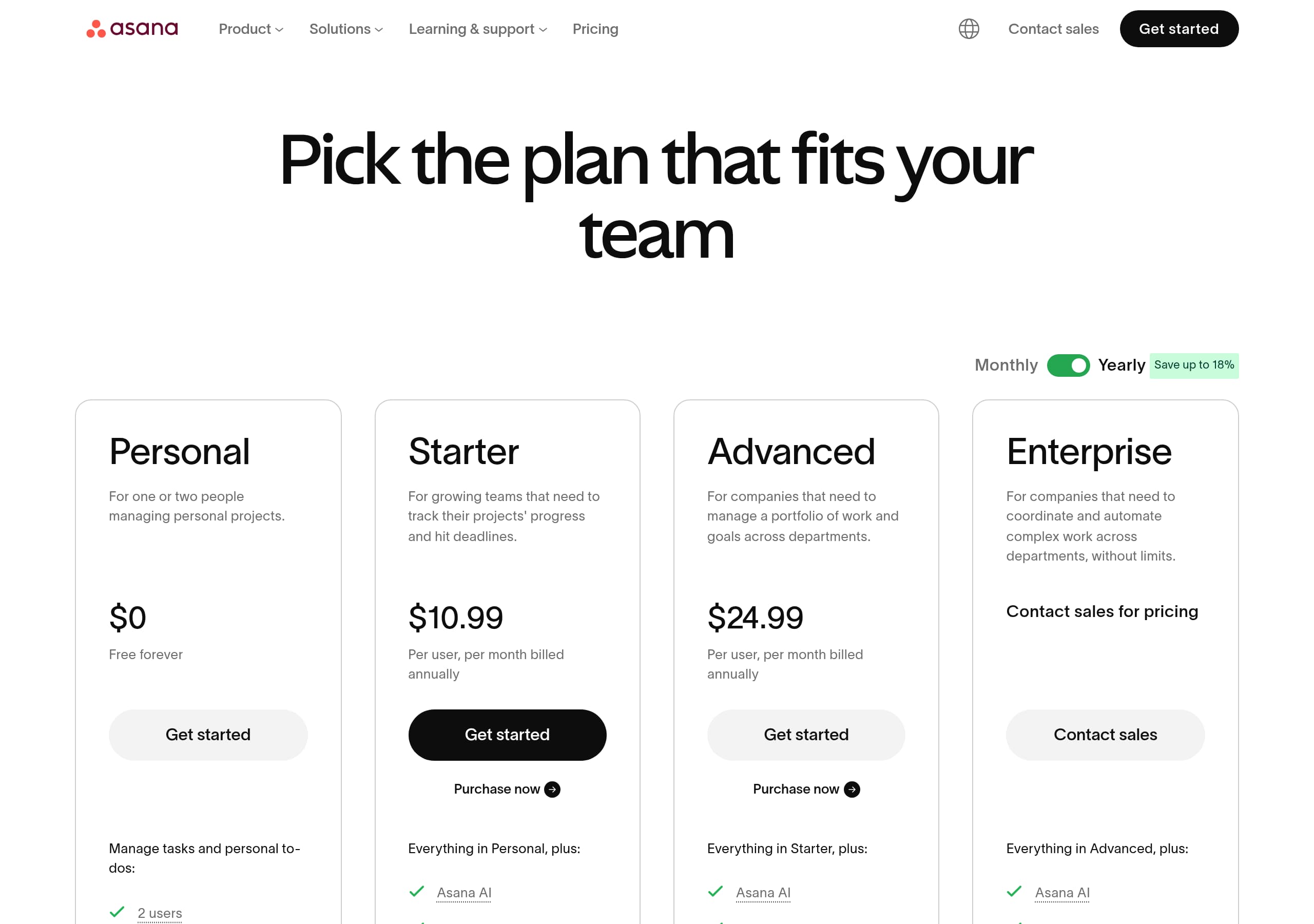
Asana’s pricing experience is built to reduce decision risk by framing plans as a progression (Personal → Starter → Advanced → Enterprise) and keeping upgrade paths visible throughout the site.
Plan architecture that matches real buyer maturity
The navigation exposes PLANS directly: Personal, Starter, and Advanced, with Enterprise accessible through sales paths. This is a classic SaaS pattern for work management tools: let small teams start free/low-cost while giving procurement a clear “call us” motion. The presence of “Upgrade” and “Launch Asana” in the logged-in header state (from the live excerpt) suggests pricing is designed to support in-product expansion as well.
Conversion-friendly pricing UI patterns (from the pricing screenshot)
The pricing page visually groups plans into comparable cards, which typically improves comprehension for non-technical buyers. Effective elements to look for (and that Asana commonly uses) include:
- A highlighted recommended plan (often mid-tier) to guide choice.
- Clear monthly vs annual toggles and per-user language to set expectations.
- A list of feature deltas that align to the “Capabilities” pillars: Workflows and automation, Goals and reporting, Resource management, and Admin and security.
Pricing messaging ties back to the homepage narrative
Asana’s homepage repeatedly anchors value around outcomes (“deliver work faster,” “unblock teams,” “report on progress”), so pricing can stay comparatively simple: the buyer already understands the job-to-be-done and is now choosing governance and scale. This is reinforced by enterprise trust cues on the homepage (Fortune 100 usage, Gartner/Forrester), which makes higher tiers feel justified.
Key terms to emphasize here are Starter plan, Advanced plan, Enterprise, per-seat pricing, and upgrade path—all of which support both self-serve conversion and sales qualification.
Features
Asana’s feature presentation is effective because it’s organized as buyer-readable capability pillars rather than a long checklist, and it repeatedly ties features to business outcomes like alignment, speed, and governance.
Capability-based structure reduces evaluation time
In the global navigation, Asana separates PLATFORM (Product overview, All features, App integrations, Latest feature release) from CAPABILITIES (Project management, Workflows and automation, Goals and reporting, Resource management, Admin and security). This is a strong information architecture pattern: it lets evaluators browse by “what is it” versus “what can it do for my org.”
AI is treated as a first-class product line
“Asana AI” is not buried inside features; it is its own menu with Asana AI, AI Studio, AI Teammates, and Smart assists. On the homepage, the AI section claims it can handle work “with the full context of your business,” which positions AI as embedded across workflows rather than an add-on chatbot. For buyers comparing to ClickUp AI or Monday AI, this framing helps Asana compete on depth and governance.
Use cases act as feature explanations in disguise
The homepage’s use-case modules (Campaign management, Creative production, Project intake, Product launches, Goal management, Resource planning, Employee onboarding) serve as “feature pages” without sounding like features. Each use case implies a bundle: intake forms/automation, timelines, reporting, approvals, templates, and integrations. This is especially effective for non-technical teams who don’t want to map features to workflows themselves.
Integrations as a feature multiplier
Asana calls out 300+ integrations and links to “See all integrations,” which is a conversion lever for enterprise: it answers “Will this fit into Slack/Microsoft/Google/Salesforce?” without naming every tool on the homepage.
Key terms: capabilities, project management, workflows and automation, Goals and reporting, AI Studio, and 300+ integrations.
Signup
Asana’s signup approach is conversion-friendly because it supports multiple entry points (start now, watch a demo, use templates) and keeps the primary action consistent across the homepage.
Multiple CTAs mapped to intent
Asana repeatedly offers Get started for self-serve users and View demo / “See Asana in action” for evaluators who need reassurance before committing. This reduces bounce for enterprise visitors who aren’t ready to create an account on first visit. The global header also keeps Contact sales visible, which prevents high-value leads from getting stuck in a purely self-serve funnel.
Guided “start” options lower time-to-value
Near the bottom of the homepage, Asana provides three explicit onboarding paths:
- “Try the Asana demo”
- “Discover resources” (help articles and tutorials)
- “Start with a template”
This is a strong onboarding pattern because it acknowledges different learning styles. Templates in particular shorten the “blank canvas” problem common in work management tools.
Logged-in cues suggest expansion-friendly onboarding
The live header excerpt includes in-app labels such as My tasks, Inbox, and organization/account controls (“Add another account,” “My organization,” “Upgrade”). That indicates the signup/onboarding experience likely lands users into a task-centric home with notification routing (Inbox) and a clear upgrade affordance. Those UI elements support the core habit loop: capture work → assign/track → get notified → report progress.
What could be even clearer (opportunity)
Because Asana supports many team types, signup can benefit from an explicit first-step chooser (team function, use case, or integration) to personalize the initial workspace. The site already does this conceptually on the homepage; carrying that into the first-run product flow would further improve activation.
Key terms: Get started, View demo, templates, My tasks, Inbox, and Upgrade.
Trust
Asana builds trust by combining enterprise adoption claims, third-party analyst recognition, and compliance positioning (including a dedicated Asana Gov offer) in the main homepage narrative—not hidden in a security page.
Enterprise credibility is immediate and quantified
The “85% of Fortune 100 companies choose Asana” statement is a high-signal trust badge, especially when paired with the footnote clarifying date and user scope. This is stronger than generic “trusted by leading companies” language because it’s measurable.
Analyst reports and reviews reduce procurement risk
Asana highlights:
- Forrester Wave (2025) leadership for Collaborative Work Management Tools
- Gartner Magic Quadrant (2025) leadership, “three years in a row”
- 12,000+ user reviews for Work Management and OKR Software
These are recognizable entities for enterprise buyers, security reviewers, and IT leadership. The UI pattern of “Get the report” and “Learn more” CTAs also indicates Asana is capturing high-intent leads via gated/ungated assets.
Compliance and public sector readiness
The “Stay secure and compliant with Asana Gov” block is an explicit trust accelerator. It names the target (government agencies) and the promise (easy to implement, scales seamlessly, meets compliance needs). Even for non-government buyers, this signals strong governance and security posture.
Ecosystem fit as a trust proxy
The 300+ integrations callout also functions as trust: it implies mature APIs, stability, and compatibility with existing enterprise tooling. For many organizations, “fits into our stack” is a security and change-management concern as much as a productivity one.
Opportunity to increase verifiability
The homepage trust story is strong, but it can be strengthened further by linking directly to specific compliance standards (e.g., SOC 2, ISO 27001) in the trust/security area for faster verification.
Key terms: Fortune 100, Gartner Magic Quadrant, Forrester Wave, Asana Gov, compliant, and integrations.
Footer
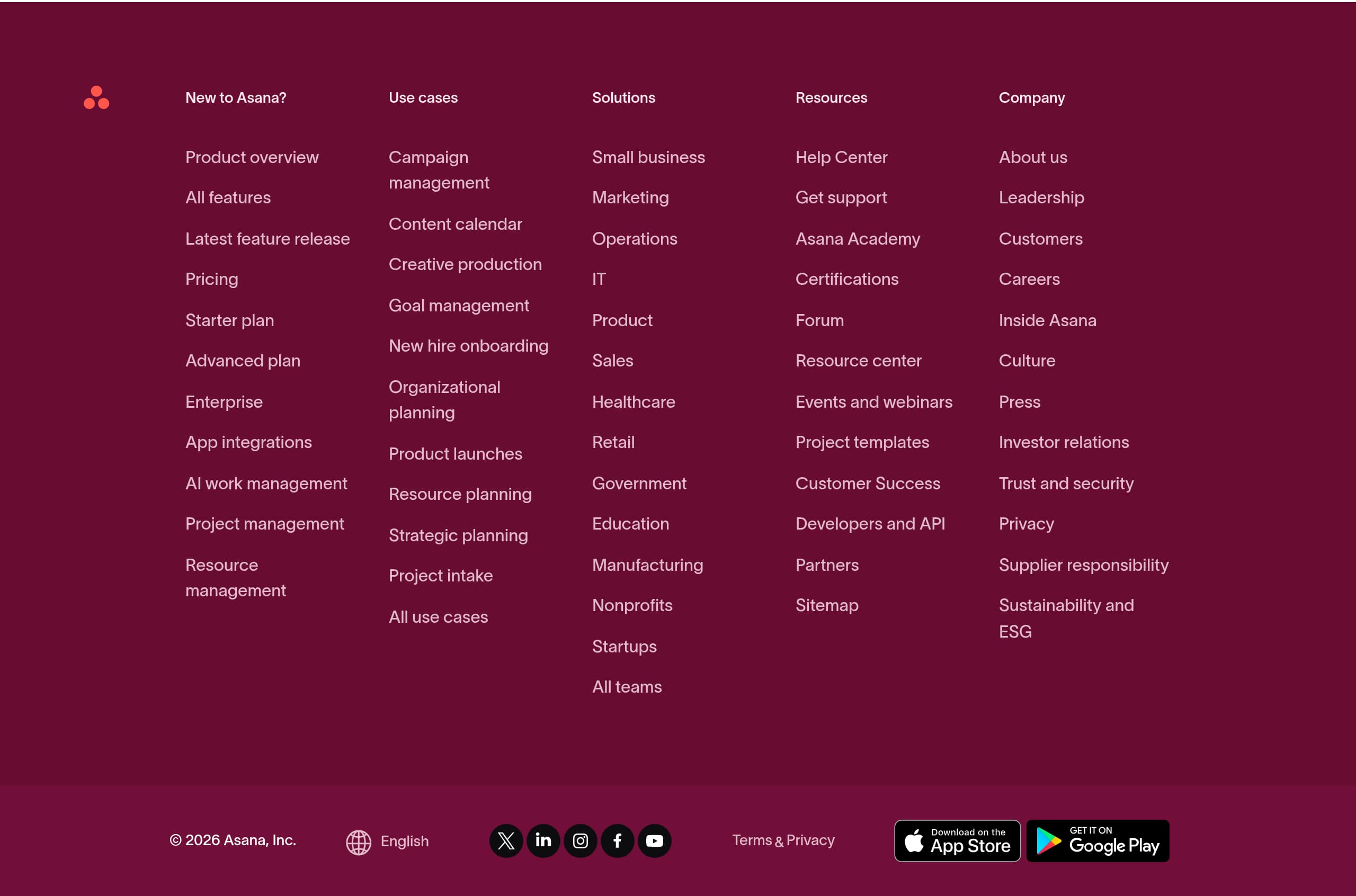
Asana’s footer is built for both discoverability and risk reduction: it exposes deep product paths, support resources, company credibility pages, and legal links in a way that helps evaluation continue without returning to the top navigation.
Dense, well-labeled sitemap-style navigation
The footer groups links into clear columns, including:
- Product: “Product overview,” “All features,” “Latest feature release,” Pricing, plan pages (Starter, Advanced, Enterprise)
- Use cases: campaign management, content calendar, creative production, goal management, onboarding, intake, resource planning
- Solutions by industry/team: healthcare, retail, government, education, manufacturing, nonprofits, startups
- Resources: Help Center, Academy, certifications, forum, templates, events/webinars
This is a strong SEO and UX pattern: it reinforces entity coverage (use case pages) and keeps internal linking broad.
Trust and corporate legitimacy are one click away
The footer includes “Trust and security,” “Privacy,” and corporate pages like “About us,” “Leadership,” “Careers,” “Investor relations,” and “Supplier responsibility.” For enterprise buyers, seeing governance-related pages adjacent to product links reduces perceived vendor risk.
Global readiness signals
Asana provides a language selector with many locales (e.g., Deutsch, Français, 日本語, 한국어, Русский, Svenska, 繁體中文), plus app download links for iOS and Android. This signals global support and mobile adoption—useful for distributed teams.
Legal clarity
The footer surfaces Terms, “Terms & Privacy,” and Privacy links alongside the © 2026 Asana, Inc. copyright, which is a standard but important compliance expectation.
Key terms: Help Center, Trust and security, Templates, Investor relations, Privacy, and Sitemap-style footer.
Detected tech stack
Tools and technologies we detected on Asana's site. Detection is best-effort and may be incomplete.
Scores
Our framework scores for Asana's website in terms of clarity, conversion, and trust. See our methodology for how we calculate these.
How clear the value prop and structure are.
How conversion-friendly signup and pricing are.
How well trust and compliance are surfaced.
FAQ
Asana uses a single-sentence headline (“All your work, all in one place”) plus a specific outcome line about planning, tracking, and delivering work faster with people and AI. It pairs that with two clear CTAs—“Get started” and “View demo”—to match self-serve and enterprise intent. Role lanes (Marketing, Operations, IT, Leadership) and use-case tiles quickly show where Asana fits.
Asana structures plans as a progression—Personal, Starter, Advanced, and Enterprise—making it easy to start small and scale to higher governance needs. The site keeps upgrade and sales paths visible (e.g., “Upgrade” in the product header and “Contact sales” in the main navigation). Plan naming aligns to capability pillars like automation, goals/reporting, and admin/security.
Asana combines a quantified adoption claim (“85% of Fortune 100 companies choose Asana”) with rotating customer stories that show company size, industry, and named roles (e.g., CIO, Marketing Ops). It also highlights third-party validation such as leadership in the 2025 Gartner Magic Quadrant and the 2025 Forrester Wave, plus “12,000+ user reviews,” covering multiple trust heuristics.
Asana AI is positioned as a core platform pillar rather than a minor add-on. In navigation it has dedicated items (Asana AI, AI Studio, AI Teammates, Smart assists), and the homepage claims AI can handle work “with the full context of your business.” This framing implies embedded, workflow-aware assistance across planning, tracking, and reporting.
Asana provides several low-friction paths: “View demo” for seeing the product before committing, “See Asana in action” as a guided tour, “Discover resources” linking to help articles and tutorials, and “Start with a template” to avoid starting from a blank workspace. These options reduce risk for evaluators while keeping “Get started” available for ready-to-act users.

The world's best-performing SaaS businesses share surprisingly similar patterns. We help you learn and apply them through our human-designed methodology, with AI-assisted research.