
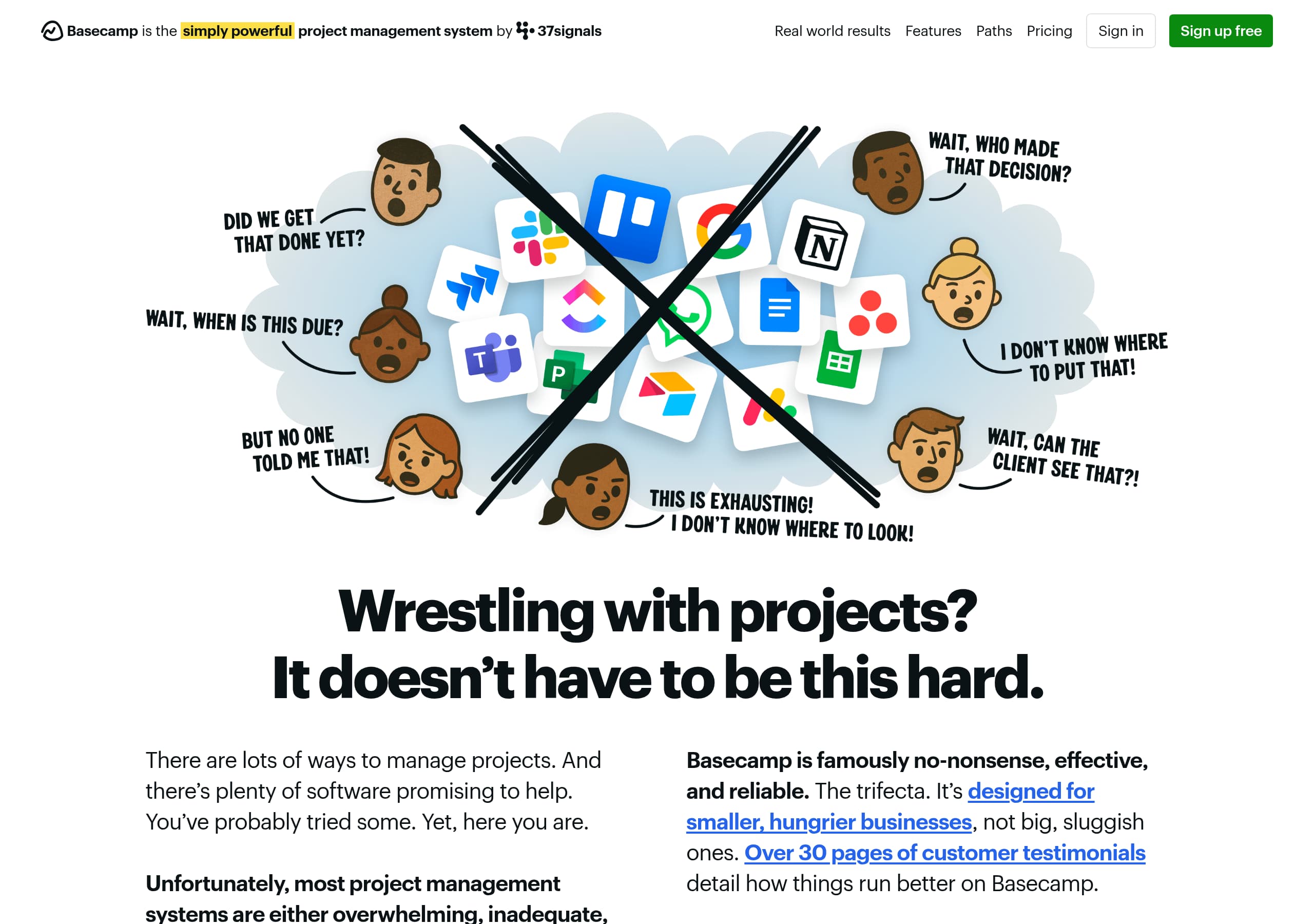
Key takeaways
Here are the key insights from our website breakdown analysis of Basecamp.
Basecamp’s homepage leads with a contrarian, plainspoken promise (“refreshingly straightforward”) and backs it up with specific credibility markers like a 21-year track record and quantified uptime, which reduces skepticism early.
The site uses a consistent “calm clarity” information architecture—Home → Projects → Reports/Visualizations → Notifications—so visitors can quickly map features to daily workflows without reading a long feature grid.
Conversion is supported by persistent, high-contrast CTAs (notably “Sign up free”) and a repeated invitation to try the product, while still keeping the narrative human (CEO signature, direct email).
Pricing is positioned as cost-simplification (“replaces Slack/Asana/Dropbox”) rather than feature-bucketing, helping Basecamp compete against tools like Asana, Trello, Jira, Notion, and Monday.com on total stack replacement.
Trust is unusually strong for a SaaS marketing site: public-facing ownership access (Jason Fried/DHH emails), business stability claims (profitable 25 years, zero debt), and operational transparency (status page, security write-up, export policy).
Social proof is displayed as volume and breadth (75,000+ organizations, 166 countries, 30+ pages of testimonials) plus repeating micro-quotes, which signals popularity even without a traditional logo wall.
Home
Basecamp’s homepage works because it makes a strong, differentiated claim (“refreshingly straightforward”) and immediately substantiates it with longevity, audience focus, and clear next steps.
What’s happening above the fold
- The nav includes Real world results, Features, Paths, Pricing, plus two conversion options: Sign in and a standout “Sign up free” CTA. That dual-CTA pattern supports both new and returning users.
- The hero copy names the pain (“Wrestling with projects?”) and contrasts Basecamp against “overwhelming… chaotic” tools, setting up an explicit alternative rather than a generic “all-in-one” pitch.
- Credibility is front-loaded: a 21-year track record, “designed for smaller… businesses,” and an invitation to “watch the video” and “try Basecamp for free.”
The core narrative structure
Basecamp then walks the visitor through a day-in-the-life flow: the home screen (projects/assignments/events), then projects as the container for work, then reports and visual tools (Lineup, Mission Control, Hill Charts), then communication via Hey! menu and Pings. This is a practical IA choice: it maps features to mental models (“what’s on my plate?”) rather than listing modules.
Human authority + low-friction reassurance
A notable E-E-A-T pattern is the personal sign-off from Jason Fried with a direct email. That’s rare on SaaS homepages and functions like an executive-level trust badge. The repeated “It’s time for Basecamp” refrains also act as micro-CTAs without adding UI clutter. Key terms: Sign up free, 21-year track record, smaller businesses, Hill Charts, Pings.
Pricing
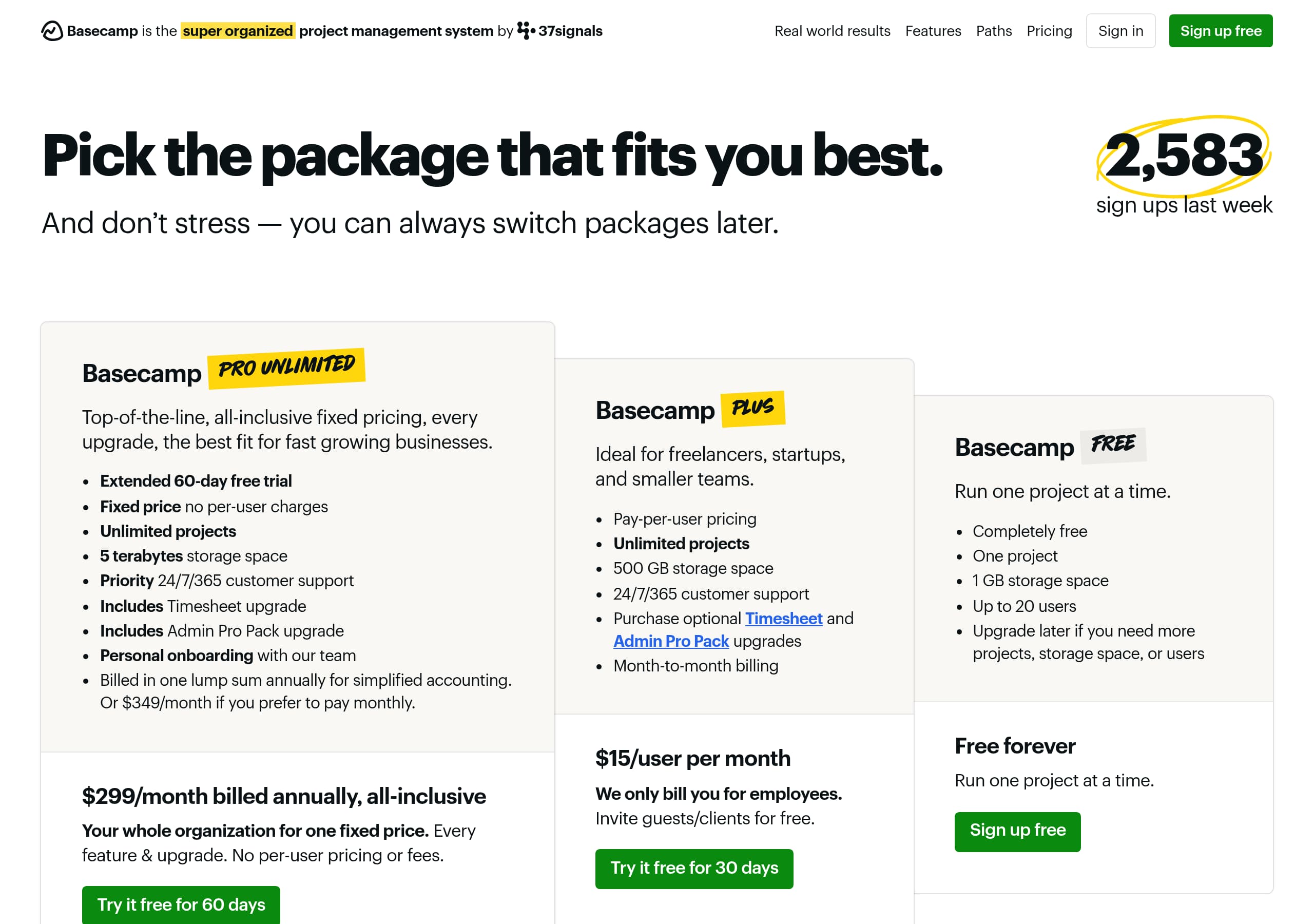
Basecamp’s pricing presentation is optimized around simplicity and budget predictability, reinforcing the brand’s “no-nonsense” positioning rather than encouraging plan comparison.
What the pricing page communicates visually
From the screenshot, the page uses a clean, high-contrast layout with a primary pricing card and minimal distractors—consistent with Basecamp’s anti-complexity stance. Instead of a dense matrix, the UI emphasizes one clear choice and a straightforward path to purchase, reducing analysis paralysis.
How the messaging supports willingness to pay
On the homepage excerpt, Basecamp explicitly claims it can replace multiple subscriptions (“no more Slack… no more Asana… no more Dropbox… replaces Google Docs/Notion”), which reframes pricing as stack consolidation. This is effective because it anchors the cost against a combined toolchain rather than against a single competitor like Trello.
Objection handling adjacent to pricing
Pricing confidence is reinforced elsewhere on-site with concrete policies:
- Refund policy: described as “fair and reasonable,” signaling low perceived risk.
- Data export: “self-service and easy” with browser-browsable format, reducing lock-in fear.
- Reliability: historical uptime “well over 99.99%,” with a linkable status page.
Tactical conversion notes
Basecamp consistently uses action language like “Sign up free” (trial-first) instead of forcing a sales call. For SMB buyers, that matches how decisions are made: quick trial, then pay. If there’s a weakness, it’s that some enterprise buyers may want explicit compliance badges on the pricing page itself; however, Basecamp compensates by linking to security materials and operational transparency. Key terms: simple pricing, stack replacement, refund policy, 99.99% uptime, Sign up free.
Features
Basecamp’s features section succeeds by demonstrating workflows (what you’ll do) rather than listing capabilities (what the software has), which makes the product feel simpler and more inevitable.
Feature communication style
The excerpt uses a guided walkthrough tone (“Let’s walk through it”) and ties each component to a practical question:
- Home screen: “What’s my week look like?” and “What’s on my plate today?”
- Projects: a “tidy, predictably structured place” where tasks, discussions, files, and decisions live.
- Reports: described as “real work… evidence,” not abstract dashboards.
- Visualizations: explicitly named (Lineup, Mission Control, Hill Charts) with a clear purpose (“see where projects really stand”).
Specific feature differentiators that stand out
- Notifications: the Hey! menu aggregates alerts in a “never-annoying” way, positioning against noisy Slack-style patterns.
- Messaging: Pings are framed as keeping work off personal channels (SMS/WhatsApp), a concrete boundary benefit.
- Client collaboration: the site repeatedly answers client-specific objections (approvals, visibility controls, email-based participation), which is crucial for agencies and client services.
- Integrations: “Doors” for linking external tools (Google Docs, Figma, Dropbox, Airtable) supports hybrid adoption instead of forcing an all-or-nothing switch.
The “question ladder” technique
A long sequence of “Can I…?” questions acts like an FAQ-feature hybrid. It’s an effective UI-copy device because it mirrors search queries and procurement checklists, while implicitly signaling breadth (“yes, we do that”) without overwhelming UI.
Competitive framing
Basecamp directly names substitutes—Slack, Asana, Dropbox, Notion/Google Docs—which is rare but clarifying. It anchors Basecamp as an all-in-one collaboration system rather than “just tasks.” Key terms: Hill Charts, Hey! menu, Pings, client approvals, Doors integrations.
Signup
Basecamp’s signup positioning is conversion-forward: it repeatedly promises immediate clarity after signup and keeps the primary CTA consistent (“Sign up free”), reducing decision friction.
What the site promises about onboarding
The homepage makes a concrete onboarding claim: “10 seconds after you sign up, clarity sets in.” That is a strong product-led growth message because it sets an expectation of fast time-to-value. It also previews the first-run experience: a home screen that unifies projects, assignments, and upcoming events.
CTA placement and consistency
- The top navigation includes Sign up free alongside Sign in, capturing both new trials and returning users.
- The repeated invitations (“poke around… watch the video… try Basecamp for free”) create multiple entry points without adding competing CTAs like “Book a demo.”
What likely happens post-signup (based on described UI)
The described structure implies a guided first project creation with predictable components (to-dos, discussions, files, schedules). The promise that “each person gets their own home screen” suggests role-based personalization happens automatically based on project access—an onboarding win because it reduces setup complexity for managers.
Support-assisted onboarding as a fallback
Basecamp also offers a “free live class” and “live walkthrough class and Q&A,” which functions as an onboarding safety net for teams rolling out across multiple collaborators. For SMBs, this replaces the need for an enterprise sales engineer while still providing human help.
Conversion risks and mitigations
A potential friction point is that Basecamp is English-only, which may affect global trials. However, the site counters international hesitation with the explicit “over 160 countries” usage claim. Overall, signup is framed as trial-first, fast, and reversible (export/refund policies elsewhere), which is exactly what a switching PM buyer needs. Key terms: Sign up free, 10 seconds, home screen, live class, trial-first onboarding.
Trust
Basecamp’s trust section is unusually concrete and founder-forward, converting common SaaS risk questions into specific, verifiable claims.
Business stability and accountability
The site directly addresses “Can we trust you?” with crisp company facts about 37signals:
- In business since 1999; Basecamp launched 2004.
- “Profitable for 25 straight years,” zero debt, privately held, “built to stay, not exit.”
- Public employee handbook and references to books (REWORK, Remote, It Doesn’t Have to Be Crazy at Work), which function as external reputation signals.
- Direct access to leadership: Jason Fried and David Heinemeier Hansson emails, with the claim they read/respond personally.
Operational trust: uptime, security, backups
- Reliability: historical uptime “well over 99.99%,” plus a link to a real-time Status Page (strong because it’s auditable).
- Security: a “full security write-up” and a prepared security PDF in lieu of custom questionnaires—clear expectation-setting for IT buyers.
- Data resilience: multiple redundant US data centers, backups “several times a day,” off-site copies, and geographically separate file backups.
Risk reduction: exit and portability
Basecamp explicitly states you can export your data anytime, self-service, and in a browsable format. This is a high-trust move because it reduces vendor lock-in fear—often a blocker in PM tools.
What’s missing (and why it may be intentional)
The site does not foreground compliance logos (SOC 2, ISO 27001) in the excerpt. Instead, it leans on transparency and long-term reliability metrics. For SMB buyers, this is often sufficient; for regulated industries, the security write-up/PDF becomes the key artifact. Key terms: 37signals, 99.99% uptime, Status Page, redundant data centers, self-service export.
Footer
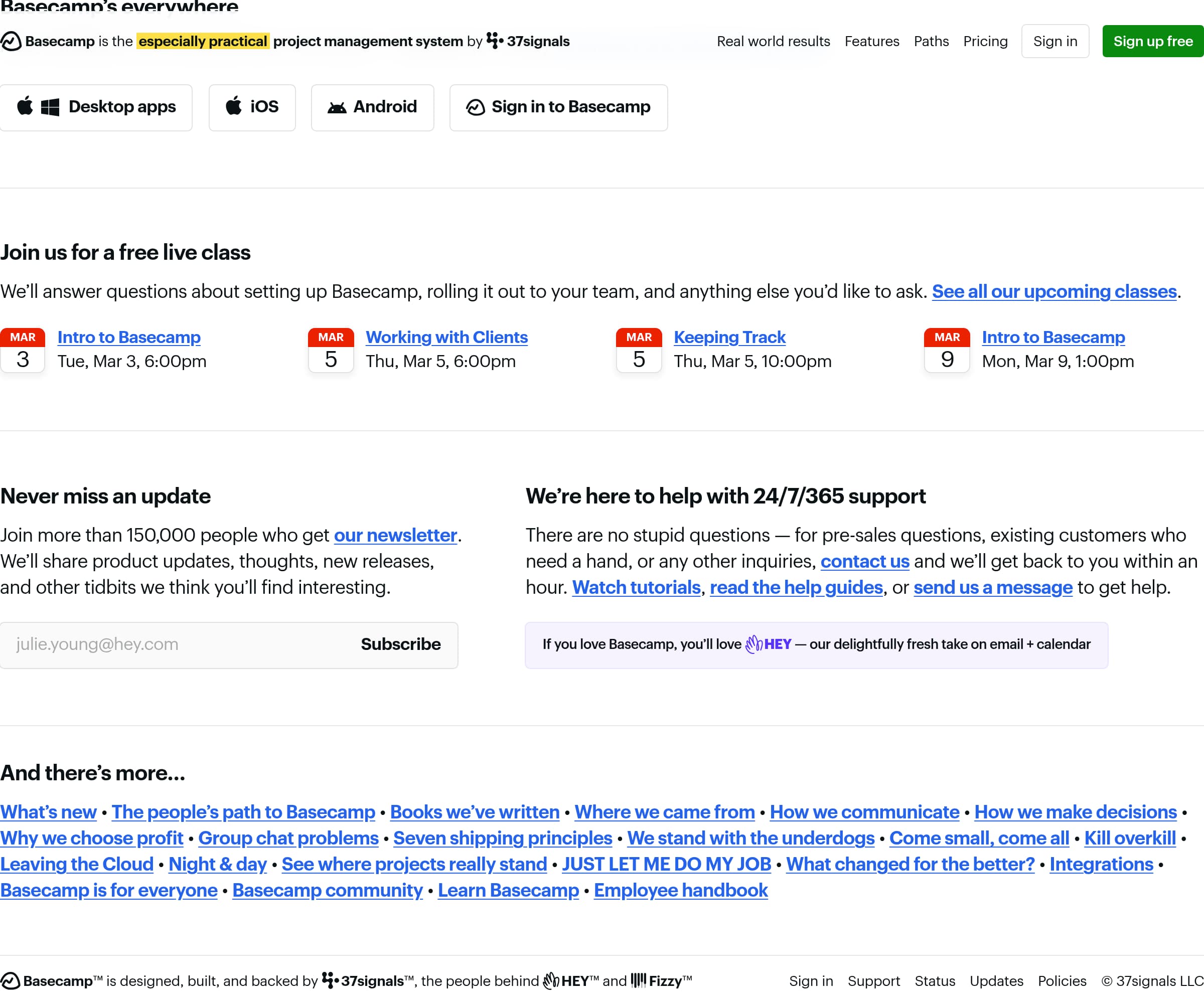
Basecamp’s footer functions as an extension of its brand narrative: it’s not just legal/navigation—it’s a library of proof, philosophy, and adjacent products that deepen conviction.
What’s visible in the footer area
From the screenshot and excerpt, the footer includes:
- Cross-platform availability: Mac, Windows, iOS, Android, and web access.
- A prominent support promise: 24/7/365 support with “within an hour” response time and links to tutorials/help guides.
- Newsletter signup (“more than 150,000 people”), adding a social proof layer while capturing leads.
- Promotion of HEY (their email + calendar product), which signals a broader ecosystem and reinforces 37signals credibility.
Deep navigational content that builds E-E-A-T
The “And there’s more…” list links to many editorial pages (“Kill overkill,” “Leaving the Cloud,” “Seven shipping principles,” “We stand with the underdogs,” “How we make decisions”). This is a deliberate content moat: it shows viewpoint consistency and gives evaluators (and search engines) substantial supporting material beyond the sales page.
Why this footer converts (without looking salesy)
For skeptical buyers, the footer is where diligence happens. Basecamp makes it easy to validate claims via:
- Integrations page
- “What’s new” changelog-style content
- Status/support/training resources
Minor UX consideration
The volume of links can be cognitively heavy, but it matches Basecamp’s audience of “smaller, hungrier businesses” who may appreciate self-serve reading over scheduling calls. Net effect: the footer acts like a trust-and-learning hub, not an afterthought. Key terms: 24/7/365 support, 150,000 newsletter, HEY, platform apps, editorial proof pages.
Detected tech stack
Tools and technologies we detected on Basecamp's site. Detection is best-effort and may be incomplete.
Frontend
Scores
Our framework scores for Basecamp's website in terms of clarity, conversion, and trust. See our methodology for how we calculate these.
How clear the value prop and structure are.
How conversion-friendly signup and pricing are.
How well trust and compliance are surfaced.
FAQ
Basecamp leads with a clear contrast: most project management tools are “overwhelming” or “chaotic,” while Basecamp is “refreshingly straightforward.” It backs that up with concrete credibility (a 21-year track record) and a guided product walkthrough that mirrors real work: a home screen for assignments and events, projects as the container, then reports, visualizations, and messaging.
Basecamp’s pricing approach is designed to feel simple rather than configurable. The pricing page layout (per screenshot) avoids a dense comparison matrix and emphasizes a straightforward decision with a clear CTA. Across the site, Basecamp supports pricing by positioning itself as a replacement for multiple subscriptions (Slack, Asana, Dropbox, and document tools), reframing cost as stack consolidation.
Basecamp relies on scale and testimonial depth instead of only logos. The site cites over 75,000 organizations using Basecamp across 166 countries and references more than 30 pages of customer testimonials. It also displays repeating micro-testimonials (“Gold standard PM app,” “Extremely user friendly”) that are easy to scan and reinforce the “simple and effective” brand promise.
Basecamp pushes a trial-first flow with a persistent “Sign up free” CTA and a specific onboarding promise: “10 seconds after you sign up, clarity sets in.” The product is introduced as a structured system—home screen, projects, reports, and notifications—so new users know what to expect. Basecamp also offers free live walkthrough classes and Q&A for rollout support.
Basecamp offers detailed, specific trust signals: 37signals has been operating since 1999, Basecamp launched in 2004, and the company claims profitability for 25 straight years with zero debt. For reliability, it cites historical uptime well over 99.99% and links to a real-time status page. For security, it provides a full security write-up and a security summary PDF, plus self-service data export.

The world's best-performing SaaS businesses share surprisingly similar patterns. We help you learn and apply them through our human-designed methodology, with AI-assisted research.