
Key takeaways
Here are the key insights from our website breakdown analysis of 1Password.
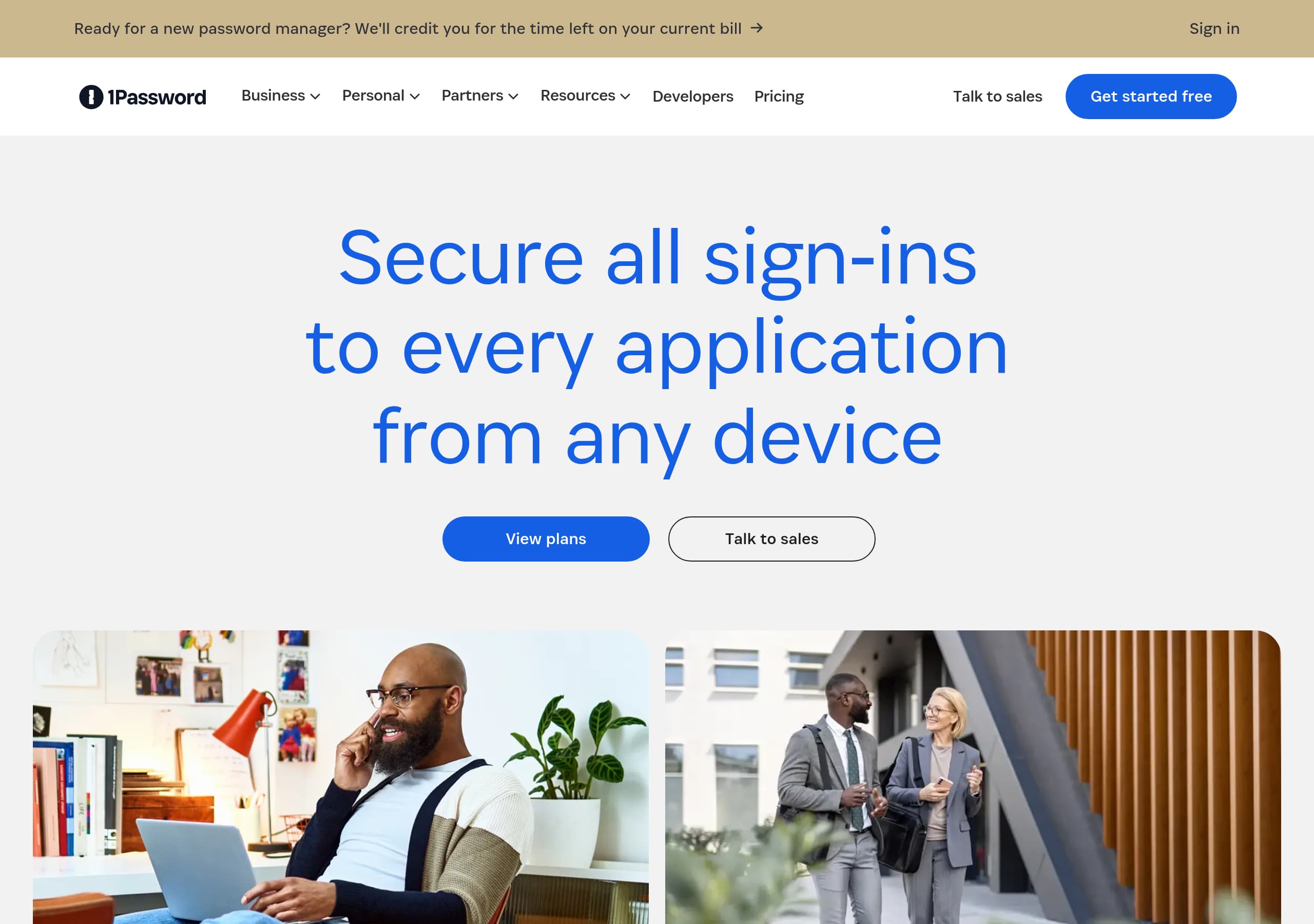
1Password’s homepage clarifies two distinct offers—Personal/Families and Business/Enterprise—and routes visitors with parallel CTAs like “View plans” and “Talk to sales,” so intent is captured quickly.
Positioning “Extended Access Management” alongside the core password manager expands the narrative from storing passwords to securing identities, devices, and apps, which helps enterprise buyers map the product to modern access management gaps.
Conversion is strengthened by a practical switching promise—“We’ll credit you for the time left on your current bill”—which directly addresses a high-friction objection for teams migrating from another password manager.
Social proof is presented with a strong mix of scale (“Trusted by 180,000 businesses”), third-party validation (Forrester ROI, Gartner Magic Quadrant mention), and a concrete customer outcome (Duke University’s coverage improvement).
The site highlights specific enterprise modules such as Device Trust and SaaS Manager, making it easier for security and IT stakeholders to self-qualify without reading lengthy product documentation.
The cookie-gated interactive demo is transparent and provides a clear fallback action, but it can still create a momentary dead end in the mid-page flow if visitors do not update preferences.
The footer is built for enterprise evaluation; it includes Trust Center, Legal Center, developer documentation, and multiple downloads (macOS, Windows, iOS, Android, CLI), reinforcing credibility and product maturity.
Home
1Password’s homepage succeeds because it communicates a broadened security scope while still keeping the primary action simple: pick a plan or talk to sales.
What the hero gets right
The above-the-fold layout pairs a pragmatic switching hook, “Ready for a new password manager?”, with a migration incentive, “We’ll credit you for the time left on your current bill.” That line tackles a real procurement objection: paying twice during a transition. The hero then lands on a universal benefit statement, “Secure all sign-ins to every application from any device,” followed by two clear CTAs, “View plans” and “Talk to sales.” The dual-CTA approach lets self-serve buyers and enterprise evaluators move forward without hunting.
Strong audience routing
Immediately after, the page splits into two labeled tracks: “PERSONAL and FAMILY” and “Business and Enterprise.” Each track has a distinct promise. Personal focuses on usability and everyday security, while Business introduces Extended Access Management and the idea of closing an “Access-Trust Gap.” This is a noticeable positioning move: it frames 1Password as more than a vault and more like an access and posture layer for identities, devices, and apps.
Mid-page conversion and friction points
The site attempts to keep momentum with an interactive demo module, but it can be blocked by cookie consent, displaying an explicit message and a recovery CTA to update preferences. That transparency helps, yet it is still a potential drop-off moment.
Overall, the home page balances multi-product navigation with a readable narrative: password manager first, then expanded enterprise access management, and it keeps the next step visible via repeated View plans and Talk to sales actions.
Pricing
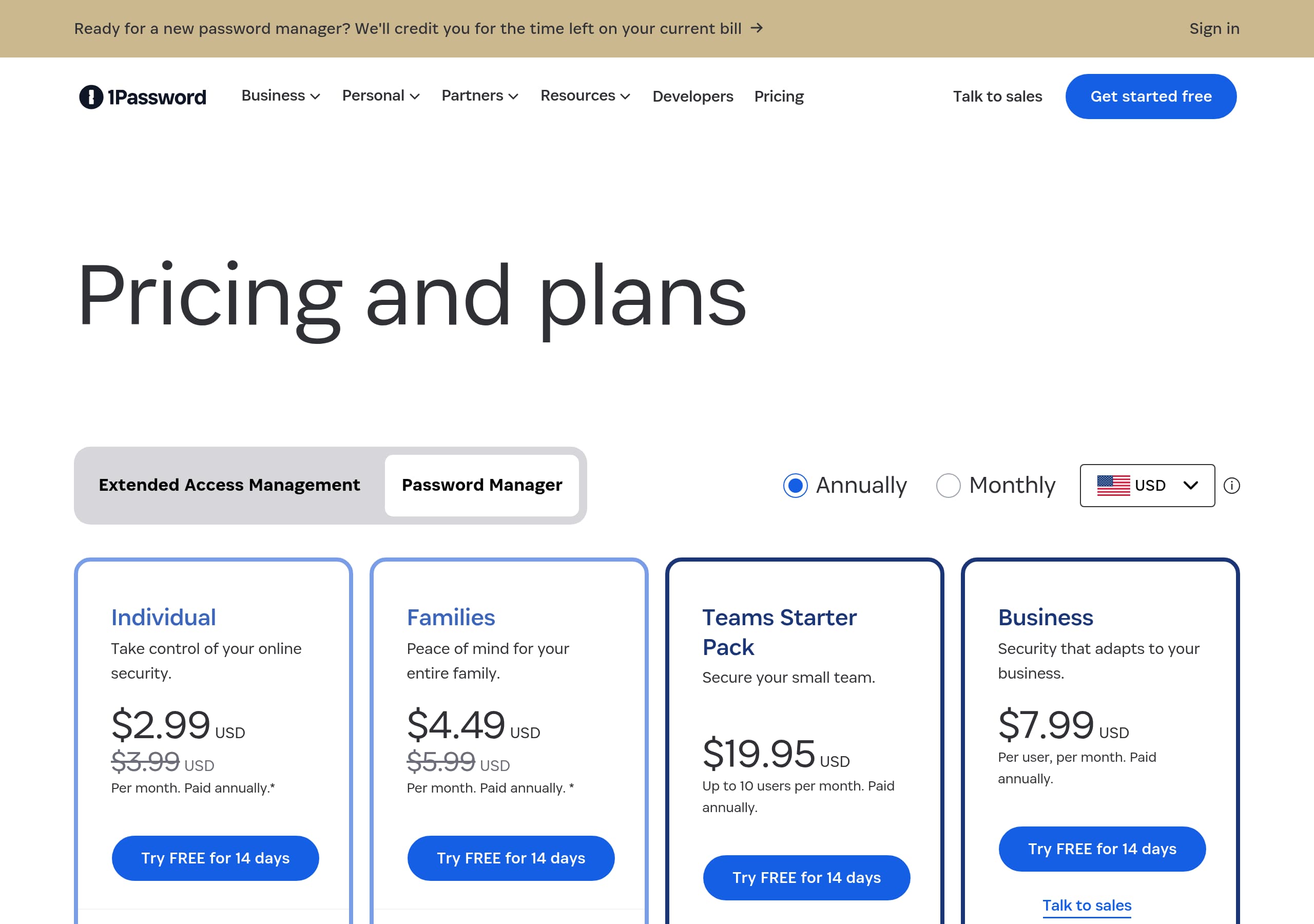
1Password’s pricing presentation is designed to reduce decision paralysis by routing visitors into the right buying motion rather than forcing a complex calculator upfront.
Clear commercial paths
From the homepage and navigation, the pricing intent is consistently supported by two primary CTAs: “View plans” for self-serve evaluation and “Talk to sales” for higher-complexity buyers. This is especially important for 1Password because it sells both Personal Password Manager plans and Business and Enterprise offerings that can involve procurement, device requirements, and rollout policies.
Pricing is framed by product segmentation
The information architecture around pricing is reinforced by the product menu: Personal Password Manager, Enterprise Password Manager, Extended Access Management, Device Trust, and SaaS Manager. Even before seeing a table, the site signals that “price” may map to bundles or modules. For a buyer, that reduces surprise later; it communicates that the enterprise value is not only password storage, but also device posture and SaaS visibility.
Reducing switching risk
One of the strongest pricing-adjacent persuasion elements appears in the hero: credit for time left on your current bill. While not a discount table, it functions as a tangible economic offset. It also implies confidence in migration and onboarding, which supports the decision to request a quote.
What could be clearer
Because the site emphasizes multiple products, pricing pages can easily become a branch point. To keep pricing conversion high, the best pattern is a fast selector: Personal/Families vs Teams/Business/Enterprise, plus a prominent “Request a demo” or “Contact sales” for Extended Access Management. The current top-level CTA structure supports this, but the broader catalog makes it essential that each pricing view clearly states what is included, especially around SaaS Manager and Device Trust.
Net result: pricing is positioned as a guided choice with self-serve plans and sales-assisted enterprise paths, which fits the product’s breadth.
Features
1Password’s feature presentation works because it ties capabilities to concrete enterprise problems—shadow IT, unmanaged credentials, device risk, and redundant SaaS spend—rather than listing generic password manager features.
Feature framing by audience and job-to-be-done
The page clearly separates Personal and Business value. Personal messaging focuses on storing “passwords, credit cards, and sensitive information” and accessing them “on any device,” highlighting cross-device access and everyday usability.
Business and Enterprise feature blocks are written as risk reductions:
- “Protect every employee from security risks and shadow IT” positions the product as a workforce control layer, not just a vault.
- “Secure access from every device” introduces 1Password Device Trust, implying posture-aware access and governance for unmanaged endpoints.
- “Eliminate unnecessary SaaS spend” introduces SaaS Manager, connecting security to operational efficiency.
Naming and packaging increase comprehension
The menu taxonomy reinforces feature discoverability: Access reviews, Access requests, Posture checks, Extended Device Compliance, SaaS discovery, SaaS workflows, and Watchtower insights. Even when a visitor does not click each item, the language communicates mature admin controls and monitoring.
Feature-to-CTA alignment
Each feature section includes an action that matches evaluation mode, for example “Learn how it works,” “Learn about Device Trust,” and “Explore SaaS Manager.” These verbs are useful because they suggest deeper pages exist for technical validation, while still keeping the homepage skimmable.
Where the feature story can tighten
Because 1Password now markets Extended Access Management, it is important that feature pages clearly define what is included in that umbrella versus what remains core password manager functionality. The homepage hints at this with “every identity, device, and app,” but enterprise buyers will look for explicit boundaries and integrations.
Overall, the feature content reads like a security and IT toolkit, anchored by Device Trust and SaaS Manager, not a generic list of vault features.
Signup
1Password optimizes signup by giving visitors multiple low-friction entry points while preserving a sales-led path for organizations that need evaluation, security review, or rollout planning.
Multiple conversion routes are visible
Across the page, visitors repeatedly see “View plans” and “Talk to sales.” Near the bottom, the site introduces a stronger enterprise action: “Request a demo” with a specific promise, “see how 1Password combines workforce identity, application insights, device trust, and enterprise password management in one place.” This phrasing is effective because it previews what the demo will cover, not just that a demo exists.
Signup intent is supported by product fit cues
The homepage includes “Explore Password Manager” for Personal/Families and “Explore Extended Access Management” for Business/Enterprise. That reduces mis-signups, where a business admin accidentally starts a consumer flow or vice versa. The navigation also supports self-serve technical evaluation via Downloads (macOS, Windows, iOS, Android, Browser, Linux, CLI), which acts like a secondary onboarding ramp.
Reducing onboarding anxiety
The switching incentive—credit for time left on your current bill—is indirectly a signup accelerator. It suggests that the company expects migration and provides economic cover for switching quickly.
Potential friction in the demo path
The interactive demo block can be hidden if the user has not agreed to cookies, with a message prompting them to update preferences. The transparency is good, but it introduces a dependency that can interrupt momentum. A best-practice mitigation is an always-available alternative, for example “Watch a video” or “View screenshots,” so visitors can keep evaluating without changing consent.
What’s missing from the visible excerpt
The excerpt does not show the exact form fields or steps for account creation or demo request. For enterprise conversion, it matters whether the demo form asks for company size, role, and existing tools, and whether there is an explicit SLA for follow-up.
Net: signup is structured around self-serve plans and demo-first enterprise onboarding, with a small cookie-related risk on the interactive demo module.
Trust
1Password’s trust posture on the marketing site is reinforced through recognitions, a dedicated Trust Center entry, and enterprise-oriented language that frames security as a system, not a feature.
Trust signals embedded in core messaging
The site leans on security-first phrasing throughout: “Secure all sign-ins,” “Keep your digital life secure,” and “Secure your business, protect your people.” For Business and Enterprise, the line “Close the Access-Trust Gap left by traditional access management tools” is a strong trust positioning statement because it implies a specific market failure and a deliberate solution category: Extended Access Management.
Third-party validation supports assurance
The proof carousel references Forrester Research with an ROI claim and mentions recognition in the Gartner Magic Quadrant for SaaS Management Platforms. These references function as due diligence shortcuts for buyers who need analyst backing for vendor selection.
Trust Center and security resources
The footer navigation includes a Trust Center, Legal Center, and resources like Security, Privacy, Developers, and Bug bounty. Even without reading those pages, their presence signals operational maturity: security reporting, privacy commitments, and a channel for vulnerability disclosure.
Product cues that imply governance
Enterprise feature labels like Access reviews, Access requests, Posture checks, and Extended Device Compliance suggest controls aligned with compliance and internal audit needs. The “Device Trust” and “SaaS Manager” modules also signal that 1Password aims to control access context and SaaS sprawl, not only store credentials.
Trust improvement opportunity
Because the marketing page references security concepts heavily, a prominent link near the hero to “Trust Center” or “Security” could reduce the distance for risk-averse buyers. Right now, those links are present in the footer, which is useful but farther down the page.
Overall, trust is built through analyst validation, security governance language, and a clear path to formal assurance via the Trust Center and legal resources, which is appropriate for enterprise security procurement.
Footer
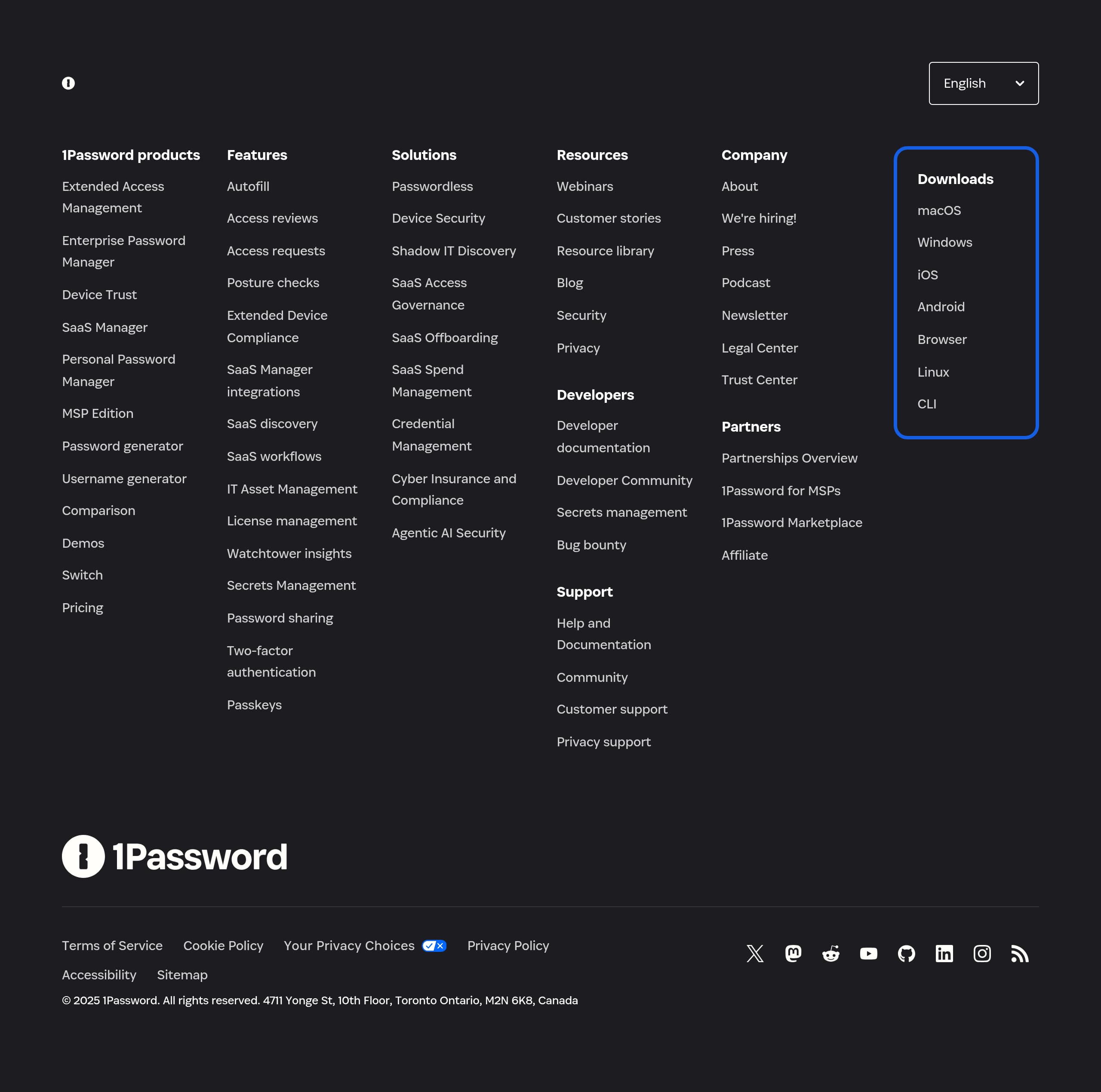
1Password’s footer is built like an evaluation hub; it supports procurement, technical validation, and post-purchase enablement, not just basic site navigation.
Strong information architecture
The footer groups content into logical clusters: Downloads, Products, Features, Solutions, Resources, Company, Legal, and Partners. This is especially useful for a broad platform pitch like 1Password because visitors may arrive with different intents—for example, an IT admin looking for CLI downloads, a security lead evaluating Extended Access Management, or a developer searching Developer documentation.
Product and platform depth is visible
The footer lists multiple 1Password offerings, including Extended Access Management, Enterprise Password Manager, Device Trust, SaaS Manager, Personal Password Manager, and MSP Edition. This breadth communicates that the product is not a single app; it is a platform with different packaging for enterprises and managed service providers.
Enterprise trust and governance links
Legal and trust links are prominent: Trust Center, Legal Center, Terms of Service, Cookie Policy, Privacy Policy, “Your Privacy Choices,” and a specific reference to California Consumer Privacy Act (CCPA) Opt-Out. That level of detail reduces friction for compliance reviews and vendor onboarding.
Support and community pathways
The footer includes Help and Documentation, Community, Customer support, and Privacy support. For security software, visible support channels can influence conversion because buyers anticipate rollout questions and incident-response coordination.
Global and accessibility signals
Language options are shown (English, Deutsch, Español, etc.), and there is an Accessibility link. The address and copyright are also present, anchoring the company identity.
Minor improvement opportunity
Because the footer is extensive, the most commercially critical links (Pricing, Request a demo, Trust Center) could be visually prioritized within the footer layout to reduce scanning time.
Net: the footer reinforces enterprise readiness, compliance transparency, and multi-platform availability, which supports both conversion and long-term retention.
Detected tech stack
Tools and technologies we detected on 1Password's site. Detection is best-effort and may be incomplete.
Scores
Our framework scores for 1Password's website in terms of clarity, conversion, and trust. See our methodology for how we calculate these.
How clear the value prop and structure are.
How conversion-friendly signup and pricing are.
How well trust and compliance are surfaced.
FAQ
1Password uses clear audience segmentation—“PERSONAL and FAMILY” versus “Business and Enterprise”—and pairs it with parallel CTAs like “View plans” and “Talk to sales.” The hero also addresses switching friction by offering to credit time left on a current password manager bill. Enterprise positioning is expanded with “Extended Access Management,” framing the product as securing identities, devices, and apps, not only passwords.
1Password guides visitors into two primary motions: self-serve evaluation via “View plans,” and sales-assisted purchasing via “Talk to sales” or “Request a demo.” The navigation and product catalog signal that pricing may differ by segment and modules, including Extended Access Management, Device Trust, and SaaS Manager. A migration credit message near the hero also reduces the perceived cost of switching vendors.
1Password combines scale and authority signals: “Trusted by 180,000 businesses and millions of families,” an ROI reference to Forrester Research, and a Gartner Magic Quadrant mention for SaaS Management Platforms. It also includes a named customer outcome, stating Duke University “tripled its security coverage” after switching. The proof is presented in a multi-slide carousel with explicit slide controls.
In addition to its Password Manager, 1Password highlights Extended Access Management for securing access across identities, devices, and apps. It also promotes Device Trust to reduce password risk and manage access across legacy or shadow IT applications, plus SaaS Manager for SaaS efficiency, license control, and spend reduction. The site’s feature navigation further suggests governance controls like access reviews, access requests, and posture checks.
1Password offers evaluation through “Request a demo,” describing a combined view of workforce identity, application insights, device trust, and enterprise password management. The site also includes an interactive demo module, but it can be hidden if the visitor has not accepted cookies, prompting them to update cookie preferences. That transparency helps, but an always-available alternative demo format would reduce drop-offs.

The world's best-performing SaaS businesses share surprisingly similar patterns. We help you learn and apply them through our human-designed methodology, with AI-assisted research.