

Key takeaways
Here are the key insights from our website breakdown analysis of Loom.
Loom’s homepage communicates the product in one pass with a single-sentence value prop, “Easily record and share AI-powered video messages,” then reinforces it with a clear “Get Loom for free” CTA and device coverage (Mac, Windows, iOS, Android).
Conversion is driven by repeated, consistent CTAs (“Get Loom for free,” “Record now,” “Start sharing”) that map to different user intents: install, record, share, and collaborate.
Loom reduces perceived effort by showing a simple workflow in the hero, “Record in a few clicks. Share anywhere. Collaborate better,” and backing it with concrete entry points (Chrome extension, desktop app, mobile app).
Trust is strengthened with both scale proof (“Millions of people across 400,000 companies”) and enterprise readiness messaging (SSO, SCIM, custom data retention, privacy settings) placed directly on the main flow, not buried.
The site sells beyond “screen recorder” by highlighting an editor with overlays and a collaboration layer (emojis, comments, tasks, CTAs), which helps Loom compete as an async communication platform, not just a capture tool.
Pricing and packaging (as shown in the pricing screenshot) should be treated as a decision aid, not just a list, by tying plan differences back to the security and admin controls referenced on the homepage.
Home
Loom’s homepage is optimized for fast comprehension: it positions Loom as a free screen recorder and an AI-powered video messaging tool in the first screen, then immediately offers “Get Loom for free.” The core promise is stated in plain language, “One video is worth a thousand words,” followed by the practical benefit, “supercharge productivity,” which matches the async communication category without overexplaining.
The hero section also reduces adoption friction by naming where Loom runs: Chrome extension, desktop app, and mobile app, plus explicit platform coverage (Mac and PC). This is a strong UI pattern for a recorder product because it answers the most common pre-purchase question, “Will this work on my device?” before users hunt through docs.
Below the hero, Loom uses a simple three-step narrative, “Record in a few clicks. Share anywhere. Collaborate better,” and then substantiates each step with distinct modules:
- Recording: “Lightning fast screen recording,” “screen and camera,” and “any device.”
- Creation: an editor description with concrete actions like “trim,” “stitch clips,” and add “text, arrows, and box overlays,” which makes the video editor feel real, not abstract.
- Distribution and collaboration: “Share or embed video anywhere you work,” plus collaboration affordances like “emojis, comments, tasks and CTAs,” which signals Loom is not only capture, it is collaborative review.
A notable conversion and credibility element is the “Loom Rewind 2025” callout with a quantified story (93M videos, 245M meetings reduced). Even if a visitor does not click, the numbers function as scale proof. Overall, Loom’s homepage does an effective job of keeping copy short, repeating the free CTA, and using feature blocks that map to user intent: record, edit, share, and respond.
Pricing
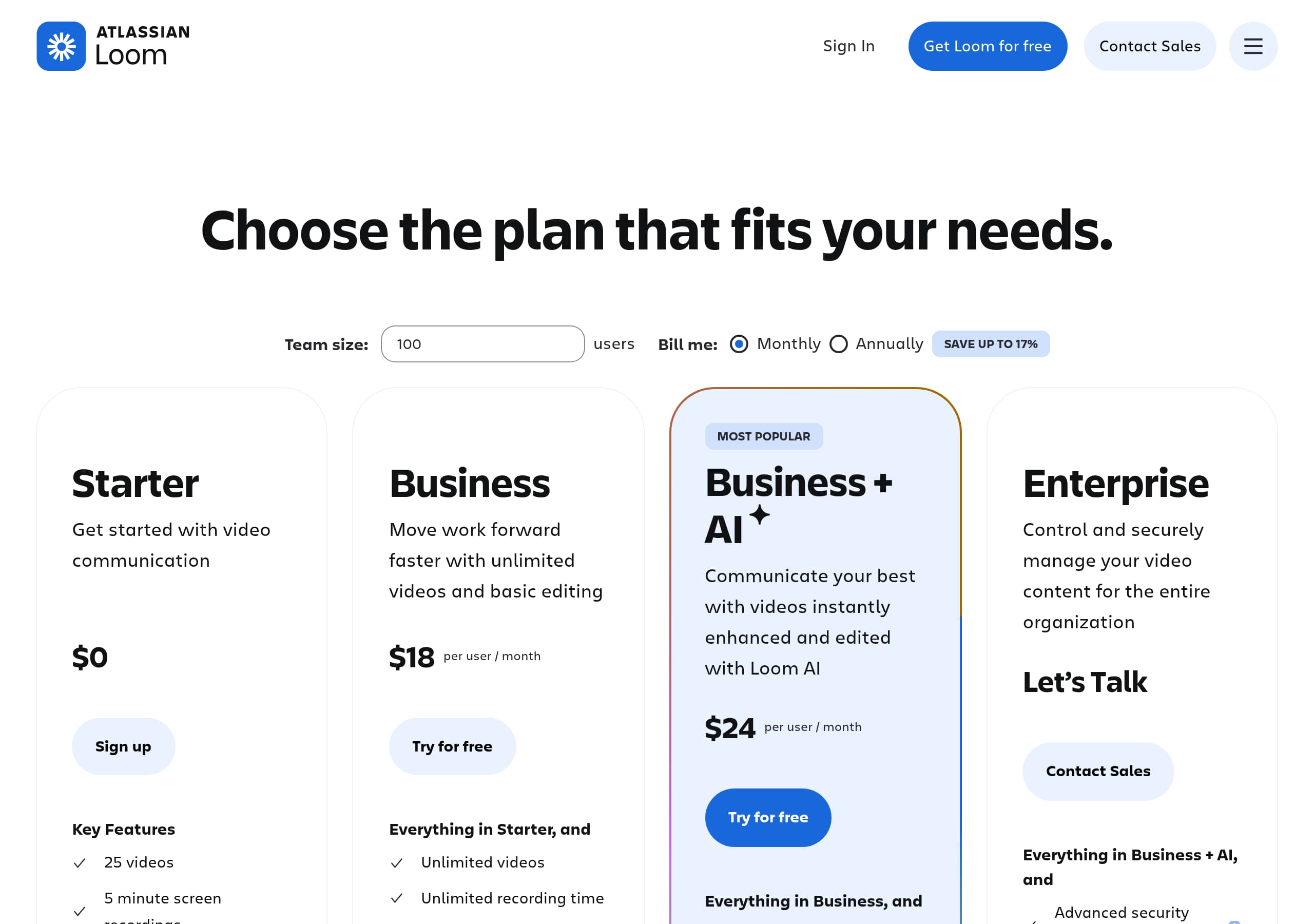
Loom’s pricing presentation (as shown in the pricing screenshot) is most effective when it helps visitors answer two questions quickly: what can I start with for free, and what do I gain by upgrading. The site already primes this decision on the homepage with repeated “Get Loom for free” and enterprise signals like SSO and SCIM, so the pricing page’s job is to convert that intent into a plan choice without forcing users to interpret a wall of features.
From a SaaS packaging perspective, Loom benefits from a clear segmentation between individual usage and organizational control. The homepage explicitly references “custom data retention policies and privacy settings,” which implies higher-tier plans should emphasize admin controls, governance, and team management rather than only creation features. When pricing cards are laid out, the most conversion-friendly structure is:
- A “Free” or starter tier aligned with “record in a few clicks” and basic sharing.
- A mid-tier aligned with the editor and collaboration layer, such as trimming, stitching, and richer engagement.
- A business or enterprise tier aligned with security and provisioning, matching the SSO and SCIM language.
The screenshot indicates a structured pricing layout with plan columns and feature comparisons, which is important for Loom because buyers compare it against alternatives like Zoom Clips, Vidyard, and Dropbox Capture. For comparators, a visible feature matrix reduces back-and-forth. Loom’s page should also keep the CTA language consistent with the homepage, so users see the same “get started” framing across steps.
The strongest conversion detail is continuity: the homepage already establishes multi-platform availability and integrations (Google Workspace, Slack). Pricing should tie those expected capabilities to plan limits or unlocks. When pricing reinforces the same narrative—record, edit, share, collaborate, and secure—it becomes a decision tool, not a price list.
Features
Loom’s feature presentation succeeds because it does not treat “screen recording” as the whole product. It builds a stack: capture, edit, distribute, and collaborate, then adds AI workflows as an adjacent value driver. The feature blocks are written in action language, for example “Record in a few clicks,” “Share anywhere,” and “Collaborate better,” which makes the product feel like a workflow rather than a tool.
The most concrete feature module is the editor section. It names specific operations, “trim,” “stitch clips,” “add eye-catching backgrounds,” and use overlays like “text, arrows, and box overlays.” Those are specific editing primitives that help visitors self-qualify quickly: if they need basic polish, Loom supports it without external software.
Loom also highlights distribution and ecosystem fit with “Share or embed video anywhere you work,” and explicitly references Google Workspace and Slack. Mentioning household tools is an effective pattern because it communicates “fits into your workflow” without listing hundreds of integrations. The excerpt further supports collaboration with “emojis, comments, tasks and CTAs,” which signals Loom is designed for async review loops, not just one-way sending.
The feature list section adds scannability with a compact inventory: “screen and camera recording,” “easy sharing and embedding,” “download and upload,” “transcriptions and closed captions,” “video privacy controls,” “custom background,” and “video and viewer insights.” Importantly, this list mixes creation with measurement, which supports customer-facing use cases like sales and support.
Finally, Loom introduces “Loom AI workflows” via blog content, describing turning a Loom into a written doc to draft SOPs and file Jira tickets. Even as an article teaser, it reframes Loom as a documentation accelerant, expanding the feature story beyond recording into downstream work output.
Signup
Loom’s signup and activation strategy is strongly implied by the homepage CTAs and product entry points: it pushes users toward immediate usage with “Get Loom for free” and “Record now,” then offers multiple installation paths: Chrome extension, desktop app, and mobile app. For a recorder product, this is the right approach because the “aha moment” is not account creation—it is completing a first record-and-share cycle.
The homepage reduces onboarding uncertainty by repeatedly describing the workflow in a single sentence, “Record in a few clicks. Share anywhere. Collaborate better.” This functions like a micro-onboarding checklist that sets expectations for what will happen after signup. The UI also nudges the next step with purpose-built CTAs: “Download now” for app acquisition, “Start sharing” for distribution, and “Connect over video” for collaboration.
A subtle but important conversion detail is that Loom demonstrates what a shared output looks like: it includes a sample share link format, “loom.com/share/…,” alongside a Q&A-style snippet (“Can you show me how to require two-factor authentication for my team?”). That preview lowers friction because users can picture the artifact they will generate and send.
For team onboarding, Loom hints at readiness for organizational rollout with enterprise items like SSO and SCIM. Even if those are not part of initial signup, they reassure admins that provisioning and policy controls exist when the trial expands.
What Loom does particularly well is keeping the path to value consistent across the page: each CTA aligns to a step in the product loop—record, edit, share, respond. That alignment is a conversion advantage versus tools that only push “Start free trial” without clarifying what happens next.
Trust
Loom’s trust messaging is effective because it is specific about enterprise controls and places them in the main homepage flow, not behind a separate security microsite. The section titled “Keep your content safe” explicitly frames the risk: protecting “your data and your customer’s data,” which is the core concern for sales, support, and internal enablement videos.
Critically, Loom names concrete capabilities: SSO, SCIM, custom data retention policies, and privacy settings. These are recognizable procurement keywords for IT and security teams, and they imply Loom can support centralized authentication, automated user provisioning, and policy-driven lifecycle management. That is materially more credible than vague claims like “bank-grade security.”
The site also reinforces trust through communication features that reduce misinterpretation and improve accessibility: “transcripts and captions in 50+ languages.” While this is positioned as engagement, it also functions as an operational trust signal for global teams that need reliable comprehension and searchable content.
Another trust-adjacent element is the way Loom demonstrates collaboration: emojis, comments, tasks, and CTAs attached to a video suggest there is a structured feedback layer, not uncontrolled file sharing. Combined with “video privacy controls” in the features list, it signals Loom is designed to manage who can view and respond.
Loom’s use-case segmentation (Sales, Engineering, Customer support, Design) also supports trust by implying the product can handle sensitive contexts like customer troubleshooting and code reviews. For these audiences, the presence of enterprise-grade controls is often a gating factor.
Overall, Loom’s trust section is strongest in specificity: it gives buyers the exact terms they will ask about, and it pairs that with the idea that video artifacts are manageable, governed, and accessible. That combination makes Loom easier to approve in regulated or security-conscious environments.
Footer
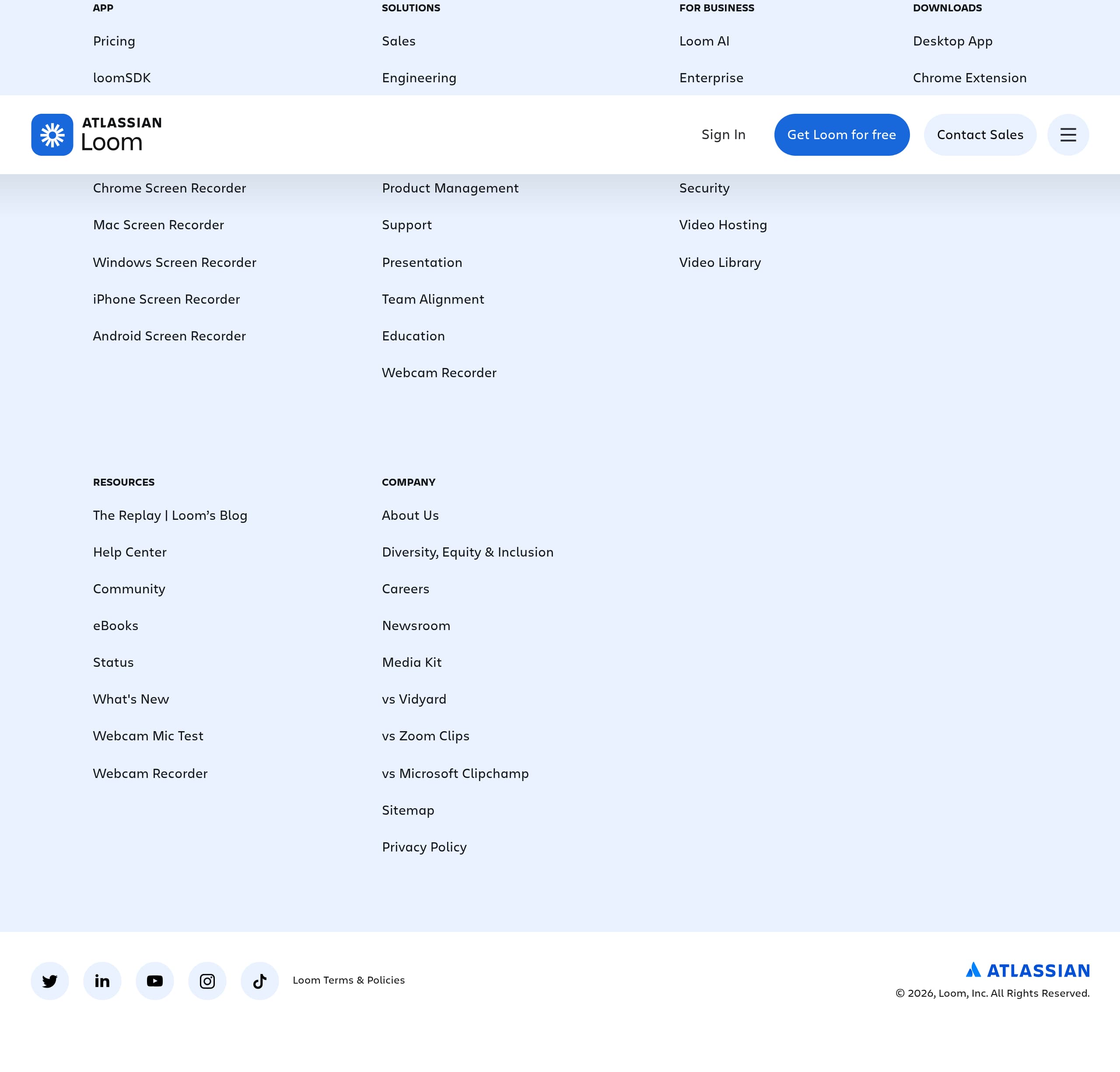
Loom’s footer (per the footer screenshot) functions as a navigation and compliance hub, which is especially important for a product that spans individual creators, teams, and enterprise buyers. A strong SaaS footer should do three jobs: help visitors find critical pages, reinforce legitimacy with legal and policy links, and offer clear paths to evaluate or contact the company.
Based on the visible site structure and the presence of “Loom for Enterprise,” “Explore our blog,” and “See all use cases” higher on the page, the footer is likely where Loom consolidates deep links that would otherwise clutter the header. This is a common pattern for high-traffic SaaS marketing sites: keep the top navigation conversion-focused, then place detail-heavy discovery in the footer.
The most conversion-relevant footer items for Loom are typically:
- Product and platform links (apps, extension, download pages), which support the multi-device promise made on the homepage.
- Use-case and solution links, which help segment visitors who did not self-identify from the hero.
- Enterprise and security resources, which align to the SSO and SCIM messaging and allow security teams to self-serve.
From a trust standpoint, the footer is where visitors expect to find privacy policy, terms, and potentially DPA or security documentation links. For a video tool that stores content, those links are not optional—they are part of the evaluation checklist.
The footer also matters for SEO and AI visibility: linking to the blog (“Explore our blog”) and to specific guides (sync vs async communication, Loom AI workflows) creates crawlable pathways to topical authority around async work.
Net takeaway: Loom’s footer should be judged by how quickly it routes different stakeholders—end users, admins, and buyers—to the right next page. When done well, it reduces support load and improves enterprise readiness without interrupting the main conversion flow.
Detected tech stack
Tools and technologies we detected on Loom's site. Detection is best-effort and may be incomplete.
Scores
Our framework scores for Loom's website in terms of clarity, conversion, and trust. See our methodology for how we calculate these.
How clear the value prop and structure are.
How conversion-friendly signup and pricing are.
How well trust and compliance are surfaced.
FAQ
Loom’s homepage explains the product in a single pass: it leads with “Easily record and share AI-powered video messages” and repeats “Get Loom for free.” It also clarifies how you use Loom by naming the Chrome extension, desktop app, and mobile app, plus Mac and PC support. Feature sections follow the workflow: record, edit (trim, stitch, overlays), share anywhere, then collaborate with comments and reactions.
Loom’s pricing page (shown in the pricing screenshot) uses plan columns and a comparison structure to help users choose a tier rather than hunt through documentation. The homepage primes this by highlighting enterprise capabilities like SSO, SCIM, and custom data retention, which typically map to higher plans. For most buyers, the decision becomes: start free for recording and sharing, then upgrade for admin controls, governance, and team-scale management.
Loom pushes a fast path to activation with “Get Loom for free,” and it offers multiple ways to start recording: Chrome extension, desktop app, or mobile app. The homepage sets expectations with a simple workflow statement, “Record in a few clicks. Share anywhere. Collaborate better,” and includes CTAs tied to each step like “Download now,” “Record now,” and “Start sharing.” This reduces friction by focusing on first value: recording and sending a Loom.
Loom includes a dedicated “Keep your content safe” section that names enterprise-grade controls: SSO, SCIM, custom data retention policies, and privacy settings. It also highlights video privacy controls as a product feature and positions transcripts and captions in 50+ languages as part of reliable team communication. Combined with adoption claims like “Millions of people across 400,000 companies,” these elements support both security review and buyer confidence.
Loom goes beyond capture by emphasizing editing and collaboration. The site describes an editor that can trim, stitch clips, add backgrounds, and place text, arrows, and box overlays. It also promotes collaboration features like emojis, comments, tasks, and CTAs directly on the video, plus easy sharing and embedding in tools like Google Workspace and Slack. This positions Loom as async communication infrastructure, not only a recorder.

The world's best-performing SaaS businesses share surprisingly similar patterns. We help you learn and apply them through our human-designed methodology, with AI-assisted research.