
Key takeaways
Here are the key insights from our website breakdown analysis of Typeform.
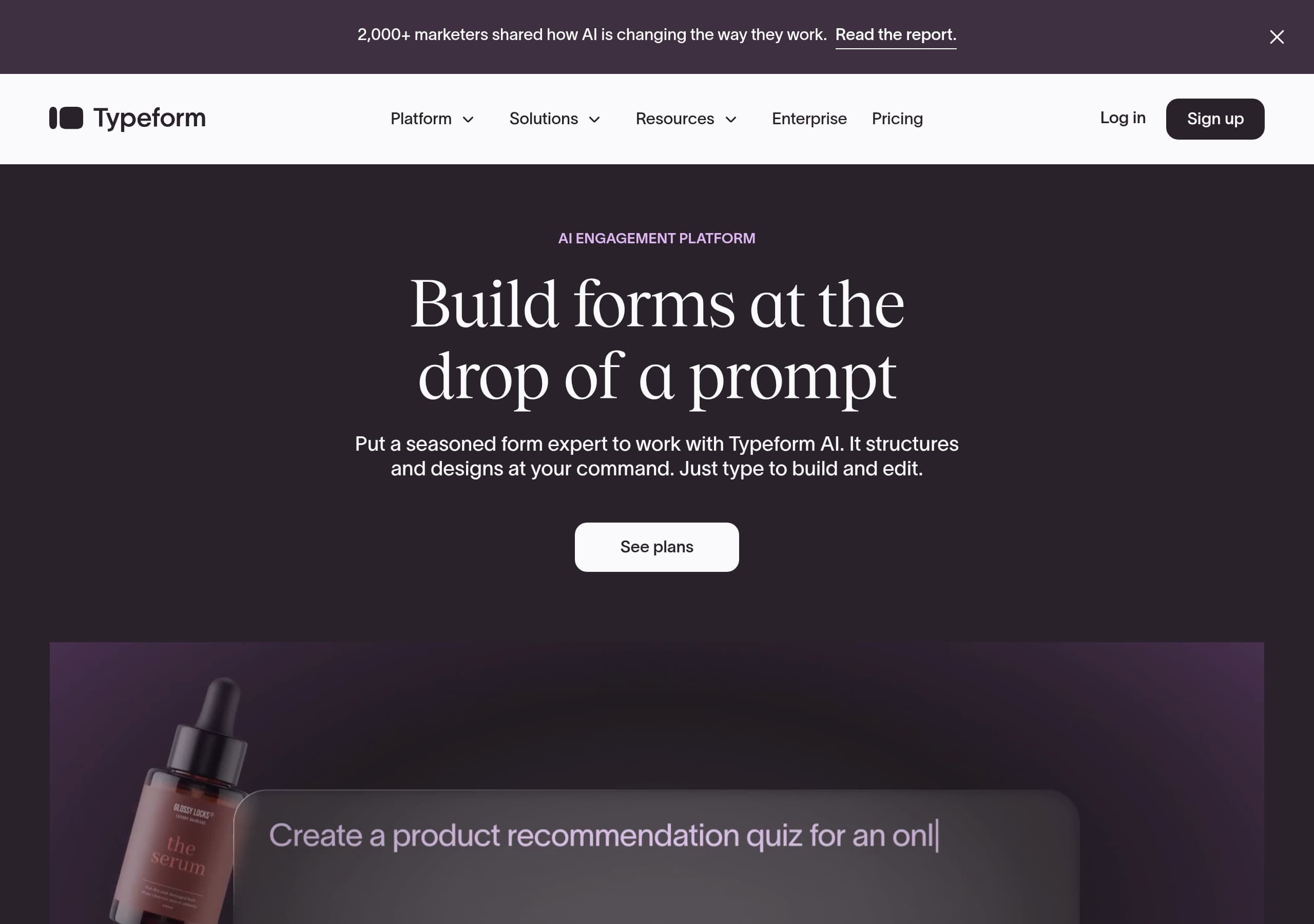
Typeform’s homepage leads with a clear, modern positioning—“AI engagement platform”—and immediately demonstrates the core promise with “Build forms at the drop of a prompt,” reducing time-to-value for new visitors.
Conversion is reinforced through repeated, context-specific CTAs such as “See plans” and “See add-on,” which map to distinct buying paths: core plans, AI-led building, and the Contacts & Automations add-on.
Typeform uses strong, scannable trust cues on the homepage, including “Trusted by 95% of the Fortune 500” and a quantified “Why Typeform?” results block (96%, 95%, 87%) to validate outcomes.
The navigation and IA are built for multi-segment discovery, splitting by platform features (Typeform AI, Integrations, Admin and security), tools (form builder, survey maker, quiz maker), teams (Marketing, Product, Human resources), and use cases.
Typeform’s positioning emphasizes action after collection, notably “The form is only the beginning” and “Contacts & Automations,” which differentiates it from simpler form builders that stop at responses.
The footer functions like a complete self-serve directory, exposing comparison pages (Typeform vs Jotform, Typeform vs Formstack), developers/API, system status, and legal pages—all of which supports SEO coverage and buyer reassurance.
Home
Typeform’s homepage works because it compresses the full story into three fast steps: AI-led creation, better response rates, then automation after capture. The hero positions Typeform as an AI engagement platform with the direct promise “Build forms at the drop of a prompt,” and immediately explains the mechanism: “Put a seasoned form expert to work with Typeform AI… Just type to build and edit.” This is unusually concrete for an AI claim because it describes the user action (typing) and the output (structured, designed forms).
The page then stacks proof and differentiation in a predictable scroll pattern:
- A prominent enterprise trust line, “Trusted by 95% of the Fortune 500,” signals suitability beyond SMB use.
- A second section reframes value as outcomes: “Get 3.5x more data with a form expert,” tying AI to response optimization rather than novelty.
- A product expansion moment, “The form is only the beginning,” introduces Contacts & Automations as the next step, which shifts Typeform from a “form tool” toward lifecycle workflows.
CTAs are consistent and low-friction: “See plans” appears repeatedly for the primary conversion path, while “See add-on” cleanly routes visitors who are evaluating automation specifically. The top bar also includes “Log in” and “Sign up,” supporting both returning and new users without burying account actions.
The global navigation is extensive but intentionally segmented: Platform overview, Typeform AI, Contacts & Automations, video engagement, analytics, integrations, and admin/security. This is paired with Tools (survey maker, quiz maker, NPS, landing page builder) and Solutions by team. The result is a homepage that stays focused on the AI-led narrative while still supporting deep exploration for high-intent buyers.
Pricing
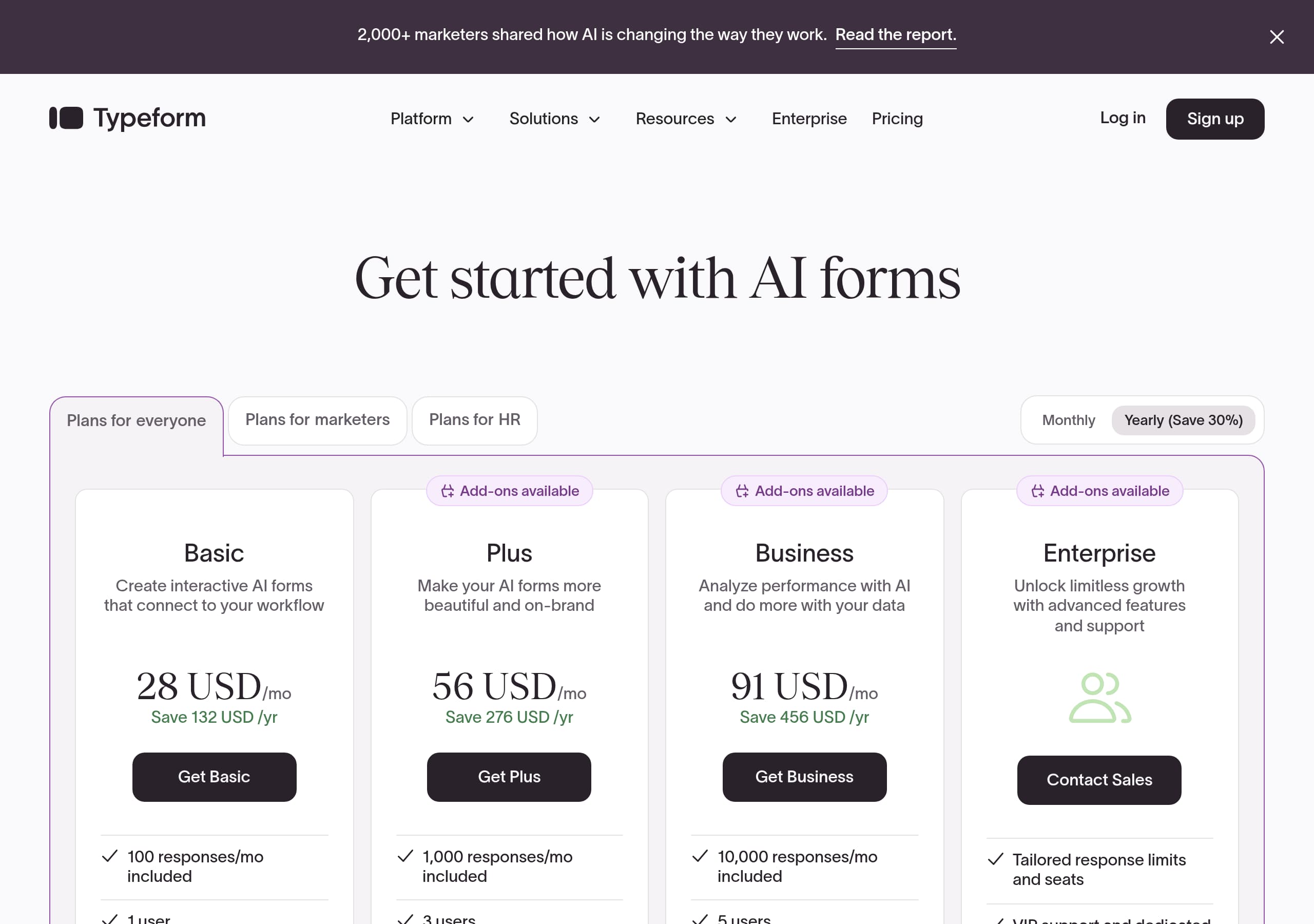
Typeform’s pricing experience is designed to route visitors into the “right plan family” rather than force a single linear tier comparison. In the live header and homepage CTAs, “See plans” points visitors toward a plans hub that already frames pricing as multiple tracks: Core Plans, Growth Plans, Talent Plans, and Enterprise Plans. This packaging strategy is effective for a product like Typeform that serves different departments, but it requires tight page-level messaging to prevent analysis paralysis.
From the pricing screenshot, the layout emphasizes plan selection and upgrade paths over long feature dumps. The most conversion-friendly aspect is the presence of parallel plan categories (for everyone, GTM teams, HR and people teams, larger orgs), which reduces the need for visitors to translate generic tiers into their use case. It also matches the navigation structure, so pricing feels like a continuation of discovery, not a separate, confusing step.
Typeform also hints at modular monetization through “See add-on” for Contacts & Automations. That matters because it sets expectations that some capabilities are optional extensions, not automatically included. When done clearly, this can increase willingness to start on a core plan while keeping a path to expand.
Practical conversion patterns worth noting:
- Repeated, consistent CTA language across pages, mainly “See plans,” helps avoid decision fatigue.
- A visible “Enterprise” path in the main navigation and footer supports high-ACV buyers who need procurement-friendly details.
- The site’s comparison pages listed in the footer (Typeform vs Jotform, Typeform vs Formstack) function as pricing-adjacent content, catching visitors who are benchmarking cost and value.
Overall, Typeform’s pricing approach favors guided self-selection. The main risk is that multi-family packaging can obscure the cheapest starting point unless the pricing page clearly surfaces entry-level eligibility and what is included by default.
Features
Typeform’s feature presentation is built around a platform narrative: create, collect, analyze, then act. Instead of listing dozens of form controls, the site foregrounds a small set of platform pillars in the main navigation: Typeform AI, Contacts & Automations, video engagement, analytics and reporting, integrations, and admin and security. This is a deliberate choice that makes Typeform feel like a workflow product, not a widget.
The homepage feature highlights reinforce that sequence. First, AI-led building: “Put a seasoned form expert to work with Typeform AI. It structures and designs at your command. Just type to build and edit.” The language signals that AI influences both content and layout, which is more specific than generic “AI helps you create forms.” Second, response optimization: “Get 3.5x more data,” positioning Typeform AI as best-practice guidance, not just generation.
Then comes the differentiator: “NEW: Contacts & Automations Trigger action that brings in customers.” This feature is described as a simple automation loop: “Collect and then act on customer contact data… triggers automatic segmentation and follow-up emails.” Even without deep technical detail, it communicates an outcome (faster conversion) and a mechanism (segmentation plus email follow-ups).
Feature discoverability is also supported by:
- A large template library exposed in the footer (job application, event registration, NPS, pre-order, beta feedback), which reduces build effort.
- Many tools pages (survey maker, quiz maker, landing page builder, NPS builder), which are likely SEO landing pages for high-intent keywords.
- An integrations catalog framed as “hundreds of your business-critical tools,” plus popular app callouts.
Overall, Typeform’s feature architecture prioritizes jobs to be done and modular add-ons. The main improvement opportunity is to make feature boundaries between core plans and add-ons unmistakable at the point where users evaluate capabilities, so expectations match packaging.
Signup
Typeform’s signup path is positioned as a direct, low-commitment entry point, and the site keeps “Sign up” persistently accessible in the header alongside “Log in.” The excerpt shows a straightforward signup surface, including a field placeholder like “Name” and an email format cue (“email@typeform.com”), which implies a minimal form to create an account without heavy gating. This aligns with Typeform’s product value: users want to start building quickly, then decide on upgrades later.
The conversion design supports multiple entry points based on intent:
- “Sign up” for users ready to try the builder.
- “See plans” for visitors who want to evaluate pricing and packaging before creating an account.
- “See add-on” for Contacts & Automations, which targets expansion buyers who may already use Typeform or who need automation capabilities.
Because Typeform’s messaging strongly emphasizes Typeform AI, the signup experience likely benefits from an immediate “prompt-to-form” first-run moment. The homepage sets that expectation clearly: “Build forms at the drop of a prompt,” and “Just type to build and edit.” A best-in-class onboarding flow would mirror this by starting users in a blank canvas with a prompt input, rather than forcing template selection first. Even without seeing the full flow, the site’s copy suggests that AI is intended to reduce the time to the first publishable form.
From a friction standpoint, Typeform also supports “Enterprise” and “Contact sales” pathways in navigation and footer, which prevents signup from being the only conversion option. That matters for regulated buyers who cannot self-serve immediately.
The main onboarding risk is expectation mismatch: if users sign up expecting AI to handle structure and design instantly, the first product screen must deliver that capability prominently. Otherwise, the homepage promise can over-pull users into a trial that feels slower than advertised.
Trust
Typeform’s trust story is anchored in enterprise readiness rather than technical deep dives on the homepage. The navigation explicitly includes “Admin and security” with the description “Enterprise-grade data protection,” which is a strong information scent for buyers who need access controls, governance, or compliance alignment. Even if a visitor does not click immediately, seeing security elevated to the primary nav reduces perceived risk.
The trust stack is reinforced in three other ways visible in the excerpt and footer:
- A clear Enterprise path in the header and “Enterprise Overview” in the footer, which implies procurement support and larger-org features.
- “System status” in the footer, a transparency pattern that signals operational maturity and uptime accountability.
- A dense set of legal and policy links, including “Terms and conditions,” “Transparency report,” “Modern slavery statement,” and “Report abuse,” which collectively suggests a mature, governed organization.
Typeform also uses indirect trust signals through ecosystem and documentation. The footer includes “Developers / API” and a large integrations catalog, which implies stability and a commitment to interoperability. For many buyers—especially in Marketing Ops and RevOps—API availability is a practical trust requirement.
What is notably absent from the visible excerpt is specific compliance badges or named standards (for example, SOC 2, ISO 27001) and explicit privacy language above the fold. Typeform may include these on dedicated security pages, but on the pages shown, trust leans more on brand and enterprise positioning than on auditable details.
Net effect: Typeform’s trust design is strong for a broad audience due to enterprise framing, transparent site utilities, and mature footer governance. For regulated industries, the site would convert better if the security section surfaced more concrete certifications and data-handling summaries closer to the main pricing decision.
Footer
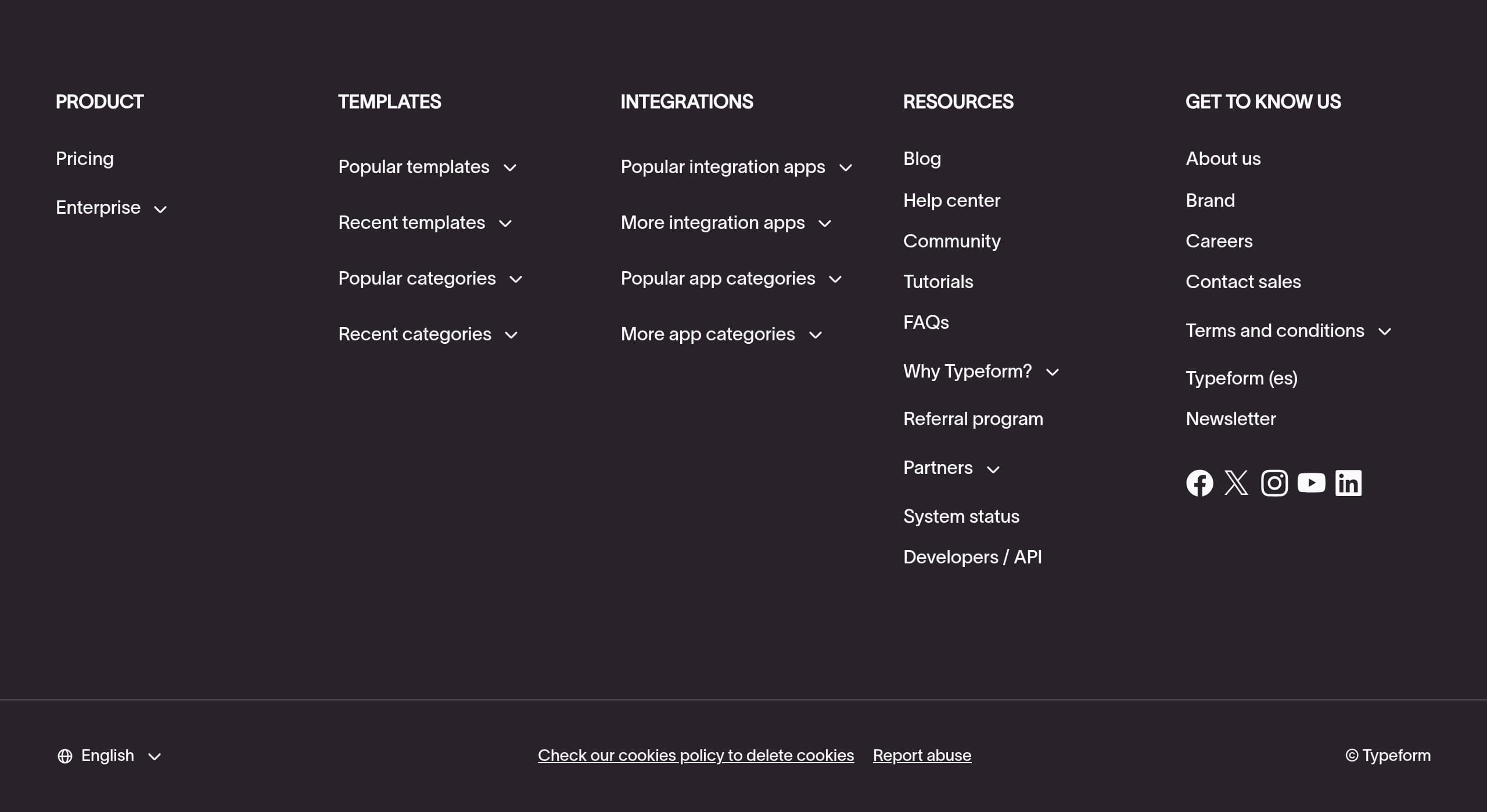
Typeform’s footer is a high-utility conversion and SEO asset, functioning as a full directory for product discovery, comparisons, support, and corporate trust. Instead of a minimal set of links, it provides a broad, categorized map: Product, Templates, Integrations, Resources, and Company. This reduces pogo-sticking for users who reach the bottom of the page still undecided.
Several footer patterns are particularly effective:
- Competitive evaluation support via “Typeform vs Jotform” and “Typeform vs Formstack.” These pages typically capture high-intent searchers who are close to purchase and want differentiation.
- Reliability and transparency utilities like “System status” and “Report abuse,” which are trust accelerators and reduce support friction.
- Developer readiness through “Developers / API,” signaling that Typeform can fit into custom workflows and enterprise ecosystems.
- Strong self-serve support: Help center, Community, Tutorials, and FAQs. This helps both pre-sales evaluation and post-signup adoption.
The footer also doubles as an SEO hub through extensive templates and integrations lists. Templates include items like job application form, event registration form, NPS survey, and beta product feedback survey. Integrations include recognizable tools like Slack, Mailchimp, Klaviyo, WordPress, Pipedrive, Google Calendar, Zoho, Office 365, and Zendesk. This structure creates many internal links to long-tail landing pages, which can improve topical authority around “form templates” and “integrations.”
From a governance perspective, the legal area is comprehensive: Terms and conditions, transparency report, modern slavery statement, plus cookie settings. Language selectors and regional variants (for example, Typeform (es)) also appear, which supports global reach.
The only downside of such a dense footer is cognitive load. Typeform mitigates this by grouping links under clear headings, but it still benefits from strong hierarchy and whitespace so the directory feels navigable rather than overwhelming.
Detected tech stack
Tools and technologies we detected on Typeform's site. Detection is best-effort and may be incomplete.
Scores
Our framework scores for Typeform's website in terms of clarity, conversion, and trust. See our methodology for how we calculate these.
How clear the value prop and structure are.
How conversion-friendly signup and pricing are.
How well trust and compliance are surfaced.
FAQ
Typeform’s homepage leads with a specific promise, “Build forms at the drop of a prompt,” and ties it directly to Typeform AI, explaining that it structures and designs forms from typed instructions. It supports this with strong proof points like “Trusted by 95% of the Fortune 500” and a quantified outcomes block (96%, 95%, 87%). CTAs like “See plans” appear repeatedly to keep the next step obvious.
Typeform frames pricing as multiple plan families rather than a single tier list, including Core Plans, Growth Plans, Talent Plans, and Enterprise Plans. This helps different departments self-select based on needs. The site also uses a separate CTA for modular functionality, “See add-on,” for Contacts & Automations, which clarifies that some capabilities can be purchased as an extension to core usage.
Typeform highlights platform-level capabilities: Typeform AI for prompt-based form building, Contacts & Automations for segmentation and follow-up actions, analytics and reporting for usable answers, and integrations that connect with hundreds of tools. The site also promotes templates and specialized tools pages such as survey maker, quiz maker, NPS form builder, and landing page builder to match different use cases.
Typeform keeps signup easy to access from the header with a clear “Sign up” action, alongside “Log in” for returning users. The messaging sets expectations that new users can start by typing a prompt to generate a form using Typeform AI. For visitors who are not ready to create an account, the site offers “See plans” and an Enterprise pathway, so evaluation can happen before signup.
Typeform elevates trust through both brand and structure. The homepage includes “Trusted by 95% of the Fortune 500,” and the navigation calls out “Admin and security” with “Enterprise-grade data protection.” The footer adds maturity signals like System status, Developers/API, Transparency report, and Report abuse. These elements reduce perceived risk even before a user reaches detailed security documentation.

The world's best-performing SaaS businesses share surprisingly similar patterns. We help you learn and apply them through our human-designed methodology, with AI-assisted research.