
Key takeaways
Here are the key insights from our website breakdown analysis of Netlify.
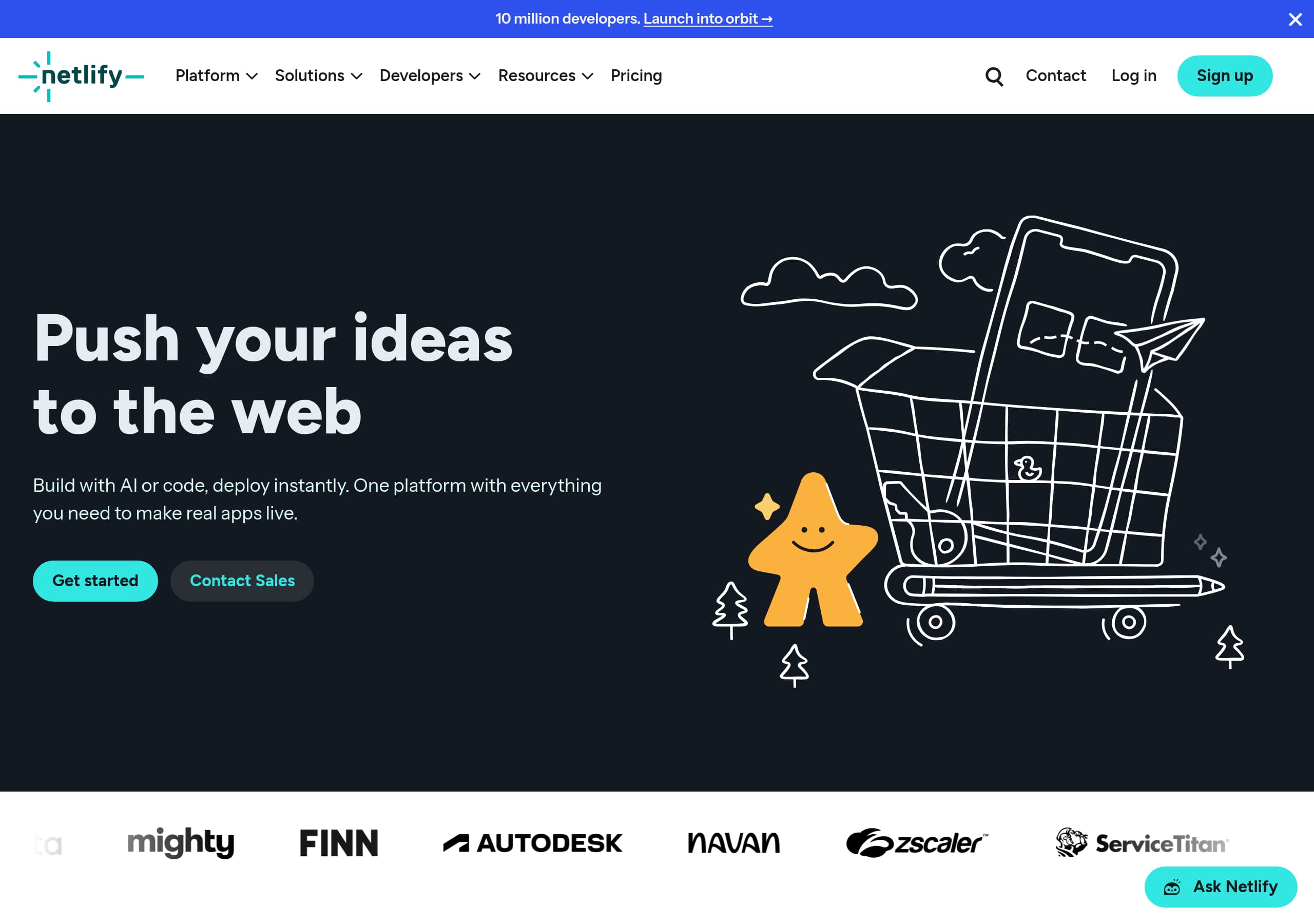
Netlify’s homepage nails clarity with a single, outcome-led promise, “Build with AI or code, deploy instantly,” supported by concrete workflow proof like “Deploy Previews” and “shareable preview link” language.
Conversion is driven by consistent dual CTAs, “Get started” and “Contact Sales,” repeated in the hero and again near the bottom, which cleanly separates self-serve and enterprise intents.
The platform story is structured around three benefit pillars, “Ship instantly,” “Build anything,” and “Grows with you,” which makes a broad developer platform feel scannable and reduces cognitive load.
Feature credibility is boosted by showing real code examples (AI Gateway, Functions, Storage, Forms) directly on the marketing page, which reduces hand-wavy claims and makes the product feel immediately usable.
Netlify uses strong scale-oriented reassurance statements like “No DevOps required,” “No complex setup,” and “No surprise bills when you scale,” which directly addresses common objections for deployment platforms.
Trust cues are present but distributed: “10 million developers,” a dedicated “Trust Center,” “Status,” and “GDPR/CCPA” links in the footer, plus security primitives in navigation, but the homepage excerpt shows limited above-the-fold compliance detail.
Home
Netlify’s homepage works because it communicates an end-to-end deployment promise in one line, then immediately backs it up with workflow-specific proof. The hero headline, “Push your ideas to the web,” is paired with the more operational subhead, “Build with AI or code, deploy instantly,” which sets expectations for speed to production rather than abstract “developer experience.”
The page structure is highly scannable and built around three benefit blocks that map to common adoption stages:
- Ship instantly: explicit sources like “Bolt, Cursor, GitHub” and the line “Every change gets a shareable preview link,” which makes Deploy Previews tangible.
- Build anything: positions the platform as a primitives bundle, “Create APIs, save images, store data,” reducing the fear of stitching services together.
- Grows with you: addresses the scaling objection with “viral moments,” plus “No crashes, no replatforming,” reinforcing automatic scaling as a core value.
Conversion elements are straightforward. In the excerpt, the hero has two primary paths, “Get started” and “Contact Sales,” and the same pairing appears again near the bottom (“Start building on Netlify”). That repetition is a strong pattern for mixed audiences, solo developers and procurement-led teams.
Netlify also adds credibility through specificity: navigation exposes platform primitives (Deploy Previews, Agent Runners, AI Gateway, Functions, Storage, Observability, Security, Edge network). Even without reading deeper, the visitor sees Netlify is not only hosting, it is a platform of deploy plus runtime services. A small improvement opportunity is making the “Everything included” claim feel less broad by surfacing one concrete proof point above the fold, for example a visible preview URL example or a mini 3-step flow.
Pricing
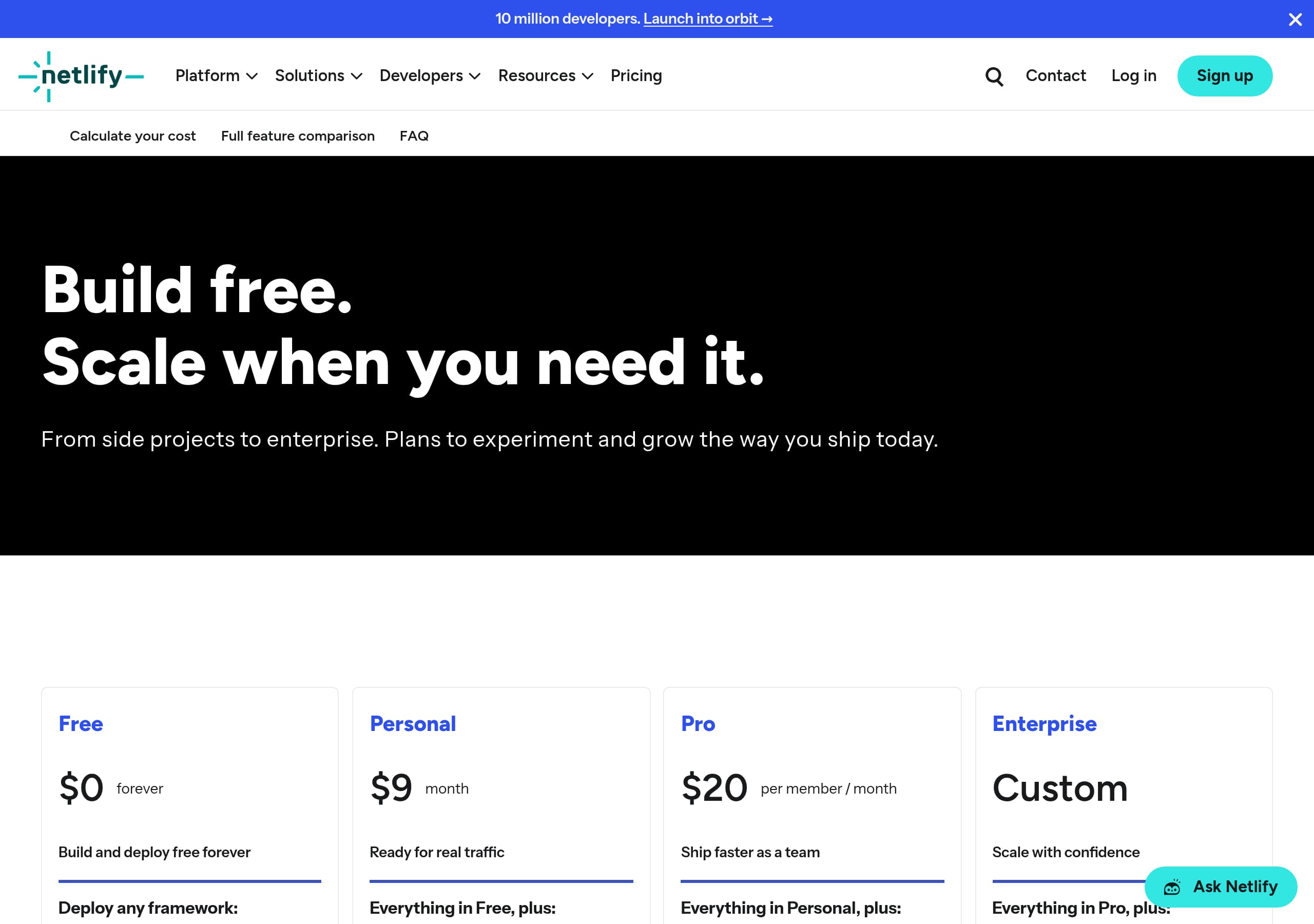
Netlify’s pricing experience (as shown in the pricing screenshot) is positioned to support both quick self-serve decisions and sales-assisted evaluation, which fits a platform that serves hobby projects and high-scale production apps. The most important win is that pricing is treated as a product surface, not a dead-end: the global navigation includes “Pricing,” and the site consistently supports an alternate path via “Contact Sales” for cases that do not map cleanly to a plan.
A strong SaaS pricing page for this category typically needs three things: plan separation, a clear path to start, and guardrails against fear of surprise costs. Netlify’s homepage copy already primes that objection with “No surprise bills when you scale,” so the pricing page should reinforce it through packaging clarity, for example explicit inclusions for bandwidth, build minutes, or team features. The screenshot format suggests a plan grid layout, which is effective when paired with a single dominant CTA per column (start free, upgrade, talk to sales).
What Netlify does particularly well, based on the on-page messaging and product architecture, is that it can price around platform primitives: Deploy Previews, Functions, Storage, Observability, and Security. That enables a modular mental model, visitors understand what they pay for and why. It also supports expansion: teams may start with deployments and later adopt AI Gateway or storage.
To further improve conversion, Netlify should ensure the pricing page answers these high-intent questions without requiring docs:
- What exactly is in the “free tier that actually works,” and what are the first realistic limits?
- Which features are team and security gated (SSO, audit logs, advanced access control) versus developer features?
- Where do usage-based components show up, especially for AI Gateway and bandwidth-heavy apps?
The pricing area is likely strong overall, but the site can win more by making cost predictability explicit, not implied.
Features
Netlify’s feature presentation is unusually credible because it shows how features are used, not just what they are. The page lists named primitives, AI Gateway, Netlify Functions, storage options (Netlify DB, Blobs), Netlify Image CDN, and Netlify Forms, and then embeds code examples for each. That is a high-signal pattern for developer platforms because it reduces the distance between “sounds good” and “I can implement this today.”
The feature set is organized into a “Primitives” concept, described as “Ready to use building blocks,” which helps unify otherwise disparate services. The site also repeats the core differentiator, “No backend setup required, just build and deploy,” which frames these tools as integrated components rather than separate products.
Specific feature proof points that land well:
- AI Gateway: calls out model providers explicitly (OpenAI, Anthropic, Gemini) and promises “usage tracking and safeguards included,” positioning it as centralized AI routing with governance.
- Functions: explains three execution modes in plain language, API endpoints, event response, and background jobs, which maps to real workloads.
- Storage: positions “agent-friendly storage” and quick provisioning, aligning with the “Build with AI” theme and the “Agent Runners” navigation item.
- Forms: highlights “Automatic form detection with one HTML attribute” and web standards compatibility, giving a concrete setup hook (data-netlify="true").
One improvement opportunity is feature discoverability for different personas. The navigation includes “Solutions” and “Use Cases” (Company Websites, E-commerce, Web Apps, Large Sites, Code Agents). To maximize conversion, the features section should explicitly bridge primitives to outcomes, for example “E-commerce: image optimization plus edge performance,” or “Web apps: Functions plus storage plus observability,” using short stack recipes.
Overall, Netlify’s features page content is best-in-class in one specific way: it demonstrates implementation detail without turning the marketing page into documentation. The result is high confidence for technical evaluators.
Signup
Netlify’s signup motion is designed to accommodate two parallel journeys: self-serve “Get started” for developers and “Contact Sales” for higher-touch buyers. The hero repeats this dual-path pattern, and the bottom-of-page CTA, “Start building on Netlify,” reinforces that the default is to begin immediately, with a sales option always available.
From the excerpt, Netlify emphasizes instant time-to-value, “Your app, live instantly,” and “deploy to global deployment in seconds.” That promise only works if the onboarding flow is short and integrates with common sources of code. Netlify explicitly names “Bolt, Cursor, GitHub, or anywhere you build,” which implies a signup flow that likely includes provider selection and repository connection. Even without the full flow visible, the copy sets a clear expectation: connect code, deploy, preview.
The signup experience is also supported by strong “where to start” scaffolding in navigation: Docs, Developer guides, Templates, Integrations, and “Project kickstarts.” That is a pragmatic onboarding pattern for developer tools because it provides a next step even if the user is not ready to deploy their own repo.
To improve conversion further, Netlify should make the initial steps explicit on the landing surface, not only implied. For example, a small “3-step” callout near the CTA would reduce anxiety:
- Sign up, 2) Connect Git or upload, 3) Get a deploy preview URL.
Another opportunity is aligning the “Build with AI” message with onboarding. The navigation mentions “Agent Experience,” “Agent Runners,” and “Ask Netlify,” but the hero CTA does not explicitly invite AI-assisted setup. A secondary CTA like “Start with a template” or “Deploy a starter” could reduce friction for first-time visitors.
Netlify is close to best-in-class here because it frames signup around immediate deployment outcomes, but it can win more by making the first minute of onboarding more visible and concrete.
Trust
Netlify’s trust story is present across the site through navigation and footer utilities, but it is not overly front-loaded on the homepage, which keeps the marketing narrative developer-centric. The excerpt includes multiple trust-adjacent elements: a top-level “Security” item in the Key Features list, “Managed security” in the “Grows with you” section, and dedicated links to “Status” and “Trust Center” in the footer. Those are meaningful because they give risk-conscious buyers a direct path to validation.
Trust is also communicated through operational claims that target common infrastructure fears:
- “No DevOps required” and “No complex setup,” which signals a managed platform approach.
- “No surprise bills when you scale,” which addresses procurement and finance anxiety.
- “Your app handles viral moments automatically,” which implies resilience and automatic scaling.
Netlify’s product primitives add additional trust cues through governance-oriented positioning. AI Gateway is framed around “usage tracking and safeguards,” which speaks to key management and cost control concerns in AI-enabled apps. The platform also highlights Observability as a named feature area in the navigation, which implies monitoring is part of the stack rather than an afterthought.
Where the trust narrative could be tightened is in explicit compliance and security assurance at the point of decision. The footer mentions “Privacy,” “GDPR/CCPA,” and the Trust Center, but the homepage excerpt does not surface concrete compliance badges, certifications, or security highlights. Even a small “Security and compliance” block with links to the Trust Center, SOC reports if available, and data handling statements would reduce sales friction for enterprise prospects.
Netlify’s trust approach is effective for developers because it stays out of the way, but for larger teams it should be easier to find proof quickly. The building blocks are already there: Trust Center, Status, Security navigation, and managed platform messaging.
Footer
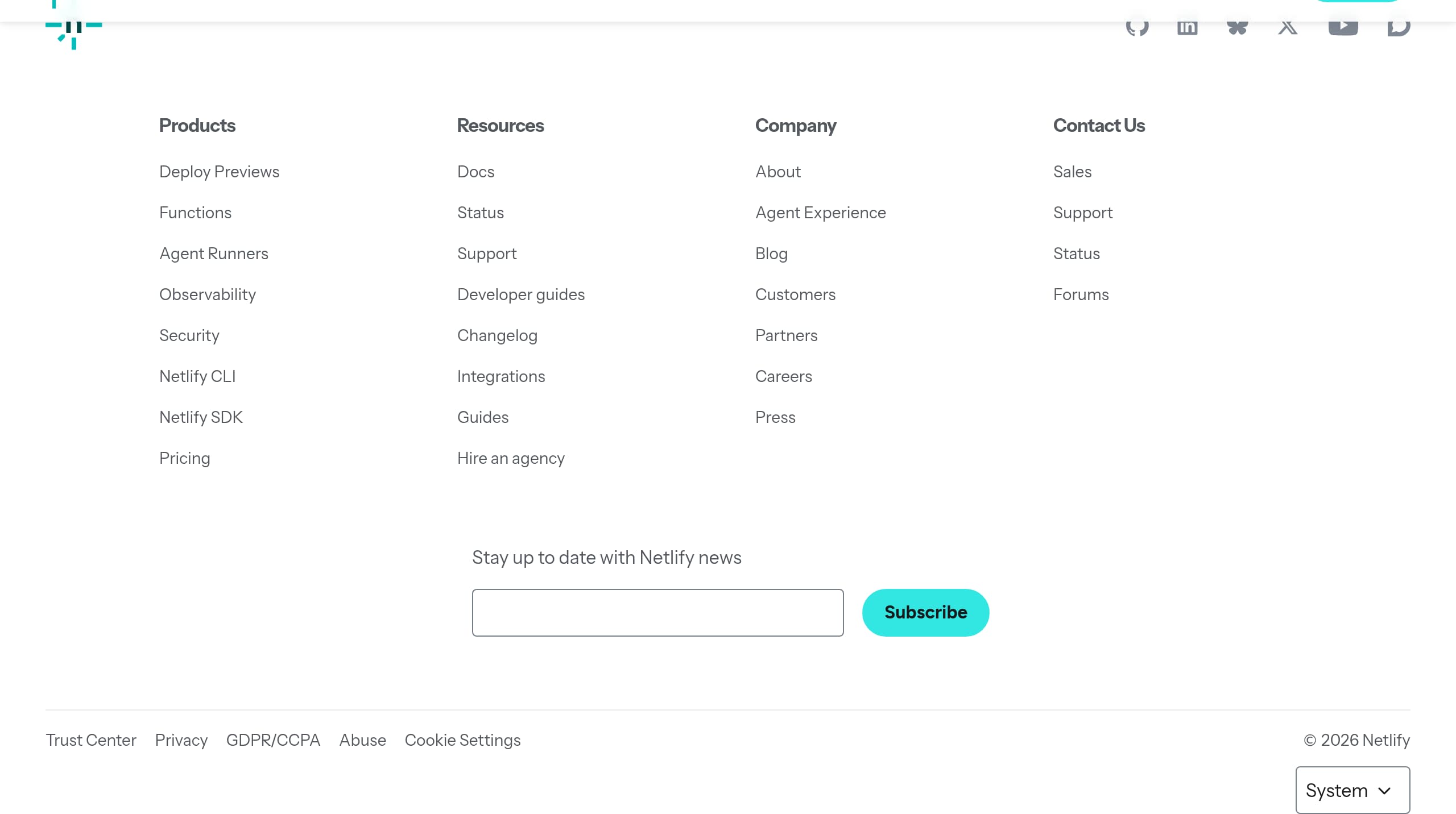
Netlify’s footer is built like a full navigation hub, and that is a strength for a broad platform with multiple personas. It includes clear column groupings for Products (Deploy Previews, Functions, Agent Runners, Observability, Security, Netlify CLI, Netlify SDK), Resources (Docs, Status, Support, Developer guides, Changelog, Integrations, Guides, “Hire an agency”), Company (About, Agent Experience, Blog, Customers, Partners, Careers, Press), and Contact paths (Sales, Support, Status, Forums). This structure supports both self-serve troubleshooting and procurement-oriented evaluation.
A notable UI detail in the excerpt is repetition: “Products” and “Resources” appear twice, which suggests either responsive layout duplication or a rendering artifact. If that duplication exists in the actual UI, removing it would reduce perceived clutter and improve scan speed.
The footer also strengthens trust and compliance discoverability. It includes direct links to Trust Center, Privacy, GDPR/CCPA, Abuse, and Cookie Settings. For B2B SaaS, having GDPR/CCPA visible at the bottom is table stakes, but including a “Trust Center” link is more proactive, it signals a maintained repository of security and compliance details.
Netlify uses the footer to reinforce community and brand presence with social links (GitHub, LinkedIn, Bluesky, X, YouTube, Discourse). GitHub and Discourse are particularly relevant for a developer audience because they act as living proof of activity and support responsiveness.
There is also an email capture module, “Stay up to date with Netlify news,” which is good for top-of-funnel retention. One thing to watch is the presence of UTM fields (UTM Campaign, UTM Content, etc.) in the excerpt, which may be hidden inputs but can look odd if visible. If those labels show in the UI, it would hurt polish.
Overall, the footer functions as a second conversion surface: it routes visitors into Docs, Pricing, Status, and Sales without forcing them back to the header.
Detected tech stack
Tools and technologies we detected on Netlify's site. Detection is best-effort and may be incomplete.
Scores
Our framework scores for Netlify's website in terms of clarity, conversion, and trust. See our methodology for how we calculate these.
How clear the value prop and structure are.
How conversion-friendly signup and pricing are.
How well trust and compliance are surfaced.
FAQ
Netlify’s homepage pairs a broad creative headline, “Push your ideas to the web,” with an operational promise, “Build with AI or code, deploy instantly.” It then supports that promise with concrete workflow details like deploying from Bolt, Cursor, or GitHub and getting a shareable preview link for every change. The page is organized into scannable pillars, “Ship instantly,” “Build anything,” and “Grows with you.”
Netlify makes pricing easy to find through a global “Pricing” navigation item and consistently offers an alternative path via “Contact Sales.” The overall site messaging reduces pricing anxiety with statements like “No surprise bills when you scale,” which should be reinforced on the pricing page through clear plan grids and usage expectations. This approach supports both self-serve developers and teams that need procurement-friendly conversations.
Netlify uses a “primitives” framing and then embeds short code examples directly on the marketing page. Visitors can see how AI Gateway routes calls to providers like OpenAI, how Netlify Functions handle API endpoints and background jobs, how storage works with Blobs, and how Netlify Forms can be enabled with a single HTML attribute. This creates feature proof while keeping the narrative benefit-led.
Netlify AI Gateway is positioned as a single gateway to call models from providers such as OpenAI, Anthropic, or Gemini “without juggling keys or accounts.” The page highlights centralized routing plus “usage tracking and safeguards,” which implies cost visibility and governance. Netlify also mentions switching between “30+ models,” reinforcing that AI Gateway is meant to reduce vendor lock-in for AI-enabled apps.
Netlify surfaces trust through multiple routes: “Security” appears in key features navigation, “Managed security” is mentioned in the scaling section, and the footer links to a dedicated “Trust Center.” The footer also includes Privacy, GDPR/CCPA, Cookie Settings, and a “Status” link. These elements give both developers and enterprise buyers direct paths to validate reliability and data handling.

The world's best-performing SaaS businesses share surprisingly similar patterns. We help you learn and apply them through our human-designed methodology, with AI-assisted research.