
Key takeaways
Here are the key insights from our website breakdown analysis of Framer.
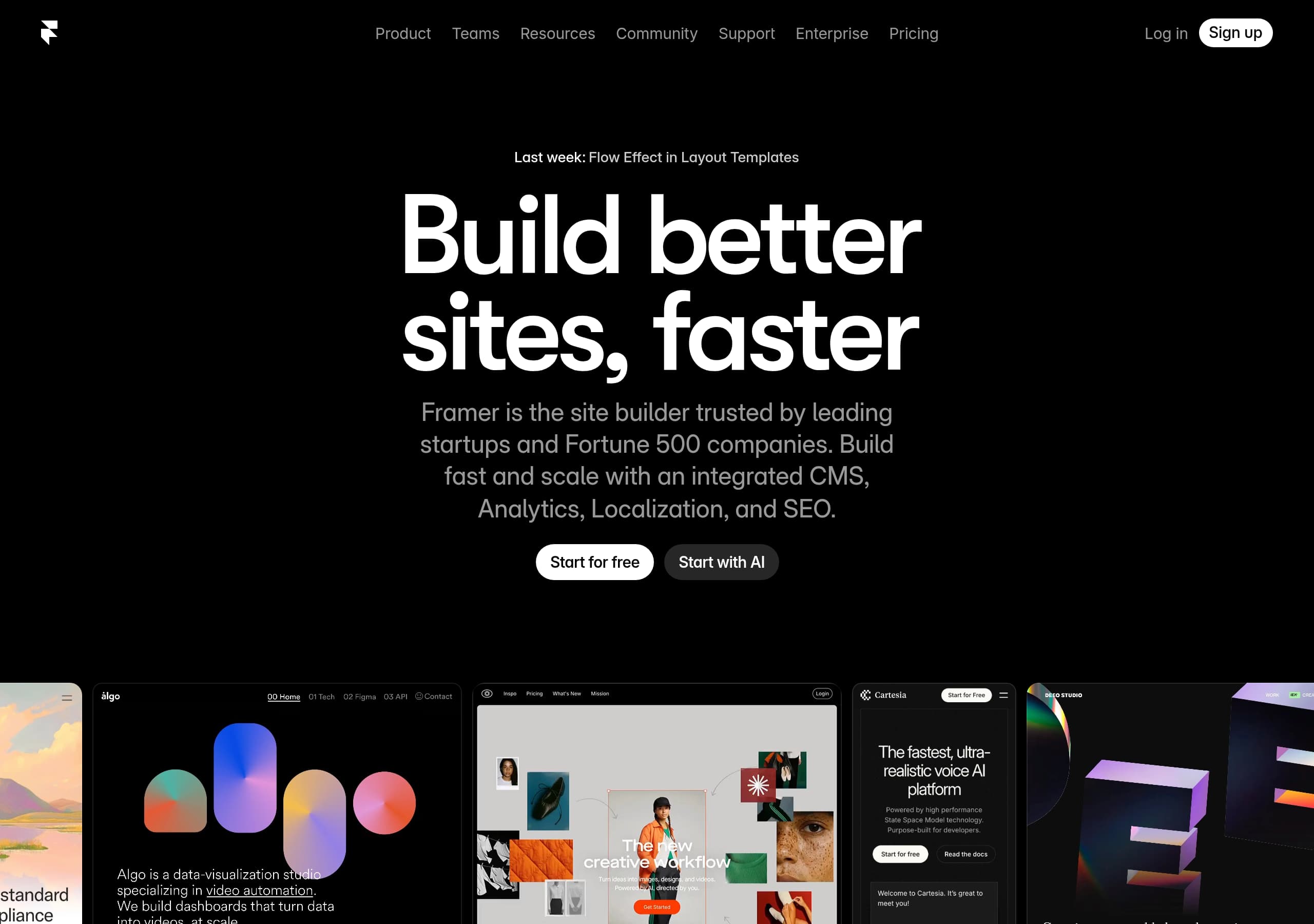
Framer’s homepage converts by pairing a single-sentence value proposition (“Build better sites, faster”) with dual, repeated CTAs (“Start for free” and “Start with AI”) that match two distinct entry intents.
The product story is structured as an end-to-end workflow—AI → Design → CMS → Collaborate → Analytics/SEO—so visitors can self-qualify quickly without hunting across pages.
Framer boosts credibility using recognizable customer entities (startups to Fortune 500) and repeated testimonial modules that explicitly remove key objections (no dev handoff, no design compromise).
The site demonstrates product capability with UI-replica visuals (CMS lists, analytics dashboards, A/B testing screens), turning feature claims into observable proof rather than abstract promises.
Pricing is positioned as scalable (“teams worldwide”, enterprise navigation present) while keeping a low-friction entry point (“Create a professional website, free”), reducing perceived risk for first-time users.
Trust is reinforced through transparent operational signals—frequent changelog-style updates with dates, detailed fix lists, and “blazing-fast hosting / Lighthouse” messaging—implying an actively maintained platform.
Home
Framer’s homepage is optimized for fast comprehension: it leads with a speed-focused promise (“Build better sites, faster”) and immediately anchors it in a credible platform narrative (integrated CMS, Analytics, Localization, and SEO).
What’s happening above the fold
- The hero combines a plain-language headline with an explicit trust claim (“trusted by leading startups and Fortune 500 companies”). This is a risk-reversal cue before pricing is even discussed.
- Two primary CTAs appear in parallel—Start for free and Start with AI—and they’re repeated (the excerpt shows duplicated CTAs). This is a deliberate dual-CTA pattern: one path for cautious evaluators, one for outcome-driven users.
- Navigation supports multiple visitor types: Product, Teams, Enterprise, Pricing, plus Resources/Community/Support, which signals a mature ecosystem rather than a lightweight builder.
Messaging that matches the audience
Framer explicitly positions as “No code website builder loved by designers.” That phrase does two jobs: it differentiates from developer-first tools (e.g., Webflow) and from commodity template builders (e.g., Wix/Squarespace) by emphasizing design control.
Proof-by-preview, not just claims
Even on the homepage flow, the content teases real product surfaces: AI-generated layouts/components, responsive design with effects, built-in CMS, and collaboration with on-page editing. Those are presented as a linear workflow—AI, Design, CMS, Collaborate—which helps users imagine the full lifecycle from blank canvas to shipped site.
Key terms: Start with AI, Start for free, Fortune 500, no-code, integrated CMS, SEO.
Pricing
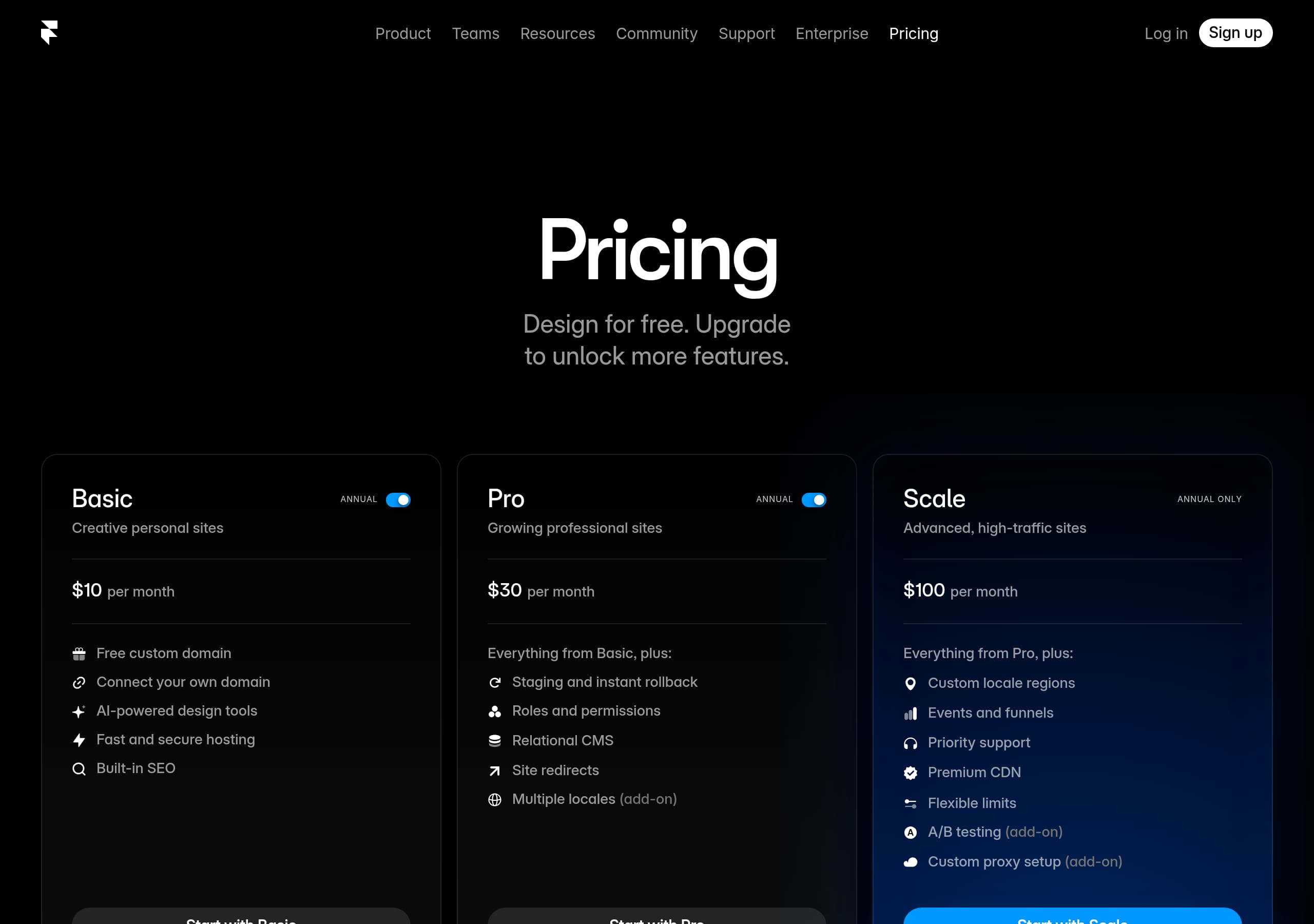
Framer’s pricing approach emphasizes low-friction adoption while keeping the information architecture ready for scaling up to teams and enterprise. The key conversion lever is that the brand promise includes “Create a professional website, free,” which frames the first step as reversible and low risk.
How pricing is framed
The global navigation includes Enterprise and Pricing as top-level items, which implies tiered plans and organizational readiness. Even when a visitor lands elsewhere (home, updates, features), pricing remains one click away—an important conversion hygiene choice for high-intent traffic.
Conversion mechanics that likely appear on the Pricing page
From the excerpted UI patterns shown across the site (A/B testing, analytics, CMS), Framer’s pricing is implicitly tied to platform capabilities rather than just page limits. Visitors are nudged to upgrade for outcomes: Analytics & insights, A/B testing & optimization, and SEO & performance. That’s more compelling than feature gating alone because it maps to growth goals (traffic, conversions, experimentation).
What the screenshots suggest to optimize further
On pricing pages for builders like Framer, the highest-performing layout typically includes:
- A plan comparison grid with 3–5 tiers
- A sticky or repeated CTA per plan
- A clear distinction between “publish” costs (hosting, custom domains) and “build” costs (editor access)
Framer already supports the right narrative: start free → publish → scale with teams/optimization. The inclusion of “Free Custom Domains” in updates also acts as a pricing-adjacent benefit that can reduce upgrade friction.
Key terms: free plan, Enterprise, upgrade path, plan comparison, custom domain, A/B testing.
Features
Framer’s features section works because it’s organized around a coherent build-and-scale pipeline rather than a grab bag of capabilities. The main takeaway is that the feature grid maps to real user workflows: generate → design → manage content → collaborate → optimize.
Clear feature taxonomy
The site uses a tight, four-part grid early on:
- AI: “Generate site layouts and advanced components in seconds”
- Design: “responsive layouts… smooth effects, interactions, and animations”
- CMS: “built-in CMS… without touching code”
- Collaborate: “editing copy directly on the page… handoff-free”
Each card has a “Learn more,” which is a classic feature-to-detail funnel: keep the homepage scannable while enabling deeper evaluation.
‘Scale without switching tools’ is the differentiator
The later modules extend beyond creation into growth and operations:
- Analytics & insights: traffic, performance, conversions
- A/B testing & optimization: funnels and growth insights
- SEO & performance: metadata controls + fast hosting + Lighthouse framing
This is strategically important because it positions Framer not only against design-first tools, but also against a stitched stack (e.g., builder + GA + Optimizely + CMS plugins). The promise is fewer integrations for the common case.
Feature proof is visual and specific
The excerpt includes UI-like elements: pageview/visitor counts, referrer breakdown (google.com, chatgpt.com, linkedin.com), and A/B test variants (Control, Version B/C). Showing these surfaces implies the features are first-party, not hypothetical.
Key terms: integrated CMS, on-page editing, A/B testing, Analytics & insights, SEO settings, interactions/animations.
Signup
Framer’s signup strategy minimizes time-to-first-success by offering two immediate onboarding modes—manual (“Start for free”) and assisted (“Start with AI”). The key insight is that these CTAs are not just marketing; they define the first product experience.
Two onboarding intents, both high converting
- Start for free fits evaluators who want to click around templates, explore publishing, or assess pricing later.
- Start with AI fits users who want a draft instantly, reducing blank-canvas friction. The site explicitly claims “Generate site layouts and advanced components in seconds,” setting an expectation for quick output.
Evidence of editor-first onboarding
The excerpt includes on-page editing states: “Click to edit · Changes are auto-saved,” “Site saved · Collaborators are notified,” and “Open in Framer.” This suggests Framer’s onboarding pushes users into the editor quickly and reinforces momentum with system feedback (autosave, publish status). Those microcopy cues are classic activation mechanics.
Collaboration as part of activation
Messaging like “collaborating on the canvas or editing copy directly on the page” implies Framer supports multiple contributor roles early (designer, marketer, copy editor). That reduces drop-off in teams because the first success can be “edit and publish” rather than “learn the whole tool.”
What’s missing (and likely handled in-product)
The public site doesn’t show the full signup form, but the repeated CTA pattern implies low friction—likely email/SSO, then straight into a project. If Framer also prompts template selection vs AI generation in step 1, that would form an effective 2–3 step onboarding flow: choose path → generate/select → publish.
Key terms: Start with AI, activation, on-page editing, auto-saved, collaboration, publish.
Trust
Framer builds trust by combining enterprise positioning with operational transparency: frequent dated updates, explicit performance/SEO claims, and UI proof for analytics and experimentation. The result is a “serious platform” impression, not a lightweight designer toy.
Operational trust: visible maintenance cadence
The updates feed includes multiple entries in January–February 2026 (e.g., “February 20, 2026: Flow Effect in Layout Templates,” “Advanced Hosting,” “Free Custom Domains”). Each entry contains granular change logs (Added/Improved/Fixed) with specific items like Safari truncation bugs and Windows keyboard shortcuts. This level of detail signals engineering rigor and reduces fear of platform stagnation.
Performance trust: lighthouse + hosting framing
The site explicitly calls out “built-in SEO settings, metadata, and blazing-fast hosting” and references Google Lighthouse categories (SEO, Performance, Accessibility). Even without exact scores shown in the excerpt, naming Lighthouse is a concrete external benchmark that sophisticated buyers recognize.
Data trust: first-party analytics surfaces
The analytics module shows metrics like pageviews/visitors and referrers (google.com, chatgpt.com, linkedin.com, youtube.com). Presenting these as first-party capabilities implies the platform is built for measurable outcomes and doesn’t rely solely on third-party scripts.
Enterprise readiness cues
Top navigation includes Enterprise, and the messaging says “trusted by leading startups and Fortune 500 companies.” Those two together create a bridge: approachable for startups, compliant enough for larger orgs (even if security/compliance badges aren’t shown in the excerpt).
Opportunity: explicit compliance/security statements
What’s least visible in the provided content is formal security language (SOC 2, GDPR, DPA). Adding a dedicated security page link near Enterprise would strengthen trust for procurement-led buyers.
Key terms: Google Lighthouse, blazing-fast hosting, changelog, Advanced Hosting, Enterprise, Fortune 500.
Footer
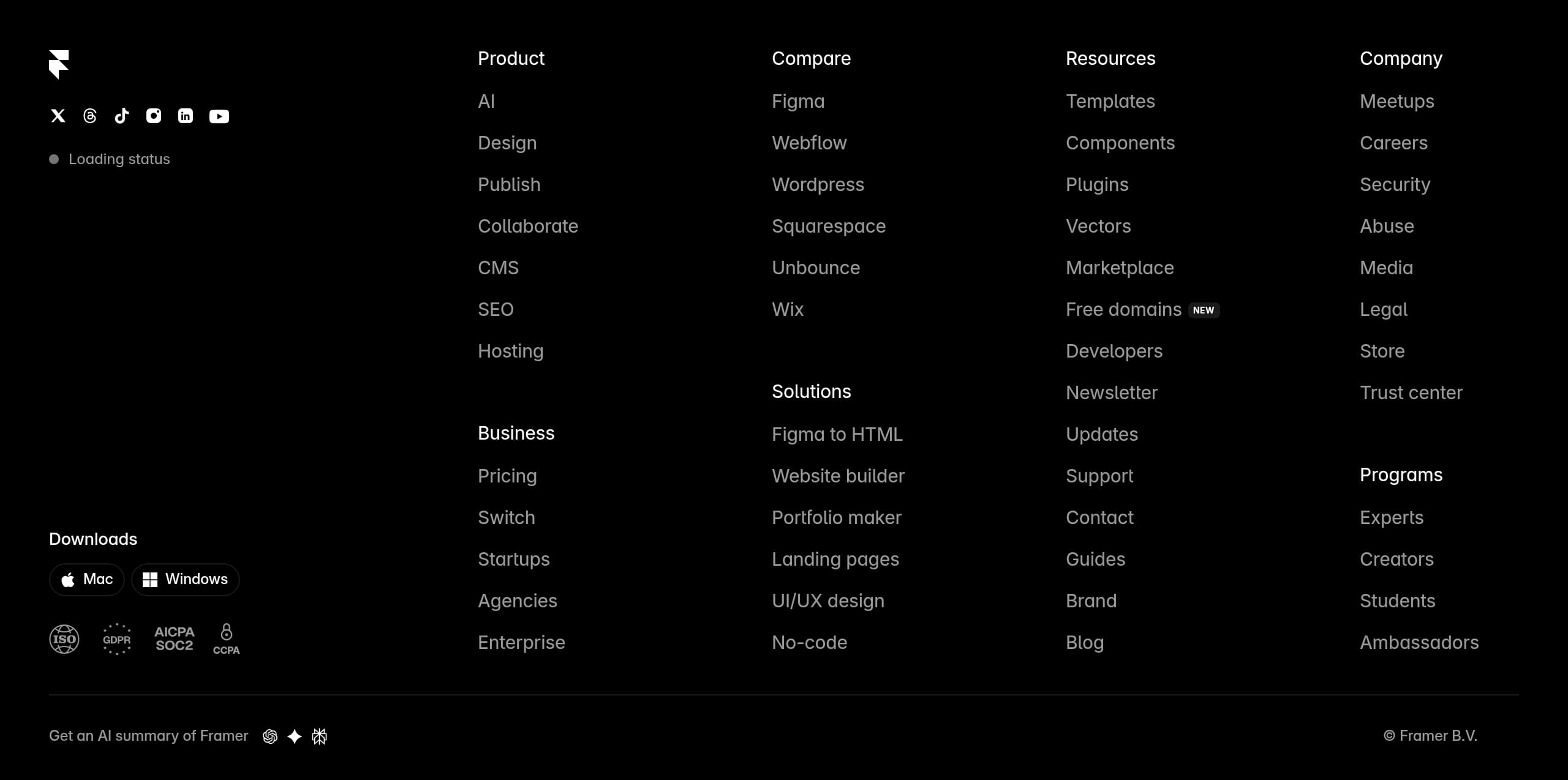
Framer’s footer functions as a conversion safety net: it reinforces that the company is a full platform (not just a landing page tool) by linking to product areas, resources, support, and enterprise entry points. The key takeaway is that the footer likely reduces dead-ends for skimmers and supports multiple user journeys.
What the site-wide IA implies
From the header navigation in the excerpt—Product, Teams, Resources, Community, Support, Enterprise, Pricing—the footer typically mirrors these categories and adds deep links (docs, guides, changelog). For SaaS buyers, this is important because many decisions happen after the first scroll; the footer is where evaluators look for “proof of substance.”
Trust + governance links (expected in a mature footer)
A strong SaaS footer usually includes:
- Legal pages (Terms, Privacy)
- Security or status links
- Contact/support entry
- Social channels
Given Framer’s enterprise positioning, having clear legal and support destinations is part of conversion. It reduces anxiety for teams that need to share links internally (procurement, IT, brand).
Content discovery as SEO engine
The excerpt shows a robust documentation/updates structure (Server API, Fetch, Components, Overrides, Publishing, Changelog). If those are linked in the footer, they serve two purposes:
- internal linking for SEO and crawling
- user reassurance that Framer supports advanced use cases (plugins, APIs, publishing)
Opportunity: segment footers by persona
If the footer groups links by persona (Designers, Marketers, Developers), it would align with Framer’s hybrid pitch: design-first, but with developer-grade capabilities like Server API.
Key terms: information architecture, Resources, Support, Enterprise, legal links, docs/changelog.
Detected tech stack
Tools and technologies we detected on Framer's site. Detection is best-effort and may be incomplete.
Scores
Our framework scores for Framer's website in terms of clarity, conversion, and trust. See our methodology for how we calculate these.
How clear the value prop and structure are.
How conversion-friendly signup and pricing are.
How well trust and compliance are surfaced.
FAQ
Framer leads with a clear speed-focused promise (“Build better sites, faster”) and immediately backs it with a credibility claim (“trusted by leading startups and Fortune 500 companies”). It uses dual CTAs—“Start for free” and “Start with AI”—so users can choose between exploring and generating a first draft quickly. The homepage also previews core modules (AI, Design, CMS, Collaborate) to reduce ambiguity.
Framer frames the entry point as low risk with “Create a professional website, free,” while keeping “Pricing” and “Enterprise” prominent in the navigation for high-intent evaluators. The product narrative ties upgrades to outcomes like built-in analytics, A/B testing, SEO settings, and hosting performance rather than only limiting features. This supports a natural path from free experimentation to paid publishing and team scale.
Framer combines customer logos with attributed testimonials from identifiable roles, including Head of Design at Perplexity and Design Lead at Miro. The quotes directly address common objections to no-code tools—speed, design freedom, and eliminating dev handoffs—using concrete language like “ship updates daily” and “shipped in days.” This makes the social proof feel operational and credible, not generic.
Framer emphasizes an end-to-end website workflow: AI to generate layouts and components, a visual design editor for responsive interactions and animations, a built-in CMS for ongoing content updates, and collaboration with on-page editing. It then extends into “scale” features such as Analytics & insights, A/B testing & optimization, and SEO & performance. The site supports these claims with UI-like visuals of dashboards and experiments.
Framer signals maturity through enterprise navigation, Fortune 500 positioning, and detailed product updates with dated changelog entries and specific fixes. It also references recognized benchmarks like Google Lighthouse and highlights “blazing-fast hosting,” built-in SEO metadata controls, and analytics surfaces. Together, these cues suggest an actively maintained platform designed for performance and measurable outcomes, not a simple template builder.

The world's best-performing SaaS businesses share surprisingly similar patterns. We help you learn and apply them through our human-designed methodology, with AI-assisted research.