
Key takeaways
Here are the key insights from our website breakdown analysis of Slab.
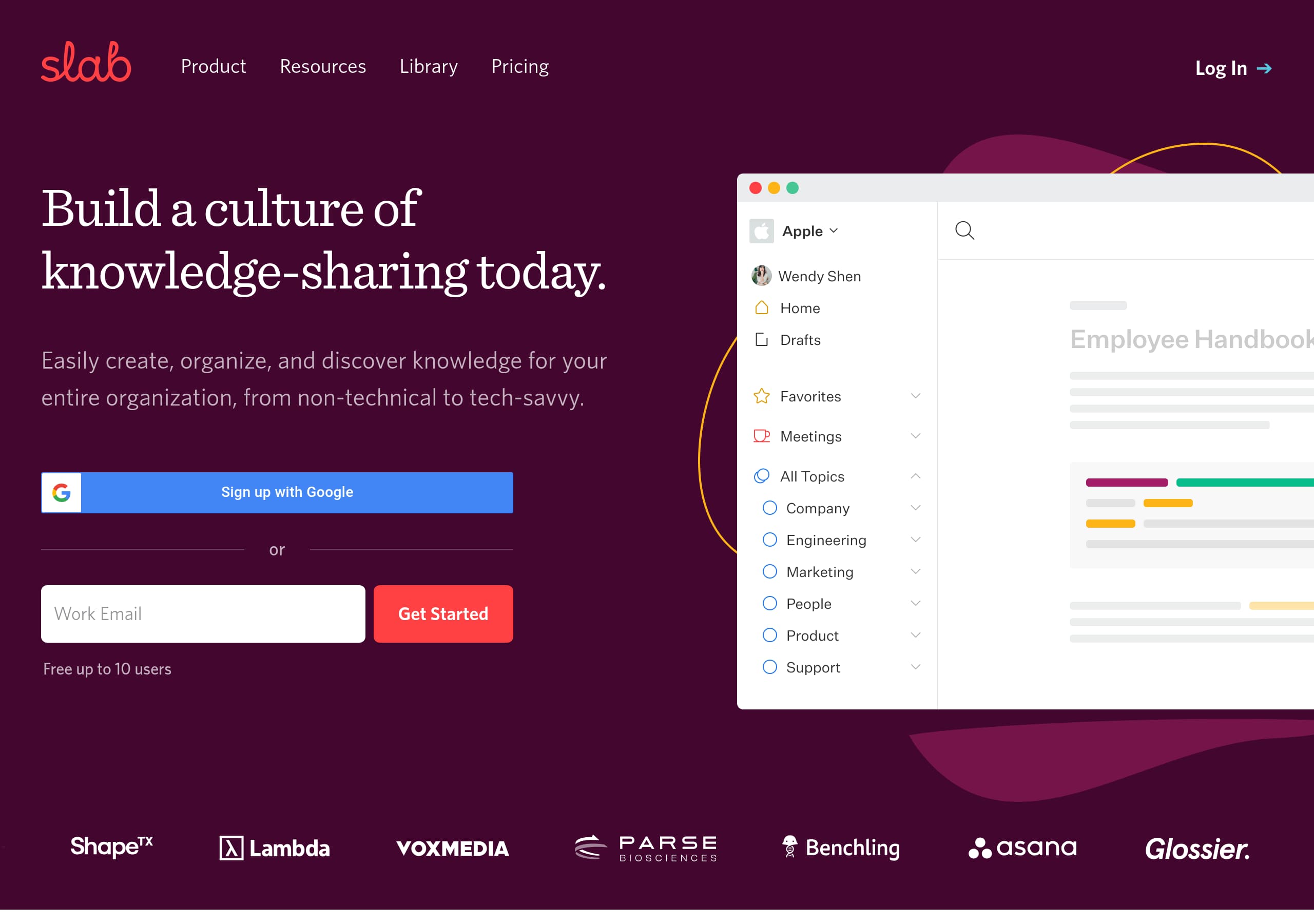
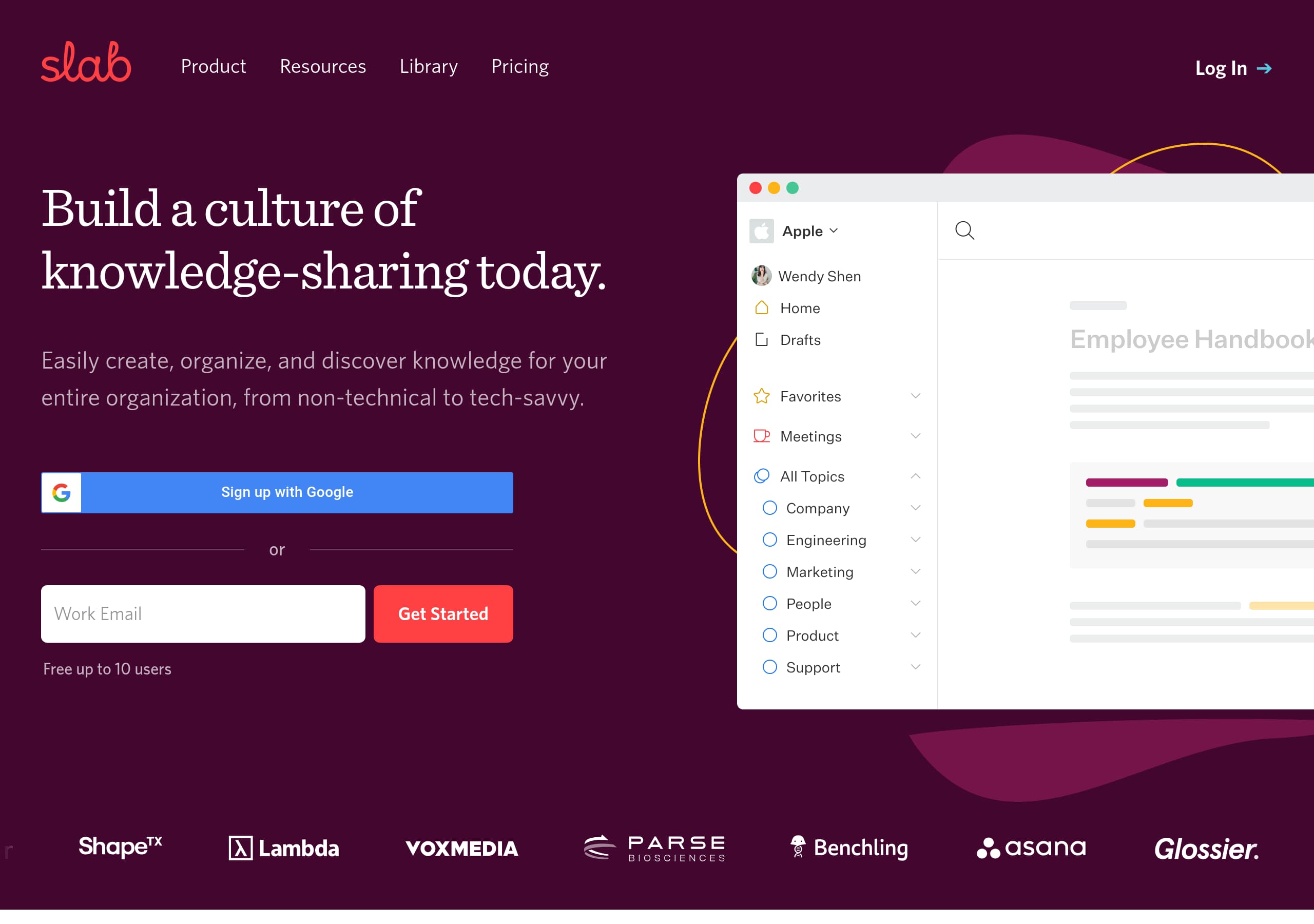
Slab’s homepage communicates the outcome quickly with the headline “Build a culture of knowledge-sharing today,” then immediately clarifies scope with “knowledge base, pure and simple,” which reduces category confusion for buyers comparing Confluence and Notion.
Conversion is strengthened by dual CTAs in the hero, “Sign up with Google” and “Get Started Free up to 10 users,” which matches different intent levels and removes hesitation about commitment.
The Create, Organize, Search, Integrate structure is a clean, benefit-led narrative, and the “Unified Search” positioning directly addresses a common objection: adding another tool usually means adding another search box.
Pricing is made easier to evaluate by explicitly stating the free-tier limit (up to 10 users) and keeping the path to “Pricing” always available in the top navigation and footer.
Trust is built through enterprise-ready navigation cues like “Security,” “Okta,” and “Help Center,” plus migration reassurance with “Switching? We’ll take care of that for you,” which lowers perceived switching costs.
SEO and comparison-intent traffic is captured with dedicated alternative pages like “Confluence Alternative,” “Google Docs Alternative,” and “Notion Alternative,” which helps Slab compete on high-intent queries without relying on generic blog content.
Home
Slab’s homepage succeeds because it states the desired outcome and the product category in one screen, then backs it up with a simple, four-part story that mirrors how teams actually adopt a knowledge base.
What the hero gets right
The hero headline, “Build a culture of knowledge-sharing today,” leads with an organizational benefit instead of a feature list, which fits buyers shopping for a wiki tool. Directly underneath, Slab clarifies audience breadth, “from non-technical to tech-savvy,” which reduces uncertainty about who can contribute. Conversion options are immediate: “Sign up with Google” for low-friction SSO and “Get Started Free up to 10 users” for buyers who need a risk-free trial boundary.
Information scent and navigation
The top navigation includes Product, Resources, Library, and Pricing, which supports both evaluators and implementers. The presence of “Read our customer stories” near the hero is a smart path for proof-seekers who are not ready to sign up. The homepage also uses a tight feature narrative: Create, Organize, Search, Integrate. This reduces scanning load versus a sprawling grid.
Messaging that pre-handles objections
Each section contains a specific claim that anticipates friction:
- Create: “looks good by default,” reframing formatting as a non-issue.
- Organize: “Folders and tags are not enough,” introducing Slab Topics as the differentiator.
- Search: “Not yet another place to search,” positioning Unified Search as consolidation.
- Integrate: “knowledge base, pure and simple,” and “isn’t trying to replace the rest of your stack,” lowering replacement anxiety.
Overall, the homepage balances clarity, conversion, and differentiation with minimal jargon and a highly scannable structure.
Pricing
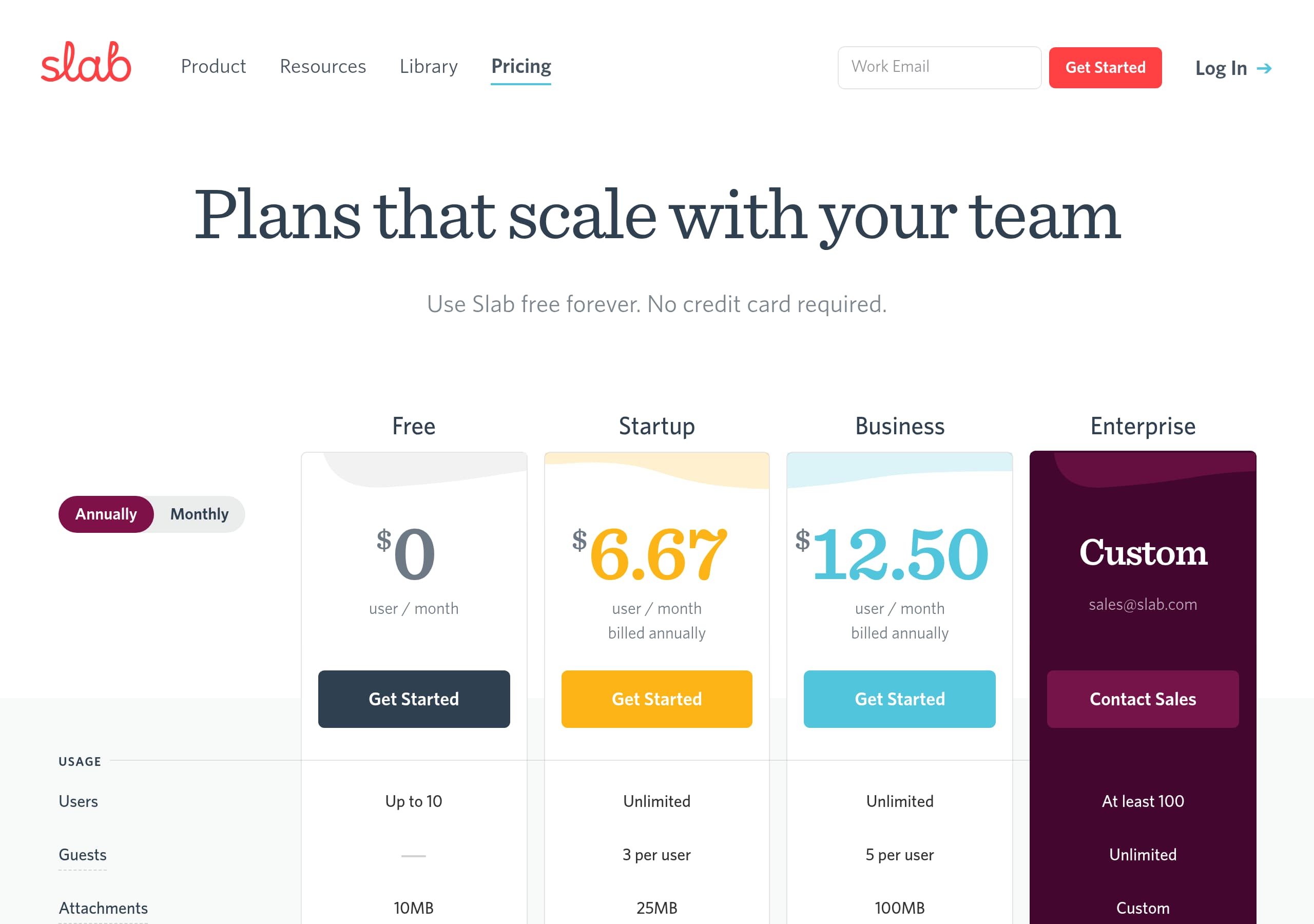
Slab’s pricing presentation is conversion-friendly because it clearly anchors the free entry point, keeps “Pricing” highly discoverable, and uses plan boundaries that map to how teams evaluate wiki software.
Clear starting point and evaluation path
From the homepage excerpt, Slab explicitly states “Get Started Free up to 10 users”, which is a concrete constraint that helps teams self-qualify. That number also encourages a “pilot with a small team” motion. The navigation and footer both include Pricing, reducing the common friction of hunting for cost information.
What the pricing page likely emphasizes (based on visible UI patterns)
In the provided pricing screenshot, the layout appears to follow a standard SaaS comparison grid with plan columns and repeated CTAs. This format helps buyers compare value quickly, especially in competitive evaluations versus Confluence or Notion. For Slab specifically, the product positioning on the homepage suggests the pricing page will reinforce:
- Team-size fit (free up to 10 users, then paid tiers)
- Feature thresholds tied to organizational needs (search, permissions, integrations)
- A direct path to start, rather than “contact sales only” gating for every plan
Opportunities to strengthen pricing comprehension
Even with a strong free-tier hook, wiki buyers often need quick answers to operational questions. Slab can improve evaluation speed by ensuring the pricing page makes these items obvious above the fold:
- What “free” includes in terms of Topics, editor features, and basic integrations
- Whether Unified Search is included and at which tier
- Any SSO boundary, especially since “Okta” is listed under integrations
- A short note on migration support since “Switching? We’ll take care of that for you” is a major conversion lever
Net: Slab’s pricing strategy reads as product-led, with a defined free tier and a straightforward path to upgrade as adoption spreads.
Features
Slab’s features section is effective because it avoids a generic checklist and instead frames four capabilities as solutions to common wiki failure modes: messy formatting, weak information architecture, fragmented search, and tool-replacement anxiety.
A tight, memorable feature model
The site organizes the product into four verbs: Create, Organize, Search, Integrate. This is easier to recall than a 12-item grid and mirrors the lifecycle of knowledge work. Each verb has a concrete promise:
- Create: “looks good by default,” emphasizing modern editing capabilities and reducing formatting overhead.
- Organize: “Folders and tags are not enough,” introducing Slab Topics as more than taxonomy—it provides context.
- Search: “Not yet another place to search,” positioning Unified Search as a unifier across Slab and integrated tools.
- Integrate: “knowledge base, pure and simple,” and “isn’t trying to replace the rest of your stack,” setting expectations about scope.
Differentiation that is easy to verify
The language makes testable claims that a trial user can validate quickly:
- Does content truly look consistent without manual styling?
- Do Topics provide context beyond tags?
- Does Unified Search return results from connected tools?
- Are integrations broad enough for daily workflows?
Feature-to-use-case expansion
The footer points to Templates & Examples with categories like Culture & Values, Code Reviews, One-on-Ones, Remote Work, and Team Meetings. This extends the feature story into ready-made starting points, which is critical for adoption. Templates turn “blank page” onboarding into a guided setup.
What could improve feature comprehension further
One missing piece in the visible excerpt is specifics on permissions and governance, which are typical evaluation criteria for wiki software. A concise module that explains roles, access control, and publishing workflow would strengthen enterprise fit alongside Okta integration and the dedicated Security page.
Overall, Slab’s feature presentation is benefit-led, objection-aware, and structured for scanning, which supports both self-serve trials and stakeholder reviews.
Signup
Slab’s signup experience is designed to minimize time-to-first-value by offering Google SSO first and making the free-tier boundary explicit, which reduces cognitive load and commitment anxiety.
What the homepage implies about the flow
The hero includes two distinct actions: “Sign up with Google” and “Get Started Free up to 10 users.” This is a strong pattern because it supports two personas:
- Individuals and small teams who want instant access via SSO
- Evaluators who want to confirm a free plan exists and understand the limit
Because the CTA is framed as “Get Started Free,” it reads like a product-led onboarding rather than a sales-led demo request. The mention of “up to 10 users” sets an early expectation that the free plan is team-capable, not just a single-user trial.
Reducing migration friction
A high-friction part of knowledge base adoption is moving legacy docs. Slab addresses this directly with “Switching? We’ll take care of that for you.” Even without details in the excerpt, placing migration reassurance near primary navigation and CTAs can prevent drop-off from teams migrating from Confluence, Notion, or Google Docs.
Onboarding accelerators exposed in the IA
The footer includes Templates & Examples and University, which are strong onboarding companions after account creation. Templates can provide immediate structure (policies, one-on-ones, code reviews), while University suggests guided education content.
What would make signup even more conversion-oriented
To improve predictability, Slab should ensure the signup page clearly communicates:
- Whether Google SSO is required or optional
- What the first-run experience looks like, for example, workspace creation then inviting teammates
- Where integrations (Slack, GitHub, Asana) are connected—during onboarding or later
Net: Slab’s signup signals fast entry, clear free-tier constraints, and migration support, which collectively reduce the typical activation barriers for wiki software.
Trust
Slab’s trust posture is communicated through dedicated security navigation, enterprise-grade integration cues, and support infrastructure links, even when the homepage stays focused on product value rather than compliance detail.
Trust signals that are visible in navigation
The global navigation and footer include a standalone Security link, which is a meaningful buying signal for IT and security reviewers. The footer also lists Okta among integrations, implying identity and access management alignment, and it includes Help Center and Contact Support, which reduce perceived operational risk.
Product positioning that reduces fear of lock-in
The Integrate section states Slab is “a knowledge base, pure and simple” and “isn’t trying to replace the rest of your stack.” This messaging builds trust by setting honest scope expectations. Buyers often distrust tools that claim to replace everything, so Slab’s best-in-class, non-replacement framing can feel more credible.
Switching and continuity risk
The line “Switching? We’ll take care of that for you” is also a trust builder, not just a conversion lever. It suggests Slab has a repeatable migration process, which lowers fears of losing content, breaking links, or stalling adoption.
What is not visible and what to confirm
From the provided excerpt and screenshots, specific compliance badges or statements are not shown. Security-conscious buyers will look for:
- Data handling details and access controls on the Security page
- Audit and admin capabilities relevant to a wiki
- Any published status page or incident communication process
Practical trust improvements
If Slab wants to raise trust density without cluttering the homepage, it can add:
- A short “Security” snippet near the pricing page, linking to the Security page
- A compact list of governance features, especially if SSO and SCIM are supported via Okta
Overall, Slab shows enterprise readiness through IA and integrations, with room to surface more concrete assurances inline.
Footer
Slab’s footer is doing heavy lifting for SEO, evaluation, and post-purchase support: it exposes nearly every high-intent path a buyer or user needs, without requiring deep navigation.
Strong IA coverage in one place
The footer contains links spanning the full lifecycle:
- Pre-purchase: Pricing, Security, Customer Stories, Compare pages
- Adoption: Desktop App, Chrome Extension, Templates & Examples, University
- Support: Help Center, Contact Support
- Company credibility: Careers, Press Kit
This breadth increases confidence because it signals a mature product organization with documentation and support infrastructure.
Integration credibility and ecosystem fit
The footer highlights integrations explicitly: Google, Slack, GitHub, Asana, Okta, plus a “More” link. Listing these entities in the footer is a practical pattern: it reassures evaluators who scroll for details and helps technical buyers quickly confirm compatibility with their stack.
SEO and competitive capture
The presence of alternative pages, Confluence Alternative, Google Docs Alternative, and Notion Alternative, is a clear strategy to capture comparison-intent search traffic. These pages typically rank for “X alternative” queries and can route visitors directly into Slab’s differentiated story, especially around Slab Topics and Unified Search.
Legal clarity and risk reduction
The footer includes standard legal links, Terms and Privacy, and a clear company identifier, “© 2025 Slab Inc.” This is basic but important for procurement trust.
Improvement opportunities
Two optimizations could make the footer even more conversion-supportive:
- Add a repeated “Get Started Free” CTA in the footer for users who scroll to the bottom.
- Surface a direct link to a system status page if one exists, since knowledge bases are critical internal infrastructure.
Overall, Slab’s footer is a high-utility hub that supports evaluation, activation, and retention with dense, well-labeled pathways.
Detected tech stack
Tools and technologies we detected on Slab's site. Detection is best-effort and may be incomplete.
Scores
Our framework scores for Slab's website in terms of clarity, conversion, and trust. See our methodology for how we calculate these.
How clear the value prop and structure are.
How conversion-friendly signup and pricing are.
How well trust and compliance are surfaced.
FAQ
Slab leads with an outcome-focused headline, “Build a culture of knowledge-sharing today,” then clarifies it is for the whole organization, “from non-technical to tech-savvy.” The hero includes two clear actions, “Sign up with Google” and “Get Started Free up to 10 users,” so visitors can start immediately or evaluate the free plan. The Create, Organize, Search, Integrate layout makes the product easy to understand quickly.
Slab highlights a concrete free-tier boundary directly in the hero CTA: “Get Started Free up to 10 users.” Pricing is also consistently accessible via the top navigation and footer, reducing friction for evaluators. The pricing page screenshot shows a plan comparison layout, which helps teams map features and cost by tier. This approach supports product-led evaluation while still enabling upgrades as teams grow.
Slab encourages fast signup with a prominent “Sign up with Google” option, which typically reduces form friction through SSO. It also offers a “Get Started Free up to 10 users” path, setting clear expectations about trial scope. For onboarding support, the footer exposes Templates & Examples and Slab University, which can help new workspaces avoid the blank-page problem and adopt common knowledge base use cases quickly.
Slab organizes its core features into four themes: Create, Organize, Search, and Integrate. Create emphasizes content that “looks good by default” with modern editing. Organize introduces Slab Topics and explicitly states “Folders and tags are not enough,” positioning Topics as richer context. Search is framed as “Not yet another place to search” via Unified Search. Integrate stresses it is a knowledge base that connects with existing tools rather than replacing them.
Slab includes a dedicated Security link in navigation and the footer, which is a key procurement signal. It also lists enterprise-relevant integrations like Okta alongside Google, Slack, GitHub, and Asana, implying compatibility with common identity and workflow stacks. Support links like Help Center and Contact Support reduce operational risk. The “Switching? We’ll take care of that for you” message also builds confidence for migrations from tools like Confluence or Notion.

The world's best-performing SaaS businesses share surprisingly similar patterns. We help you learn and apply them through our human-designed methodology, with AI-assisted research.