
Key takeaways
Here are the key insights from our website breakdown analysis of QuickBooks.
QuickBooks (quickbooks.intuit.com) leads with an immediate promotional hook (50% off for 3 months) paired with persistent “Buy now” CTAs, which reduces decision friction for high-intent visitors.
The homepage value proposition is conversion-oriented and specific—integrated tools, AI automation, and expert support—then it repeatedly routes users to “See plans & pricing” for the next step.
QuickBooks uses quantified social proof (4.3/5 from 8,000+ reviews) and named customer quotes placed above-the-fold to validate AI features like Intuit Assist in a concrete, credible way.
Feature positioning is organized around AI “agents” (Customer, Payments, Payroll) and “expert assisted,” which reframes accounting as outcomes (faster payments, fewer manual tasks) instead of modules alone.
The pricing experience is designed to accommodate multiple buyer types (Online, Solopreneur, Self-Employed, Payroll, Time, Payments) by emphasizing plan selection and guided fit (“Help me choose a plan”).
Trust is reinforced with enterprise-scale cues—“Trusted by millions,” extensive legal/licensing disclosures, and clear support/sales hours—supporting regulated “money movement” and payroll use cases.
Home
QuickBooks’ homepage is engineered to move visitors from curiosity to purchase by pairing a strong promo with an outcome-led AI narrative.
What’s working in the hero and above-the-fold
The very first impression combines a retail-style offer (50% OFF for 3 months) with repeated, high-contrast “Buy now” CTAs. This is reinforced by a clear product identity (“QuickBooks®: Official Site”) and a utility nav that immediately offers Plans & Pricing, Top features, and Business types, plus a prominent Talk to Sales phone number.
Messaging hierarchy that reduces ambiguity
The core promise—“Save time and grow with integrated tools, AI automation, and trusted experts… financial clarity”—is specific enough to differentiate from generic accounting software. The page then uses quick jumps like “See plans & pricing” and “Help me choose a plan,” which functions as a guided-selling shortcut for visitors who don’t know whether they need QuickBooks Online, Payroll, or another SKU.
Concrete proof embedded early
Rather than burying validation, QuickBooks surfaces 4.3/5 based on 8,000+ reviews and named testimonials (e.g., Kim Cross; Neal Hamilton; Jan Haugo) near the hero flow. That placement is a deliberate UI pattern: credibility appears before deep feature exploration. The “Get paid 5 days faster” claim also gives the homepage a tangible performance hook.
Key terms: Buy now, 50% OFF, Intuit Assist, See plans & pricing, Get paid 5 days faster, Help me choose a plan.
Pricing
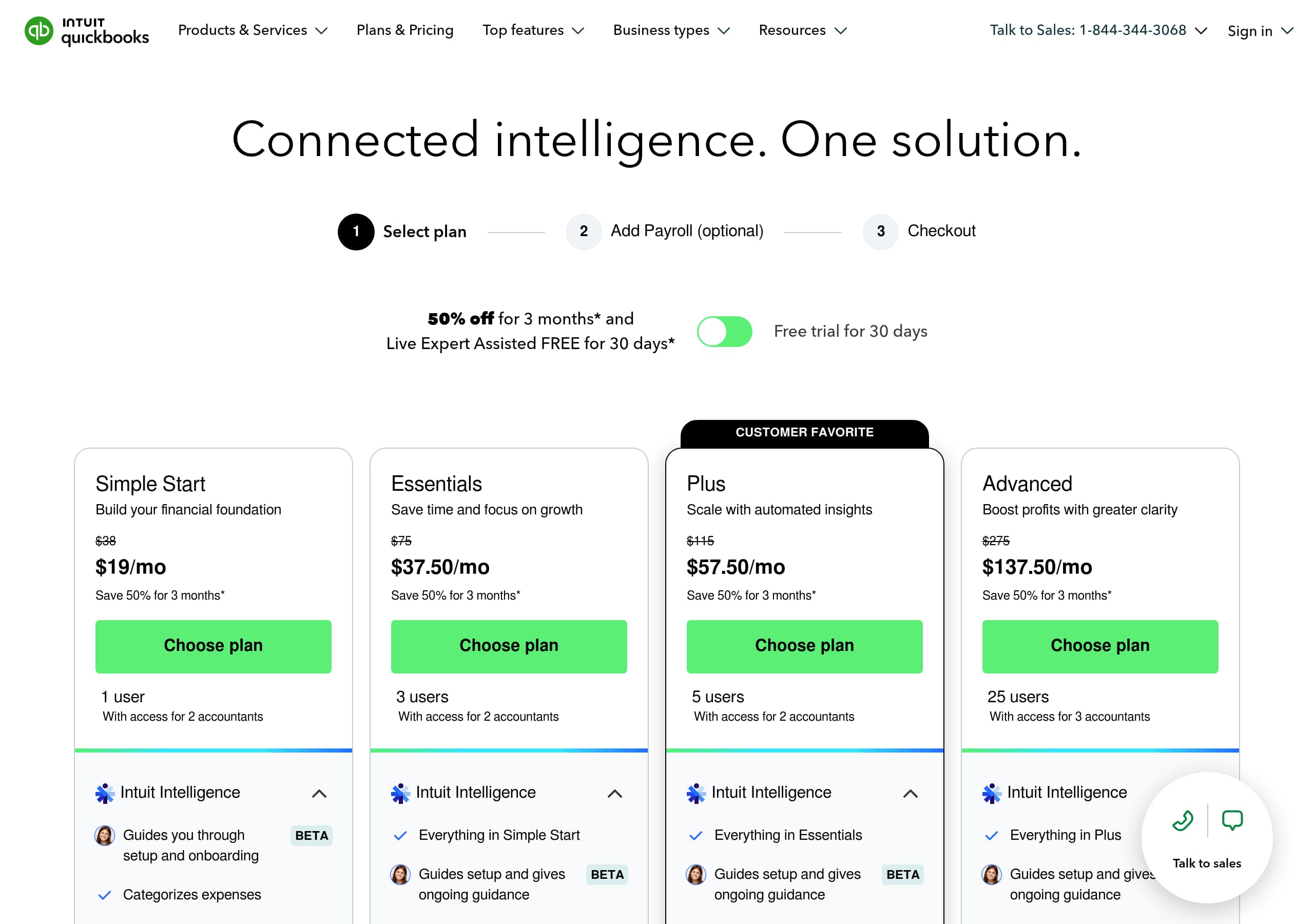
QuickBooks’ pricing experience is optimized for breadth (many product lines) while still pushing visitors toward a single decisive action: pick a plan and purchase.
Clear next step from multiple entry points
The homepage repeatedly links to “See plans & pricing”, and the nav includes Plans & Pricing, which reduces hunt time. A parallel path—Talk to Sales: 1-844-435-1151 with defined hours—supports higher-ACV buyers and visitors with complex needs (Payroll, Payments, multi-user, accountant collaboration).
Likely pricing-page structure (from the screenshot)
The pricing layout appears card-based, with plan tiles and a prominent top bar. The key conversion pattern is consistent with Intuit’s approach: a primary CTA per plan (e.g., buy/start), a visible promo condition (the 50% off for 3 months offer), and comparison cues so buyers can self-qualify. This matches the site’s “Find a plan that fits you” guided framing, which is crucial when QuickBooks sells to multiple segments (solopreneurs, small businesses, accountants).
Tactics that improve conversion for multi-SKU products
QuickBooks mitigates complexity by:
- Using a guided selector (Help me choose a plan) rather than forcing feature-by-feature reading.
- Keeping the purchase action persistent (Buy now) to prevent scroll fatigue.
- Making “Important pricing details and product information” discoverable, which lowers refund risk and improves buyer confidence.
Where pricing clarity could still break down is in cross-product adjacency (Online vs Desktop vs Payroll vs Time). The site counters this by exposing product families in the header and footer and routing visitors back to plan-fit flows.
Key terms: Plans & Pricing, Help me choose a plan, 50% OFF for 3 months, Buy now, Talk to Sales, pricing details.
Features
QuickBooks frames its feature set as AI-driven workflows (“agents”) plus expert oversight, which maps directly to small-business jobs-to-be-done like getting paid, closing the books, and running payroll.
Strong feature narrative: automation with control
The “Your workload, unloaded” section breaks features into clear, digestible modules:
- Accuracy you can count on: agents categorize/reconcile, combine data, spot inconsistencies for expert review.
- Your business. Your control: users review and approve AI suggestions, reinforcing human-in-the-loop safety.
This combination addresses the main objection to accounting automation: fear of incorrect categorization or compliance mistakes. The UX explicitly says the user remains the final decision-maker.
Agent-based packaging is easy to scan
QuickBooks introduces named components that feel like productized capabilities:
- Customer Agent: scans email inbox, drafts follow-ups.
- Payments Agent: recommends payment strategies and invoice reminders to improve cash flow.
- Payroll Agent: collects time/attendance data and flags inconsistencies.
These are outcome-led descriptions (follow-ups sent, cash flow improved, payroll run faster) rather than feature jargon. The page also connects to the broader Intuit platform promise: “All new. All in one place” combining AI, experts, third-party apps, and business tools.
Ecosystem depth as a feature
“Over 800 integrations” is presented as a first-class feature, not a footnote. That’s important because QuickBooks often competes with Xero, FreshBooks, Wave, and Zoho Books on ecosystem compatibility—especially for payments, e-commerce, and CRM.
Key terms: AI automation, Customer Agent, Payments Agent, Payroll Agent, review and approve, 800 integrations.
Signup
QuickBooks’ signup path is designed to support both self-serve and sales-assisted onboarding, which is necessary given the product’s range (accounting, payroll, payments, time tracking, money tools).
Primary self-serve route: plan selection → purchase
The site repeatedly funnels users to “See plans & pricing” and “Buy now”, indicating a standard SaaS flow where plan choice precedes account creation and onboarding. The persistent CTAs reduce the chance that users read about features without taking action. The promo (50% off for 3 months) also functions as a time-limited nudge to complete checkout.
Guided fit reduces abandonment
The “Find a plan that fits you” module—“Answer a few questions… we’ll recommend the right fit”—is a notable onboarding assist. For QuickBooks, this is critical because the wrong initial plan (e.g., solopreneur vs multi-user accounting vs payroll add-ons) creates churn and support burden. A question-led selector is a proven UX pattern for complex SaaS catalogs.
Parallel assisted route: call or schedule
QuickBooks keeps Talk to Sales (1-844-435-1151) visible with defined sales hours, plus “Schedule now.” That’s a conversion win for:
- businesses migrating from QuickBooks Desktop
- companies needing Payroll + Payments bundling
- firms that want QuickBooks Online Advanced or accountant collaboration
Account access and support pathing
“Sign in” is present in the header, and “Get help signing in” routes to support. This protects returning-user conversion (retention) by minimizing login friction.
Key terms: Help me choose a plan, Buy now, See plans & pricing, Talk to Sales, Schedule now, Sign in.
Trust
QuickBooks builds trust by combining scale signals (“millions of businesses”), transparent support access, and explicit financial-services licensing disclosures that matter for payments and payroll.
Scale and credibility cues
The homepage includes “Trusted by millions of businesses worldwide,” which is a classic enterprise-scale trust marker. It’s reinforced by repeated review widgets (4.3/5 from 8,000+ reviews) and named testimonials that reference specific workflows (manual task reduction, close speed). That combination reduces skepticism around AI-led accounting claims.
Human oversight positioning (risk reduction)
QuickBooks explicitly states that users review and approve AI suggestions and can collaborate with experts or an accountant. This is a trust tactic disguised as a feature: it reassures buyers that automation won’t silently change books without review. The “expert assisted” theme also signals service-backed accountability—important for regulated categories like payroll tax and money movement.
Compliance/legal transparency in the footer
The excerpt includes a detailed disclosure: “Money movement services are provided by Intuit Payments Inc., licensed as a Money Transmitter by the New York State Department of Financial Services,” plus a link for license details and complaint handling (Texas customers). These specifics are unusually concrete for SaaS marketing pages and are particularly trust-positive for Payments.
Support and escalation clarity
The site offers multiple trust-preserving escalation routes:
- Visit support page
- “How can we help?”
- Sales phone number + hours
This reduces perceived risk for buyers who anticipate setup issues (bank connections, migrations, payroll). Trust here is not only security language—it’s operational reliability and access.
Key terms: Trusted by millions, review and approve, expert assisted, Intuit Payments Inc., Money Transmitter, support page.
Footer
The QuickBooks footer is built as a full sitemap for a product ecosystem, and it doubles as a compliance and brand-trust hub—especially important for a finance platform under Intuit.
Footer as ecosystem navigation
The footer exposes a dense set of pathways across Products, Features, Resources, and Partners. Notably, it lists many distinct QuickBooks entities (QuickBooks Online, QuickBooks Desktop, QuickBooks Enterprise, QuickBooks Online Payroll, QuickBooks Payments, QuickBooks Time, QuickBooks Money). This breadth helps with SEO and user recovery: visitors who didn’t find their exact need in the header can re-route without pogo-sticking back to Google.
Strong retention and support links
“Learn & Support” includes Product support, Tutorials, Blog, and utilities like Free invoice generator, invoice templates, and calculators (paycheck, sales tax, payments cost). These tools are conversion assists (lead capture and remarketing) and also reduce pre-purchase anxiety by letting users test artifacts (invoice templates) before buying.
Partner and accountant motions are explicit
The footer contains “For accountants,” “For developers,” “Find a partner,” and the ProAdvisor/Accountant-related paths referenced in the header. This is a clear signal that QuickBooks is a platform with an implementation channel, not just a single SMB app—helpful for higher-consideration buyers.
Legal, trademarks, and compliance density
The bottom area includes Terms of Service, Licenses, Accessibility, Privacy, Security, country selectors, and trademark statements (QuickBooks, TurboTax, Credit Karma, Mailchimp). The presence of money transmission licensing text is a trust amplifier for Payments and payroll-adjacent features.
Key terms: sitemap footer, Resources, Partners, Licenses, Privacy, country selector.
Detected tech stack
Tools and technologies we detected on QuickBooks's site. Detection is best-effort and may be incomplete.
Scores
Our framework scores for QuickBooks's website in terms of clarity, conversion, and trust. See our methodology for how we calculate these.
How clear the value prop and structure are.
How conversion-friendly signup and pricing are.
How well trust and compliance are surfaced.
FAQ
QuickBooks routes visitors to “Plans & Pricing” and reinforces that step with repeated “See plans & pricing” CTAs across the homepage. The site also highlights a time-bound promotion (50% off for 3 months) and keeps “Buy now” visible to reduce drop-off. For higher-consideration buyers, it offers a parallel path via “Talk to Sales” with posted sales hours.
The homepage combines an immediate offer (50% off for 3 months) with persistent “Buy now” and “See plans & pricing” CTAs, so users always have a next step. It supports the value proposition with quantified proof (4.3/5 from 8,000+ reviews) and named testimonials that reference Intuit Assist and time savings, validating the AI messaging early.
QuickBooks repeats a consistent rating widget (4.3/5 based on 8,000+ reviews) and pairs it with named customer quotes and business names. It also includes a specific perception metric: 74% of customers say Intuit Assist gives a better view of financial health. This combination of scale (review volume) and detail (quotes tied to workflows) makes the proof more believable.
QuickBooks emphasizes AI-driven workflows and human oversight. It describes AI agents that categorize and reconcile transactions, draft lead follow-ups (Customer Agent), recommend invoice/payment strategies (Payments Agent), and streamline payroll by collecting time and attendance data (Payroll Agent). It also highlights platform breadth with “Over 800 integrations,” positioning QuickBooks as an ecosystem.
QuickBooks supports both self-serve and assisted onboarding. Self-serve users are funneled through “See plans & pricing” and “Buy now,” while uncertain buyers can use “Help me choose a plan,” which recommends a fit after a few questions. Assisted onboarding is available via “Talk to Sales” and scheduling options, plus support links for sign-in issues.

The world's best-performing SaaS businesses share surprisingly similar patterns. We help you learn and apply them through our human-designed methodology, with AI-assisted research.