
Key takeaways
Here are the key insights from our website breakdown analysis of Rippling.
Rippling’s homepage wins by framing the product as a single “workforce operating system,” then immediately proving it can unify HR, IT, Payroll, and Finance through shared data, permissions, and automation.
The site uses dual-path conversion ("Create free account" and "Get a demo") to capture both self-serve SMB intent and enterprise buying committees without forcing a single motion.
Navigation is built like a product catalog (HR/IT/Finance/Global/Platform) with deep submenus and “All products” groupings, which improves findability for many high-intent searches (e.g., Global Payroll, Employer of Record).
Social proof is layered: third-party ratings (Software Advice 4.9, Capterra 4.9, PC Magazine Editor’s Choice) plus named customer stories (Chess.com, Y Combinator, Barry’s) and quantified outcomes (e.g., “90-second onboarding,” “save 40 hours”).
Rippling differentiates “all-in-one” credibly by emphasizing shared underlying data, role-based permissions, and workflow automation, rather than only listing bundled modules.
The footer reinforces enterprise readiness with explicit legal entities and licensing numbers (insurance, payments, lending), plus Security & Data Protection and System Status—trust elements many HR/payroll buyers look for before booking a demo.
Home
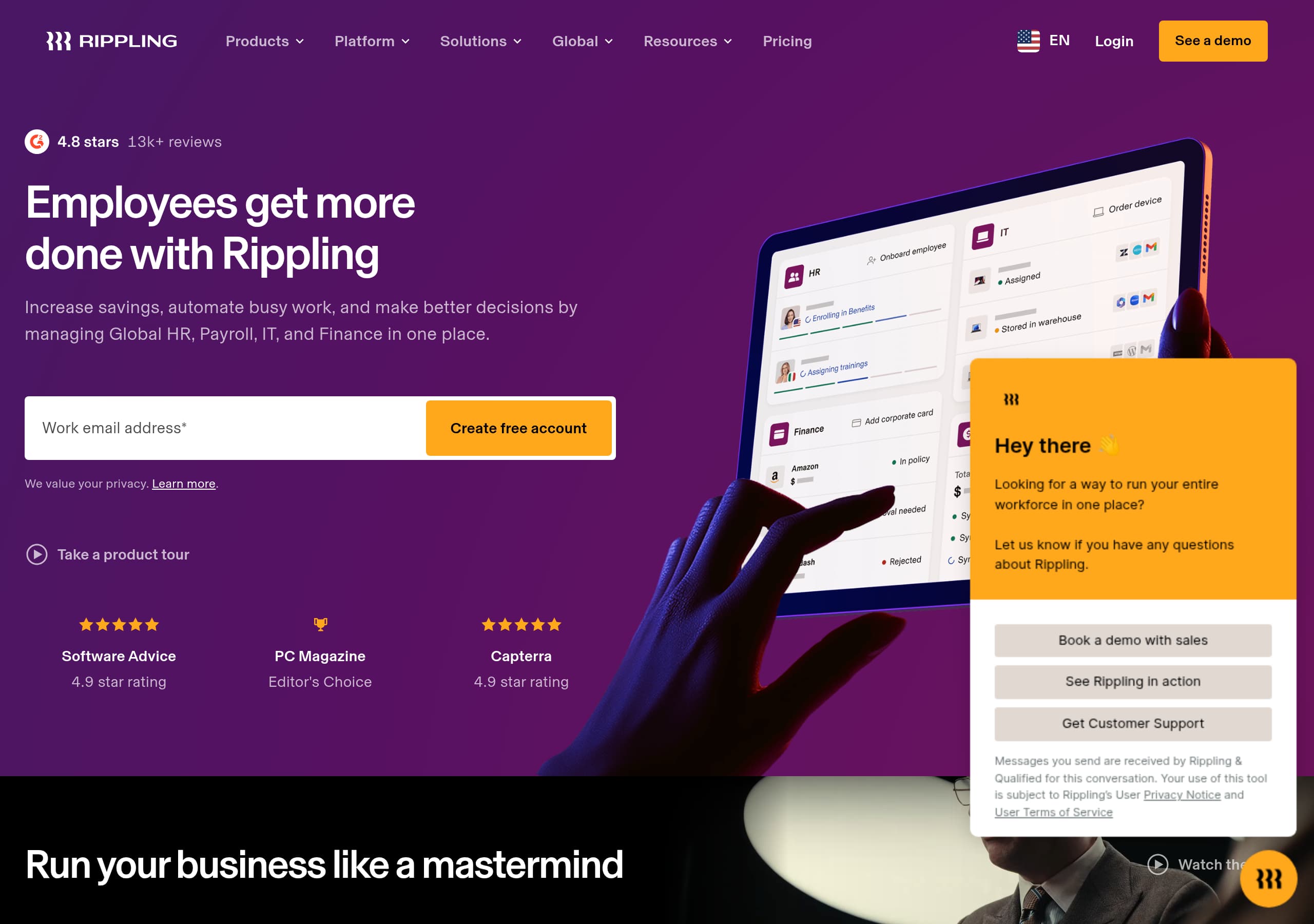
Rippling’s homepage is optimized around a single, memorable positioning—“#1 Workforce Management System” and “operating system for your entire workforce”—and then backs it up with specific cross-functional outcomes. The key takeaway: the hero doesn’t just say “all-in-one”; it tells you what unification enables (automation, savings, better decisions) and offers immediate next steps.
What’s working in the hero and above the fold
- The primary headline focuses on outcomes: “Employees get more done with Rippling,” followed by a concrete scope: managing Global HR, Payroll, IT, and Finance “in one place.”
- Conversion is immediate: an email field plus dual CTAs (“Create free account” and “Take a product tour”), alongside privacy reassurance (“We value your privacy”).
- Third-party badges are visible near the hero (Software Advice 4.9, Capterra 4.9, PC Magazine Editor’s Choice), reducing perceived risk before a visitor scrolls.
Messaging that reduces ‘all-in-one’ skepticism
Rippling explicitly contrasts itself with other suites: “Unlike most ‘all-in-one’ platforms that simply bundle tools…” then explains the differentiator—deep underlying data, controls, and AI capabilities shared across products. This is reinforced with concrete platform primitives: Workflow Studio, Analytics, Policies, Permissions, and Integrations.
Information architecture supports many entry points
The mega-navigation is structured by department (HR/IT/Finance/Global/Platform) plus “Solutions” by industry and company size. That layout mirrors how buyers search (e.g., “Global Payroll,” “Contractor of Record,” “Time & Attendance”) and supports SEO breadth without diluting the main story.
Key terms: workforce management system, Create free account, product tour, shared data, role-based permissions, Workflow Studio.
Pricing
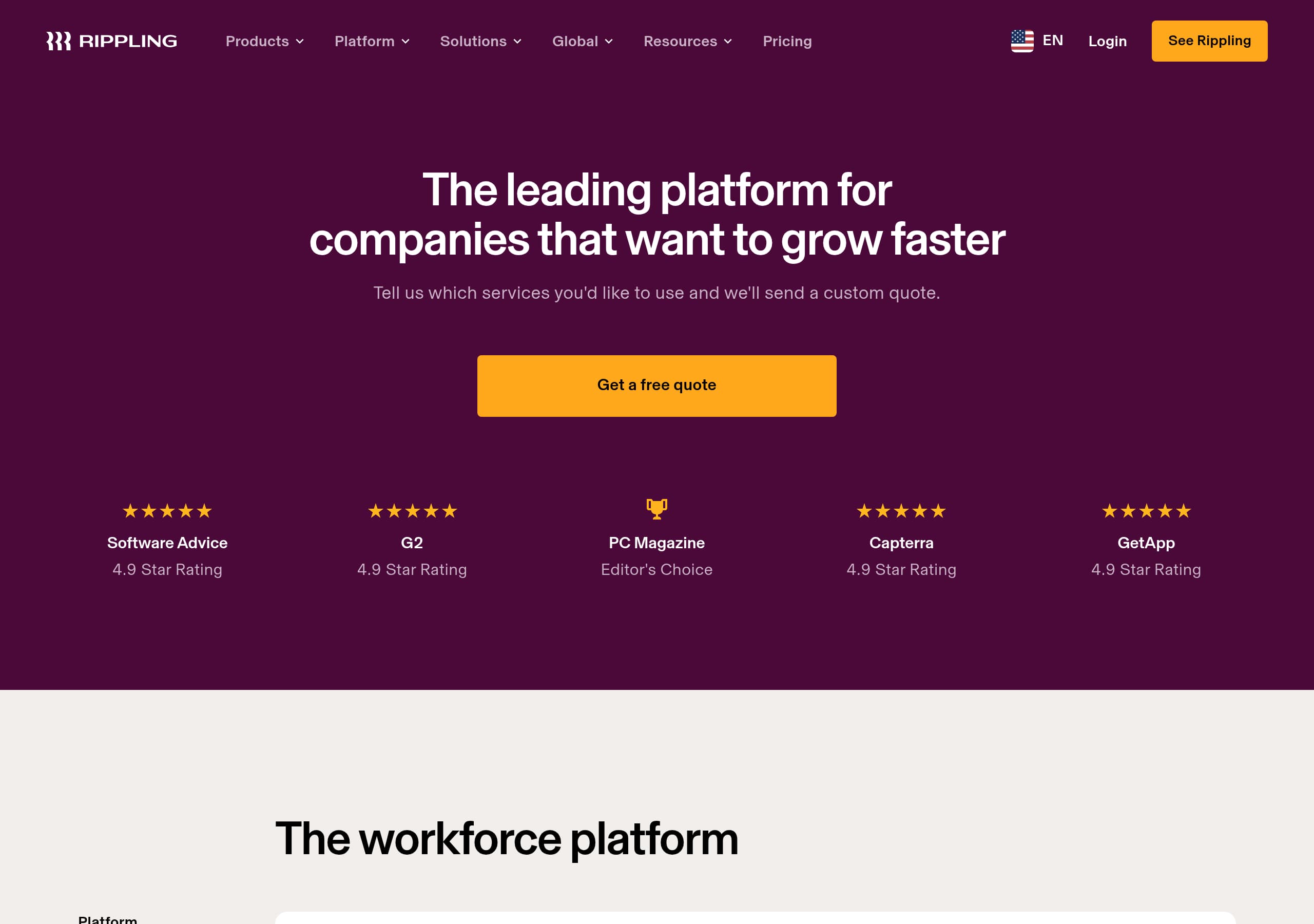
Rippling’s pricing approach is designed to keep the “platform + modules” story intact while still giving buyers a clear path to evaluate cost. The key takeaway: instead of a single public flat-rate, Rippling uses pricing as a qualification and packaging surface—pushing visitors to select products and talk to sales—while still offering enough structure (modules, categories, and global products) to set expectations.
What the pricing UI signals (based on the Pricing screenshot + site structure)
- Pricing appears organized around product families (HR, Payroll, IT, Finance, Global), consistent with the main navigation. This reduces confusion in a multi-product suite where “pricing” could otherwise be ambiguous.
- The repeated CTAs across the site (“Get a demo,” “See a demo,” and sometimes “Create free account”) indicate a sales-assisted motion for most packages, likely with configuration-based pricing (employee count, countries, modules).
- The site frequently uses “All [category] products” patterns, which typically map to “build your plan” packaging rather than a single-tier grid.
Why this works for Rippling’s buyer and product reality
Workforce platforms have real variability: payroll frequency, multi-state or multi-country taxes, device fleet size, identity providers, spend controls, and compliance requirements. By keeping pricing modular, Rippling can anchor value around outcomes (automation, consolidation, reduced risk) instead of competing purely on per-employee pricing against alternatives like Gusto, Deel, BambooHR, UKG, ADP, or Workday.
What would make pricing even more conversion-friendly
- Add 2–3 example bundles (e.g., “Startup HR + Payroll,” “IT + Identity + Devices,” “Global EOR”) with illustrative ranges.
- Provide a transparent “starting at” for one flagship module (often Payroll or HRIS) to capture comparison shoppers.
Key terms: modular pricing, Get a demo, packaging, Global Payroll, Employer of Record, configuration-based pricing.
Features
Rippling’s features presentation is unusually effective for a broad suite because it organizes complexity around platform primitives and department apps, then explains how they interlock. The key takeaway: the site doesn’t rely on a giant feature checklist; it repeatedly ties features to shared infrastructure—data, permissions, workflows, integrations—so the suite feels coherent.
Two-layer feature model: apps + platform capabilities
Rippling gives visitors two mental models:
- Department products: HR, IT, Finance, Payroll, plus Global modules (Employer of Record, Global Payroll, Global Contractors, Contractor of Record, Global Benefits, Global Spend).
- Platform capabilities: Workflow Studio, Analytics, Policies, Permissions, Integrations, and App Studio.
This matters because buyers often start with one pain (e.g., payroll) but expand later. The “Start with the apps you need, or run them all together” section explicitly supports land-and-expand.
Differentiation through data and control plane
Feature copy makes specific claims about internal architecture:
- “Products share incredibly deep underlying data, controls, and AI capabilities.”
- Workforce context (roles, org charts, reporting lines) attaches to each employee, enabling “smarter automation” and “cleaner reporting.”
- Role-based logic for permissions and approvals is defined once and enforced across apps.
These are concrete platform differentiators compared to stitched-together suites, and they resonate with IT/security stakeholders.
Automation is presented end-to-end (not single-task)
Examples describe workflows spanning multiple departments: onboarding, payroll, performance, device issuance, and corporate cards “instantly and without switching systems.” This is a subtle but powerful feature framing: Rippling is selling process orchestration, not isolated tools.
Customization without heavy engineering
“App Studio” (no-code) plus “engineer-built custom apps” (Solutions) creates a compelling combo: self-serve customization with an escape hatch for complex processes.
Key terms: Workflow Studio, Analytics, Policies, Permissions, App Studio, end-to-end workflows.
Signup
Rippling’s signup flow is designed to capture intent quickly while preserving an enterprise-friendly sales motion. The key takeaway: the homepage uses a low-friction email capture (“Create free account”) but keeps the higher-commitment path (“See a demo”) consistently available, which aligns with mixed audiences—from startups to enterprises.
What’s observable in the CTA structure
- The hero includes a required “Work email address” field and a prominent Create free account button.
- Secondary evaluation paths are present: “Take a product tour,” “Watch the video,” and repeated “Get a demo” buttons across product sections.
- The site repeats “Request live demo” and “Watch tour video” language later, suggesting two onboarding modes: live sales-led demos and on-demand walkthroughs.
Why this fits the category
Workforce management touches sensitive data (payroll, identity, devices, benefits). Many buyers won’t complete a purely self-serve checkout without validation around compliance, implementation, and integrations. Rippling’s flow acknowledges that reality by:
- Using email capture as a lightweight commitment.
- Providing extensive product menus and resources so buyers can self-educate before talking to sales.
- Using privacy reassurance near forms (“We value your privacy”) to reduce hesitation.
Potential friction points (and why they may be intentional)
- “Create free account” implies self-serve, but many Rippling deployments still require configuration, approvals, and sometimes sales involvement. If the post-email steps are longer than expected, mismatch can occur.
- That said, the presence of “See a demo—live or on demand” mitigates expectation risk by offering clarity: you can evaluate without fully “signing up.”
Tactical improvements that would increase conversion
- Add a 1–2 line “what happens next” beneath the email field (e.g., “Instant access to a guided tour” vs “We’ll schedule your demo”).
- Provide a short selector (“I’m here for HR / Payroll / IT / Global”) to route to relevant flows.
Key terms: Create free account, See a demo, product tour, work email capture, live or on-demand demo, privacy reassurance.
Trust
Rippling builds trust by combining third-party validation, enterprise-grade product claims, and operational transparency links that are easy to find. The key takeaway: trust isn’t confined to a single “security” page—Rippling spreads risk-reducers across the homepage, navigation, and footer, which matches how HR/payroll buyers evaluate vendors.
Trust signals visible during primary browsing
- Third-party review badges (Software Advice 4.9, Capterra 4.9) and PC Magazine Editor’s Choice appear near the hero, before users are asked to commit.
- Testimonials include senior titles (VP of People, Director of Employment Compliance), signaling the product is used in compliance-heavy environments.
Enterprise-ready platform claims (specific, not vague)
Rippling’s copy stresses mechanisms that matter to security and audit stakeholders:
- Shared permissions and access controls with dynamic, role-based logic.
- Policies that “enforce company rules automatically.”
- IT positioning around “identity, access, and devices,” suggesting alignment with common controls (joiner/mover/leaver, device inventory, access provisioning).
- Analytics claims like “join and pivot data” and “calculated fields,” implying mature reporting beyond basic dashboards.
Compliance and transparency via global + regulated offerings
Rippling sells regulated-adjacent products (payments, insurance services, lending) and global employment solutions (Employer of Record, Contractor of Record). That typically increases due diligence requirements, so it helps that the site includes a dedicated “Security & Data Protection” link and “System Status” in the footer.
Where trust could be even stronger on top-level pages
- Surface security attestations (e.g., SOC 2 Type II, ISO 27001) directly in-site if available, not just in a linked page.
- Add an implementation assurance element near demos (e.g., “guided onboarding,” “migration support”), since switching payroll/HRIS is perceived as risky.
Key terms: Security & Data Protection, System Status, role-based access, policies enforcement, identity and device management, global compliance.
Footer
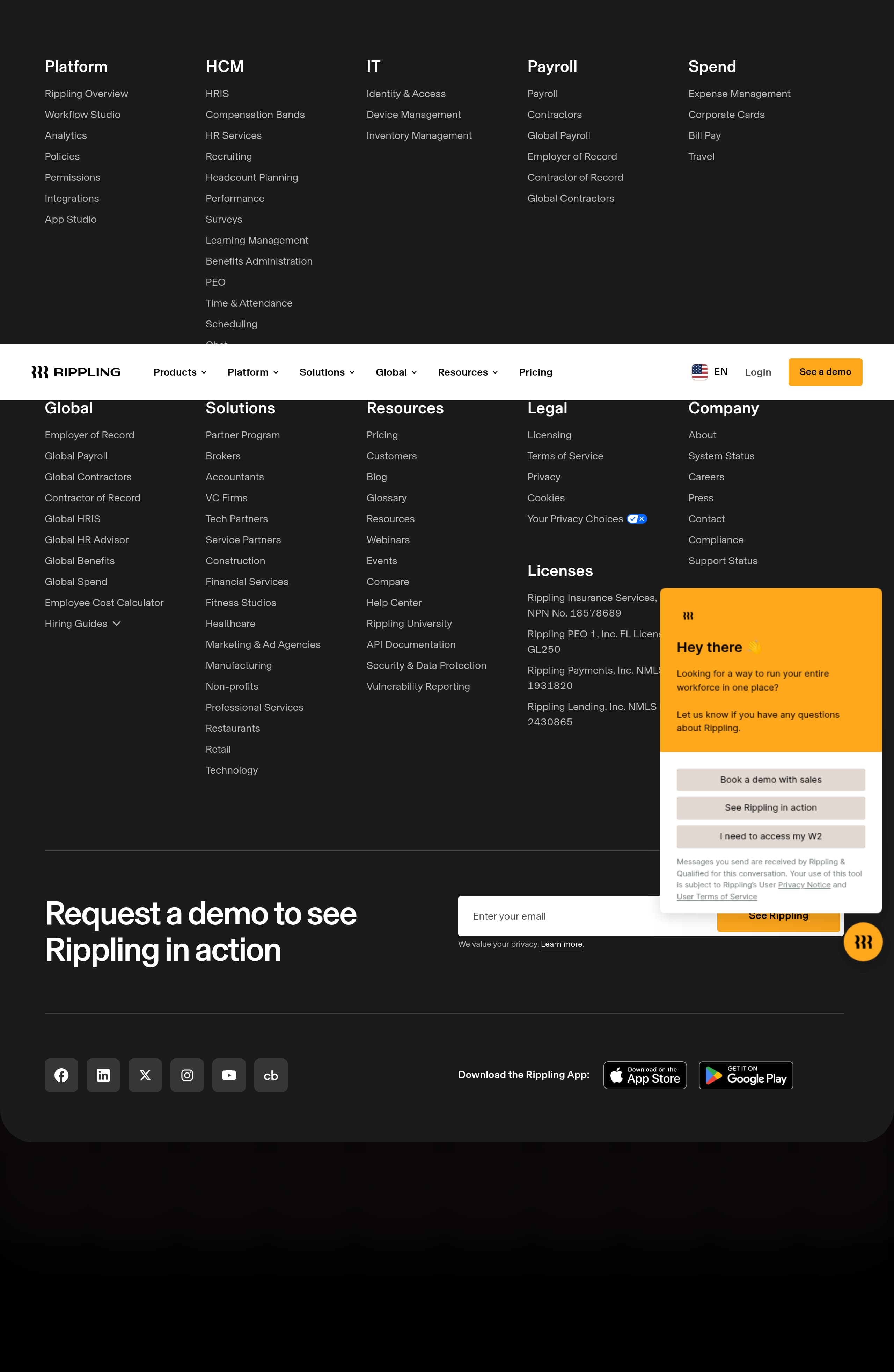
Rippling’s footer is built for enterprise evaluation: it’s dense, highly scannable, and includes legal, compliance, and product discovery links that reduce procurement friction. The key takeaway: the footer doubles as a trust and navigation hub—especially important for a multi-product platform where visitors may land on any page from search.
Strong information architecture and findability
The footer groups links into clear buckets that mirror the site’s structure:
- Platform capabilities (Overview, Workflow Studio, Analytics, Policies, Permissions, Integrations, App Studio)
- Product suites (HCM/HRIS, Recruiting, Benefits Administration, Time & Attendance, Scheduling, IT Identity & Access, Device Management, Payroll variants, Spend tools)
- Global products (Employer of Record, Global Payroll, Contractor of Record, Global HRIS, Global Benefits)
- Resources (Pricing, Customers, Blog, Glossary, Webinars, Events, Compare)
This is a practical SEO pattern: it reinforces internal linking to high-intent pages (e.g., “Global Payroll,” “API Documentation”) and helps buyers jump directly to evaluation content.
Trust and governance details are unusually explicit
The footer includes:
- “Security & Data Protection” and “Vulnerability Reporting” links.
- Legal pages (Terms of Service, Privacy, Cookies, Your Privacy Choices).
- “System Status” and “Support,” which signals operational maturity.
- Multiple regulated entity disclosures with license identifiers, including:
- Rippling Insurance Services, Inc. (NPN No. 18578689)
- Rippling Payments, Inc. (NMLS No. 1931820)
- Rippling Lending, Inc. (NMLS No. 2430865)
These details are powerful for trust because they’re verifiable and suggest compliance readiness.
Conversion remains present—even in the footer
A final CTA area (“Request a demo to see Rippling in action” + email field) captures bottom-of-page intent without forcing users to scroll back.
Key terms: Security & Data Protection, Vulnerability Reporting, API Documentation, System Status, license numbers, footer demo CTA.
Detected tech stack
Tools and technologies we detected on Rippling's site. Detection is best-effort and may be incomplete.
Scores
Our framework scores for Rippling's website in terms of clarity, conversion, and trust. See our methodology for how we calculate these.
How clear the value prop and structure are.
How conversion-friendly signup and pricing are.
How well trust and compliance are surfaced.
FAQ
Rippling’s homepage pairs a clear platform promise (“manage Global HR, Payroll, IT, and Finance in one place”) with immediate next steps: a work-email field for “Create free account,” plus options to take a product tour or request a demo. It also places credibility near the hero using third-party ratings (Capterra 4.9, Software Advice 4.9) and PC Magazine Editor’s Choice.
Rippling’s pricing experience is oriented around modules and product families rather than a single flat plan. The site organizes offerings across HR, IT, Finance, Payroll, and Global products, and frequently routes users to “Get a demo” for configuration-based quotes. This fits workforce management buying, where pricing varies by headcount, countries, payroll complexity, and selected features.
Rippling supports two evaluation motions: self-serve and sales-led. The hero includes a work email field and “Create free account,” while the navigation and product sections repeatedly offer “See a demo” and “Get a demo,” including live or on-demand options. Privacy reassurance appears near forms, which helps reduce friction when visitors are sharing company email addresses.
Rippling combines independent review signals and named customer validation. On the homepage it displays Software Advice and Capterra 4.9-star ratings plus PC Magazine Editor’s Choice. It also features testimonials with names and titles (e.g., VP of People at Chess.com, Director of Employment Compliance at Y Combinator) and customer stories that highlight quantified outcomes like hours saved and faster onboarding.
Rippling emphasizes platform controls that matter to enterprise stakeholders, including role-based permissions, policy enforcement, and identity/device management. The site makes governance links easy to find (Security & Data Protection, Vulnerability Reporting, System Status) and includes explicit legal and licensing disclosures in the footer for affiliated entities (insurance, payments, lending), which supports procurement and compliance review.

The world's best-performing SaaS businesses share surprisingly similar patterns. We help you learn and apply them through our human-designed methodology, with AI-assisted research.