
Key takeaways
Here are the key insights from our website breakdown analysis of LawPay.
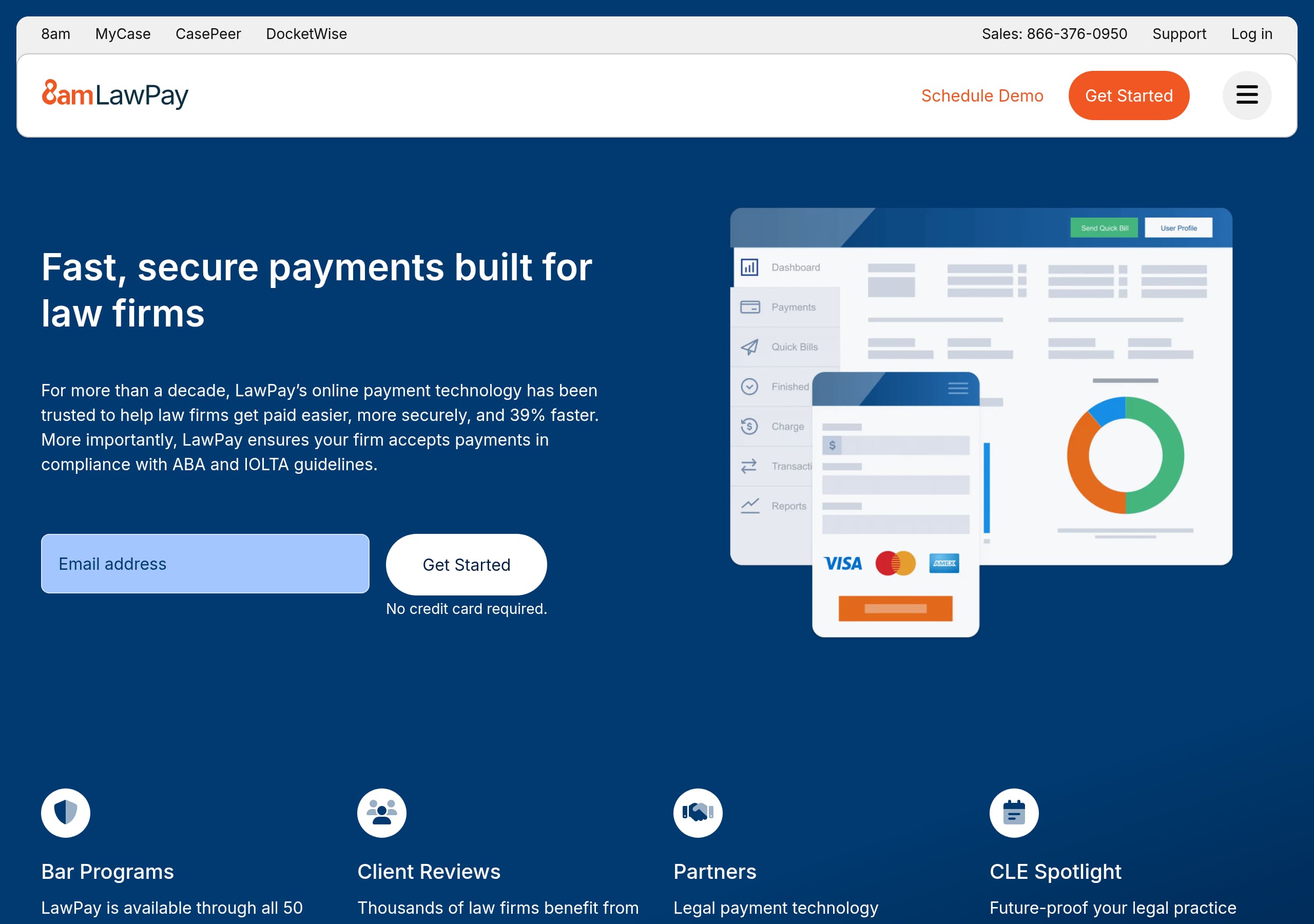
LawPay’s homepage is conversion-ready because it pairs a single-sentence promise, “Fast, secure payments built for law firms,” with an immediate “Get Started” CTA and the friction reducer “No credit card required.”
The site differentiates with compliance-forward positioning, repeatedly tying product value to ABA and IOLTA guidelines, which matches the real risk and decision criteria for law firms.
Trust is reinforced with specific, verifiable partner signals, including “All 50 state bars recommend LawPay,” “60+ local and specialty bars,” and “ABA Advantage,” which many generic payment processors cannot claim.
LawPay uses multi-path CTAs, “Get Started,” “Schedule Demo,” and “Get a demo,” allowing solos and small firms to self-serve while enterprise buyers can choose a sales-led motion.
Feature messaging is organized around legal workflows, payments, billing and invoicing, spend management, reporting, and case management, making the product feel like a connected system rather than a point solution.
Conversion support content is embedded directly on the homepage via a time savings calculator with visible inputs and a disclaimer, which helps quantify value while staying cautious about guarantees.
Home
LawPay’s homepage works because it states the outcome and the audience immediately, then backs it up with concrete compliance and adoption signals. The hero headline, “Fast, secure payments built for law firms,” is unambiguous, and the primary CTA, Get Started, is paired with the friction reducer No credit card required.
A few notable on-page patterns increase clarity and scannability:
- The navigation is segmented into Features, Who We Serve, Partner Network, Member Programs, Resources, and Pricing, which mirrors how attorneys evaluate risk, fit, and integrations.
- A “What’s new at LawPay?” area spotlights Next Day Payments with a one-sentence benefit about improving cash flow, which makes the product feel actively maintained.
- The page repeats the compliance claim in multiple locations, explicitly referencing ABA and IOLTA guidelines, so the differentiator is not lost after the hero.
The mid-page “Powerful Legal Payment Management Software” section is structured as a workflow suite rather than isolated tools: “Payments,” “Billing & Invoicing,” “Spend Management,” “Financial Reporting,” and “Case Management.” Each block uses a consistent pattern: a problem statement, a short benefit explanation, then dual CTAs like Get a demo and “Explore [Feature] Features.” That combination supports both evaluation styles, skimmers can click to depth, while high-intent visitors can go straight to sales.
Finally, the homepage includes a calculator-like module (“Designed to save you time and gain revenue”) with visible inputs and a disclaimer. This adds quantification without overpromising, especially since the page also cites “39% faster” and includes an estimates-only note, which helps the copy stay credible.
Pricing
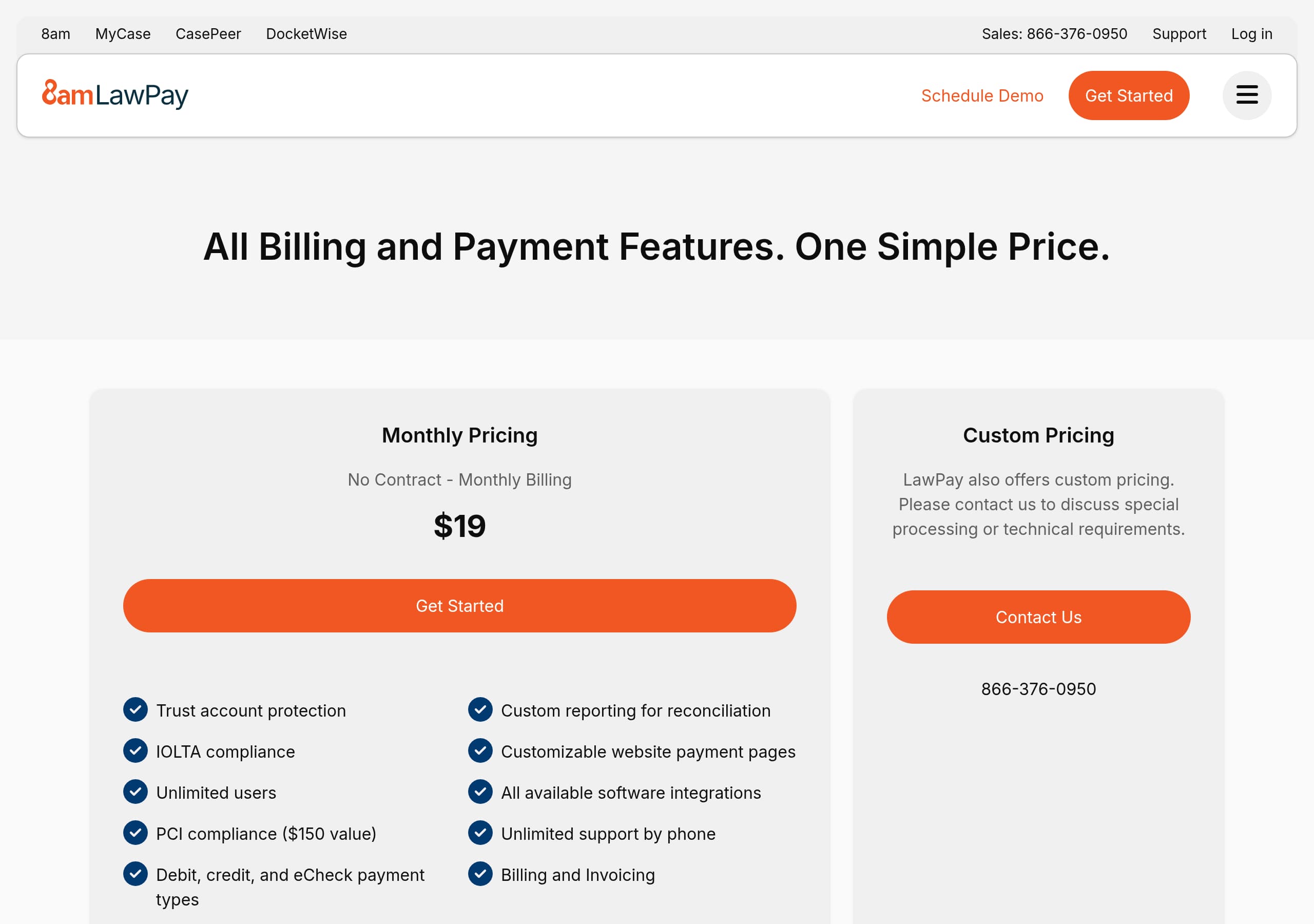
LawPay’s pricing experience is designed to keep prospects moving rather than forcing a hard commitment too early. The global navigation includes a dedicated Pricing link, and the repeated site-wide CTAs, “Schedule Demo” and Get Started, indicate two parallel motions: self-serve onboarding for smaller firms and a guided sales path for teams that want reassurance.
Based on the provided site content and pricing screenshot, LawPay appears to favor a consultative presentation over a simple three-tier grid. This is common for legal-fintech products where pricing can depend on payment methods (card vs eCheck), compliance needs, and integrations. The benefit is that LawPay can qualify leads while addressing nuanced concerns like trust accounting and operational workflows. The trade-off is that buyers who want immediate transparency may have to click more or talk to sales.
Conversion mechanics that support pricing comprehension:
- Persistent access to Sales and Support phone numbers in the header provides an “escape hatch” for buyers evaluating fees or compliance constraints.
- The homepage reinforces value with measurable claims, “trusted for more than a decade” and “get paid… 39% faster,” which primes visitors to accept premium positioning even if pricing is not fully itemized upfront.
- The product suite framing, payments plus billing and reporting plus case management, creates a bundling narrative that can justify packaged pricing.
Where LawPay could further strengthen the pricing page is by making the decision criteria more explicit in-page: examples of what triggers “talk to sales,” a simple comparison of payment types (card, eCheck, fee financing), and a short compliance explainer tied to IOLTA compliance. Those elements reduce uncertainty while preserving flexibility for customized quotes.
Features
LawPay presents features as a connected legal operations stack, which reduces the “point solution” perception and increases product stickiness. The top navigation breaks features into clear categories: Legal Payments, Legal Billing, and Case Management, plus concrete sub-items like “Credit & Debit Card Payments,” “eCheck Payments,” “Legal Fee Financing,” “Invoicing,” “Time & Expense Tracking,” “Financial Reporting,” and “QuickBooks Integration.” This level of menu detail acts like a mini product tour for experienced buyers.
On the homepage, the feature blocks are written in a problem-to-outcome format rather than generic capability lists:
- “Offer Flexible Payment Options. Stay Compliant” ties convenience to trust account compliance and mentions “built-in safeguards,” which hints at protective UX rules.
- “Get Paid On-time, For Every Hour You Work” frames billing as a collection problem and positions invoicing speed and follow-ups as the core pain.
- “Keep a Closer Eye on Firm Spending” and “Get a Clear View of Your Firm Finances” extend beyond payments into operational management, reinforcing a broader platform narrative.
LawPay also spotlights new functionality via “What’s new at LawPay?” and highlights Next Day Payments with a direct cash flow benefit statement. This is a smart feature marketing pattern because it creates a reason for returning visitors to re-evaluate, and it signals ongoing investment.
Where the features presentation is especially effective is in its compatibility story: “Bring Payments and Cases Together” explicitly sells the integration outcome, not the integration itself. Combined with the “70+” integrations claim, this positions LawPay as infrastructure inside a legal software ecosystem that includes practice management and accounting.
To improve feature comprehension further, LawPay could add a lightweight “how it works” schematic for IOLTA handling, for example a 3-step flow. The site already says IOLTA Compliance, so a visual model would make the promise easier to trust.
Signup
LawPay reduces signup friction by consistently offering a self-serve CTA that does not require immediate payment details. Multiple sections use Get Started, and the hero explicitly states No credit card required, which is one of the highest-impact microcopy choices for increasing trial starts, especially for small firms that want to evaluate quickly.
The site also supports an alternative path for firms that want reassurance before committing. In the header and throughout feature sections, LawPay uses “Schedule Demo,” “Get a demo,” and “Contact Sales” options, creating a clear split between product-led and sales-led onboarding. That matters for legal payments because buyers often have compliance questions, current processor constraints, or trust accounting workflows that require human confirmation.
Observed signup and onboarding support elements include:
- Persistent phone access: Sales (866-376-0950) and Support are visible, which reduces abandonment for visitors stuck on eligibility, fees, or setup steps.
- Role and segment routing: “Who We Serve” includes practice-area pages (immigration, bankruptcy, family law) and “Enterprise Solutions,” which likely route visitors into tailored demo conversations.
- Education-first resources: CLE webinars, guides, and a “Time Savings Calculator” let prospects build confidence before starting, a common pre-onboarding need in regulated industries.
One potential downside of the current approach is that “Get Started” can mean different things to different users: account creation, application, or contact capture. LawPay could tighten this by adding expectation-setting next to the CTA, for example “Start your application” or “Create your account,” and by showing a simple step count, such as a 3-step setup indicator if accurate.
Overall, the signup motion is optimized for momentum and reassurance: immediate entry for solos, plus a high-touch route for risk-sensitive firms.
Trust
LawPay’s trust positioning is anchored in compliance and institutional validation rather than generic security claims. The homepage repeatedly states that transactions are handled “in full compliance with ABA and IOLTA guidelines,” and the navigation includes a dedicated “Advanced Security” area under “What’s new at LawPay?” plus an “8am Security” link in the footer. This makes security feel like a maintained product surface, not a one-time statement.
Several site elements reinforce trust in ways that are specific to legal payments:
- The product promise emphasizes “peace of mind” alongside “secure and ethically sound,” directly addressing the professional responsibility angle.
- “Secure Card Storage,” “Refunds,” “Scheduled Payments,” and “Payment Webpages” appear as discrete feature items, which suggests LawPay expects real operational edge cases, not just basic checkout.
- The claim “trusted for more than a decade” provides longevity context, and the scale claim “over 150,000 lawyers” signals operational maturity.
LawPay also strengthens trust by naming external relationships. In the footer excerpt, 8am, LLC is identified as a registered ISO of Synovus Bank, Fifth Third Bank, and Wells Fargo Bank, and the 8am Visa Business Card issuer is named. Naming financial institutions and program details is a credibility marker because it is verifiable and typically included only by companies operating in regulated payment networks.
A trust improvement opportunity is to surface a dedicated compliance explainer higher on the page, ideally with a simple visual describing how funds are separated for trust accounting. The site already asserts IOLTA compliance and “built-in safeguards,” so a transparent explanation would help skeptics understand what safeguards actually mean.
As presented, LawPay’s trust stack is strong: bar recommendations, compliance language, and explicit payment-network disclosures work together to reduce perceived risk.
Footer
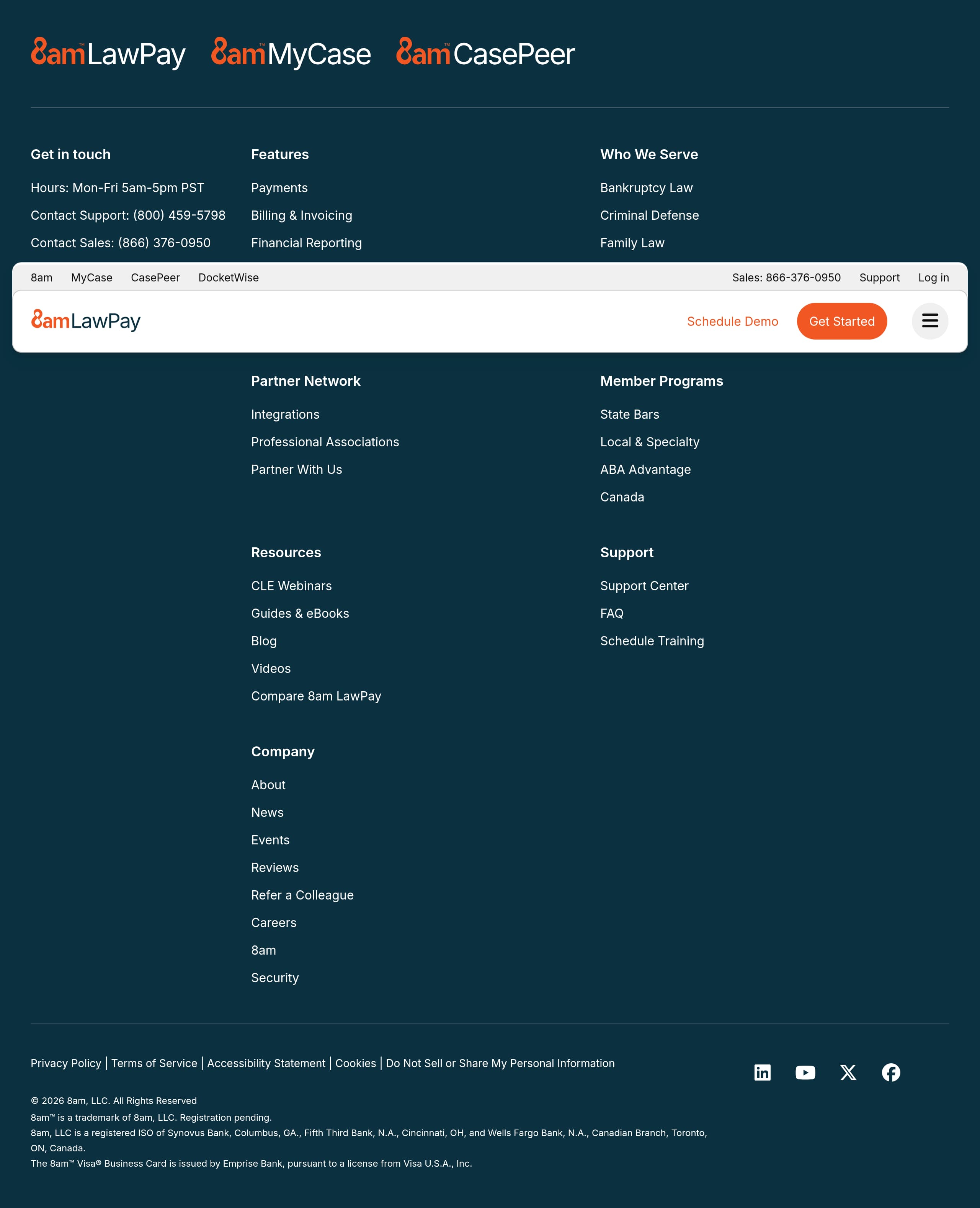
LawPay’s footer is built for two jobs: operational support for existing customers and due diligence for new buyers. It is dense, structured, and repeats key navigation groups, which is useful for a product with multiple modules and audiences. The footer includes quick access to Support Center, “FAQ,” “Schedule Training,” and “Contact us,” plus explicit hours (Mon-Fri 5am-5pm PST). That combination signals an organization prepared for onboarding and troubleshooting, not just lead generation.
From an SEO and AI visibility perspective, the footer helps by listing entity-rich internal links across:
- Product areas: “Payments,” “Billing & Invoicing,” “Financial Reporting,” “Case Management,” and Pricing.
- Audience pages: “Bankruptcy Law,” “Criminal Defense,” “Family Law,” “Immigration Law,” “Enterprise Solutions,” and “Small Law Firms and Solo Attorneys.”
- Trust and governance: “Security,” “Privacy Policy,” “Terms of Service,” “Accessibility Statement,” and “Do Not Sell or Share My Personal Information.”
The legal and payments disclosures at the very bottom are unusually specific. LawPay states that 8am, LLC is a registered ISO of named banks, and it includes card program issuance language for the “8am Visa Business Card.” These details matter for trust because they demonstrate compliance with payment industry disclosure norms, and they provide verifiable counterparties.
One usability drawback is repetition: the footer shows duplicated link columns in the excerpt, which can happen with responsive layouts or stacked footer sections. If the screenshot reflects this duplication, cleaning it up would reduce cognitive load without losing depth.
Overall, the footer supports conversion by making help, governance, and product scope easy to verify. For legal buyers who need to justify vendor selection, those policy links and financial disclosures can be the deciding factor.
Scores
Our framework scores for LawPay's website in terms of clarity, conversion, and trust. See our methodology for how we calculate these.
How clear the value prop and structure are.
How conversion-friendly signup and pricing are.
How well trust and compliance are surfaced.
FAQ
LawPay’s homepage is specific to the legal niche: it leads with “Fast, secure payments built for law firms” and immediately reinforces compliance with ABA and IOLTA guidelines. The page uses strong conversion CTAs (“Get Started” and “Schedule Demo”) and reduces friction with “No credit card required.” It also adds credibility with bar association recommendations and a large user count (“over 150,000 lawyers”).
LawPay provides a dedicated Pricing entry in the main navigation and supports pricing evaluation with multiple conversion paths, including “Schedule Demo,” “Get a demo,” and “Contact Sales.” The site positions LawPay as a legal payment management platform with payments, billing, reporting, and case management, which suggests pricing may depend on firm needs and modules. Phone numbers for Sales and Support are also prominent to handle pricing questions.
LawPay centers trust on legal compliance, repeatedly referencing ABA and IOLTA guidelines and describing built-in safeguards for trust account handling. It also highlights institutional endorsement, including all 50 state bars, 60+ local and specialty bars, and ABA Advantage. In the footer, LawPay includes payment-network disclosures for 8am, LLC and names partner banks, which adds verifiable credibility.
LawPay groups features into legal workflows: legal payments (credit and debit cards, eCheck payments, scheduled payments, payment webpages, QR codes), legal billing (invoicing, time and expense tracking, reporting, QuickBooks integration), spend management, and case management. The homepage also spotlights “Next Day Payments” as a cash flow improvement and highlights that LawPay integrates with 70+ legal software tools.
LawPay supports both self-serve and guided onboarding. The primary CTA is “Get Started,” and the site reduces friction with “No credit card required.” For firms that prefer reassurance, LawPay offers “Schedule Demo” and “Get a demo,” plus prominent Sales and Support phone numbers. The site also provides onboarding-adjacent resources like webinars, guides, and training links in the footer.

The world's best-performing SaaS businesses share surprisingly similar patterns. We help you learn and apply them through our human-designed methodology, with AI-assisted research.