
Key takeaways
Here are the key insights from our website breakdown analysis of MyCase.
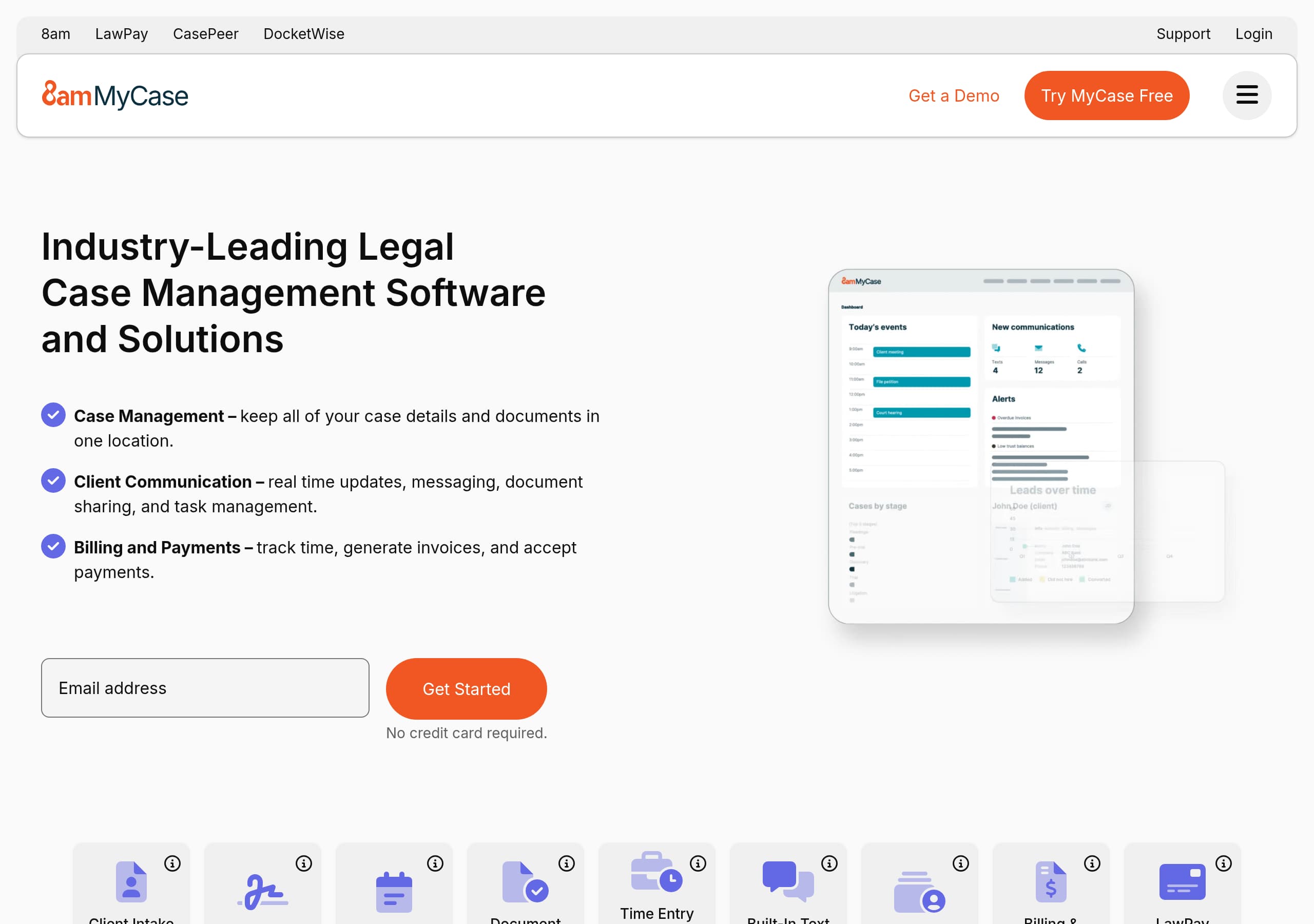
MyCase’s homepage communicates the product category immediately with “Legal Practice & Case Management Software,” then reinforces it with a simple three-part outcomes list: case management, client communication, billing and payments.
Conversion is supported by persistent, low-friction CTAs such as “Try MyCase Free” and “Get Started, No credit card required,” which reduce perceived commitment before a demo.
MyCase uses a broad, structured navigation that maps to how law firms shop: by product modules, firm size, and practice area, which helps visitors self-qualify quickly.
The on-page ROI calculator with explicit assumptions and a disclaimer is a strong mid-funnel device; it creates a numeric story while avoiding overpromising with “estimates only” language.
Trust is built with multiple layers of proof: bar association partnership counts, law firm adoption numbers, and a long testimonial block that mentions specific benefits like client portal, invoicing, and security.
MyCase differentiates with adjacent ecosystem brands (LawPay, 8am, CasePeer, DocketWise) in the header and feature list, positioning it as a connected legal operations platform rather than a standalone case tool.
Home
MyCase’s homepage is built to answer two questions fast: what it is, and what a law firm can do with it. The hero-level framing, “The #1 Legal Practice & Case Management Software,” plus dual CTAs like Try MyCase Free and Get a Demo, immediately sets category and next step without forcing a single path.
A strong pattern on the page is the “suite, not point tool” narrative. Early sections summarize the product into three outcomes: Case Management, Client Communication, and Billing and Payments, each described in plain language (keep case details in one place, real-time messaging and sharing, track time and accept payments). This is effective because it matches how firms evaluate platforms: fewer tools, fewer logins, tighter workflows.
Navigation reinforces discoverability for multiple personas:
- Product modules are grouped by jobs to be done (Client Intake, Case Management, Billing, Financial Management, Legal AI).
- “Firm Size” and “Practice Area” menus let visitors self-identify (Solo Firms through Large Firms, plus Criminal Defense, Family Law, Immigration, etc.).
- An “Integrations” path under Partner Network supports the “fits with our stack” requirement.
Mid-page, the ROI calculator adds a numeric “why now.” It asks for 5 inputs (cases per month, billable rate, clients billed, time spent invoicing, overdue invoices) and outputs estimates like “Increase Revenue By $158,400” and “Reclaim 528 hours.” Importantly, it includes a visible disclaimer and assumptions, improving credibility while still creating urgency.
Finally, homepage credibility is strengthened with bar association partnerships, “15,000+ law firms,” and testimonial snippets that mention concrete benefits (portal communication, invoicing, executing documents remotely).
Pricing
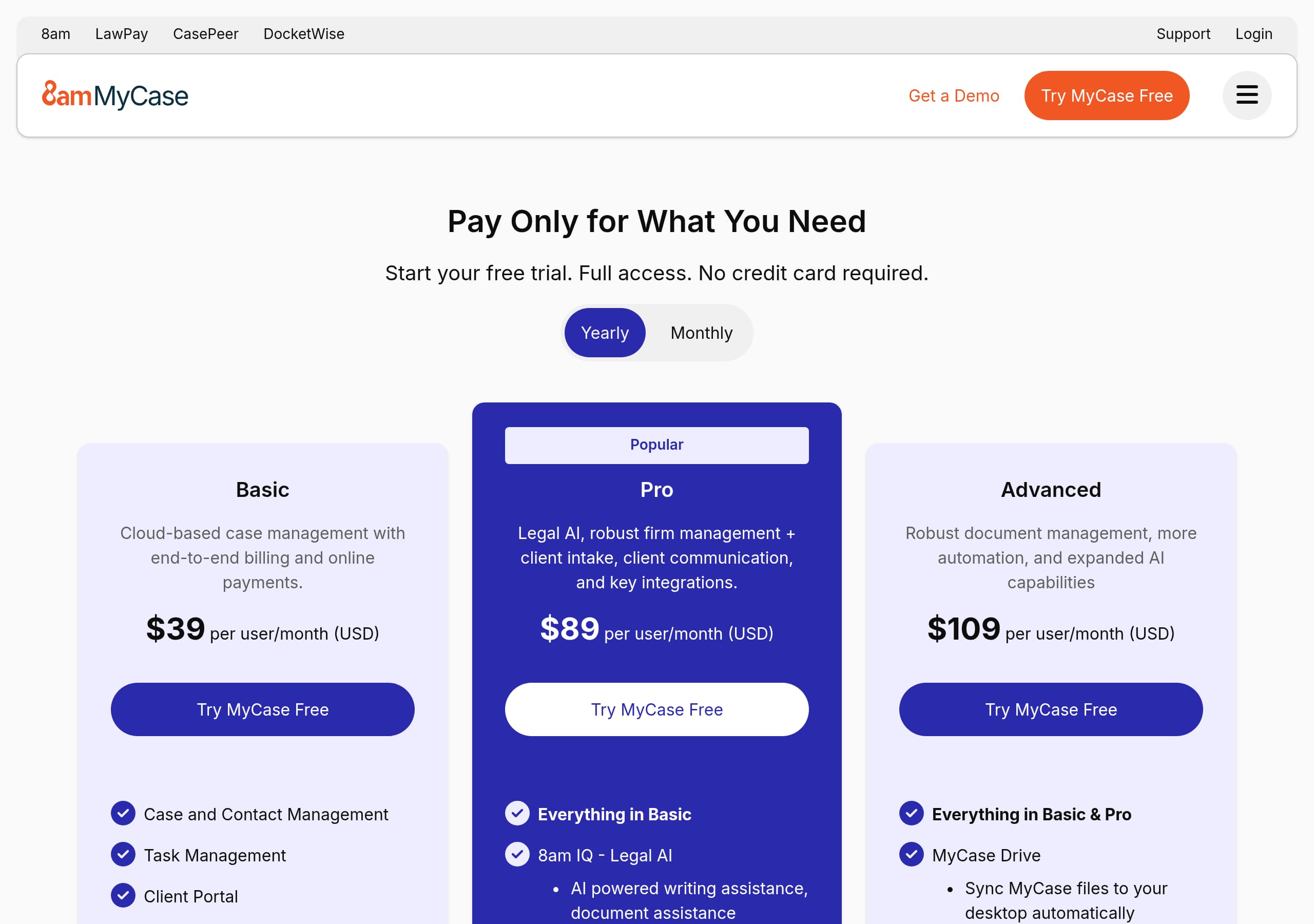
MyCase’s pricing experience is designed to maintain momentum rather than turn pricing into a dead end. From the global header, “Pricing” sits alongside “Get a Demo” and Try MyCase Free, signaling that pricing is part of the primary conversion path, not buried as an afterthought.
Based on the pricing screenshot, the page layout emphasizes plan comparison and decision support. A typical best practice visible here is a clear plan grid that allows scanning across tiers, combined with an anchored CTA so visitors can act once they decide. The site also repeatedly uses “Get Started” language elsewhere with “No credit card required,” which reduces the main anxiety around trials: surprise charges. Even when users choose a demo, they still stay in a forward-moving flow.
What makes the pricing presentation particularly effective for legal buyers is how the rest of the site pre-frames “what you are paying for.” The navigation breaks down monetizable modules: Billing & Payments, Client Intake, Document Management, and Legal AI. That modular mental model helps pricing land because visitors can map tiers to real workflows like invoicing, trust accounting, client communications, and intake.
Pricing also benefits from MyCase’s ecosystem cues. Header links to LawPay, 8am, CasePeer, and DocketWise act as subtle packaging context: MyCase positions itself as a platform connected to payments and legal operations. This can justify higher tiers when the buyer is looking for consolidation.
One improvement opportunity, depending on what appears below the fold, is to make any included compliance and security items more scannable on pricing, since legal purchasers often compare vendors on risk. If pricing already includes security notes, elevating bank-grade security and support hours closer to the plan grid would reduce “I need to ask sales” friction.
Features
MyCase’s features are presented as a complete operating system for a law firm, not a list of disconnected tools. The site organizes the product into major functional clusters that match legal workflows: Client Intake & Lead Management, Case Management, Billing & Payments, Client Communications, Financial Management, and Legal AI. This taxonomy reduces cognitive load because visitors can quickly find the area that matches their immediate pain.
The feature grid uses short, action-oriented descriptions that connect capability to outcome. Examples from the excerpt include:
- Client Intake Forms: “Send customizable online intake forms to new clients.”
- eSignature: sign, initial, date, plus “Automate reminders.”
- Calendaring: a “central calendar” plus text reminders.
- Document Management: auto-populate documents with client details.
- Time Entry and Expense Tracking: reminders for common tasks.
- Built-In Text Messaging: “unlimited texts,” dedicated number, auto-reminders.
- Client Portal: case updates and invoicing through an online portal.
- LawPay Payments: card, eCheck, payment plans, scheduled and recurring payments.
What stands out is how many features include a concrete mechanism, not just a claim. “Dedicated number,” “auto-populate,” “integrated text reminders,” and “scheduled and recurring payments” are implementation-level details that help buyers imagine day-to-day usage.
The page also supports segmentation by practice area and firm size, which is a feature-positioning strategy. Instead of rewriting the platform for each vertical, MyCase highlights how the same core modules adapt: immigration emphasizes status tracking and reminders, personal injury highlights expense tracking and intake automation, family law highlights time tracking and trust accounting.
A modern differentiator is the dedicated “Legal AI” menu: AI Writing Assistant, Legal Document AI, and AI Case Assistant. Even without deep detail in the excerpt, placing AI as a first-class product category signals roadmap investment and helps MyCase compete with alternatives like Clio, PracticePanther, and Smokeball that also market automation and AI-enhanced workflows.
Signup
MyCase’s signup path is optimized around lowering commitment, then offering guided help once intent is confirmed. The most conversion-friendly element is the repeated CTA pattern: “Try MyCase Free” and “Get Started” appear alongside “Get a Demo,” letting visitors choose between a self-serve evaluation and a sales-assisted route.
The strongest friction reducer is explicit trial positioning: “No credit card required.” That single line appears near the “Get Started” CTA and is repeated again near the closing CTA, which is a smart placement strategy because it addresses hesitation both at first contact and at final decision.
The site also supports signup readiness with pre-onboarding reassurance. The “Easy Onboarding” section explicitly mentions data migration and training, and frames the setup as “quick, intuitive, and lawyer-friendly.” This matters because practice management platforms have switching costs, and firms worry about importing matters, contacts, and documents. By naming migration and training, MyCase signals that implementation is part of the product experience, not an extra project.
Conversion is further supported by contextual nudges:
- The “Do More with MyCase” section keeps visitors moving deeper with “See all features.”
- Practice area menus act as soft onboarding; users can self-select “Immigration” or “Family Law” and see relevant outcomes.
- The ROI calculator functions as a pre-signup justification step, especially for partners who need a business case.
An improvement opportunity is to ensure the free trial flow clearly communicates what happens next (account creation steps, required fields, and time to first value). If the trial requires scheduling, the “Try MyCase Free” wording should match the actual mechanics to prevent drop-off.
Overall, MyCase’s signup narrative is consistent: immediate access is available, commitment is low, and support exists to get the firm live quickly with onboarding coverage and support hours listed in the site footer area.
Trust
MyCase’s trust story is strongest when it stays specific to legal risk: client confidentiality, payments, and operational reliability. The navigation explicitly includes “Why MyCase: Bank Grade Security, Best in Class Support, Mobile App,” which elevates trust as a core buying criterion rather than a fine-print afterthought.
On the homepage, the “Safe and Secure” block states that data is protected with “bank-grade security measures” and frames the outcome as client trust and reduced cybersecurity worry. This is effective positioning for law firms because the buyer is often balancing productivity benefits against ethical and regulatory obligations.
Payments trust is reinforced structurally through LawPay integration. The site repeatedly references LawPay Payments, including debit, credit, and eCheck, plus payment plans and scheduled payments. Since LawPay is a known name in legal payments, prominently tying billing and collections to that payment rail reduces perceived risk around chargebacks, trust accounting workflows, and client payment convenience.
MyCase also uses compliance-adjacent cues without over-claiming. For example, the “Stay Secure & Compliant” use case category signals governance awareness, and the USCIS payment change banner for immigration firms shows the product is tracking real regulatory shifts and building tooling like 8am Smart Spend to adapt.
Trust is additionally supported by transparency in the ROI calculator. The calculator includes a detailed “How the math works” and repeats “estimates only” and “not a guarantee.” That kind of explicit methodology disclosure is rare on marketing pages and reduces skepticism.
Where trust could be even stronger is by surfacing more verifiable security details closer to the main conversion points—for example, links to security documentation, data handling practices, or third-party audit references. Still, the combination of security positioning, payments credibility, and institutional partnerships gives MyCase above-average trust density for a legal SaaS homepage.
Footer
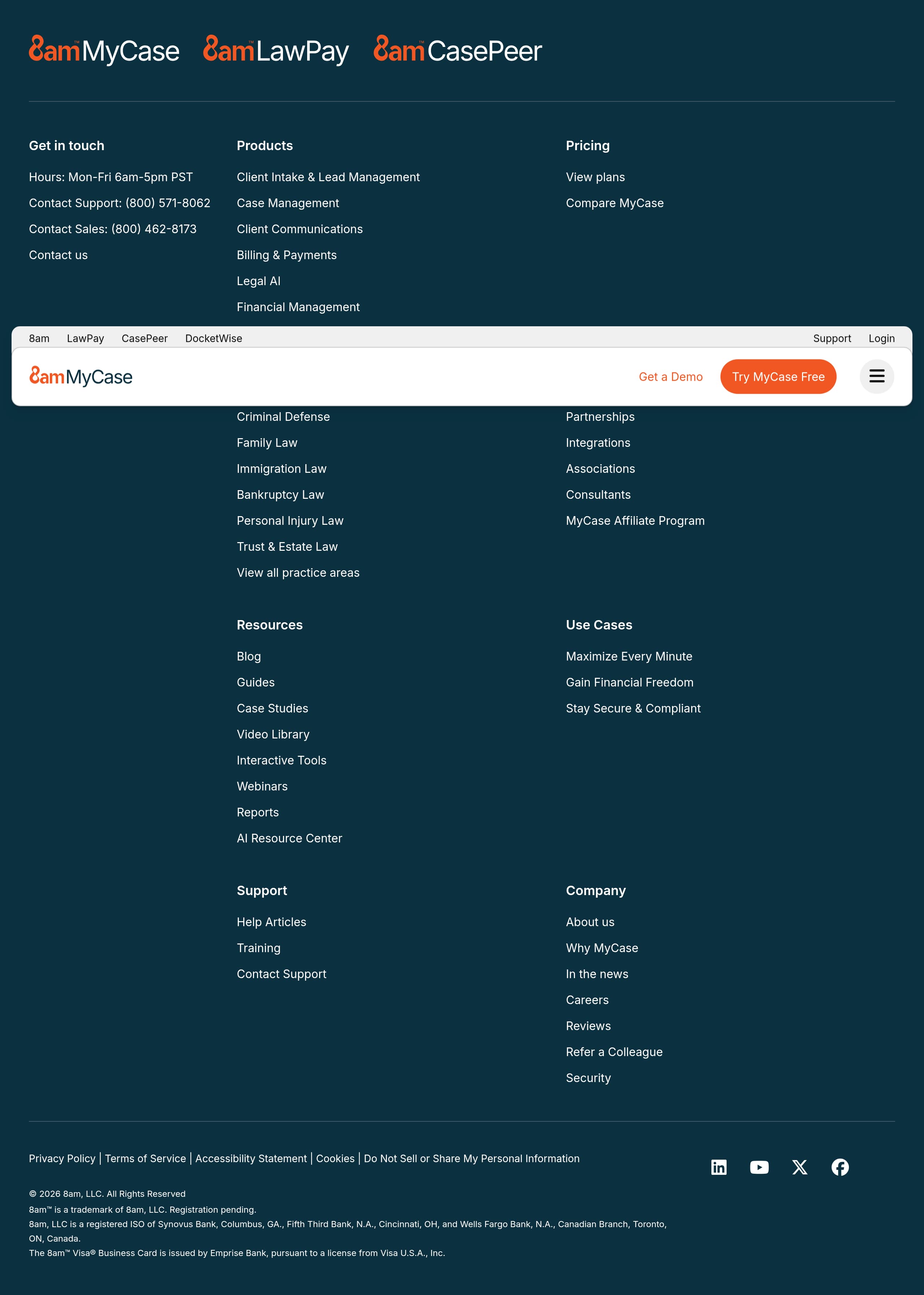
MyCase’s footer functions as a practical site map plus a credibility layer for buyers who scroll for verification. It includes direct contact channels and operating hours, “Hours: Mon-Fri 6am-5pm PST,” plus separate phone numbers for Support and Sales. That separation signals an established organization and helps reduce anxiety about being stuck after purchase.
From a navigation standpoint, the footer mirrors the main IA in a scannable list: Products (Client Intake, Case Management, Client Communications, Billing & Payments, Legal AI, Financial Management), Pricing, Firm Type and practice areas, Partner Network (Partnerships, Integrations, Associations, Consultants, Affiliate Program), and Resources (Blog, Guides, Case Studies, Video Library, Tools, Webinars, Reports, AI Resource Center). This redundancy is useful because it gives late-stage evaluators a fast way to jump to due diligence content without reopening the main menu.
The footer also reinforces conversion paths. “Pricing” and plan comparison links remain available, and “Contact us” provides a clear alternative for firms that require procurement steps or want to validate fit for a specific practice area.
What is notably effective is that the footer does not overcomplicate the decision with too many competing CTAs. Instead, it supports common end-of-page intents:
- Find pricing or compare plans.
- Confirm support availability.
- Locate integrations and partnerships.
- Access educational content for stakeholder alignment.
If legal or compliance links exist (privacy policy, terms, security documentation), they should be easy to spot here, since many legal buyers explicitly look for them in the footer. Based on the screenshot, the footer is structured and comprehensive, with support contact clarity and resource depth that helps MyCase rank for informational queries while still guiding users back to product pages.
Scores
Our framework scores for MyCase's website in terms of clarity, conversion, and trust. See our methodology for how we calculate these.
How clear the value prop and structure are.
How conversion-friendly signup and pricing are.
How well trust and compliance are surfaced.
FAQ
MyCase quickly defines the category as legal practice and case management software, then summarizes value in three workflow outcomes: case management, client communication, and billing and payments. It supports multiple buyer types with navigation by product module, firm size, and practice area. Conversion is reinforced with repeated CTAs like “Try MyCase Free” and “Get Started, No credit card required,” plus an ROI calculator that includes assumptions and disclaimers.
MyCase treats pricing as a primary journey step, with “Pricing” in the main navigation near “Get a Demo” and “Try MyCase Free.” The pricing page layout (per the screenshot) emphasizes plan comparison and an action-oriented next step. Across the site, MyCase reduces pricing friction by repeating “No credit card required” for getting started and by pre-framing what plans cover through clear module categories like billing, intake, and document management.
MyCase promotes a low-commitment start with “Try MyCase Free” and explicitly states “No credit card required.” For firms worried about switching costs, the site highlights “Easy Onboarding,” calling out data migration and training support. This pairing—self-serve entry plus implementation reassurance—is designed to reduce drop-off from firms that need confidence they can move matters, contacts, and documents into the platform.
MyCase combines institutional and peer proof. It highlights partnerships with “130+ bar associations” and large adoption numbers like “15,000+ law firms” and “18,000+ firms.” It also includes a long set of testimonials that mention specific benefits, such as the client portal, easy invoicing, remote document execution, and consolidating client files securely. An ROI calculator adds quantified persuasion with a transparent methodology disclaimer.
MyCase elevates security as a top navigation theme with “Bank Grade Security” under “Why MyCase,” and reiterates it in a “Safe and Secure” section focused on protecting sensitive client data. Trust is reinforced by integrating LawPay payments and by showing transparency in the ROI calculator with explicit assumptions and “not a guarantee” language. These elements reduce perceived risk for firms evaluating practice management platforms.

The world's best-performing SaaS businesses share surprisingly similar patterns. We help you learn and apply them through our human-designed methodology, with AI-assisted research.