
Key takeaways
Here are the key insights from our website breakdown analysis of Cloudflare.
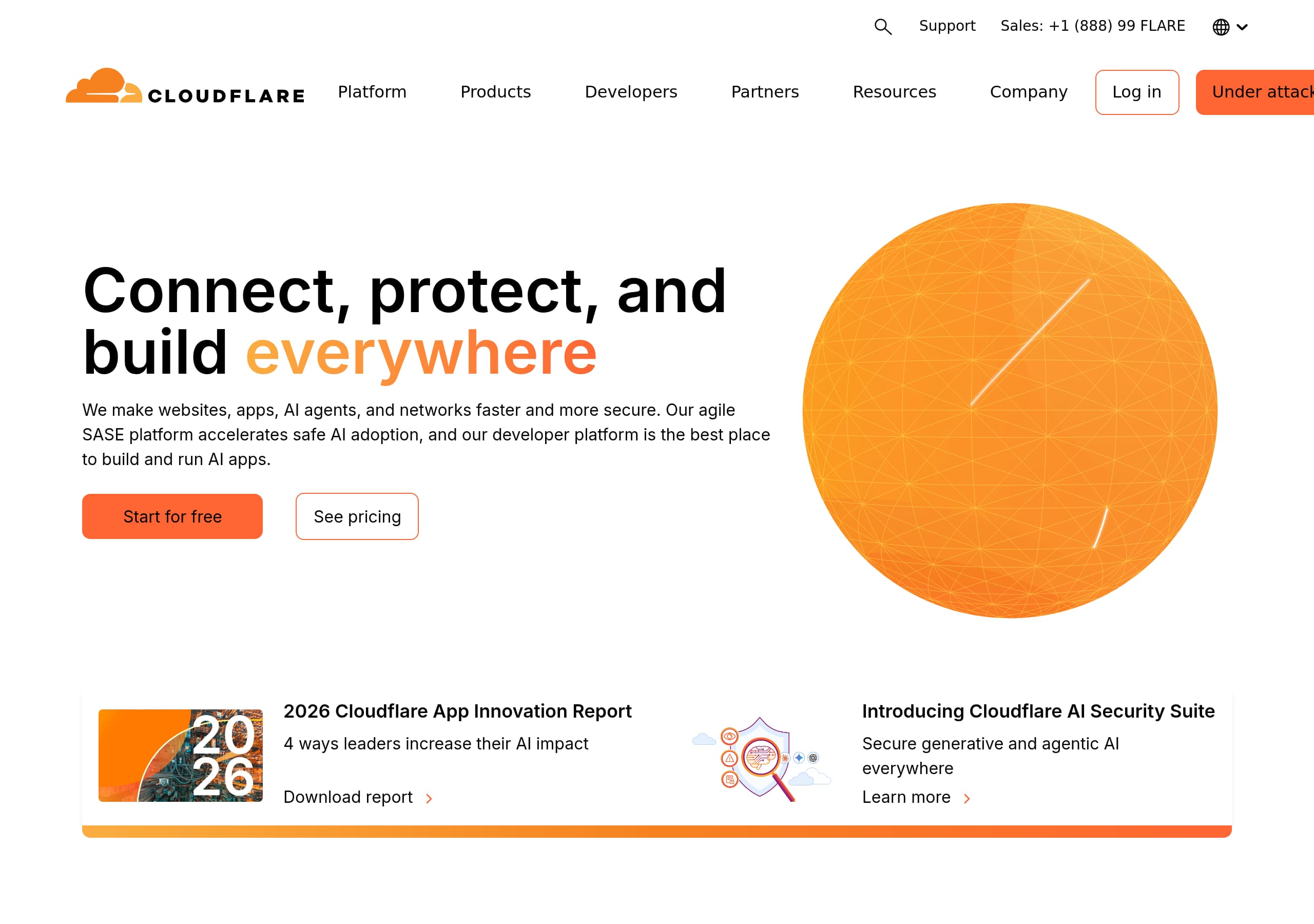
Cloudflare’s homepage is optimized for multi-audience clarity by pairing a broad “connect, protect, and build” promise with immediate segmentation into Enterprise, Small business, and Developers paths.
Dual CTAs (“Start for free” and “See pricing”) reduce decision friction by letting visitors self-select between a product-led motion and an enterprise buying motion without hunting for next steps.
The site consistently reinforces a unifying platform narrative (“connectivity cloud”) to make a large catalog (60+ services) feel cohesive instead of fragmented across many product pages.
Conversion is strengthened by contextual lead magnets (e.g., “2026 Cloudflare App Innovation Report”) and timely product announcements (e.g., AI Security Suite) that match current buyer priorities.
Cloudflare’s pricing presentation (as shown) supports comparison behavior with clear plan tiers and a predictable upgrade path, which is essential for a product spanning individual to enterprise customers.
Trust is built through prominent privacy and compliance navigation (Trust, Privacy, & Safety; policies; transparency) and by positioning research entities like Cloudforce One and Radar as credibility anchors.
Home
Cloudflare’s homepage wins by making an extremely broad platform feel like one product: the connectivity cloud. The hero message (“Connect, protect, and build everywhere”) is followed immediately by a plain-language expansion (“We make websites, apps, AI agents, and networks faster and more secure”), which reduces ambiguity for first-time visitors.
Key conversion mechanics are visible above the fold:
- Dual, high-contrast CTAs: Start for free and See pricing, supporting both self-serve and evaluation workflows.
- Fresh, time-stamped content blocks (“2026 Cloudflare App Innovation Report”) that signal currency and give research-driven visitors a reason to engage.
- Product announcement placement (“Introducing Cloudflare AI Security Suite”) that matches current enterprise concerns around GenAI and agentic security.
The navigation is doing heavy lifting, and it’s structured in a way that helps users self-identify fast. You can see top-level grouping into Platform (Connectivity cloud), Products (SASE, WAF, DDoS, CDN, DNS, etc.), Developers (Workers, D1, R2, AI Gateway), Partners, Resources, and Company. That’s a classic “platform + solutions + ecosystem” pattern used by vendors competing with Palo Alto Networks (SASE), Zscaler (Zero Trust), Akamai (CDN/security), Fastly (edge delivery), and AWS (developer platform/compute).
A particularly effective UI pattern is the repetition of the platform story in scannable verbs: “connect your users, apps, clouds,” “protect everything,” “build and scale applications.” Those verb headers act like micro-headlines that let skimmers understand the scope without reading paragraphs. The page also includes persona routing (“Enterprise,” “Small business,” “Developers”), which is essential when one domain serves IT, security, and engineering decision-makers.
Pricing
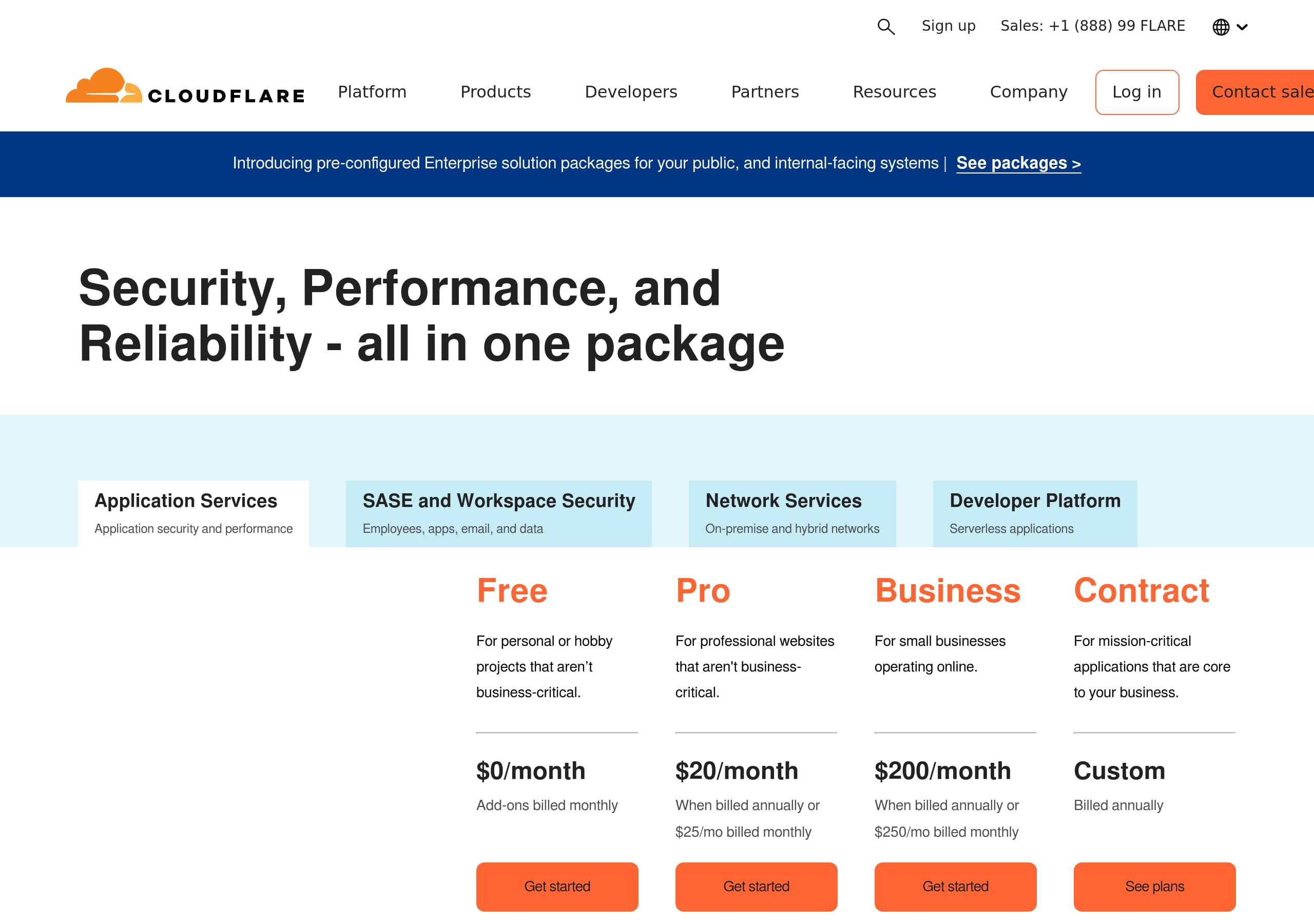
Cloudflare’s pricing experience (as shown) works because it supports comparison-first buying behavior while still nudging the visitor toward the right motion (self-serve vs sales). The layout emphasizes tiered plans with predictable progression—critical for a platform that spans Individual plans, Small business plans, and Enterprise plans.
From the screenshot, the pricing page appears to follow a familiar SaaS table structure:
- Clear plan columns with distinct names and price anchors (monthly pricing emphasis).
- A consistent set of feature rows so visitors can evaluate differences without opening multiple tabs.
- Prominent CTAs at the plan level (typically “Get started” / “Buy” / “Contact sales”), enabling immediate action after comparison.
The site navigation reinforces pricing as a platform-wide construct rather than a single product’s pricing. In the live excerpt, “Plans & pricing” sits alongside major product categories (Application security, Application performance, Networking, Developers). That matters because Cloudflare sells bundles and platform adoption; it reduces the risk that visitors assume pricing is only for “CDN” or only for “Cloudflare One.”
A strong detail in Cloudflare’s broader pricing architecture is the inclusion of “Compare plans,” “Global services,” and “Support and success bundles.” This is an enterprise-friendly pattern: it signals that beyond the base tier, there are support packages, professional services, and potentially SLA-backed add-ons. For larger buyers, that’s often the deciding factor more than the base subscription price.
What makes this pricing conversion-friendly is that it pairs with home-page CTAs (“See pricing” and “Start for free”), creating a clean loop: evaluate tiers, then either self-serve into an account or escalate to sales. The main improvement opportunity is reducing cognitive load for first-time visitors by adding “recommended for” persona labels (e.g., developers, small teams, regulated enterprises) directly in the plan headers.
Features
Cloudflare’s feature presentation is effective because it organizes a huge catalog into digestible categories while repeatedly tying everything back to the connectivity cloud umbrella. The navigation and on-page sections reveal a consistent taxonomy: Security (WAF, DDoS, API security, bot management), Performance (CDN, DNS, smart routing, load balancing), Networking (Magic Firewall, Network Interconnect), SASE/Zero Trust (ZTNA, secure web gateway), and Developers (Workers, D1, R2, AI Gateway).
Two UI patterns make this scale manageable:
- Category clustering: “Products” is not a single long list; it’s grouped (SASE, Application security, Application performance, Networking, Global services). This supports scanning and reduces overwhelm.
- Use-case routing: “Modernize applications,” “VPN replacement,” “Phishing protection,” “WAN modernization,” etc. This is a buyer-friendly layer above product names, especially for non-technical stakeholders.
The copy also uses strong outcome language and measurable expectations. Examples visible in the excerpt include “Get started in 5 minutes” and “Over 60 cloud services on one unified platform.” Even without deep technical specs on the homepage, those numbers help visitors anchor what “platform” means.
For developers, Cloudflare’s feature story is unusually concrete: Workers, D1, R2, Workers KV, and AI Gateway are named products with clear verbs (“Build, deploy serverless apps,” “Store data without costly egress fees,” “Observe, control AI apps”). That clarity is important when competing with AWS Lambda, Vercel, Netlify, and Fly.io—tools where developer experience is often the deciding factor.
The main opportunity is cross-linking “feature → proof → CTA” more explicitly in each cluster. For example, in the AI section, adding a short “why it’s different” bullet list (latency, data controls, logging) alongside “Learn more” would help visitors validate differentiation faster. Overall, the site succeeds by making the platform breadth feel intentional, not accidental, through consistent categorization and outcome-led labeling.
Signup
Cloudflare’s signup and lead capture system is intentionally split into two paths: product-led self-serve (“Start for free”) and enterprise evaluation (“Contact sales”). That dual-track conversion design is appropriate for Cloudflare’s audience mix and is reinforced by persistent CTAs on the homepage.
From the live excerpt, the enterprise path uses a relatively detailed sales form:
- Required identity fields (first name, last name, phone, work email, company).
- Qualification fields: job level, job function, and country (with a full searchable list).
- Explicit consent and legal acknowledgments (required Terms of Service and personal information collection/use; optional marketing sharing).
- Post-submit confirmation (“Someone from Cloudflare will be in touch with you shortly”) plus a clear note about email communications and unsubscribe.
This is a classic enterprise SaaS pattern: the form doubles as a lead qualification instrument for routing to the right sales team and for segmenting follow-up. The tradeoff is friction—there are at least 6 required fields plus multi-select dropdowns, which can reduce completion rates.
Cloudflare mitigates that friction by keeping self-serve available in parallel (“Start for free” and “Compare plans”), so visitors who aren’t ready for a sales conversation can still activate quickly. The excerpt also shows adjacent “SASE demo hub” and “10-step SASE journey” links, which function as mid-funnel alternatives when a visitor hesitates.
If Cloudflare wanted to optimize further, the highest-impact change would be progressive profiling: reduce the initial form to work email + company + country, then collect job level/function after the first response or during scheduling. Another tactical win would be adding an estimated response-time badge (e.g., “reply in <24 hours”) near the submit button to increase confidence. As-is, the signup architecture is coherent: PLG entry for speed, sales form for qualified enterprise demand.
Trust
Cloudflare’s trust posture is strongly communicated through both navigation and explicit policy language, which is essential for a vendor selling security, networking, and developer infrastructure. The site foregrounds trust entities and governance content rather than burying it, using a dedicated “Trust, Privacy, & Safety” area with links to Privacy Policy, Trust Policy, Compliance, Transparency, and public-interest programs.
A notable trust pattern is the way Cloudflare connects trust to operational proof, not just legal pages:
- Cloudforce One is presented as “Threat research and operations,” implying active security capability.
- Cloudflare Radar provides internet traffic and security trends, which signals data visibility and monitoring sophistication.
- “Global network” and “Global locations and status” are linked, suggesting transparency about infrastructure footprint and uptime/incident awareness.
In the contact form flow, Cloudflare also adds practical trust language: “We never sell your data, and we value your privacy choices,” plus an explicit unsubscribe statement. These micro-trust statements matter because the form requires phone, job details, and country—fields that can trigger privacy concerns.
The presence of programs like Project Galileo, Athenian Project, and election-related initiatives provides reputational trust for public sector and NGO-adjacent buyers. It signals the company operates in high-stakes environments, which can reduce perceived vendor risk.
From a UX perspective, the trust content is easy to find because it appears in top nav categories and footer-level governance links (based on the screenshot set). The main improvement would be adding more immediate, quantified trust markers on high-intent pages—e.g., visible certification badges (SOC 2, ISO 27001) and SLA/uptime statements—so visitors don’t need to click into compliance pages. Still, Cloudflare’s trust presentation is unusually comprehensive and aligned with security-first positioning.
Footer
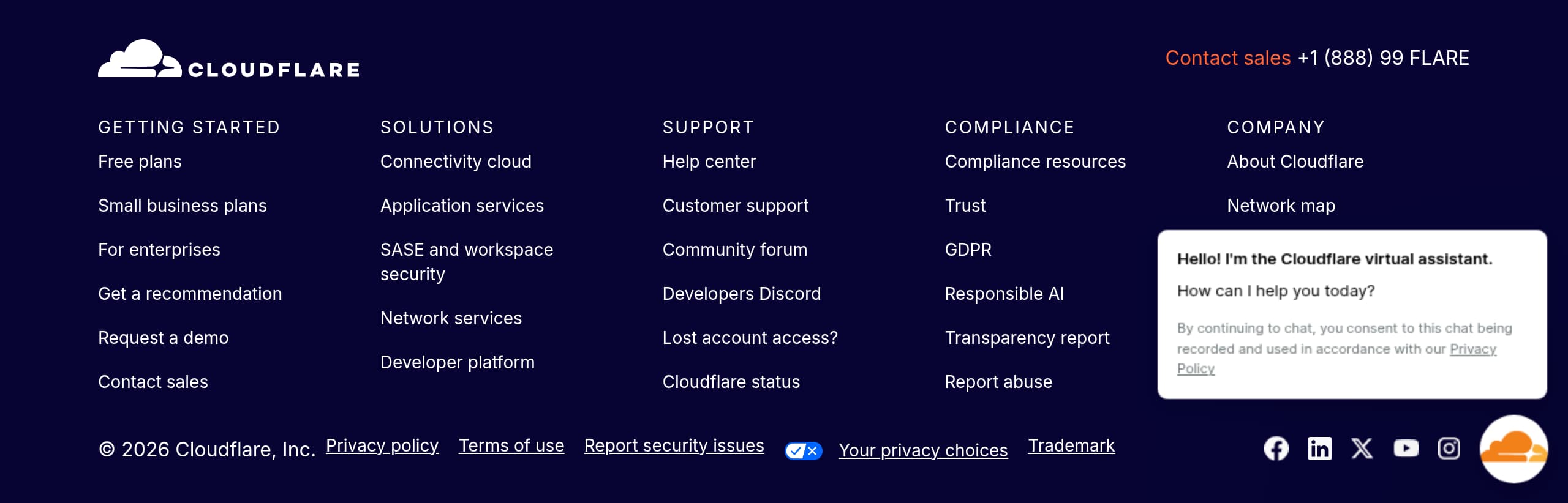
Cloudflare’s footer (as shown) functions like a second navigation layer for a very broad platform, and it’s designed for enterprise credibility rather than minimalism. The structure typically mirrors the top-level IA: Products/Platform, Developers, Partners, Resources, Company, and Trust-related links—helpful for visitors who scroll after skimming the hero and want a “map” without reopening menus.
Based on the screenshot, the footer emphasizes depth and governance:
- Company-level destinations like Leadership, Investor relations, Press, and Careers reinforce that Cloudflare is a mature, public-company-grade vendor.
- Dedicated trust and policy links (Privacy, compliance, transparency) support procurement workflows and vendor risk review.
- Community and support routes (“Community forum,” account access help) reduce support friction for existing users.
A key conversion detail is that Cloudflare keeps “Log in” and “Under attack?” accessible in the broader site chrome (visible in the excerpt, and typically echoed near the footer). “Under attack?” is a unique intent-based link that matches Cloudflare’s brand as an emergency reliability/security provider; it’s a strong differentiator versus generic SaaS footers.
The footer also supports multiple buyer journeys:
- Developers can find documentation, Discord/community, and build tutorials.
- Security/IT buyers can find demos, analyst reports, and solution guides.
- Partners can find partner portals and program details.
What makes this footer effective for SEO and discoverability is the entity-rich internal linking to named products (Workers, R2, WAF, DDoS, Zero Trust). That helps search engines understand topical authority across security, networking, and edge compute. The main risk is cognitive load—there’s a lot to scan—so strong column headings and consistent typography are crucial. Overall, the footer is doing the right job: navigation redundancy, trust reinforcement, and journey completion for different personas.
Detected tech stack
Tools and technologies we detected on Cloudflare's site. Detection is best-effort and may be incomplete.
Scores
Our framework scores for Cloudflare's website in terms of clarity, conversion, and trust. See our methodology for how we calculate these.
How clear the value prop and structure are.
How conversion-friendly signup and pricing are.
How well trust and compliance are surfaced.
FAQ
Cloudflare uses a single umbrella promise (“Connect, protect, and build everywhere”) and immediately explains it in plain language (faster and more secure websites, apps, AI agents, and networks). It pairs that with dual CTAs (“Start for free” and “See pricing”) and clear audience routing (Enterprise, Small business, Developers). This combination keeps a broad platform understandable and gives visitors a next step without extra scrolling.
Cloudflare’s pricing is positioned as platform-wide (“Plans & pricing”) and supports multiple segments with Individual, Small business, and Enterprise plans. The pricing layout (as shown) emphasizes side-by-side tier comparison, helping users evaluate feature differences and choose a plan quickly. Navigation also highlights “Compare plans” and “Support and success bundles,” which signals an upgrade path for teams that need additional services and enterprise support.
Cloudflare supports both self-serve onboarding (“Start for free”) and a sales-led path (“Contact sales”). The sales form is detailed, requiring contact fields plus qualification fields like job level, job function, and country, along with required legal acknowledgments. This increases lead quality for enterprise routing, while the self-serve path keeps activation fast for developers and smaller teams who don’t want to talk to sales first.
Cloudflare highlights a dedicated Trust, Privacy, & Safety area with links to policies, compliance, and transparency materials. It also elevates credibility entities like Cloudforce One (threat research and operations) and Cloudflare Radar (internet traffic and security trends). In lead forms, Cloudflare includes explicit privacy language (e.g., not selling data) and unsubscribe controls, which helps reduce friction when requesting sensitive business information.
Cloudflare groups products into outcome-aligned categories such as SASE/Zero Trust, Application Security (WAF, DDoS, API security), Performance (CDN, DNS, load balancing), Networking, and Developers (Workers, D1, R2, AI Gateway). It also offers use-case navigation like VPN replacement, phishing protection, and WAN modernization. This taxonomy helps different personas find relevant entry points without requiring them to already know Cloudflare product names.

The world's best-performing SaaS businesses share surprisingly similar patterns. We help you learn and apply them through our human-designed methodology, with AI-assisted research.