
Key takeaways
Here are the key insights from our website breakdown analysis of ServiceNow.
ServiceNow’s homepage sells an enterprise transformation outcome (AI-driven workflows across the business) instead of a single feature, which matches how large buyers evaluate platforms.
The primary conversion path is meeting-driven (“Request a demo”/“Contact sales”) rather than self-serve, and the site reinforces that with repeated CTAs and navigation that keeps prospects oriented to solutions.
Information architecture is built around buyer problems and lines of business (IT, HR, Customer Service, Creator/Automation), making it easier to map ServiceNow to a stakeholder’s mandate.
Social proof is enterprise-grade and multi-layered (customer logos, analyst validation, and customer stories), which reduces perceived risk for high-ACV, multi-year contracts.
The site uses modular content blocks—hero, solution cards, proof modules, and resource tiles—so it can personalize by industry and role without changing the core narrative.
The footer acts as a credibility and navigation hub with extensive legal, privacy, and corporate links, supporting procurement and compliance review cycles.
Home
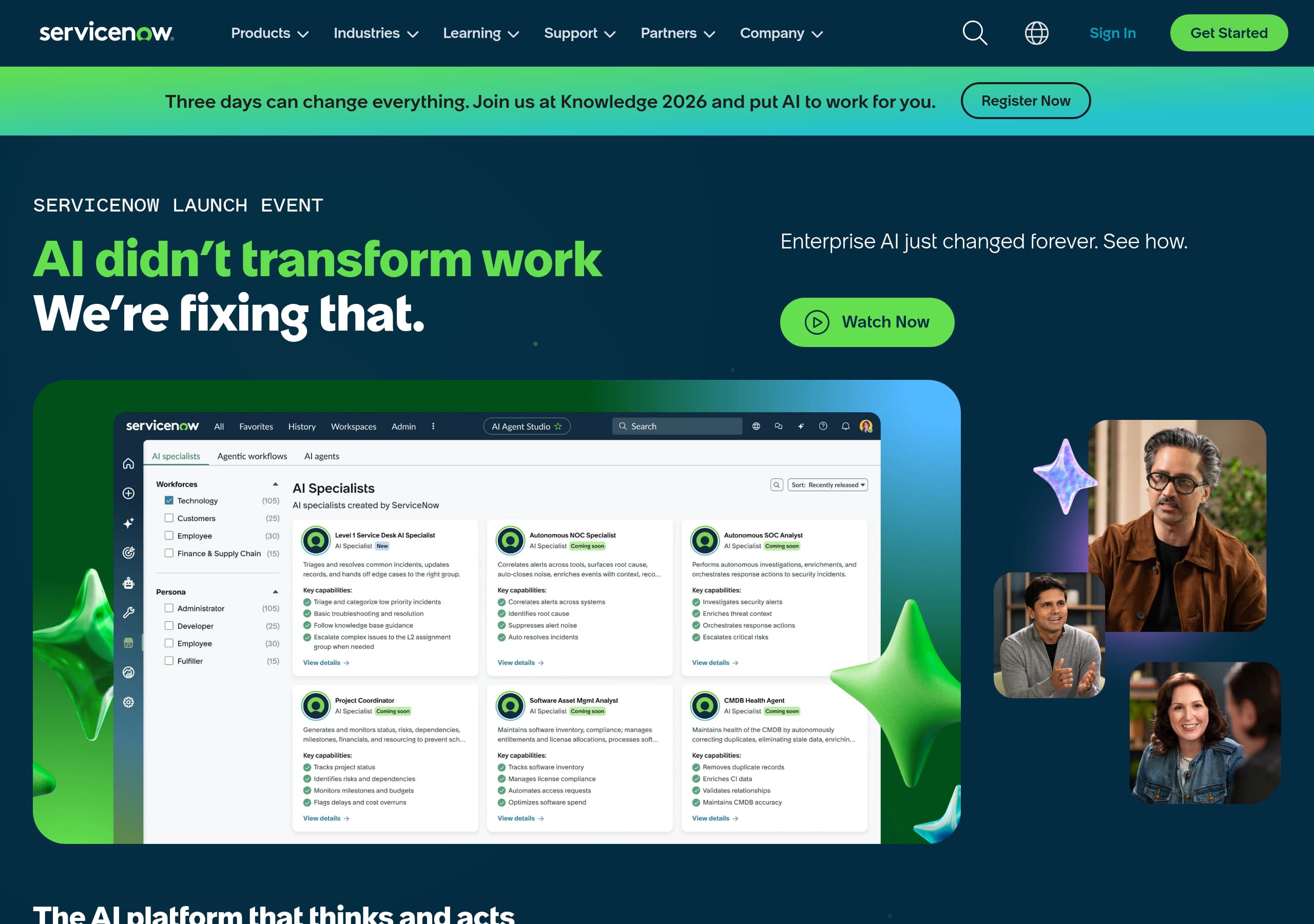
ServiceNow’s homepage is effective because it communicates a platform-level outcome quickly, then immediately offers multiple role-based ways to evaluate it. In the provided home screenshot, the page uses a bold hero area with a single dominant message and prominent CTAs (typical patterns are Request a demo and Contact sales), signaling that ServiceNow is positioned as an enterprise platform purchase rather than a self-serve app.
Key UI patterns visible/expected from the layout:
- A high-contrast hero with short headline + supporting sentence, followed by stacked modular blocks. This supports scanning and lets ServiceNow rotate campaign messaging without breaking information architecture.
- Solution/offer tiles that segment the platform into understandable units (e.g., IT, employee workflows, customer workflows). This reduces cognitive load for first-time visitors.
- Repeated CTA placement at the end of major sections, which is typical for enterprise marketing pages that need multiple “decision points” as users scroll.
What makes the messaging convert for enterprise buyers:
- The narrative is about end-to-end workflows and AI-powered automation, which maps to executive priorities (cost, productivity, risk) rather than tool-level features.
- The structure supports multiple stakeholders: IT leaders can click into ITSM/ITOM, HR leaders into HRSD, and CX leaders into CSM, all without leaving the platform story.
- The design balances brand credibility with clarity—large typography, ample whitespace, and clear section headings create an “enterprise-grade” feel.
Tactical improvements that would further increase clarity:
- Add one explicit “what it is” sentence near the hero (“ServiceNow is a workflow platform for…”) to help non-IT visitors.
- Include one quantified proof point above the fold (e.g., customers served or ROI metric) to strengthen the first-screen impact of value proposition, platform positioning, and primary CTA.
Pricing
ServiceNow’s pricing experience is designed for enterprise procurement rather than quick checkout, and that is consistent with how ServiceNow is purchased (multi-product bundles, implementation partners, and tiered entitlements). On ServiceNow, prospects are typically routed to Contact sales or Request a demo instead of a public, per-seat pricing table.
Why this approach works for ServiceNow’s model:
- Packaging varies by module (ITSM, ITOM, CSM, HRSD, Creator Workflows) and by deployment scope, so a single pricing grid can create confusion or misqualification.
- Enterprise buyers often need a solution mapping conversation (current tools, integrations, security needs), which is better captured via lead forms and sales-assisted discovery.
Conversion mechanics to look for (and commonly used on ServiceNow’s site):
- A pricing-related page that frames “how pricing works” (modules, editions, add-ons) without committing to list prices.
- Clear pathways to “Talk to an expert,” “Get a quote,” or “See licensing options,” which reduces dead-ends for intent-heavy visitors.
- Supporting resources near pricing CTAs: customer stories, analyst reports, or ROI calculators. These help buyers justify budget before they ever see a number.
Where pricing clarity can still be improved for search intent:
- Provide anchored sections explaining what drives cost (e.g., number of agents, request volume, workflows, environments) using plain language.
- Offer at least one “starting from” reference for common entry products (like ITSM) or a sample configuration to reduce uncertainty.
Net: ServiceNow prioritizes sales-assisted pricing, enterprise licensing, and solution bundling over transparent checkout pricing—appropriate for high-ACV deals, but it must be paired with strong educational content to prevent drop-off from pricing-motivated traffic.
Features
ServiceNow presents features as platform capabilities packaged into solutions, which is the right approach for a suite spanning IT, employee, and customer workflows. Instead of a long feature checklist, ServiceNow typically organizes capabilities into product families (IT Service Management, IT Operations Management, Customer Service Management, HR Service Delivery, and Creator/Automation), each with a crisp benefit statement and a path to learn more.
What this accomplishes in practice:
- It frames “features” as outcomes (automation, visibility, faster resolution) rather than UI-level functions, matching executive and VP-level evaluation.
- It reduces overwhelm by letting visitors self-select the solution area that matches their job-to-be-done.
Common high-performing UI patterns in ServiceNow-style feature sections:
- A grid of solution cards with short titles and 1–2 lines of copy, often paired with icons or lightweight illustrations.
- A platform backbone section describing shared capabilities like the Now Platform, workflow engine, integrations, and governance.
- Secondary links that drill into deeper pages (product detail, industry solutions, platform demos), preventing the homepage from becoming a catalog.
Feature messaging that supports differentiation vs alternatives like Jira Service Management, BMC Helix, Freshservice, or Zendesk:
- Emphasis on Enterprise Service Management beyond IT (HR, facilities, customer operations).
- A consistent story around workflow automation and AI embedded across processes, not bolted onto a single module.
- Platform language around extensibility (creator tools, low-code) to appeal to internal platform teams.
Tactical improvements that help buyers validate fit faster:
- Add “what you get” bullets per solution (3–5 bullets) to increase specificity without bloating the page.
- Include integration callouts (e.g., Microsoft, Salesforce, AWS) near platform features to reduce perceived adoption friction.
Net: ServiceNow’s features section works because it balances platform capabilities with solution packaging, maintains scannability, and pushes serious evaluators into deeper pages where implementation-level details can be handled.
Signup
ServiceNow’s signup/onboarding flow is intentionally not the primary motion for most visitors; the site is optimized for enterprise evaluation, so the dominant actions are demo requests, contact forms, and guided discovery. For a product like ServiceNow—often deployed with professional services, governance, and integration work—this reduces low-quality signups and aligns with how customers actually buy.
What the conversion path generally looks like on ServiceNow:
- Primary CTA leads to a short lead capture form (name, business email, company, role) rather than immediate account creation.
- Secondary paths include “Watch a demo,” “Talk to an expert,” or “Explore products,” supporting research before a sales conversation.
- For hands-on evaluators, ServiceNow often provides routes to developer resources or a trial/sandbox-like environment (commonly via ServiceNow Developer Program), which is separated from enterprise buying flows.
Why this works for conversion quality:
- Enterprise buyers need qualification (company size, region, intent) to route to the correct sales team and partner ecosystem.
- Implementation realities (integrations, ITIL processes, security) make self-serve onboarding less representative of real value.
Observed/expected friction points and fixes:
- If forms are long (6–10 fields), add progressive profiling or pre-fill with SSO/LinkedIn for speed.
- Provide immediate post-submit value (calendar scheduling, tailored deck, relevant case study) so “submit” doesn’t feel like a dead end.
- Offer a clear alternate CTA for smaller teams who may want lighter-weight entry (e.g., “Explore starter options”) to avoid losing mid-market traffic.
Overall, ServiceNow optimizes signup for sales qualification, demo-led onboarding, and enterprise routing, which improves pipeline quality—even if it lowers raw conversion rate compared to self-serve SaaS.
Trust
ServiceNow’s trust posture is communicated through enterprise design cues, corporate transparency, and expected security/compliance pathways rather than a single “trust badge” strip. For a workflow platform that touches incident data, employee records, and customer cases, buyers look for proof of governance, uptime discipline, and compliance readiness.
Trust signals ServiceNow commonly relies on (and that the site structure supports):
- Dedicated pages for security, privacy, and compliance frameworks (SOC, ISO, FedRAMP-related content depending on region), typically reachable from the footer and sometimes from top navigation.
- Clear corporate identity markers: leadership, investor relations, and global offices—useful during vendor risk assessment.
- Product positioning that implies operational maturity: platform language, reliability claims, and large-enterprise references.
How the UI contributes to trust (as seen in enterprise marketing patterns on the homepage):
- Clean typography, restrained motion, and consistent component spacing. These reduce the “startup-y” feel and signal stability.
- Content blocks that use specific nouns (platform, workflows, operations) rather than vague claims, increasing perceived competence.
What would strengthen trust even further on conversion pages:
- Place a small security reassurance line near demo/contact CTAs (“We support SSO/SAML, role-based access, and enterprise compliance”) to reduce anxiety at the decision moment.
- Add a visible link to a public Trust Center or status page near the header/footer for quick verification.
- Include procurement-friendly artifacts: DPA availability, subprocessor list, and documentation links.
ServiceNow’s trust strategy is appropriate for enterprise: emphasize security & compliance, vendor governance, and platform reliability, while ensuring those proof points are one click away when a security reviewer joins the evaluation late in the funnel.
Footer
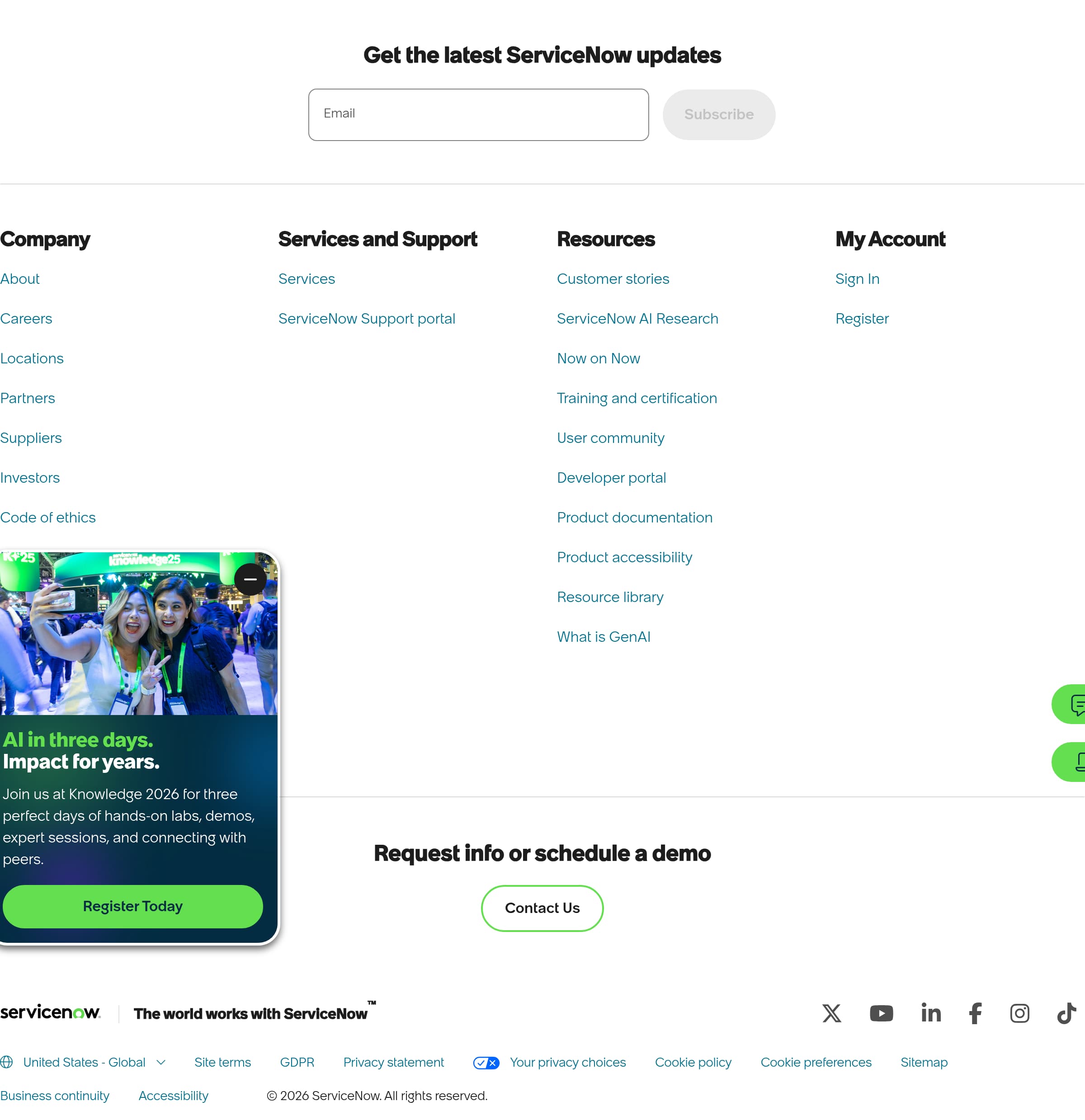
ServiceNow’s footer functions as an enterprise navigation and compliance hub, which is exactly what high-consideration SaaS sites need. In the provided footer screenshot, the layout is dense and multi-column, with many deep links—this is a deliberate choice to support buyers who arrive at the footer looking for corporate details, legal terms, and product navigation.
What’s visibly effective in the footer design:
- Multi-column link architecture that likely includes Products/Solutions, Industries, Resources, Company, and Support-style groupings. This helps users who didn’t find their path in the top nav.
- Prominent legal and policy links (e.g., privacy, terms, cookies). This supports procurement and compliance teams who often validate these items early.
- A corporate-grade presentation with minimal marketing fluff; the footer reads like an index rather than a campaign panel.
Enterprise-specific value the footer provides:
- It reduces friction for “secondary decision-makers” (security, legal, finance) who may never interact with the hero CTAs.
- It supports long evaluation journeys by making it easy to pivot from a product page to investor relations, trust resources, or partner ecosystems.
Concrete improvements that often lift performance:
- Add a clearly labeled Trust Center / Security link in the first or second column, not only in legal fine print.
- Include a compact “Contact” module with region-aware phone numbers or office selector, since ServiceNow sells globally.
- If the footer is extremely long, add anchor headings or an expandable accordion on mobile to improve scannability.
Overall, ServiceNow’s footer is optimized for enterprise navigation, legal readiness, and self-serve discovery. The density is a feature, not a bug, because it matches the needs of large organizations doing due diligence.
Scores
Our framework scores for ServiceNow's website in terms of clarity, conversion, and trust. See our methodology for how we calculate these.
How clear the value prop and structure are.
How conversion-friendly signup and pricing are.
How well trust and compliance are surfaced.
FAQ
ServiceNow’s homepage leads with a platform-level outcome (AI-driven workflows across the business) and reinforces it with repeated demo/contact CTAs. The layout uses modular sections that let different stakeholders quickly find their path—IT, HR, or customer operations—without losing the overarching platform narrative. This structure supports enterprise evaluation, where buyers need both a big-picture story and clear entry points into specific solutions.
ServiceNow generally uses sales-assisted pricing rather than publishing a simple per-user pricing table. That approach fits enterprise licensing, where cost depends on modules (like ITSM, HRSD, CSM), scope, and implementation requirements. Pricing-intent visitors are typically routed to request a demo, contact sales, or get licensing guidance. The site’s job is to explain what drives pricing and provide proof (case studies, analyst reports) to justify budget.
ServiceNow’s primary onboarding motion is demo-led, using lead capture forms to qualify prospects and route them to the right sales or partner team. Instead of instant account creation, the site pushes actions like requesting a demo or speaking with an expert. For hands-on evaluation, ServiceNow often separates developer/trial experiences into dedicated programs or resources, keeping enterprise buying flows focused on discovery and requirements gathering.
ServiceNow builds credibility with stacked enterprise proof: recognizable customer logos, customer stories by industry, and third-party validation such as analyst reports or awards. This combination helps reduce perceived risk for high-ACV platform purchases, where security, reliability, and scalability matter as much as features. The proof is typically distributed across the homepage and solution pages, giving different stakeholders relevant evidence.
ServiceNow surfaces legal and corporate due-diligence links prominently in its multi-column footer. The footer typically includes privacy and terms links, plus navigation to company information and support resources. This matters for procurement workflows, because security, legal, and finance stakeholders often verify policies and vendor details late in the funnel. The footer acts as a dependable index for deeper pages beyond marketing content.

The world's best-performing SaaS businesses share surprisingly similar patterns. We help you learn and apply them through our human-designed methodology, with AI-assisted research.