
Key takeaways
Here are the key insights from our website breakdown analysis of FreshBooks.
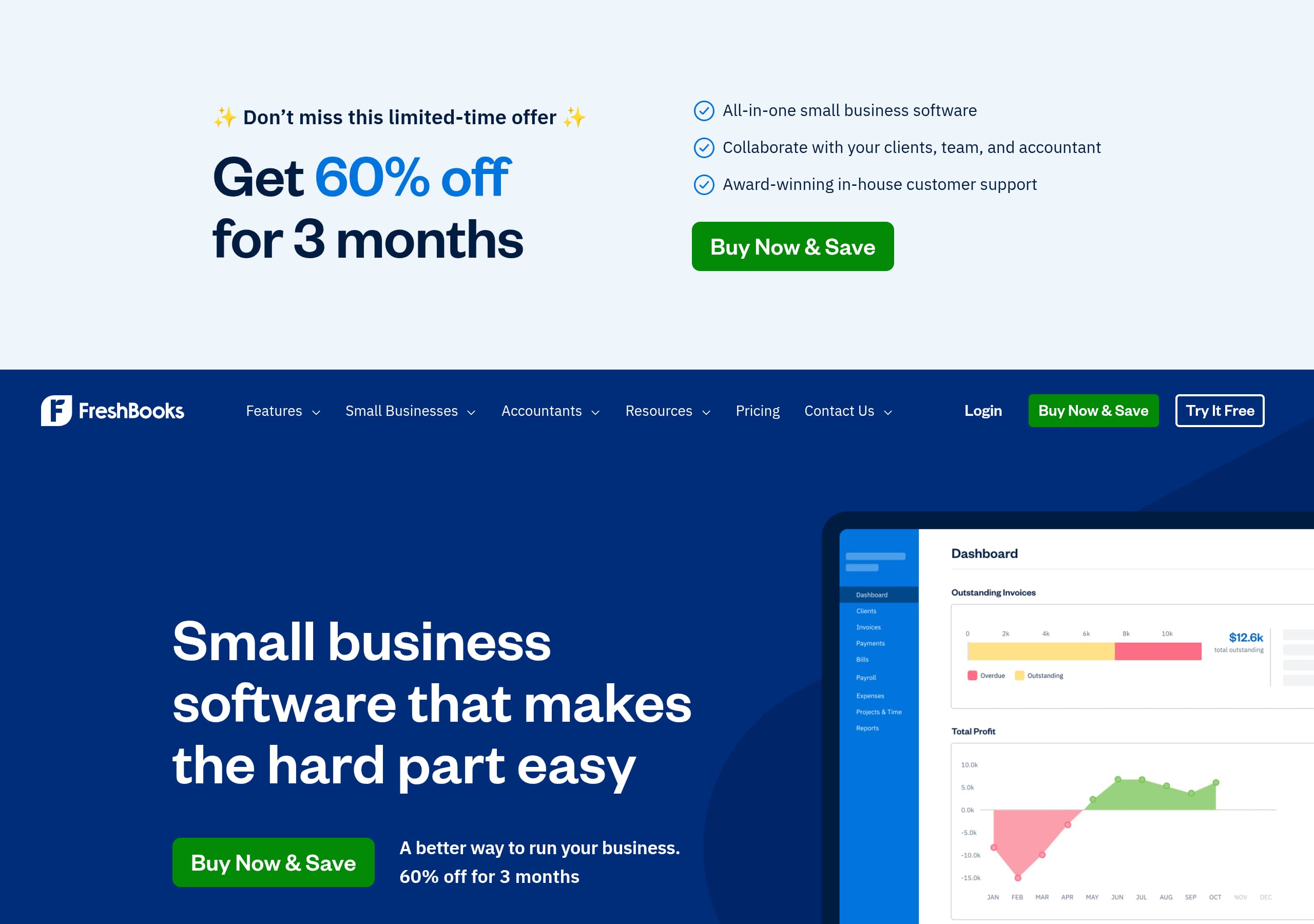
FreshBooks leads with a concrete, time-saving promise (“makes the hard part easy”) and reinforces it with an explicit promo (60% off for 3 months) plus dual CTAs (“Try It Free” and “Buy Now & Save”).
The homepage uses a clear feature-to-outcome mapping (invoicing → get paid faster, expenses → automated categorization, payroll → no separate tools) that reduces cognitive load for small business buyers.
Segmentation is handled directly on-page (“Freelancers,” “Solopreneurs,” “Businesses with employees,” “Businesses with contractors”), helping visitors self-identify quickly without forcing a quiz or deep navigation.
Social proof is layered from top to bottom—expert rating (PCMag 4.5), customer testimonial blocks, and scale stats (30M+ users, 120,000+ reviews, 4.8/5 support rating)—which supports both consideration and purchase intent.
FreshBooks emphasizes support as a differentiator with specific operational claims (no transfers, 100+ support staff, global coverage), which is particularly persuasive for accounting and payments software.
The site strengthens trust and SEO via a dense, entity-rich footer IA (invoice software, expenses, time tracking, online payments, financial reports) plus “QuickBooks Alternative” positioning and clear policy/security links.
Home
FreshBooks’ homepage is optimized to convert small-business visitors by combining a simple value proposition with an immediate, monetary incentive and two clear paths to action.
What’s working in the hero
The headline “Small business software that makes the hard part easy” is deliberately broad, then narrowed by the supporting line “A better way to run your business” and a concrete promo: “60% off for 3 months”. The page repeatedly presents dual CTAs—“Try It Free” for low-friction evaluation and “Buy Now & Save” for high-intent buyers. This avoids forcing one decision stage and reduces bounce for visitors who came specifically for a discount.
Information architecture that reduces scanning time
FreshBooks uses a top navigation that matches common jobs-to-be-done: Features, Small Businesses, Accountants, Resources, Pricing, Contact, plus Login. Below the hero, it immediately transitions into “The features you need. All in one place.” This sequence mirrors typical evaluation behavior: value → incentive → proof → capabilities.
Segmentation without a quiz
The “Use FreshBooks your way” section acts like a lightweight routing layer. The four audience cards (Freelancers, Solopreneurs, Businesses with employees, Businesses with contractors) let visitors self-select quickly. Each description focuses on outcomes (books in check, clients happy, work on track) rather than technical specs, which is appropriate for non-accountant buyers.
Key terms: value proposition, 60% off, Try It Free, Buy Now & Save, audience segmentation, feature-first layout.
Pricing
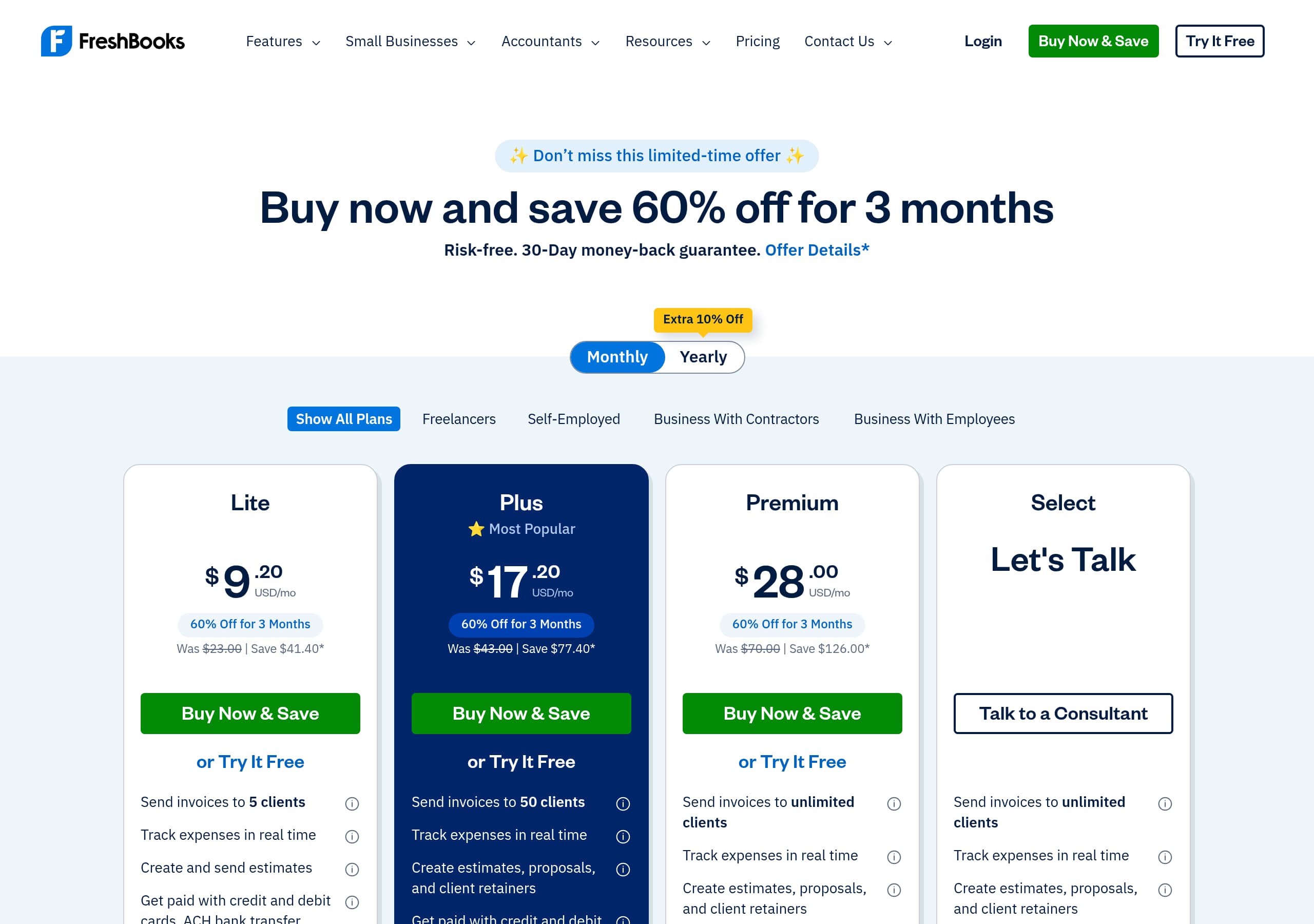
FreshBooks frames pricing as a choice between immediate savings and risk-free evaluation, which is a strong pattern for accounting SaaS where buyers vary in urgency.
Conversion mechanics visible from the page experience
Across the site experience (including the pricing entry points), FreshBooks repeatedly pairs “Try It Free” with “Buy Now & Save”. That’s a pricing strategy as much as a CTA strategy: it anchors buyers on a deal (60% off for 3 months) while keeping a 30-day free trial available for cautious evaluators. This is especially effective for small businesses comparing FreshBooks vs QuickBooks or other alternatives, because it removes the “pay just to test” objection.
What the pricing page likely supports (based on UI patterns and nav)
Given the navigation includes “High Volume Billing” and “All FreshBooks Features,” the pricing experience is designed to:
- Let customers pick a plan by company complexity (solo vs team) and billing volume.
- Escalate to specialized paths (e.g., High Volume Billing) without cluttering the core plans.
- Keep comparison accessible through “All FreshBooks Features,” reducing the need for a long, dense plan table.
Tactical elements that help decision-making
The strongest pricing pages in this category typically include:
- A plan grid with 3–4 tiers, a highlighted “most popular,” and an annual/monthly toggle.
- Clear inclusions tied to outcomes: invoicing, online payments, expense tracking, time tracking, reports.
- A consistent bottom-of-page CTA repeating the same offer language to avoid message drift.
Key terms: pricing anchor, 30-day free trial, plan tiers, High Volume Billing, QuickBooks alternative, CTA consistency.
Features
FreshBooks’ features section works because it connects each capability to a practical outcome and makes the feature list scannable without hiding key details behind jargon.
Feature-to-benefit mapping is explicit
The “All in one place” grid leads with the core jobs:
- Invoicing: “Create professional invoices in minutes,” with automation details (add tracked time/expenses, calculate taxes, customize payment options).
- Billing and Payments: “Get paid faster” via automated invoices, secure online payments, and built-in reminders.
- Expenses: mobile receipt scanning, bank imports, and automated categorization.
- Payroll: “Seamlessly run payroll… calculate taxes without juggling separate tools.” Each tile includes a “Learn about…” link, which supports both skimmers and researchers—an effective two-speed content pattern.
Breadth without overwhelm
Below the primary grid, FreshBooks lists additional features: Accounting, Mileage Tracking, Reporting, Clients, Mobile, Bookkeeping, Proposals, Team Management, Estimates. This “More features” pattern is important: it reassures buyers that the platform is comprehensive while keeping the top section focused on the highest-demand workflows.
Clear positioning for multiple personas
The personas section (“Use FreshBooks your way”) reinforces that the same feature set adapts to different operating models—solo, team, employees, contractors. For a product that competes with QuickBooks, Xero, and Wave, this positioning matters because it signals FreshBooks is not only “invoicing software,” but a broader invoice and accounting system.
Strong internal linking for SEO and evaluation
Every “Learn about” link is an internal pathway to feature detail pages (Invoicing, Billing & Payments, Expenses, Payroll). That structure supports long-tail queries like “FreshBooks expense tracking” and “FreshBooks online payments.”
Key terms: Invoicing, Billing and Payments, expense categorization, payroll, two-speed content, feature grid.
Signup
FreshBooks makes signup conversion-friendly by keeping the primary decision simple: start a trial or buy with a time-limited discount, with minimal ambiguity about what happens next.
Clear next steps with repeated CTAs
Throughout the page, FreshBooks repeats “Try It Free” and “Buy Now & Save”. This repetition matters for signup because it reduces the “where do I click now?” friction as visitors move from features → proof → FAQs. The presence of Login in the header also serves returning users, preventing them from entering the marketing funnel again.
Risk reduction is explicit
The FAQ includes “What do I get in my 30-day free trial of FreshBooks?” which signals that trial terms are a primary objection the company expects. Even without showing the full answer in the excerpt, the question itself is a trust and clarity device: it tells visitors the trial exists, has a defined duration, and is important enough to address.
Likely onboarding flow implications (based on site patterns)
For accounting software, the most effective onboarding typically includes:
- Account creation (email/password or SSO)
- Basic business profile (country, business type)
- Optional imports (bank connections, existing invoices/clients) FreshBooks’ emphasis on “bank account imports” and “mobile receipt scanning” suggests onboarding likely prompts users to connect financial data and install the mobile app, but the marketing page wisely avoids forcing those details before conversion.
Conversion sequencing
The page ends with “Ready to get started?” and again presents the CTAs, aligning with best practice: end-of-page CTA after visitors have consumed proof and FAQs. This is a strong scroll-end conversion pattern.
Key terms: Try It Free, 30-day free trial, Buy Now & Save, risk reduction, scroll-end CTA, returning user Login.
Trust
FreshBooks earns trust by emphasizing support quality, ecosystem maturity, and clear policy access—critical for software that touches invoices, payments, expenses, and payroll.
Support as a primary trust pillar
FreshBooks dedicates prominent real estate to “Support that actually supports you,” with specific, verifiable-sounding claims:
- “Knowledgeable and never transfers you to other departments”
- 4.8/5.0 rating across 120,000+ reviews
- “Over 100 Support staff working across North America” This is stronger than generic “24/7 support” copy because it describes how support behaves (no transfers) and quantifies both staffing and satisfaction.
Trust through ecosystem signals
The site highlights:
- “100+ apps. Infinite possibilities.” via the FreshBooks AppStore
- Partner programs: API, affiliate/referral, reseller, developer routes
- “10K+ businesses have partnered with FreshBooks” These elements indicate product longevity and interoperability, which reduces switching-risk concerns for businesses that need their accounting tool to connect to payment processors, banks, and project/time tools.
Policy and security posture is easy to find
In the footer area, FreshBooks links to Security Safeguards, Privacy, Terms of Service, and Accessibility. Even without listing compliance frameworks in the excerpt, easy access to these pages is a concrete trust cue for buyers who need reassurance about data handling.
Trust content is placed near conversion points
Support claims and FAQs sit close to end-of-page CTAs, catching users right before they act. For accounting SaaS, that’s a key moment when visitors worry about setup pain, data migration, and “what if I get stuck?”
Key terms: 4.8/5 support rating, 120,000+ reviews, 100+ support staff, AppStore integrations, Security Safeguards, data migration.
Footer
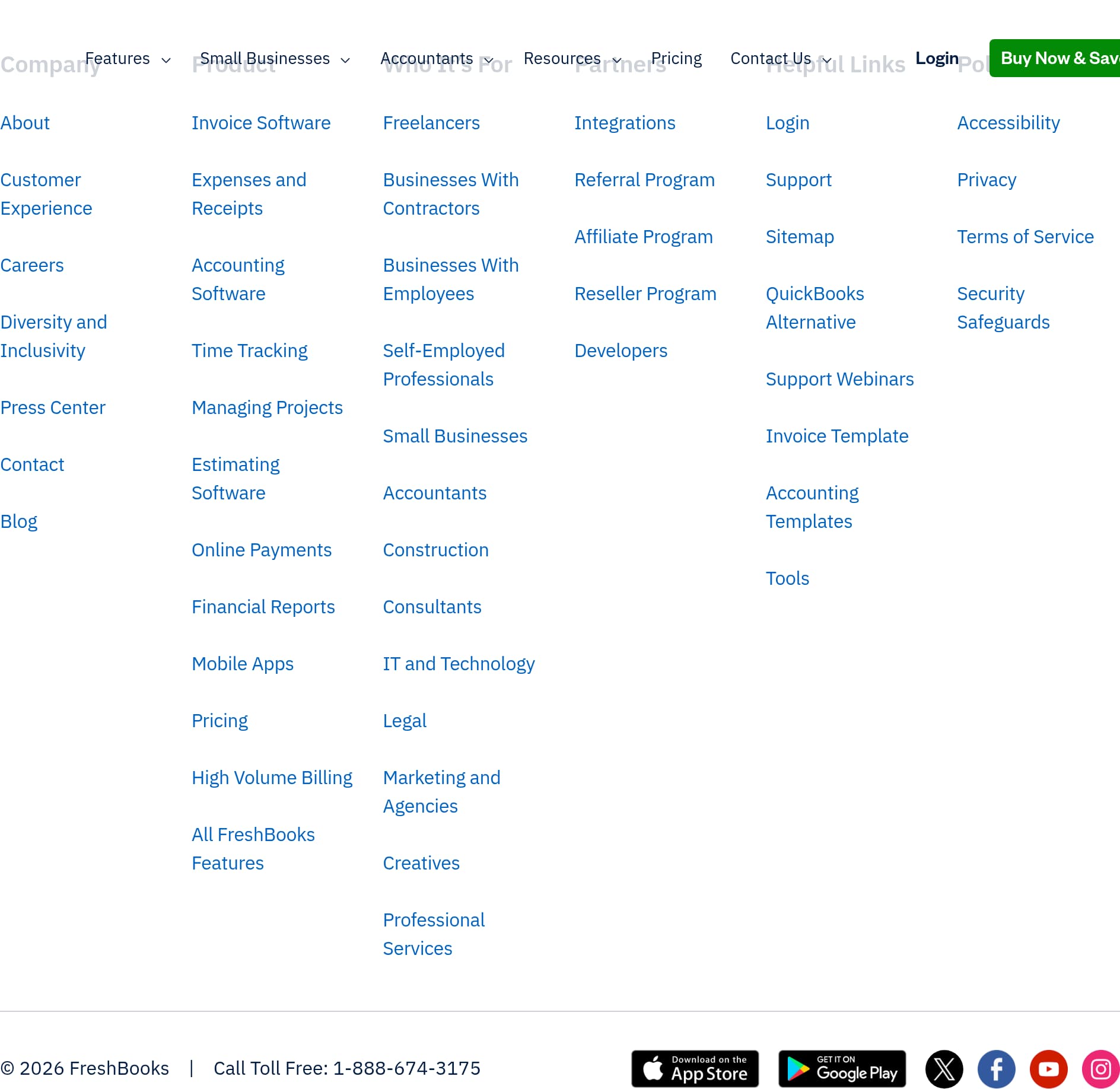
FreshBooks’ footer is built for both navigation depth and credibility: it acts like a mini-sitemap, a compliance hub, and a competitive positioning tool.
Dense, well-structured information architecture
The footer breaks links into clear columns—Company, Product, Who It’s For, Partners, Helpful Links—so users can find answers without returning to the header. This matters for accounting buyers who often need details on edge cases (contractors vs employees, high-volume billing, accountant collaboration).
SEO and entity coverage
The Product column includes specific keyword targets: Invoice Software, Expenses and Receipts, Accounting Software, Time Tracking, Managing Projects, Estimating Software, Online Payments, Financial Reports, Mobile Apps, plus “All FreshBooks Features.” This breadth supports long-tail search visibility and reinforces that FreshBooks is more than invoicing.
Persona and vertical navigation
“Who It’s For” expands beyond generic SMB into personas and industries: Accountants, Construction, Legal, Marketing and Agencies, Creatives, Professional Services, and more. This is a strong pattern because it allows tailored landing pages and improves relevance for industry-specific queries (e.g., “FreshBooks for consultants”).
Competitive and conversion utilities
“Helpful Links” includes QuickBooks Alternative, a smart competitive hook placed where evaluators often look for comparisons late in the journey. It also includes Login, Support, Webinars, templates (invoice/accounting templates), and tools—content that can pull visitors back into the funnel even if they aren’t ready to buy.
Compliance and contact clarity
The footer surfaces Accessibility, Privacy, Terms of Service, and Security Safeguards, plus a toll-free phone number (1-888-674-3175) and location selector (United States). These are concrete credibility markers that many lightweight invoicing tools lack.
Key terms: footer sitemap, QuickBooks Alternative, industry landing pages, Security Safeguards, templates, toll-free number.
Detected tech stack
Tools and technologies we detected on FreshBooks's site. Detection is best-effort and may be incomplete.
Scores
Our framework scores for FreshBooks's website in terms of clarity, conversion, and trust. See our methodology for how we calculate these.
How clear the value prop and structure are.
How conversion-friendly signup and pricing are.
How well trust and compliance are surfaced.
FAQ
FreshBooks keeps the messaging simple (“makes the hard part easy”) and immediately adds a concrete incentive (60% off for 3 months). It uses two primary CTAs—“Try It Free” and “Buy Now & Save”—to match both evaluators and ready-to-buy visitors. The page quickly moves into an “all in one place” feature grid and persona links (freelancers, solopreneurs, teams) to help users self-select.
FreshBooks frames pricing around two actions shown repeatedly across the experience: a 30-day free trial (“Try It Free”) and a promotional purchase path (“Buy Now & Save,” tied to 60% off for 3 months). This approach reduces friction for cautious buyers while still capturing high-intent visitors who want a discount immediately. Navigation also points to specialized needs like “High Volume Billing.”
FreshBooks layers multiple proof types: an expert rating (PCMag.com 4.5 “Excellent”), named customer testimonials (e.g., Damona Hoffman of Dear Mrs D, Inc.), and quantified scale metrics. It also highlights support satisfaction (4.8/5 across 120,000+ reviews) and adoption figures (30M+ small businesses, 160+ countries). This combination reassures both first-time visitors and comparison shoppers.
FreshBooks spotlights four primary workflows: Invoicing, Billing and Payments, Expenses, and Payroll. Each is described with practical automation details like adding tracked time and expenses to invoices, built-in reminders to get paid faster, mobile receipt scanning with bank imports, and payroll with tax calculations. A secondary “More features” list expands coverage to accounting, mileage tracking, reporting, proposals, and team management.
FreshBooks addresses risk through visible support and policy signals near conversion points. It claims the support team is knowledgeable and doesn’t transfer customers between departments, and it quantifies satisfaction (4.8/5 across 120,000+ reviews) plus staffing (100+ support staff across North America). The footer also links to Security Safeguards, Privacy, and Terms of Service for buyers who want reassurance before starting a trial.

The world's best-performing SaaS businesses share surprisingly similar patterns. We help you learn and apply them through our human-designed methodology, with AI-assisted research.