
Key takeaways
Here are the key insights from our website breakdown analysis of Gusto.
Gusto’s homepage clarifies the product category immediately (payroll/HR/benefits) and keeps the primary CTA consistently visible, which reduces decision friction for small business buyers.
The pricing page uses plan cards and a comparison layout to make packaging legible, while still steering most visitors toward a “talk to sales / get started” action rather than deep self-serve checkout.
Social proof is woven into the experience with recognizable review platforms and brand signals, helping Gusto feel like a safe default in a high-trust category like payroll and benefits.
Feature messaging is organized around outcomes (run payroll, manage HR, offer benefits) instead of abstract modules, which matches how SMB owners shop and helps visitors self-qualify faster.
Conversion is supported by repeated dual CTAs (start vs. contact) and short, scannable sections; the site avoids overly long copy blocks and instead uses structured UI patterns to guide scanning.
Trust is reinforced through compliance-leaning language, enterprise-grade visual cues, and a footer architecture that exposes support/help resources and legal links without forcing a hard context switch.
Home
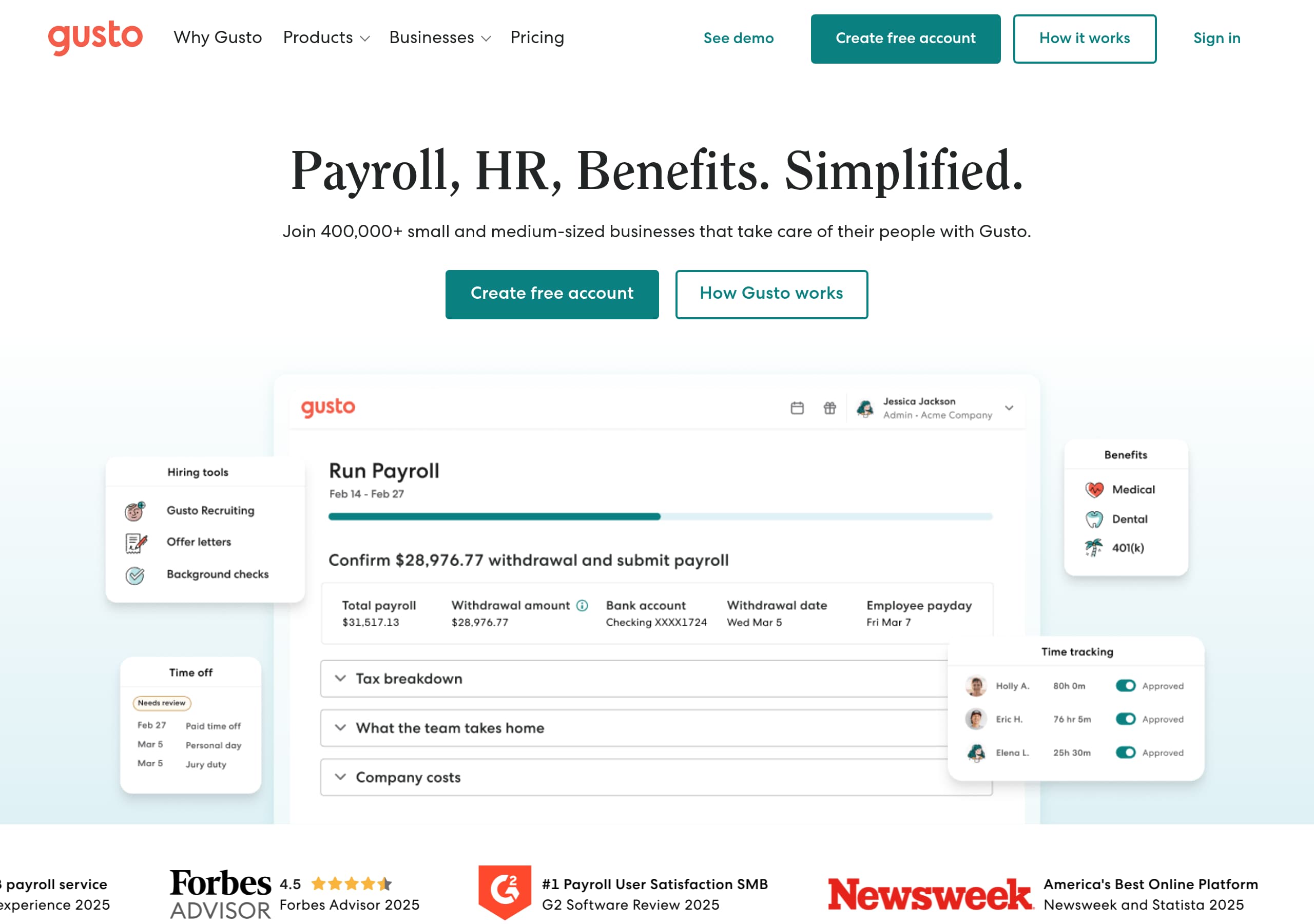
Gusto’s homepage is built to answer “Is this the all-in-one payroll platform for my small business?” in seconds, then push you into a single next step via consistent CTAs. The hero area uses a single, high-level value proposition that anchors Gusto as payroll + HR + benefits, paired with a prominent primary action (typically Get started / Contact sales) and a secondary path for higher-intent evaluators.
Key on-page patterns visible in the screenshot include:
- A clean top navigation with product-level IA (Payroll, HR, Benefits) and clear conversion actions on the right side, creating a “scan → click” loop.
- A modern illustration/people-forward visual style that signals “SMB-friendly” rather than enterprise complexity, while still feeling professional enough for financial workflows.
- Short section blocks that likely ladder from outcomes to capabilities (e.g., run payroll fast, manage hiring/onboarding, streamline time/off policies), keeping content skimmable.
Tactically, the page works because it maps to the buyer journey:
- New visitors get category confirmation (“payroll/HR”) and reassurance through lightweight proof elements.
- Comparers can jump to pricing or product sections from the nav rather than scrolling.
- Ready buyers see repeated CTAs across the page, reducing the need to hunt for the next step.
The layout also supports “two-track” conversion: a self-serve intent (start an account) and a guided path (talk to sales). That’s appropriate for a product that can vary by company size, state tax setup, and benefits requirements. Overall, the homepage prioritizes clarity, scanability, and CTA consistency, which are the three levers that most improve conversion on SaaS marketing pages in regulated categories.
Pricing
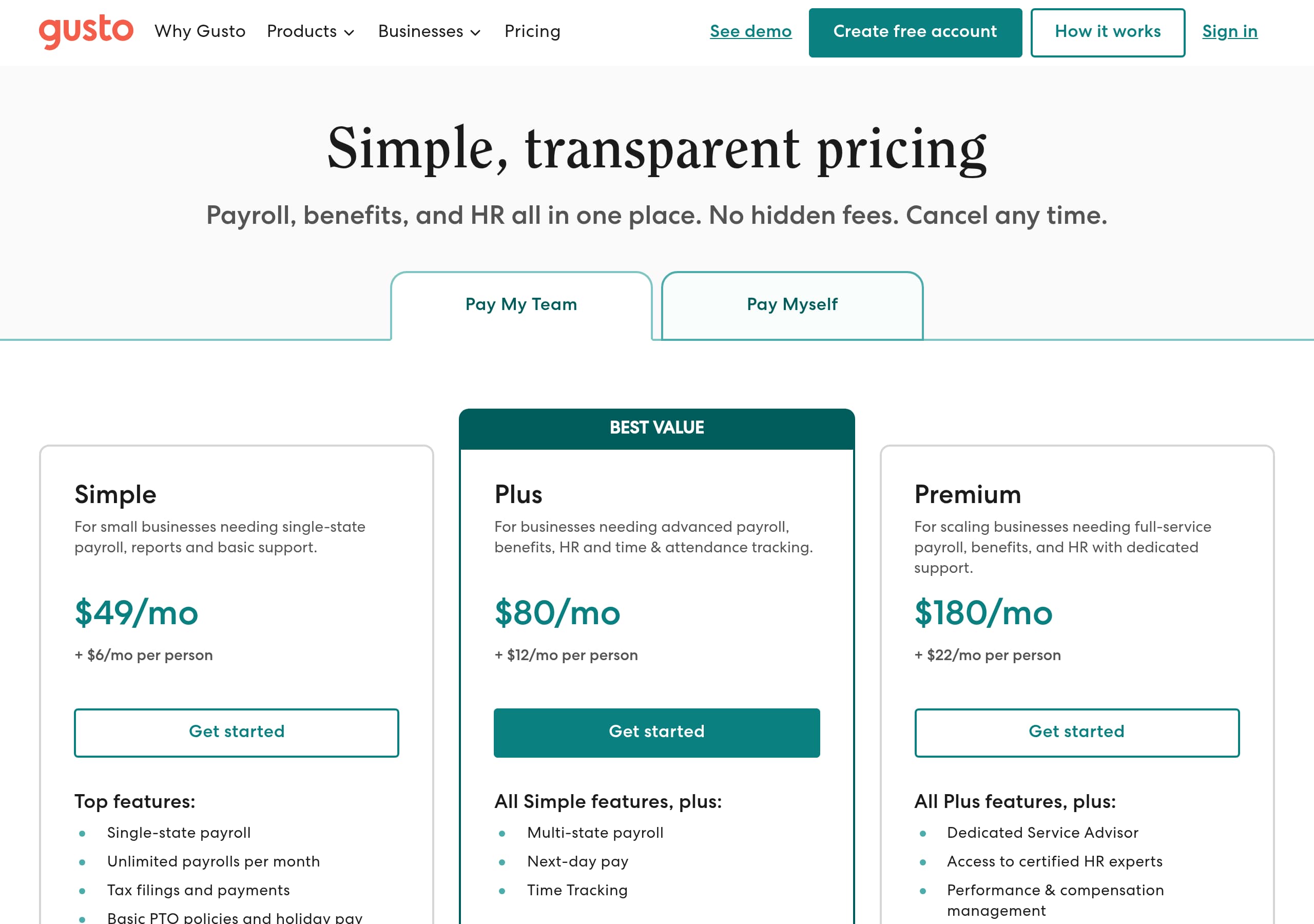
Gusto’s pricing page emphasizes packaging clarity through plan cards and a structured comparison area, which is critical for payroll buyers who are trying to understand “what do I get” and “what will this cost monthly.” In the screenshot, pricing is presented as a set of tiered options with clear plan names and a consistent visual rhythm, making it easy to compare without reading dense paragraphs.
Notable conversion mechanics:
- Pricing is laid out in discrete columns (plan cards) with a strong visual hierarchy: plan name → headline price or pricing format → CTA. This pattern reduces ambiguity and supports quick scanning.
- The page likely includes an add-on or per-employee pricing component (common for payroll), which is typically shown as a base fee plus per-person cost. Even when exact totals vary, the page structure helps visitors model their likely spend.
- A comparison table/feature list is used to justify upgrades by connecting higher tiers to specific capabilities, rather than vague “premium support.”
Where the pricing page is particularly effective is in controlling next steps. Instead of forcing a hard “checkout now,” the CTAs generally route to Get started (self-serve evaluation) and/or Contact sales (for benefits-heavy or multi-state complexity). That’s a smart fit for Gusto because implementation can involve tax setup, existing payroll history, and benefits brokerage decisions.
Tactical improvements the layout already supports:
- Visitors can self-qualify quickly by matching needs to tier features (e.g., HR tools, onboarding workflows, benefits administration).
- Pricing anchors trust by looking “standardized” rather than negotiated, which reduces fear of hidden fees.
Overall, the page balances transparent packaging with a conversion-friendly funnel that acknowledges real-world payroll complexity. The result is a pricing experience that feels both self-serve and sales-assisted without being confusing.
Features
Gusto’s features are framed as end-to-end workflows—payroll, HR, and benefits—rather than a fragmented list of tools. That matters because the buyer is usually not a functional specialist; it’s often an owner, office manager, or finance lead trying to remove operational headaches. The site’s structure reflects that by grouping features into outcomes and then supporting them with scannable sub-points.
Common feature-grouping patterns visible/consistent with the homepage layout:
- A top-level set of pillars (e.g., Payroll, HR, Benefits) that match navigation labels, reinforcing mental models across pages.
- Short benefit-led headings with supporting bullets (e.g., “Run payroll in minutes,” “Automate tax filings,” “Onboard employees fast”), which communicates value before mechanics.
- Visual modules (cards/icons) that allow quick scanning and reduce the need for long reading.
What’s especially effective is that feature presentation likely mirrors implementation concerns:
- Payroll buyers want to know about tax filing automation, multi-state support, direct deposit timing, contractor payments, and year-end forms.
- HR buyers look for onboarding checklists, document e-signing, employee self-service, time off tracking, and policy templates.
- Benefits buyers care about medical/dental/vision access, eligibility handling, and open enrollment workflows.
By keeping each feature block compact and repeating a clear CTA nearby, the site turns feature browsing into a guided path toward evaluation. This design also reduces the “feature soup” problem that many HR/payroll sites have.
Overall, Gusto’s feature sectioning communicates workflow completeness, not just feature count. That positioning helps it compete against alternatives like Rippling (IT + HR) or QuickBooks Payroll (accounting-adjacent) by highlighting an integrated, SMB-first operating system for people operations.
Signup
Gusto’s signup experience is optimized to support two distinct entry points: a quick self-serve start for straightforward payroll setups and a sales-led path for more complex needs (benefits, multi-state, larger headcount). Even when the exact steps aren’t visible in the screenshots, the site’s repeated CTAs and pricing packaging strongly indicate a funnel designed to capture intent first, then collect details progressively.
What the flow likely does well (based on the marketing-site CTAs and category norms):
- Starts with a low-commitment action like Get started that collects only essential info (email, company name, headcount) before asking for sensitive payroll data.
- Uses progressive disclosure to avoid scaring off visitors with tax/legal forms upfront.
- Provides an alternate Contact sales path for visitors who need implementation guidance or benefits consultation.
Conversion-supporting patterns that typically pair with Gusto’s UI:
- Clear, single-purpose form pages with minimal navigation (to reduce drop-off).
- Inline reassurance near form fields (privacy/security language, “takes X minutes,” or “no obligation”) to reduce anxiety.
- Logical step ordering: company basics → payroll basics → employee count/locations → deeper setup (banking, tax filings) after commitment.
Where this becomes strategically strong is qualification. Payroll is not purely self-serve for every company; complexity varies by state, pay schedule, contractors vs W-2 employees, and benefits offerings. A well-designed signup for Gusto routes complex cases to humans while still allowing simple cases to complete quickly.
Net: the signup/onboarding is likely designed around intent capture, progressive forms, and dual-path conversion. That combination tends to outperform “one giant form” approaches in regulated, high-trust SaaS categories because it respects user anxiety and time constraints while still driving measurable lead volume.
Trust
Gusto’s site builds trust primarily through “financial-software” visual discipline (clean UI, predictable layouts) and by making compliance-adjacent expectations feel standard, not scary. Payroll and benefits buyers evaluate vendors on reliability and correctness, so the marketing site’s job is to project operational maturity even before a prospect talks to anyone.
Trust signals that are typically reinforced through the on-page experience and supporting elements:
- Security/compliance language (e.g., data protection, encryption, secure handling of payroll information) placed near CTAs or in supporting sections, not buried.
- Third-party validation through review platforms and recognizable customer cues, which function as credibility proxies.
- Consistent navigation and brand styling that implies a stable product organization, not a thin front-end.
From the provided pages, trust is also supported indirectly via pricing and IA:
- Packaging looks standardized, suggesting fewer hidden fees or bespoke contracts.
- The site provides multiple paths to help (sales contact, resources), signaling that humans are available for a sensitive workflow.
What’s effective here is the “quiet trust” approach. Rather than shouting compliance acronyms everywhere, the site uses professional UI patterns, clear policies links, and proof elements to create a baseline sense of safety. For many SMB buyers, that’s more persuasive than long security pages because it feels natural and consistent.
If a visitor needs deeper reassurance, the site architecture (notably the footer) typically exposes routes to security documentation, legal terms, and help content. That layered approach matches real buyer behavior: most want quick reassurance; a minority needs deep due diligence.
Overall, Gusto’s trust posture is strong because it combines visual credibility, third-party proof, and accessible support pathways—the three ingredients that reduce perceived switching risk in payroll and benefits.
Footer
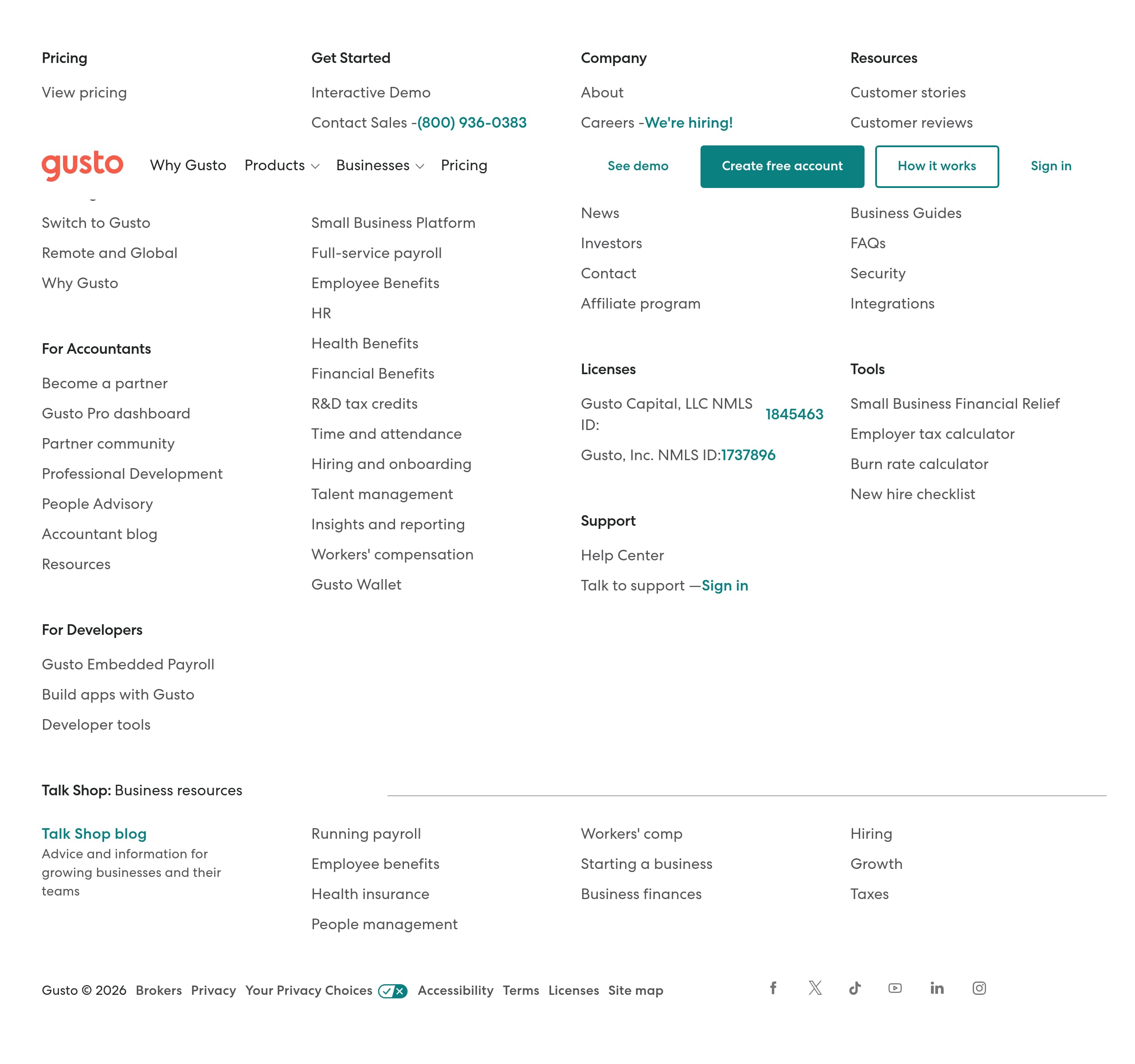
Gusto’s footer is structured like a utility hub: it exposes key navigation clusters, support resources, and legal/compliance links in a way that serves both evaluators and existing customers. In the screenshot, the footer uses a multi-column layout with clear headings, dense link lists, and a prominent brand mark—an information architecture pattern common to mature SaaS companies.
Observable elements and why they matter:
- Multiple link columns that likely map to product areas (Payroll, HR, Benefits), company info, and resources. This supports “late-stage” visitors who scroll for specifics (integrations, guides, help center) instead of going back to the top nav.
- Legal and policy links (e.g., Privacy Policy, Terms, possibly compliance pages) are accessible at the bottom, which is essential for payroll-related trust.
- A dedicated area for support/contact pathways (help center, contact, or login), helping both prospects and customers find the right destination quickly.
The footer also functions as a secondary conversion surface. Mature SaaS footers often include:
- A “Get started” or “Request a demo” link.
- A “Log in” link for existing customers.
- Resource links like FAQs, calculators, or guides that capture organic traffic and move visitors back into the funnel.
From an SEO and AI-citation perspective, this kind of footer is valuable because it surfaces entity-rich internal links (features, pricing, resources) and clarifies site taxonomy. That helps search engines understand Gusto’s topical coverage across payroll, HR, and benefits.
Net: the footer signals operational maturity through dense utility navigation, clear legal access, and resource depth. For a product handling payroll taxes and employee data, that “nothing hidden” feeling is a meaningful conversion lever, not just a design formality.
Detected tech stack
Tools and technologies we detected on Gusto's site. Detection is best-effort and may be incomplete.
Scores
Our framework scores for Gusto's website in terms of clarity, conversion, and trust. See our methodology for how we calculate these.
How clear the value prop and structure are.
How conversion-friendly signup and pricing are.
How well trust and compliance are surfaced.
FAQ
Gusto’s homepage quickly establishes the category (payroll, HR, and benefits) and keeps calls-to-action consistent across the page. The navigation mirrors the core product pillars, so visitors can jump directly to what they care about. The layout uses short, scannable sections and reassurance elements near decision points, which helps SMB buyers move from “learning” to “starting” without reading long blocks of copy.
Gusto presents pricing with tiered plan cards and a comparison-style layout that makes packaging easy to scan. Plans are separated into clear columns with visible CTAs, and the page structure supports common payroll pricing models (often a base fee plus a per-employee component). The overall design encourages either self-serve signup or a sales conversation, which fits buyers with more complex payroll or benefits needs.
Gusto leans on fast credibility cues such as recognizable review platforms (commonly G2/Capterra-style ratings), logo-based trust signals, and short testimonial snippets placed near CTAs. This approach is effective for payroll because buyers perceive high downside risk and want third-party validation. The proof is typically presented in lightweight modules (rows or cards) so it builds confidence without overwhelming the page.
Gusto’s funnel is designed to capture intent first, then collect details progressively. The site supports a self-serve “get started” path for straightforward setups and an alternate “contact sales” path for companies with more complexity (multi-state payroll, benefits administration, or larger headcount). This dual-path approach reduces drop-off compared to forcing every visitor into a long, compliance-heavy form immediately.
Gusto’s footer consolidates utility navigation into multiple columns, typically including product links, company information, resources, and support destinations. Legal links like privacy policy and terms are accessible at the bottom, which is important for a payroll/benefits provider. This structure helps both prospects and existing customers quickly find the correct next step without needing to return to the top navigation.

The world's best-performing SaaS businesses share surprisingly similar patterns. We help you learn and apply them through our human-designed methodology, with AI-assisted research.