
Key takeaways
Here are the key insights from our website breakdown analysis of Justworks.
Justworks nails audience qualification early by asking “How many W-2 employees does your company have?”, which reduces mismatched leads and sets up a more relevant product recommendation path.
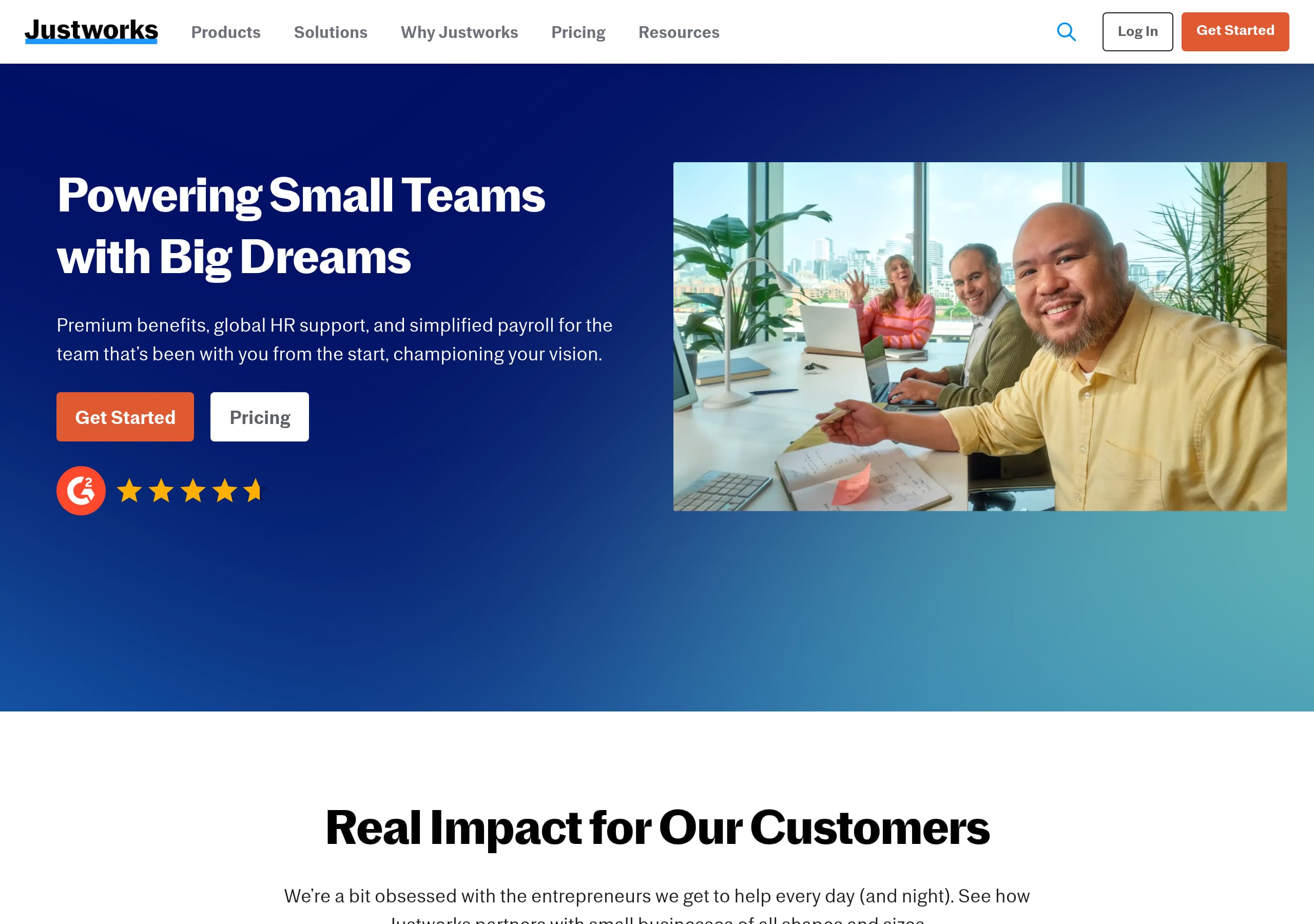
The homepage pairs a clear promise (“PEO & Payroll Solutions for Small Businesses” and “Powering Small Teams with Big Dreams”) with dual CTAs (“Get Started” and “Pricing”), supporting both high-intent and research-mode buyers.
Justworks strengthens trust with concrete operational scale metrics, including $31B+ payroll processed in 2025, $8.9B total taxes processed, 4,000 tax localities supported, and 268k+ W-2s generated, which are stronger than generic badges.
Product positioning is cleanly segmented into three lanes (All-In-One PEO, Global EOR, Flexible Payroll), helping visitors self-select without reading long feature narratives.
Social proof is presented as customer stories plus a visible G2-style review quote in the footer, but the site could improve scan-ability by surfacing recognizable customer logos or ratings higher on the page.
The conversion path leans heavily on “Get Started” and phone calls (Sales and Support numbers in the header), which suits HR and payroll buyers who want human confirmation, but may create friction for users who want transparent self-serve pricing first.
Home
Justworks’ homepage succeeds because it communicates a small-business HR platform with multiple buying paths in the first screen, then quickly guides visitors into the right product type. The top header exposes key navigation (Products, Solutions, Pricing, Resources) and keeps two high-intent CTAs, “Get Started” and “Pricing”, alongside phone access for Sales and Support, which is a strong fit for payroll and PEO buyers who often want reassurance.
The hero message, “Powering Small Teams with Big Dreams,” is paired with a more concrete descriptor, “Premium benefits, global HR support, and simplified payroll.” That combination balances brand tone with operational clarity, and it also signals the main value pillars: benefits access, global HR support, and simplified payroll.
Below the hero, the page transitions into proof and segmentation:
- A customer impact module (“Real Impact for Our Customers”) repeats “Read Story” cards, emphasizing narrative validation rather than feature claims.
- A “Your HR Needs Covered by Justworks” grid lists five jobs-to-be-done: Hire/Onboard/Pay, Offer Benefits, Stay Compliant, Get Human Support, Go International. This is a practical use-case-first feature map that reduces the need for jargon.
- The page then asks a qualifying question: “How many W-2 employees does your company have?” with bracketed options, followed by a product matching quiz. This is an effective lead qualification pattern for PEO eligibility and pricing context.
Finally, “HR Solutions Built for Small Businesses” clarifies the suite, All-In-One PEO, Global EOR, and Flexible Payroll, each with “Learn More” and “Compare Plans.” The only missed opportunity is that the hero does not explicitly define “PEO” for first-time founders, which could reduce clarity for top-of-funnel traffic.
Pricing
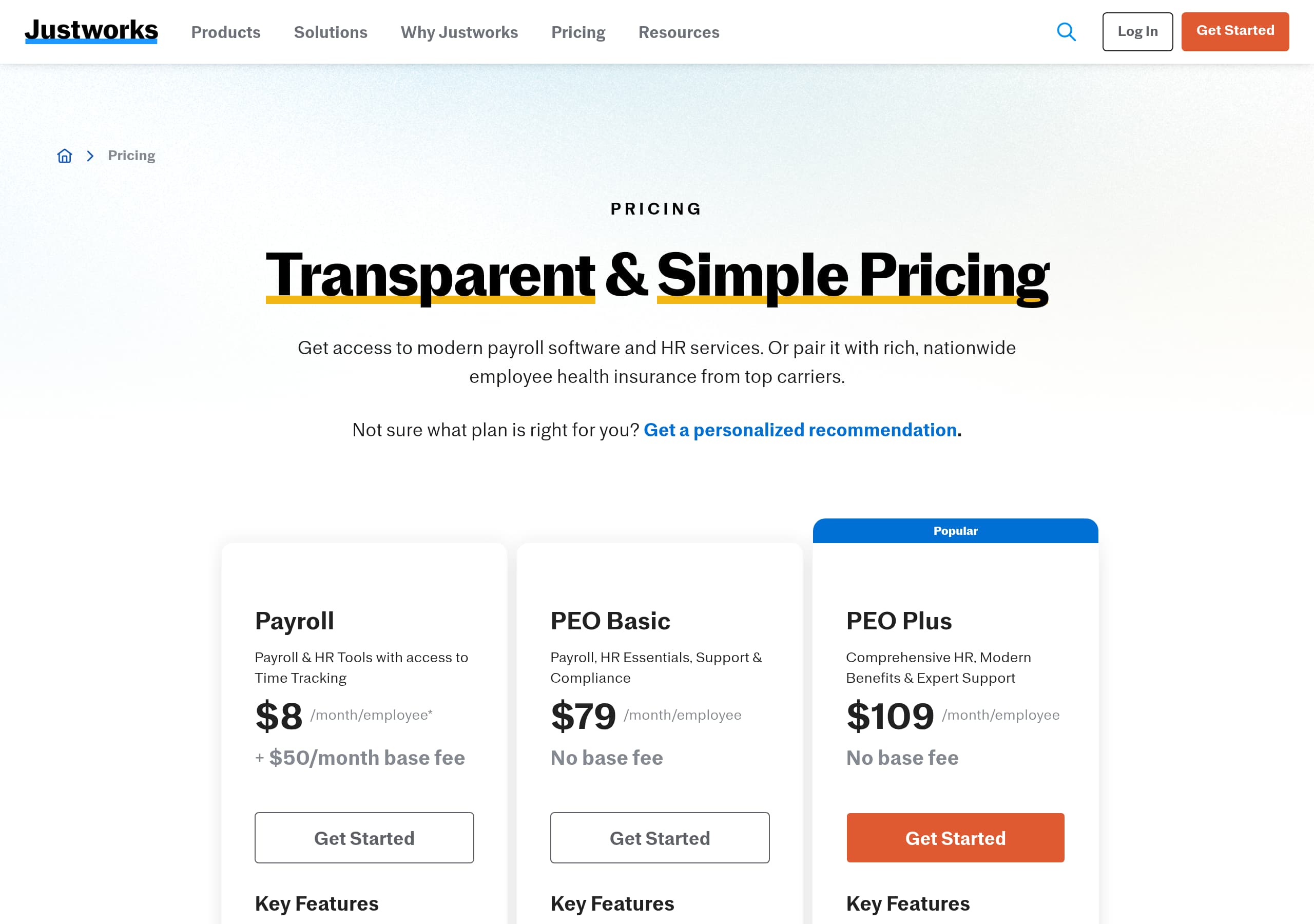
Justworks’ pricing experience is designed to support comparison and sales-assisted evaluation rather than pure self-serve checkout. The site repeatedly routes visitors to “Pricing” from the header and pairs it with “Compare Plans” CTAs across product tiles, signaling that plan selection is a primary conversion step. On the homepage excerpt, each solution block (PEO, EOR, Payroll) includes both “Learn More” and “Compare Plans”, which is a strong pattern for buyers who need to validate scope before they talk to sales.
From the pricing screenshot context (and the site’s navigation structure), the pricing page appears oriented around packaging by product line, not a single universal plan. This is appropriate because Justworks sells materially different offerings, All-In-One PEO (co-employment, benefits, compliance), Global EOR (international employment), and Flexible Payroll (payroll-first with optional add-ons). Pricing pages in this category work best when they:
- Keep plan columns simple and anchored to “who it is for.”
- Use a visible “Compare” interaction to reduce scrolling fatigue.
- Provide compliance and tax handling inclusions in plain language.
Justworks also uses a qualification question (“How many W-2 employees…”) on the main flow, which implies pricing and eligibility may vary by employee count. That is credible and reduces surprise later, but it can also feel like pricing gating if the pricing page does not show baseline ranges.
Where pricing could be stronger for conversion: surface a compact summary of what is included across all plans (for example payroll runs, tax filings, HR tools), and mirror the homepage’s operational scale numbers (like $31B+ payroll processed) near the pricing table as a reassurance block. For risk-sensitive purchases, visitors often want “what happens if something goes wrong,” so linking pricing to support expectations and response channels can improve close rates.
Features
Justworks presents features as outcomes first, then maps them to product lines, which is the right approach for complex HR categories where visitors may not know which solution they need. Instead of listing dozens of modules, the site uses a clear “Your HR Needs Covered by Justworks” grid with five buckets: “Hire, Onboard, Pay,” “Offer Benefits,” “Stay Compliant,” “Get Human Support,” and “Go International.” Each item includes a “Discover” CTA, creating a task-based navigation layer that is easier to scan than a traditional feature checklist.
The product architecture is then clarified in “HR Solutions Built for Small Businesses,” which splits the suite into three offerings:
- All-In-One PEO: positioned as “HR, benefits, payroll, and compliance managed from one easy place.”
- Global EOR: positioned for hiring “without the stress of local entity set-up” and to stay compliant.
- Flexible Payroll: positioned as “more than just payroll software” with the ability to scale or add features.
This three-lane structure is effective because it aligns to three distinct buyer intents: outsource HR operations (PEO), employ internationally (EOR), or modernize payroll (Payroll). Each tile includes “Learn More” plus “Compare Plans”, which reinforces a next step without forcing a demo request.
Justworks also supports feature credibility with operations-focused blocks like “A Stress-less Tax Season” and “Documents Filed and Ready to Go,” which imply specific deliverables (tax filing, W-2 and 1099 generation). The presence of figures like 4,000 tax localities supported signals feature depth in compliance, not just surface-level software.
A tactical improvement would be adding a compact “what you get” matrix that ties each outcome to the relevant product (PEO vs Payroll vs EOR) to prevent confusion for visitors who assume everything is included everywhere. For high-consideration buyers, scope clarity is a feature.
Signup
Justworks’ signup and lead capture flow is built around qualification and routing, not immediate account creation. The clearest evidence is the embedded prompt: “To get started, answer the question below: How many W-2 employees does your company have?” with discrete ranges (0–1, 2–6, 7–15, 16–49, 50+). This is a strong progressive profiling step because employee count is essential for PEO fit, benefits eligibility, and service scope.
Immediately after, the site introduces a second conversion device: “Which Justworks Product is Right for You?” followed by “Take a quick quiz… Answer a few questions to get started.” This indicates a multi-step intake that likely gathers intent (PEO vs payroll vs EOR), geography, and timeline, then routes to either a plan comparison or a sales conversation. In HR services, this approach can outperform generic “Request a demo” forms because it feels personalized and reduces the risk of wasting time.
Conversion choices are also visible in the persistent header and utility links:
- “Get Started” for the primary path.
- “Log in” for existing customers.
- Prominent phone numbers for Sales and Support, which supports high-touch conversion and reduces anxiety.
Potential friction: visitors who want instant pricing or immediate product access may feel slowed down by the quiz or qualification question, especially if they are in the “Flexible Payroll” segment that expects a more self-serve setup.
To improve the signup experience without changing the model, Justworks could clarify what happens after the quiz in one sentence, for example “See recommended plans, then book a call if needed.” Also, showing a step count (like “3 questions”) can increase completion rates by setting expectations. Overall, the flow is well-aligned to a consultative sale, but it is less optimized for pure self-serve.
Trust
Justworks builds trust primarily through operational proof, compliance-adjacent messaging, and accessible support channels, which is exactly what buyers look for in payroll, tax filing, benefits, and HR administration. The most persuasive trust element on the page is the metrics block that quantifies scale and execution:
- $31B+ payroll dollars processed in 2025
- $8.9B total taxes processed in 2025
- 4,000 tax localities supported
- 268k+ W-2s generated in 2025
These numbers do more than impress, they directly reduce perceived risk by demonstrating repetition, coverage, and operational maturity. The copy also frames the implication clearly, for example “we’re not new to this,” and “Sit back while we take care of filing W-2s and 1099s for you,” which addresses a common anxiety: “Will this provider actually file correctly and on time?”
Trust is also reinforced through human support visibility. The header includes Sales and Support phone numbers, and the solutions grid includes “Get Human Support” with “Timely support from a team that cares.” For compliance-heavy services, easy escalation paths signal accountability.
What is less visible in the provided excerpt is explicit security and compliance certification language (for example SOC 2, ISO 27001, GDPR), or detailed explanations of PEO regulatory posture. There is a “Justworks status” link in the footer navigation, which hints at transparency around uptime and incidents, but it is not leveraged on the main trust narrative.
A concrete improvement would be adding a short trust strip near the metrics block that answers three questions: where data is stored, what audits exist, and what payroll tax guarantees apply. Even a simple security and compliance summary with links to documentation can increase enterprise confidence, especially for Global EOR buyers. Still, the current trust story is strong because it is grounded in specific, verifiable operational outputs.
Footer
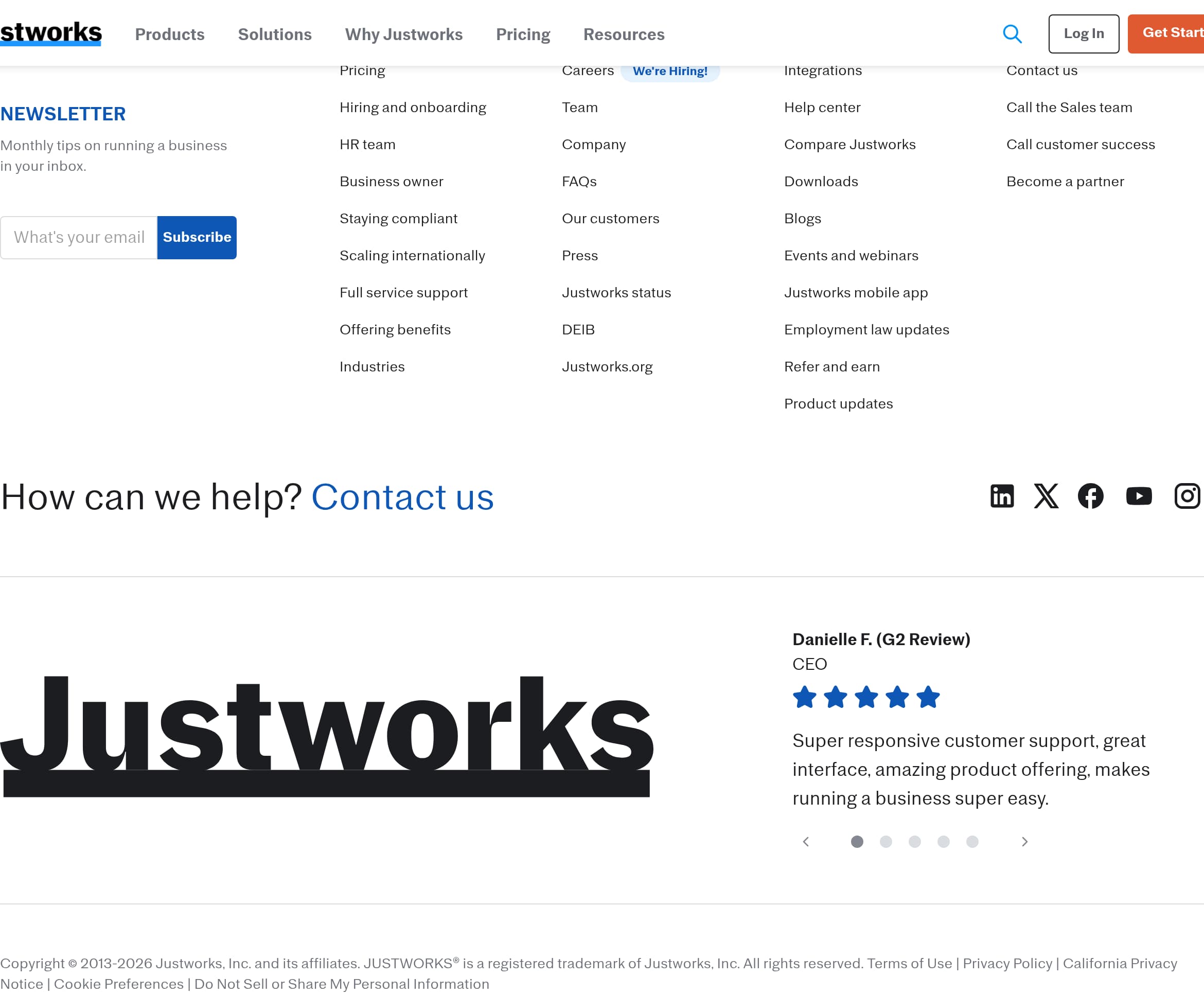
Justworks’ footer is built for credibility and discoverability, functioning as a site map for multiple buyer types and as a compliance anchor for a regulated category. It includes dense navigation clusters spanning Solutions, About, Resources, and Contact, plus utility and legal links like Terms of Use, Privacy Policy, “California Privacy Notice,” “Cookie Preferences,” and “Do Not Sell or Share My Personal Information.” For a payroll and benefits platform, these disclosures are not decorative, they are necessary trust signals that indicate attention to privacy obligations.
The footer also continues conversion support rather than ending the journey. It offers:
- “Give Us a Call” with the Sales number and “Call Now,” reinforcing a phone-first option.
- A “Log In” link for existing customers.
- A “Newsletter” subscription module (“Monthly tips on running a business in your inbox”), which captures top-of-funnel visitors who are not ready to buy.
From the excerpt, the footer includes a “Danielle F. (G2 Review) CEO” quote, which is an unusual but effective placement for social proof at the bottom of the page. This reinforces support quality and interface usability, two differentiators that matter when switching payroll providers.
In terms of trust infrastructure, the footer references “Justworks status,” DEIB, and Justworks.org, indicating broader corporate presence and transparency. It also lists “Integrations,” “Help center,” “Justworks mobile app,” and “Employment law updates,” which collectively signal product maturity and ongoing compliance guidance.
One improvement would be to reduce redundancy and increase scan efficiency. The excerpt shows repeated blocks (for example multiple “How can we help?” and repeated testimonial lines), which can make the footer feel cluttered. Consolidating repeated items into a single support hub section and adding a compact “Security” or “Compliance” link cluster would make the footer even more useful for evaluators who scroll specifically to validate legitimacy and governance. Overall, it is a strong, conversion-aware footer with the right legal coverage for the category.
Detected tech stack
Tools and technologies we detected on Justworks's site. Detection is best-effort and may be incomplete.
Scores
Our framework scores for Justworks's website in terms of clarity, conversion, and trust. See our methodology for how we calculate these.
How clear the value prop and structure are.
How conversion-friendly signup and pricing are.
How well trust and compliance are surfaced.
FAQ
Justworks leads with a clear category and audience fit: “PEO & Payroll Solutions for Small Businesses,” then supports it with concrete benefits like “premium benefits,” “global HR support,” and “simplified payroll.” It uses dual CTAs, “Get Started” and “Pricing,” plus visible Sales and Support phone numbers. The page also segments intent into five HR needs and three product lines (PEO, EOR, Payroll), which helps visitors self-select quickly.
Justworks repeatedly routes visitors into plan evaluation using “Pricing” in the main navigation and “Compare Plans” CTAs on each product tile. The packaging is framed around distinct offerings: All-In-One PEO, Global EOR, and Flexible Payroll, rather than a single generic plan. The site also qualifies visitors by employee count, which implies pricing or eligibility may vary by company size, a common requirement for PEO-style services.
Justworks starts onboarding with qualification. The site asks, “How many W-2 employees does your company have?” with predefined size ranges, then offers a “Which Justworks Product is Right for You?” quiz that matches needs to the right solution. This approach is designed to route leads to the appropriate product path (PEO, EOR, or Payroll) and likely supports a sales-assisted motion, reinforced by prominent phone contact options.
Justworks highlights customer stories in a “Real Impact for Our Customers” section with many “Read Story” entries, emphasizing breadth of use cases. It also displays a named reviewer quote, “Danielle F. (G2 Review), CEO,” praising responsiveness and usability. In addition to testimonials, it uses operational scale metrics like $31B+ payroll processed in 2025 and 268k+ W-2s generated, which function as trust-building proof.
Justworks focuses on execution proof and compliance coverage. It cites $31B+ in payroll dollars processed in 2025, $8.9B in total taxes processed, support for 4,000 tax localities, and 268k+ W-2s generated. It also reassures buyers with “A Stress-less Tax Season” and “Documents Filed and Ready to Go,” plus easy access to Sales and Support by phone. Legal and privacy links are prominent in the footer.

The world's best-performing SaaS businesses share surprisingly similar patterns. We help you learn and apply them through our human-designed methodology, with AI-assisted research.