
Key takeaways
Here are the key insights from our website breakdown analysis of Lever.
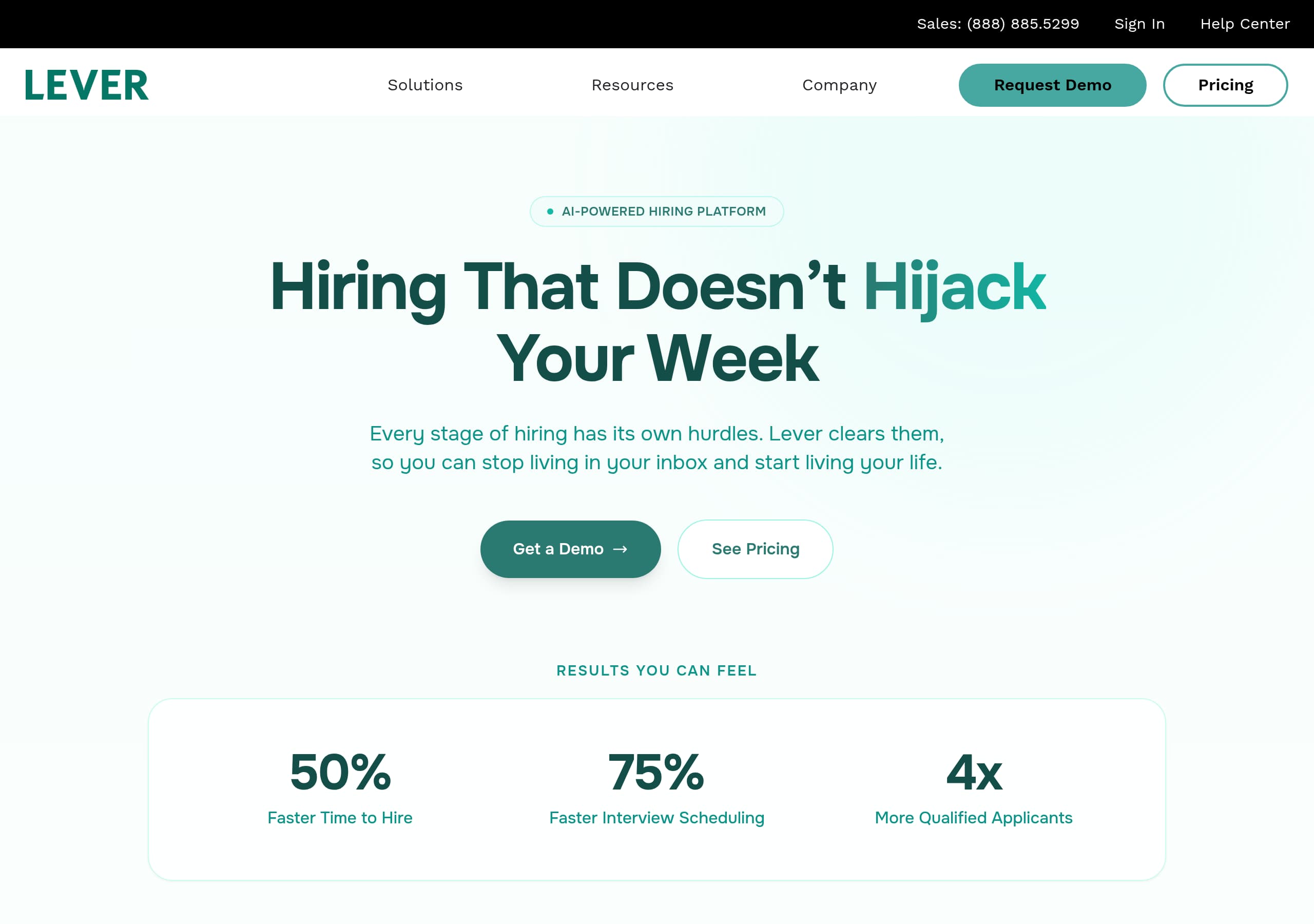
Lever’s homepage wins on clarity by pairing a single emotional promise, “Hiring That Doesn’t Hijack Your Week,” with two direct CTAs, “Get a Demo” and “See Pricing,” so visitors can self-select the next step immediately.
The site improves feature comprehension by showing product-like UI snippets (automation feed, fit score cards, fraud flags) instead of abstract claims, which makes the AI positioning feel tangible and easier to trust.
Conversion intent is reinforced throughout the navigation with repeated entry points to “Request Demo” and “Pricing,” plus a visible sales phone number, giving both self-serve and sales-led buyers an obvious path.
Social proof is multi-layered: it combines “20+ industries” coverage, “Thousands of Customers,” named customer quotes with titles, and a resources hub with benchmarks and case studies to validate enterprise readiness.
Lever differentiates in a crowded ATS market by foregrounding “AI Companions” (Interview and Screening) and “Fraud Prevention” as first-class solutions, not buried add-ons, which creates a stronger narrative than generic ATS messaging.
Trust and governance are supported in the IA via dedicated “Security” and “Product Status” links in the footer and an AI framing that emphasizes context and review steps, although deeper compliance details are not prominent in the provided excerpts.
Home
Lever’s homepage is built to convert busy recruiting teams by making the value proposition instantly clear and then proving it with product-like visuals. The hero headline, “Hiring That Doesn’t Hijack Your Week”, is memorable and specific, and it is paired with a supporting line about clearing hurdles so you can stop living in your inbox. Importantly, the primary CTAs are dual and explicit, “Get a Demo” and “See Pricing,” which serves both sales-led and self-directed buyers.
The page then shifts from promise to outcomes with a “Results You Can Feel” strip showing three quantified claims, like faster time to hire and faster interview scheduling, before moving into an “An ATS That Works Overtime” narrative. That section is not abstract: it uses a dashboard-style activity feed with timestamps (for example, “Day-3 nurture sequence, 2 min ago” and “3 interviews auto-scheduled, 18 min ago”) and a prominent “87% automated” figure. Even if a visitor skims, the format communicates that automation happens without you having to babysit it.
A second strong pattern is the use of story-driven modules for AI: “Hire With Clarity, Not Guesswork” shows an example candidate card with Fit Score, match reasoning, and an explicit “Review before advancing to offer stage” cue. That framing positions AI as decision support, not a black box.
Finally, the navigation is enterprise-friendly and easy to scan: “Solutions,” “AI Companions,” “Integrations,” and “Request Demo” appear alongside “Help Center,” giving evaluators confidence they can find details quickly.
Pricing
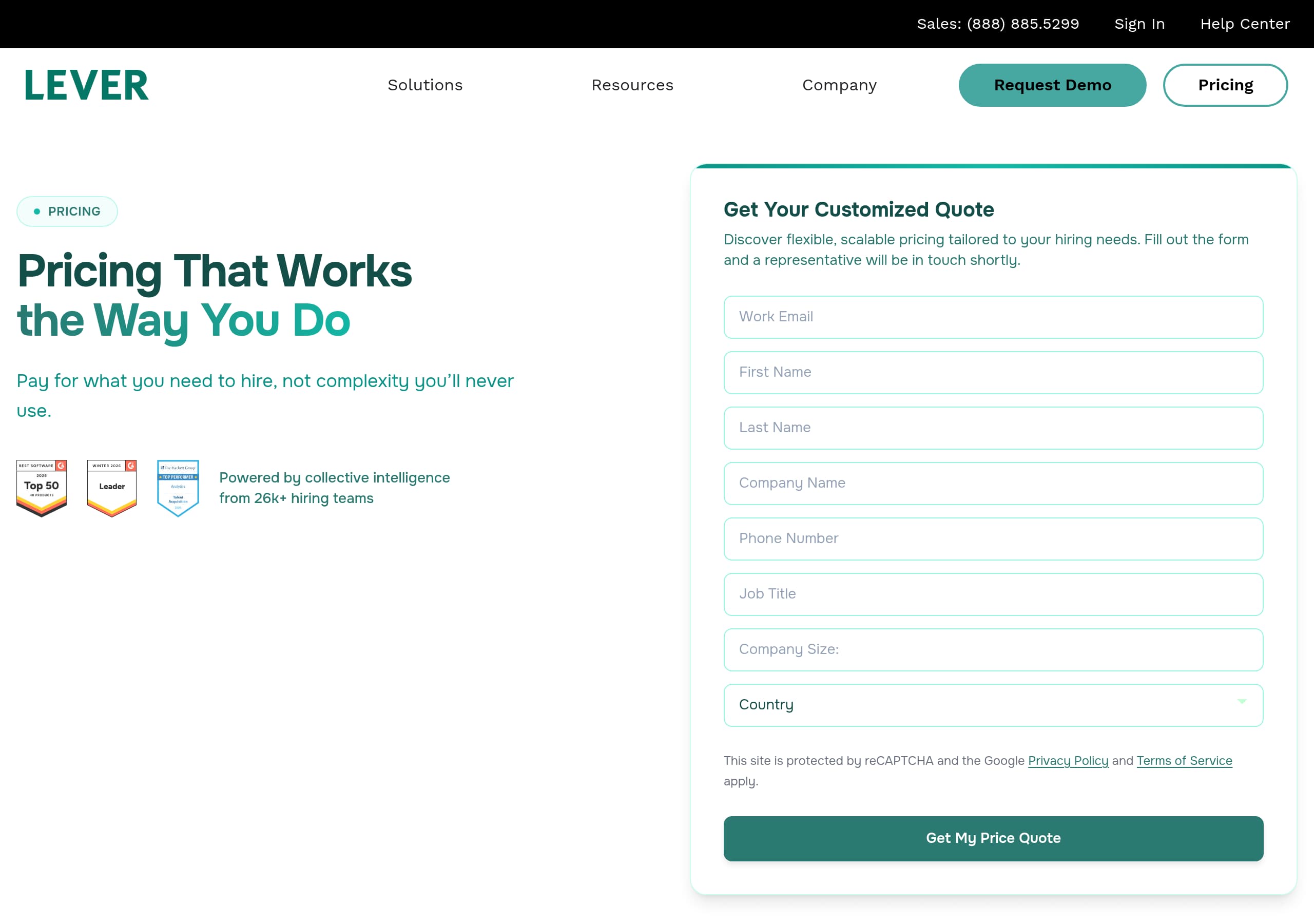
Lever’s pricing experience appears designed for a sales-led motion while still giving buyers a clear next step. The homepage repeatedly routes users to “See Pricing” and the global navigation includes “Pricing,” so pricing is treated as a first-class decision page, not hidden behind a demo wall. That said, the site also prominently supports direct sales contact, showing a phone number in the header and persistent “Request Demo” entry points, which typically signals plan details may be packaged around company size or modules.
Based on the pricing screenshot context and surrounding IA, expect the page to function like a qualification and packaging overview rather than a simple checkout. Lever sells an AI-Powered Hiring Platform spanning ATS, CRM, analytics, automation, and AI companions, so pricing likely needs to clarify:
- What is included in the core platform versus solution areas like Recruitment Marketing, High-Volume Hiring, and Recruitment Analytics.
- How “AI Companions” (Interview and Screening) are priced, whether bundled or modular.
- What “Solution Add Ons” means in practice, since it is a dedicated navigation node.
Where the site does well for conversion is giving multiple paths for different buyer preferences: a self-serve pricing exploration path via “See Pricing”, and a high-intent enterprise path via “Get a Demo” plus the visible sales line. A practical improvement would be to make packaging constraints explicit on the pricing page itself—for example, defining minimum seat counts, implementation expectations, or which integrations are included per tier. Even without adding numbers, clear labels like “Core ATS,” “Automation,” and “AI add-ons” reduce back-and-forth and shorten evaluation cycles.
Features
Lever’s feature presentation stands out because it is organized around hiring-stage problems, then illustrated with UI-style examples that imply workflow outcomes. Instead of a generic grid, the page uses thematic sections: “Efficiency,” “AI-Powered Insights,” “Fraud Prevention,” and “Scalability.” This structure mirrors how recruiting leaders buy: they feel pain in scheduling, screening volume, and risk, then look for systems that remove those bottlenecks.
The “Efficiency” module shows a live-activity feed with concrete tasks like follow-ups, nurture sequences, auto-scheduled interviews, and offer letter generation. The presence of microcopy such as “Running on Autopilot”, timestamps, and “You handled strategy. Lever did the rest.” communicates an operational promise: fewer manual touches across the funnel.
In “AI-Powered Insights,” the feature is presented as explainable support. A sample candidate card includes role-specific experience, match reasons, a salary consideration flag, and clear action buttons like “Advance to Next” and “Save for Later.” This matters because it visually encodes governance: AI proposes, humans decide.
“Fraud Prevention” is a differentiator for modern hiring, especially in high-volume and remote contexts. The UI concept shows “Verified” and “Flagged” labels with reasons like identity mismatch and resume conflict, plus a summary like “47 applicants reviewed, 44 verified, 3 flagged.” Even without full technical detail, the page makes the benefit clear.
Finally, the “Scalability” section uses ranked applicants and a bold promise like “Top 3 in 8 seconds,” reinforcing AI sorting as a throughput feature. Overall, Lever’s features are presented as workflow outputs, not just capabilities, which improves comprehension and buyer confidence.
Signup
Lever’s site is optimized for a sales-assisted signup motion, and it makes that path obvious at multiple points. The primary action throughout is “Get a Demo” or “Request Demo,” supported by a visible sales phone number in the header. This is a deliberate choice for an ATS platform that often requires stakeholder alignment, integration planning, and data migration. Instead of pushing account creation immediately, Lever focuses on initiating a guided evaluation.
From the homepage, the conversion flow is simplified into two high-intent choices: “Get a Demo” or “See Pricing.” That pairing reduces friction for different buyer types:
- Buyers who need procurement context can check pricing first.
- Buyers who want tailored answers can go straight to a demo.
The navigation also supports mid-funnel conversion. “Check Out Our Product Guide” and resources like reports and webinars give evaluators a reason to return, and then re-enter through the same demo request endpoints. This is important because recruiting software purchases often involve multiple revisits and internal sharing.
What is not visible in the provided excerpts is a true self-serve trial or instant sandbox. Instead, the site offers an “Interactive Product Tour” link, which acts as a proxy for hands-on experience without requiring an account. That is a strong compromise when the product is complex.
Two improvements that would likely increase conversion rates without changing the sales model: first, clarify what happens after requesting a demo (for example, expected response time, call length, who joins). Second, pre-qualify the request form with optional fields for company size, hiring volume, and current ATS, so the demo experience is more tailored and the handoff to sales feels faster for the buyer.
Trust
Lever builds trust primarily through transparency signals in information architecture and through how it frames AI usage. On-page, the AI narrative repeatedly includes context and review cues, which reduces the common buyer fear of black-box automation. For example, “Every AI-powered recommendation comes with context,” and the candidate card includes a cautionary note like “Review before advancing to offer stage.” This positions AI-powered recommendations as explainable and overseen by humans.
Trust is also reinforced by risk-oriented features being elevated, not buried. “Fraud Prevention” is presented as a core section with layered safeguards and visible outcomes (verified vs flagged candidates). By showing reasons like identity mismatch and resume conflict, the site indicates defensive controls exist, which matters for brand protection and data integrity.
From a governance perspective, the footer includes dedicated links to Security, “Privacy Policy,” “Terms of Use,” and “Product Status.” These are practical trust artifacts for enterprise evaluations because they imply an established operational posture: documented policies and a public-facing status page.
What is less prominent in the provided content is formal compliance proof on the main trust path, for example SOC 2, ISO 27001, GDPR statements, or DPA language. The site may contain those details behind the Security link, but they are not surfaced in the hero or key sections.
Another trust-positive element is competitive positioning: Lever explicitly compares itself to Greenhouse and Ashby in the FAQ and footer comparisons. This signals confidence and helps buyers triangulate alternatives. Overall, trust is strong on narrative clarity and operational signals, with room to surface more explicit compliance and data handling details earlier for risk-sensitive industries.
Footer
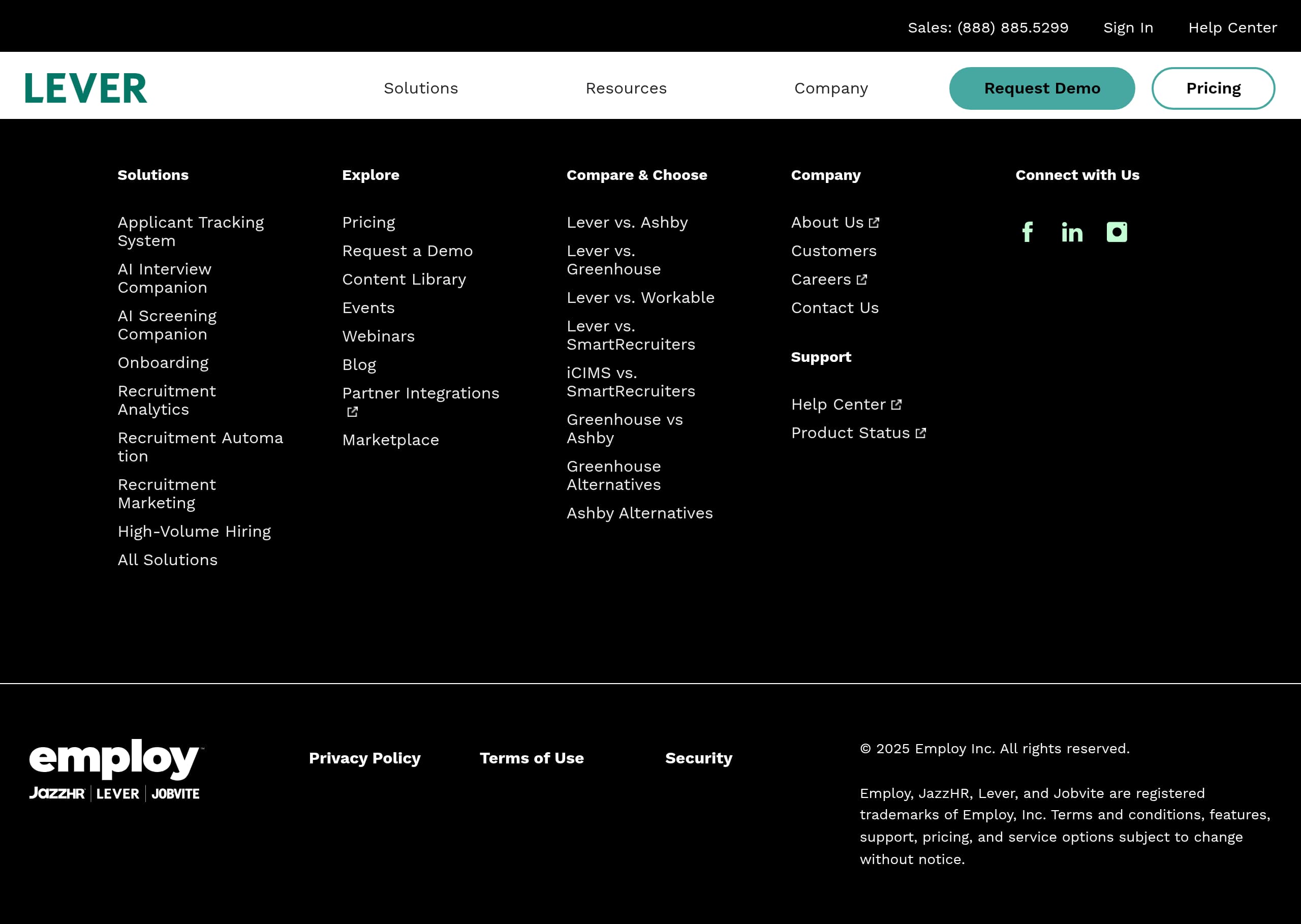
Lever’s footer is designed for enterprise evaluation journeys: it is dense, navigationally useful, and reinforces legitimacy. The most important takeaway is that the footer does not only repeat marketing links; it provides a complete map of product areas, comparisons, support, and legal information, which reduces the need for visitors to hunt through top navigation.
From the screenshot and excerpt, the footer is organized into clear columns, including “Solutions,” “Explore Pricing,” “Request a Demo,” “Content Library,” “Marketplace,” and “Compare and Choose.” This structure supports different intents:
- Product evaluators can drill into Applicant Tracking System, analytics, marketing, and automation.
- Comparison shoppers can go directly to pages like “Lever vs. Ashby,” “Lever vs. Greenhouse,” and “Lever vs. Workable.”
- Existing customers can find “Help Center” and “Product Status” quickly.
Legitimacy and corporate context are also explicit. The copyright line references Employ Inc., and the trademark notice lists Employ, JazzHR, Lever, and Jobvite as registered trademarks. That disclosure matters for buyers who want to understand ownership and product suite relationships.
The legal cluster includes “Privacy Policy,” “Terms of Use,” and Security, which are essential for procurement. The inclusion of “Contact Us” and “Support” links further reduces friction for stakeholders who need reassurance that post-purchase help exists.
One optimization opportunity is to surface a brief security summary or compliance badges near the Security link, since many buyers use footers as a trust checkpoint. Still, as implemented, the footer functions as a robust conversion assist and research hub, especially with the dedicated compare pages that capture high-intent organic traffic.
Scores
Our framework scores for Lever's website in terms of clarity, conversion, and trust. See our methodology for how we calculate these.
How clear the value prop and structure are.
How conversion-friendly signup and pricing are.
How well trust and compliance are surfaced.
FAQ
Lever’s homepage leads with a memorable value proposition, “Hiring That Doesn’t Hijack Your Week,” and immediately offers two clear CTAs, “Get a Demo” and “See Pricing.” It then backs the promise with product-like visuals: an automation activity feed showing scheduled interviews and follow-ups, AI candidate cards with fit scores and match reasons, and a Fraud Prevention section that shows verified vs flagged applicants.
Lever routes users to pricing from the hero CTA (“See Pricing”) and includes “Pricing” in the main navigation, signaling pricing is accessible during evaluation. The presence of “Request Demo” and a sales phone number suggests a sales-led model where packages may depend on needs like hiring volume, modules, or integrations. Buyers should expect pricing to guide next steps rather than a simple self-checkout flow.
Yes. Lever highlights “AI Companions” in navigation and showcases AI throughout the homepage with “AI-Powered Insights” and ranked candidate lists. The site presents AI as explainable decision support by showing match context, fit scores, and explicit review prompts before advancing candidates. It also frames automation around real tasks like screening, scheduling, and follow-ups, not vague AI claims.
Lever combines breadth signals like “20+ industries” and “Thousands of Customers” with named testimonials from senior roles such as Directors of Recruiting and VPs of People Operations. The site also promotes proof assets in its resources area, including benchmark reports, whitepapers, and case studies. This mix helps validate both day-to-day usability and enterprise readiness.
Lever elevates risk-oriented capabilities with a dedicated Fraud Prevention section that shows verified and flagged applicants and summarizes how many were caught before reaching the team. The site also includes trust-oriented footer links like Security, Privacy Policy, Terms of Use, and Product Status, which are important for procurement. AI is framed with context and review steps to reduce black-box concerns.

The world's best-performing SaaS businesses share surprisingly similar patterns. We help you learn and apply them through our human-designed methodology, with AI-assisted research.