
Key takeaways
Here are the key insights from our website breakdown analysis of GitHub.
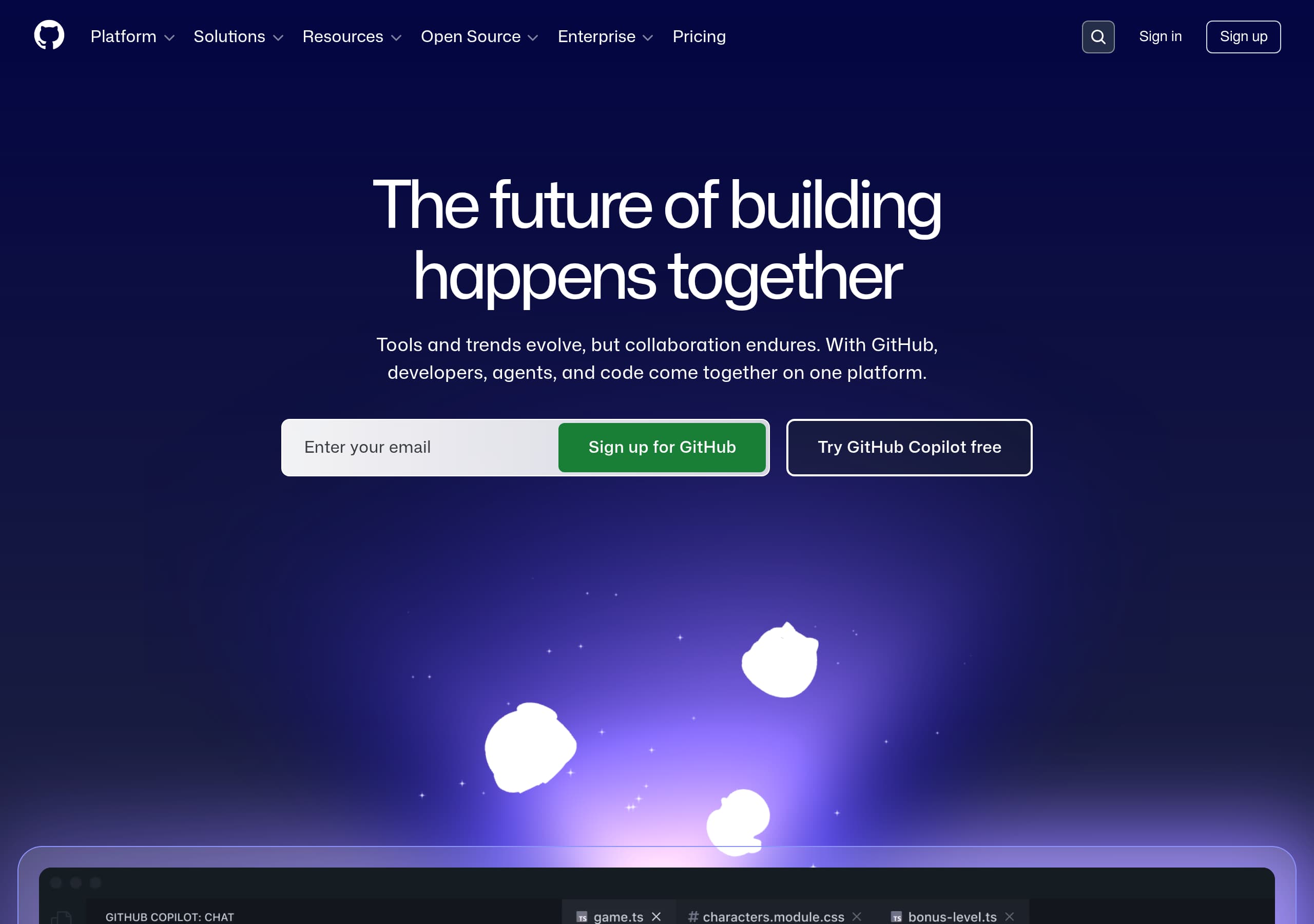
GitHub’s homepage wins by combining an aspirational platform narrative (“The future of building happens together”) with immediate, product-level CTAs like “Sign up for GitHub” and “Try GitHub Copilot free,” reducing the gap between interest and action.
The navigation is intentionally enterprise-grade: it exposes AI, CI/CD, security, and collaboration as first-class pillars, which pre-qualifies serious teams while still leaving a simple entry path for individual developers.
GitHub uses quantified outcomes (e.g., “25%” speed lift, “70% MTTR reduction,” and “8.3M secret leaks stopped”) alongside demos to make abstract AI/security value feel measurable and credible.
Social proof is layered: recognizable customer logos, industry reports (Gartner Magic Quadrant), and in-context testimonials reinforce trust at multiple points in the scroll, not just in a single “customers” section.
The site sells an integrated platform by repeatedly mapping features to lifecycle stages (code → plan → collaborate → automate → secure), making it easier for buyers to justify consolidation vs. point tools.
Trust is supported with dedicated trust-center style links, extensive documentation/community entry points, and enterprise add-ons (Advanced Security, Premium Support), signaling operational maturity beyond developer-first branding.
Home
GitHub’s homepage is effective because it sells a single idea—developers, agents, and code working together—while still giving visitors immediate paths into the two highest-demand products: GitHub and GitHub Copilot.
Hero & above-the-fold mechanics
- The hero headline (“The future of building happens together”) is paired with a clarifying subhead about collaboration staying constant as tools evolve. That’s broad enough for enterprises, but still developer-native.
- Two primary CTAs appear immediately: an email capture for Sign up for GitHub and “Try GitHub Copilot free.” This is a deliberate dual-CTA pattern that supports both platform adoption and AI evaluation.
- The page uses an embedded demo-style animation showing Copilot Chat refactoring code, which functions as a product proof element without forcing a click.
Narrative structure that matches the SDLC
GitHub then frames the platform around a lifecycle sequence: Code, Plan, Collaborate, Automate, Secure. This is a strong information architecture choice because it maps directly to how teams measure ROI (velocity, quality, delivery, risk).
Enterprise-ready, not “developer-only”
The top navigation exposes “Enterprise platform,” “Available add-ons,” and security pillars (Advanced Security, Secret protection). Combined with enterprise logos below the fold, the page signals that GitHub is not just a repo host—it’s an AI-powered developer platform designed for regulated and large-scale environments.
Key terms emphasized by the page’s structure: GitHub Copilot, AI-powered developer platform, CI/CD, application security, collaboration.
Pricing
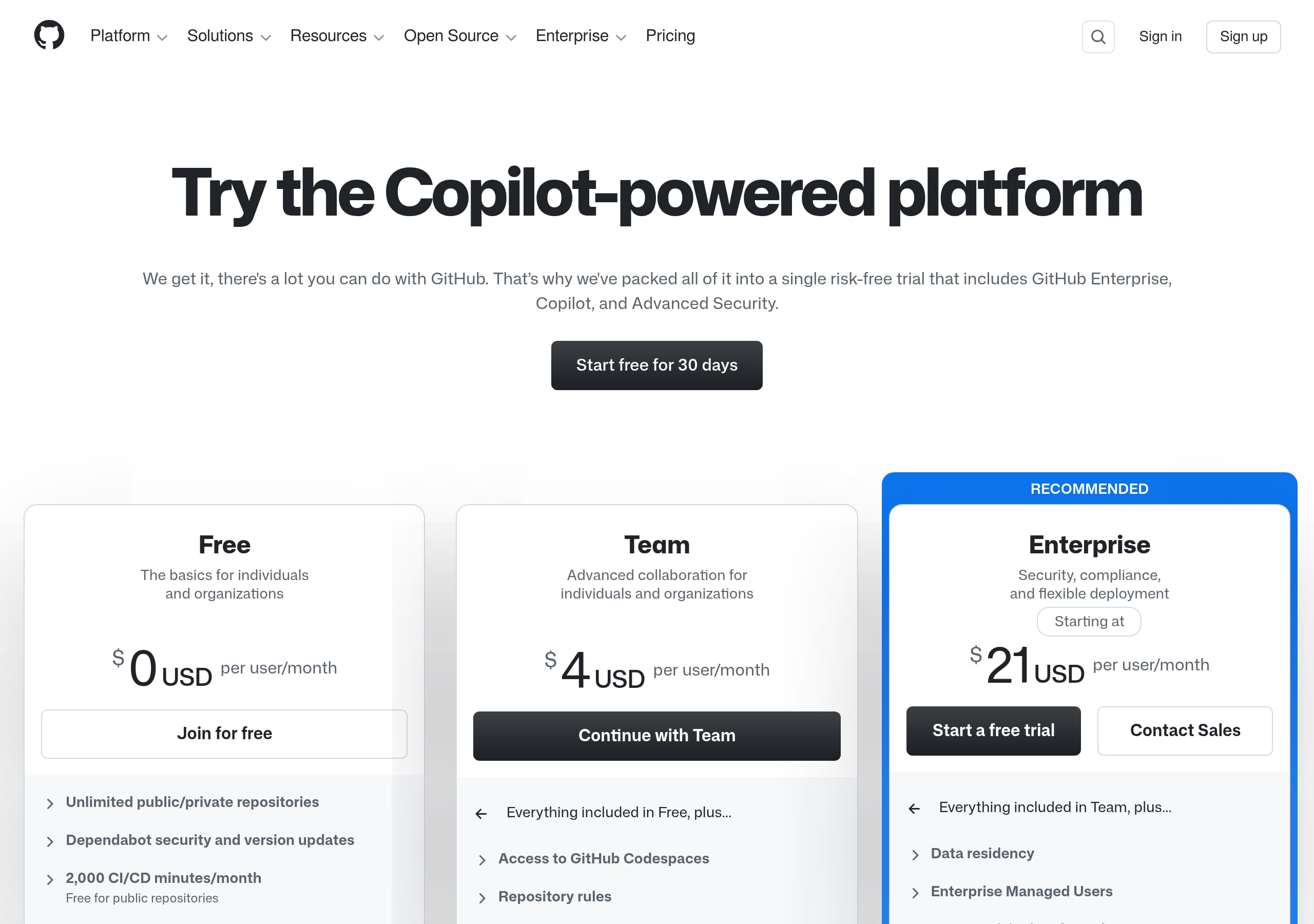
GitHub’s pricing approach (as reflected by the site’s global IA and pricing entry points) is optimized for tiered adoption: start free/low-friction for individuals, then expand into team and enterprise plans with clearly separated add-ons like GitHub Copilot and GitHub Advanced Security.
How the pricing model is framed
From the homepage navigation and footer, “Pricing” is consistently accessible, and enterprise buyers are guided toward “Enterprise platform” plus “Available add-ons.” This matters because GitHub is effectively pricing a platform plus optional capabilities, not just “seats.” The add-on framing (e.g., Copilot for Business, Advanced Security, Premium Support) makes procurement easier by aligning to budget owners and initiatives.
Conversion-friendly pricing expectations
On a product like GitHub, the most conversion-sensitive choices are:
- A clear “individual vs. team vs. enterprise” ladder.
- Separate line items for security and AI to avoid sticker shock for small teams.
- A path to “contact sales” or enterprise negotiation without blocking self-serve.
The homepage also reinforces a key pricing UX pattern: users can act before they price-shop. The CTAs “Sign up for GitHub” and “Try GitHub Copilot free” encourage trial-first behavior, which reduces pricing friction for technical evaluators.
What’s especially strong for enterprise evaluation
GitHub repeatedly connects pricing-relevant features to outcomes and governance: CI/CD reliability (Actions), secure development (Advanced Security), and 24/7 coverage (Premium Support). This allows the pricing page to stay relatively clean while the rest of the site handles value justification.
Key terms likely reinforced on the pricing page: Free plan, Team, Enterprise, add-ons, Copilot for Business, GitHub Advanced Security.
Features
GitHub’s features messaging works because it avoids a generic “everything for developers” list and instead presents a curated set of platform pillars with explicit outcomes and strong internal linking to each product area.
Feature pillars are organized by job-to-be-done
The homepage highlights:
- GitHub Copilot for writing/testing/fixing code.
- GitHub Actions for CI/CD automation.
- GitHub Codespaces for instant cloud dev environments.
- GitHub Mobile for managing work on the go.
- GitHub Marketplace to extend the toolchain.
- GitHub Advanced Security, Dependabot, and Secret Protection for AppSec. This is a lifecycle-based catalog that matches how teams adopt tooling: start with repo + PRs, add CI, then add security and governance.
Specific, observable product claims
The site uses concrete phrasing that implies capability scope:
- “Launch a full, cloud-based development environment in seconds” (Codespaces).
- “Ship faster with secure, reliable CI/CD” (Actions).
- “Apply fixes in seconds” and “Copilot Autofix” (security remediation).
- “Assign initial reviews to Copilot” (code review acceleration). These statements are outcome-led while still pointing to tangible behaviors inside the product.
Cross-linking keeps depth without clutter
Each feature block ends with an “Explore …” link, which is a scalable pattern: the homepage stays readable, and motivated visitors self-select into deeper pages. This is particularly important for GitHub because the platform spans DevOps, DevSecOps, planning, and community.
Integration story is reinforced in navigation
The top nav includes “MCP Registry” and “GitHub Models,” signaling that GitHub is positioning itself as an AI platform layer, not just an IDE plugin.
Key terms: platform pillars, GitHub Actions, GitHub Codespaces, GitHub Advanced Security, Dependabot, Marketplace integrations.
Signup
GitHub’s signup experience is engineered for low friction: the homepage repeatedly asks only for an email to start, and it offers two clear entry paths—create a GitHub account or try GitHub Copilot—without forcing visitors to understand the full platform first.
CTA design and funnel entry
The primary signup module is minimal: “Enter your email” + Sign up for GitHub, placed in the hero and repeated near the bottom (“Millions of developers and businesses call GitHub home”). Repetition is a deliberate CTA echo pattern: it catches both quick deciders and visitors who need to scroll for proof.
Alongside that, “Try GitHub Copilot free” targets an evaluation-driven segment. This is smart segmentation because Copilot has a clear trial value proposition and can pull users into GitHub’s broader ecosystem.
Reduced cognitive load
GitHub avoids asking visitors to choose a plan before they’ve experienced value. Instead, it leads with:
- a demo animation (what happens after signup),
- lifecycle framing (where GitHub fits),
- and concrete outcomes (speed and security metrics). This sequence supports activation by building confidence before any complex configuration.
Post-signup expectations and identity
While the excerpt doesn’t show the full signup form, GitHub’s interface hints at account-centric continuity: “Sign in,” “Sign up,” and persistent access to search (“Search or jump to…”). That sets expectations that once a user is in, GitHub becomes a daily workspace.
Practical improvement opportunity
For enterprise prospects, GitHub could reduce ambiguity by pairing the email capture with a secondary enterprise-oriented CTA (e.g., “Talk to sales” or “View enterprise plans”) directly in the hero. The nav has enterprise options, but the hero is optimized primarily for self-serve.
Key terms: email-first signup, dual entry path, CTA repetition, trial-first, activation.
Trust
GitHub builds trust by mixing security-specific claims, enterprise-grade support positioning, and deep ecosystem signals (docs, community, status) that indicate operational maturity.
Security messaging is outcome-driven
The homepage doesn’t just say “secure”; it quantifies and operationalizes:
- “Built-in application security where found means fixed.”
- “70% MTTR reduction with Copilot Autofix.”
- “8.3M secret leaks stopped in the past 12 months with push protection.” These claims are paired with named products—GitHub Advanced Security, Dependabot, Secret Protection—which makes the trust narrative verifiable and easier for buyers to map to controls.
Enterprise readiness is explicit
GitHub highlights “Enterprise platform” and lists “Available add-ons” including Premium Support described as “Enterprise-grade 24/7 support.” This is a classic enterprise trust cue: it signals incident response coverage, predictable SLAs, and a support model that matches mission-critical software delivery.
Trust infrastructure and transparency
The global navigation includes a Trust center link under “Support & services,” and the footer includes “Status,” “Docs,” and “Contact GitHub.” These are small UI elements, but they matter: mature SaaS vendors expose their documentation surface area and uptime communication pathways.
Community as a trust amplifier
GitHub’s open-source programs (Sponsors, Security Lab, Maintainer Community Accelerator, Archive Program) act as long-term reputation signals. For developers, this is trust-by-alignment; for enterprises, it signals ecosystem stability and talent familiarity.
Balanced trust placement
Trust isn’t relegated to a single badge row. It shows up in security product blocks, enterprise add-on language, and customer proof. That consistent distribution reduces skepticism during scrolling.
Key terms: Trust center, GitHub Advanced Security, push protection, Premium Support, Status page, security campaigns.
Footer
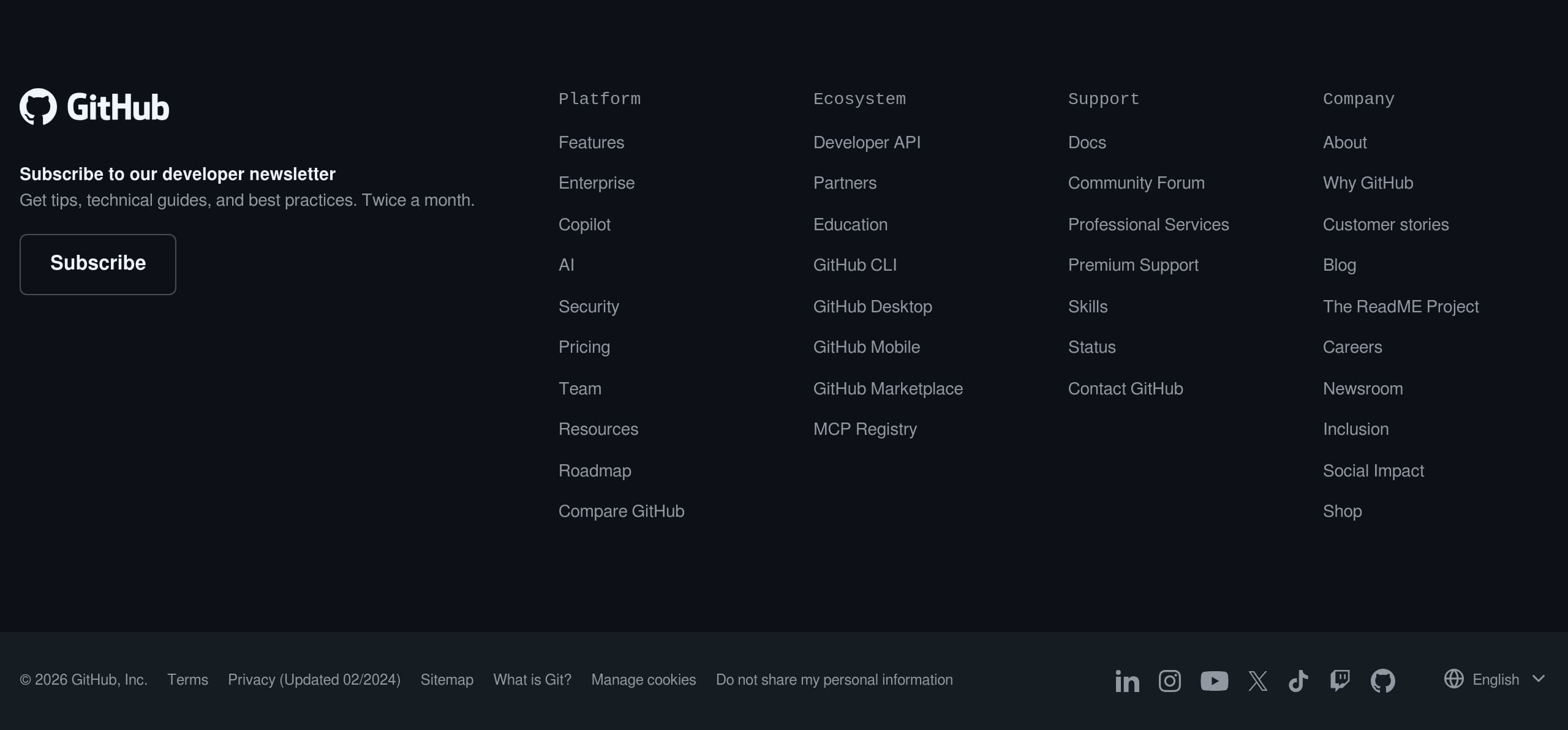
GitHub’s footer is designed as a high-density sitemap that supports multiple audiences—individual developers, platform admins, procurement, and community members—without hiding critical legal and trust links.
Information architecture and audience routing
The footer is segmented into clear groups:
- Platform: Features, Enterprise, Copilot, AI, Security, Pricing.
- Resources: Roadmap, Compare GitHub, Developer API, Education tools.
- Support: Docs, Community Forum, Professional Services, Premium Support, Status, Contact.
- Company: About, Careers, Newsroom, Inclusion, Social Impact. This structure reduces pogo-sticking because users can jump directly to evaluation content (“Compare GitHub”), implementation content (“Developer API”), or operational needs (“Status”).
Trust & compliance signals
Legal links are explicit and current-looking: Terms, Privacy (Updated 02/2024), “Manage cookies,” and “Do not share my personal information.” For regulated industries, having these links visible and unambiguous is a quiet but important trust marker.
Global reach and brand legitimacy
The language selector includes English, Português (Brasil), Español (América Latina), 日本語, 한국어—an enterprise legitimacy cue suggesting investment in localization. Social channels (LinkedIn, YouTube, X, TikTok, Twitch) also signal an active brand and community presence.
Newsletter and retention loop
A developer newsletter module (“Twice a month”) provides a non-product conversion for visitors not ready to sign up. This is effective lead capture that doesn’t compete with the primary signup CTA.
Small improvement opportunity
Given GitHub’s security posture messaging, surfacing Trust center and Security documentation even more prominently (e.g., a “Security” subsection header) could further speed due diligence.
Key terms: footer sitemap, Status, Privacy, language selector, developer newsletter, Premium Support.
Detected tech stack
Tools and technologies we detected on GitHub's site. Detection is best-effort and may be incomplete.
Scores
Our framework scores for GitHub's website in terms of clarity, conversion, and trust. See our methodology for how we calculate these.
How clear the value prop and structure are.
How conversion-friendly signup and pricing are.
How well trust and compliance are surfaced.
FAQ
GitHub’s homepage pairs a broad platform message with immediate, specific CTAs: an email field to “Sign up for GitHub” and a second CTA to “Try GitHub Copilot free.” It reinforces value with an on-page Copilot demo animation, a lifecycle framing (Code, Plan, Collaborate, Automate, Secure), and quantified results like 25% faster development and 70% MTTR reduction.
GitHub routes pricing through a tiered adoption model: individuals can start self-serve, while teams and enterprises are guided toward an “Enterprise platform” with add-ons such as GitHub Advanced Security, Copilot for Business, and Premium Support. This add-on framing matches how companies buy (security, AI, support) and avoids forcing every visitor into a single plan decision upfront.
GitHub combines recognizable customer logos (e.g., Duolingo, Mercedes-Benz, Shopify, Spotify) with quantified impact metrics (25% developer speed boost, 8.3M secret leaks stopped, 70% MTTR reduction). It also references third-party validation via a Gartner Magic Quadrant report and includes attributed testimonials with role titles, which increases credibility for enterprise evaluation.
GitHub groups capabilities into clear pillars tied to the software lifecycle: Copilot for coding, Actions for CI/CD, Codespaces for cloud dev environments, Projects/Issues/Discussions for planning and collaboration, and Advanced Security/Dependabot/Secret Protection for security. Each block uses outcome-led language and links to “Explore” pages, keeping the homepage scannable while allowing deeper investigation.
GitHub highlights specific security products (GitHub Advanced Security, Dependabot, Secret Protection) and pairs them with measurable claims like 8.3M secret leaks stopped and 70% MTTR reduction with Copilot Autofix. It also provides enterprise cues such as Premium Support (24/7), a Trust center link, documentation resources, and a Status page—signals that the platform is operated like critical infrastructure.

The world's best-performing SaaS businesses share surprisingly similar patterns. We help you learn and apply them through our human-designed methodology, with AI-assisted research.