
Key takeaways
Here are the key insights from our website breakdown analysis of Metabase.
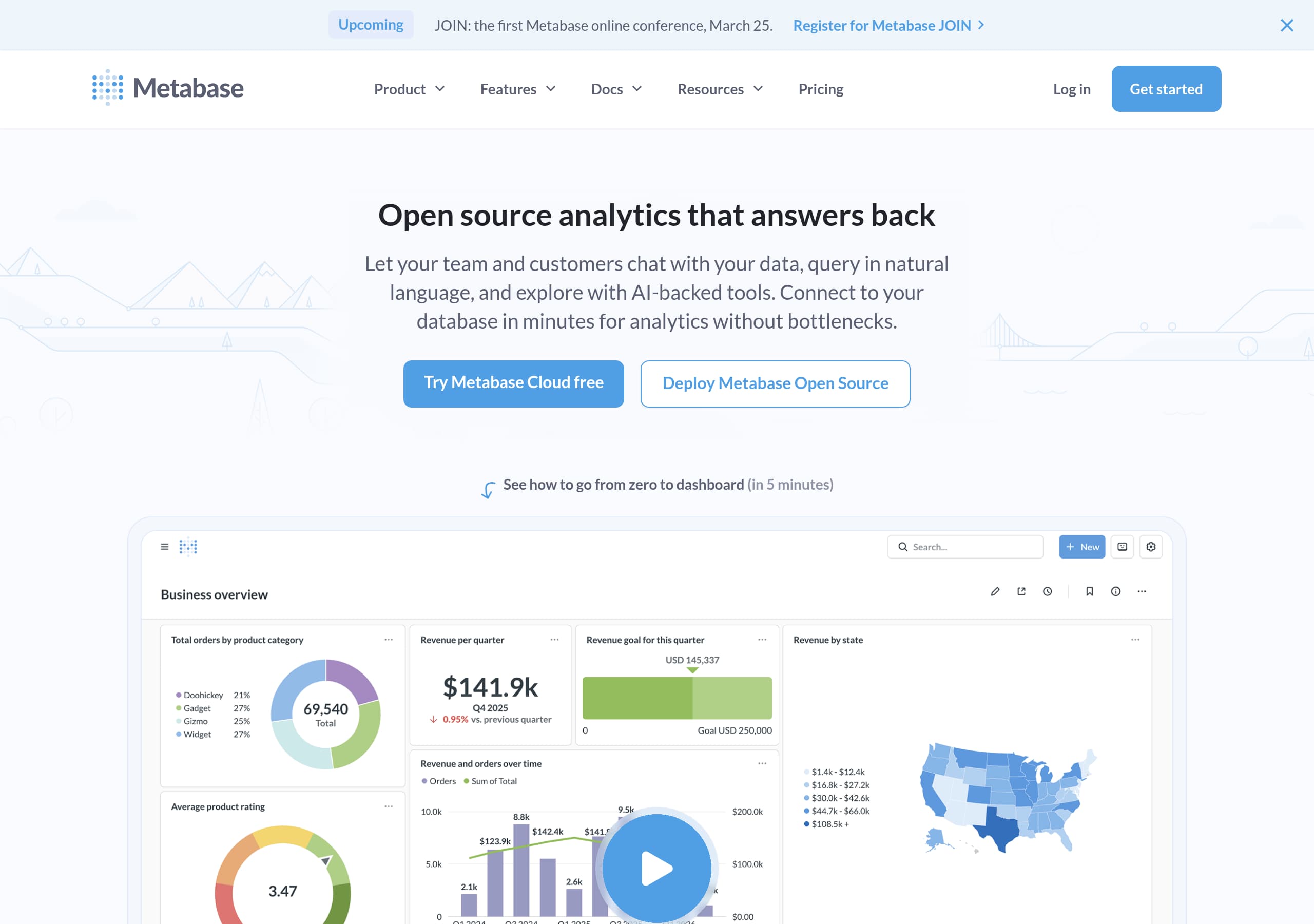
Metabase’s homepage nails the positioning by combining “Open source Business Intelligence and Embedded Analytics” with an AI-forward promise, “Open source analytics that answers back,” then immediately offers two paths: Try Metabase Cloud free or Deploy Metabase Open Source.
Conversion intent is captured with dual, audience-specific CTAs across the page, including a “Watch 5-minute demo” prompt that reduces evaluation effort and a concrete Docker command that makes self-hosting feel instant.
The site builds trust with specific, auditable claims: “trusted by over 90,000 companies” plus a dedicated security callout listing SOC1, SOC2, GDPR, CCPA, and SSO methods like SAML, LDAP, JWT, Google.
Metabase communicates product depth through feature naming that matches real buyer requirements, for example data segregation, granular permissions, usage analytics, result and model caching, and embedded analytics SDK, instead of vague marketing labels.
Social proof is diversified: a named customer quote with role and company, plus a “love” section that surfaces multiple community-style endorsements, which helps both enterprise buyers and developers validate credibility.
The footer functions like a mini knowledge hub, linking to comparisons (Metabase vs. Tableau, Looker, PowerBI, Superset), learning resources, and legal pages, supporting both SEO discovery and late-stage buyer reassurance.
Home
Metabase’s homepage works because it communicates a two-sided product (team BI plus embedded analytics) in one screen, then gives an immediate choice between cloud and self-hosted. The hero headline, “Open source analytics that answers back,” pairs an AI benefit with open source credibility, while the subhead spells out outcomes: “chat with your data,” “query in natural language,” and “analytics without bottlenecks.”
Several conversion patterns stand out:
- Dual primary CTAs are visible: “Try Metabase Cloud free” for fast trials and “Deploy Metabase Open Source” for dev-led evaluation.
- A speed promise, “go from zero to dashboard (in 5 minutes),” is reinforced by a “Watch 5-minute demo” link, reducing time-to-value anxiety.
- The page includes an “Upcoming” event banner (Metabase JOIN), which adds freshness and community momentum without changing the core CTA.
Metabase also uses credibility anchors early. The line “Metabase is trusted by over 90,000 companies” is placed near the top, then later reinforced with named testimonial quotes. The homepage copy is unusually specific about product mechanics: “visual query builder,” “built-in drilldowns,” “semantic models,” and “mark vetted data sources.” Those phrases map to real BI workflows, which helps buyers self-qualify.
The layout implied by the screenshot and excerpt emphasizes scannability: product navigation is segmented into Business Intelligence vs Embedded Analytics, and the features menu is deep but organized. Overall, the homepage balances open source positioning, AI-assisted querying, and quick-start onboarding in a way that matches how Metabase is typically adopted: start small, then expand governance and embedding.
Pricing
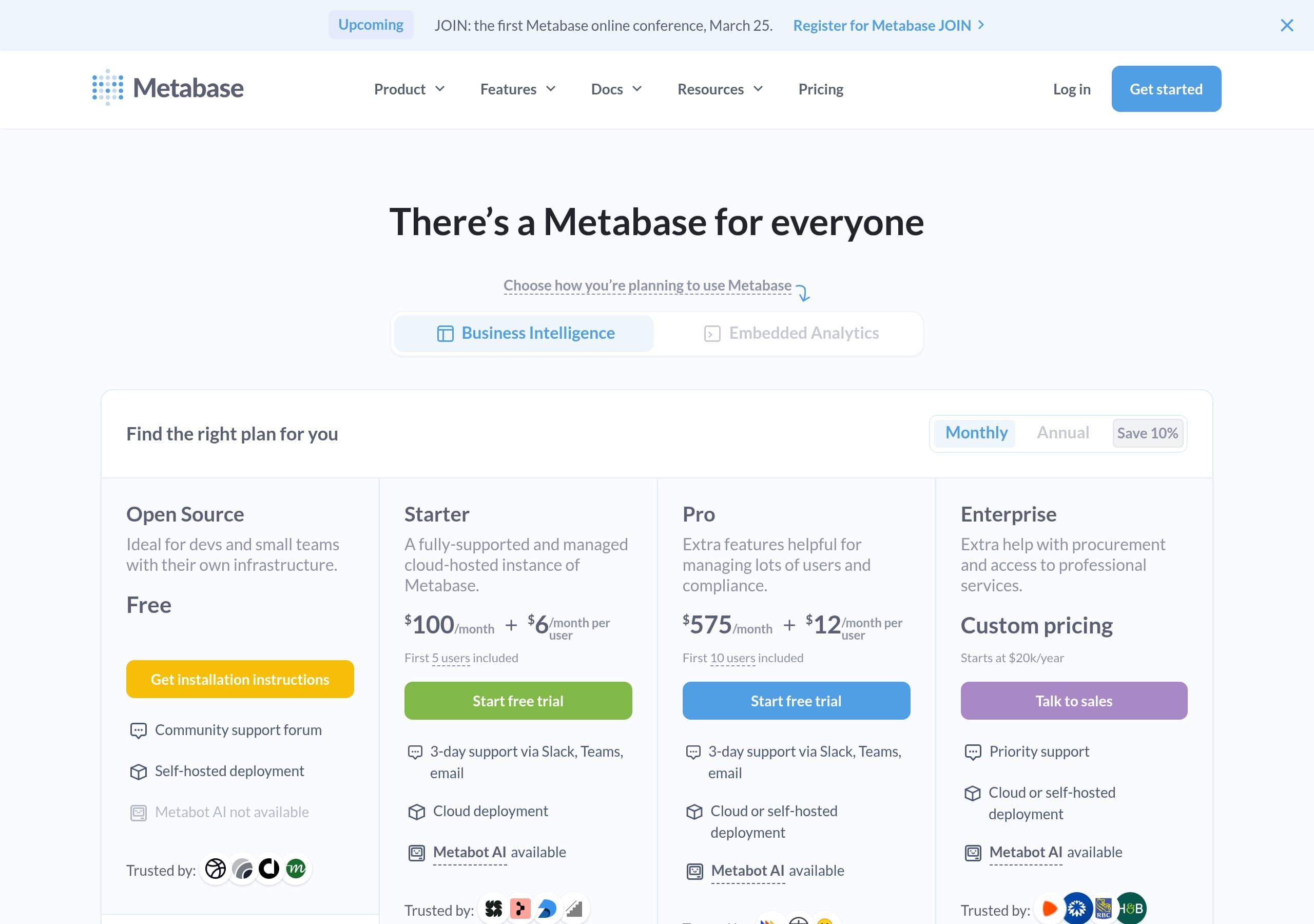
Metabase’s pricing experience is structured to support three distinct adoption paths: free self-hosted evaluation, lightweight cloud entry, and governance-heavy enterprise expansion. The site repeatedly references “Starter and Open Source,” “Pro,” and “Enterprise,” which signals a tiered model designed for increasing security and admin needs rather than purely feature gating.
From the pricing screenshot context and the global navigation, a few conversion-supportive tactics are likely doing the heavy lifting:
- Pricing is paired with clear product routes: “Metabase Cloud” for immediate trials and “Open Source” for self-hosted control. This reduces the common BI friction of choosing deployment first.
- The homepage line “Pro Plans to support your team at every stage in your growth” sets expectations that Pro is about governance and control, not cosmetic upgrades.
- The “Learn more” pathways (for embedding, plans, and security) function as secondary CTAs for buyers who need validation before they will click “Get started.”
What Metabase does especially well is tying pricing justification to operational requirements described elsewhere on the page: multi-tenant data segregation, granular permissions, SSO integrations, and staging environments. Even if a visitor lands directly on pricing, these are the exact buyer checkboxes that explain why higher tiers exist.
One improvement opportunity is to make evaluation steps explicit on pricing itself, not only on the homepage. For example, the homepage provides a Docker command and a “Try Metabase Cloud free” CTA, but pricing should ideally mirror that with a clear “free forever” vs “free trial” distinction and a simple decision helper (team BI vs embedded analytics). Still, the overall pricing framing is strong because it aligns tiers with deployment choice, security posture, and scaling complexity.
Features
Metabase’s feature presentation succeeds because it names capabilities in buyer language and ties them to specific workflows: asking questions, governing data access, embedding analytics, and scaling administration. Instead of generic “powerful dashboards,” the site lists concrete modules like Query builder, SQL editor, Drill-through, Permissions, Data segregation, Usage analytics, CSV upload, and the Embedded analytics SDK.
A notable pattern is how Metabase connects features to multiple audiences via the docs IA. The “Learn” section is split into “Querying and Dashboards” for explorers, “Embedding” for developers, and “Administration” for operators. That segmentation is mirrored on the homepage copy:
- For non-technical users: “Query data without writing code,” “visualize results,” and “built-in drilldowns.”
- For power users: “Drop into SQL,” explicitly framing SQL as an “escape hatch,” which is a credible acknowledgement of real analytics work.
- For product teams embedding analytics: “iframes for speed” vs “React SDK for customization,” plus “white-labeling, dynamic styling, and interactive controls.”
Metabase also does a good job highlighting what typically becomes painful at scale. The “Keeps up as you grow” section calls out admin-grade requirements that buyers recognize: multi-tenant data segregation, SSO IdPs (SAML, LDAP, JWT, Google), “track data and dashboard usage,” and “result and model caching.” These are not flashy features, but they are the ones that prevent churn.
The only caution is cognitive load: the navigation exposes many feature links, which can feel dense. Metabase counters this by repeatedly anchoring on a small set of outcomes, self-serve analytics, embedded reporting, and governance. Overall, the feature story feels grounded because it is expressed as specific building blocks rather than abstract promises.
Signup
Metabase’s signup and onboarding message is optimized for two fast starts: a cloud trial for immediate value and a self-hosted deploy for engineering-led teams. The homepage makes this explicit with side-by-side CTAs, “Try Metabase Cloud free” and “Deploy Metabase Open Source,” which reduces the common friction of being forced into a single funnel.
The most conversion-effective onboarding element is the inclusion of a copy-pastable command: docker run -d -p 3000:3000 metabase/metabase. That is a rare marketing-site move that acts like a one-step install, collapsing perceived setup complexity into a single action. It also reinforces the “Always open-source” claim with a tangible next step.
Metabase further supports activation with time-boxed guidance:
- “See how to go from zero to dashboard (in 5 minutes)” sets a clear expectation for first success.
- “Watch 5-minute demo” is a low-commitment alternative for visitors who are not ready to connect a database yet.
Even without seeing the actual account creation screens, the IA suggests additional onboarding support routes that reduce drop-off: “Getting Started,” “Installing Metabase,” “Adding a database,” and “Asking questions” are all directly linked from Docs and Guides. This is important because Metabase has multiple personas and deployment models, and documentation often functions as onboarding.
Where Metabase could improve conversion is by making the first-step decision even more explicit, for example a short selector for “I want team BI” vs “I want embedded analytics,” then routing to cloud, open source, or embedding docs accordingly. Still, the current approach is strong because it pairs immediate CTAs, fast proof of value, and developer-friendly installation in the same hero experience.
Trust
Metabase’s trust signals are strongest where they are specific and checkable, especially around security, compliance, and access control. The homepage explicitly states “Enterprise-grade security” and lists compliance frameworks including SOC1, SOC2, GDPR, CCPA, which helps security-conscious buyers quickly determine if deeper review is worthwhile.
Trust is also built through operational and governance features that imply maturity:
- Granular permissions and “make sure people see what they need to, and nothing else,” addresses least-privilege expectations.
- “Multi-tenant data segregation” signals readiness for agencies, multi-customer SaaS, and regulated environments.
- “Integrate with SSO IdPs (SAML, LDAP, JWT, Google)” communicates compatibility with enterprise identity stacks.
Beyond security, Metabase frames reliability and manageability through admin-oriented capabilities. “Keep dashboards snappy” with “result and model caching” reduces performance risk, and “Spin up staging environments without touching prod” plus “Export configs, models, and dashboards” signals a safer change-management posture. These statements matter because BI tools often fail trust checks due to brittle deployment and uncontrolled changes.
Another trust amplifier is the open source posture. “Always open-source” plus the Docker command implies inspectability and portability, which are key trust drivers for teams worried about lock-in. The footer also links to “Status,” “License,” and “GitHub,” which are classic transparency signals.
One gap is that the marketing excerpt does not show dedicated security documentation links from the trust section itself, although “Security” exists in the top nav. Overall, Metabase’s trust story is credible because it pairs named compliance standards, enterprise auth options, and governance primitives rather than relying on vague assurances.
Footer
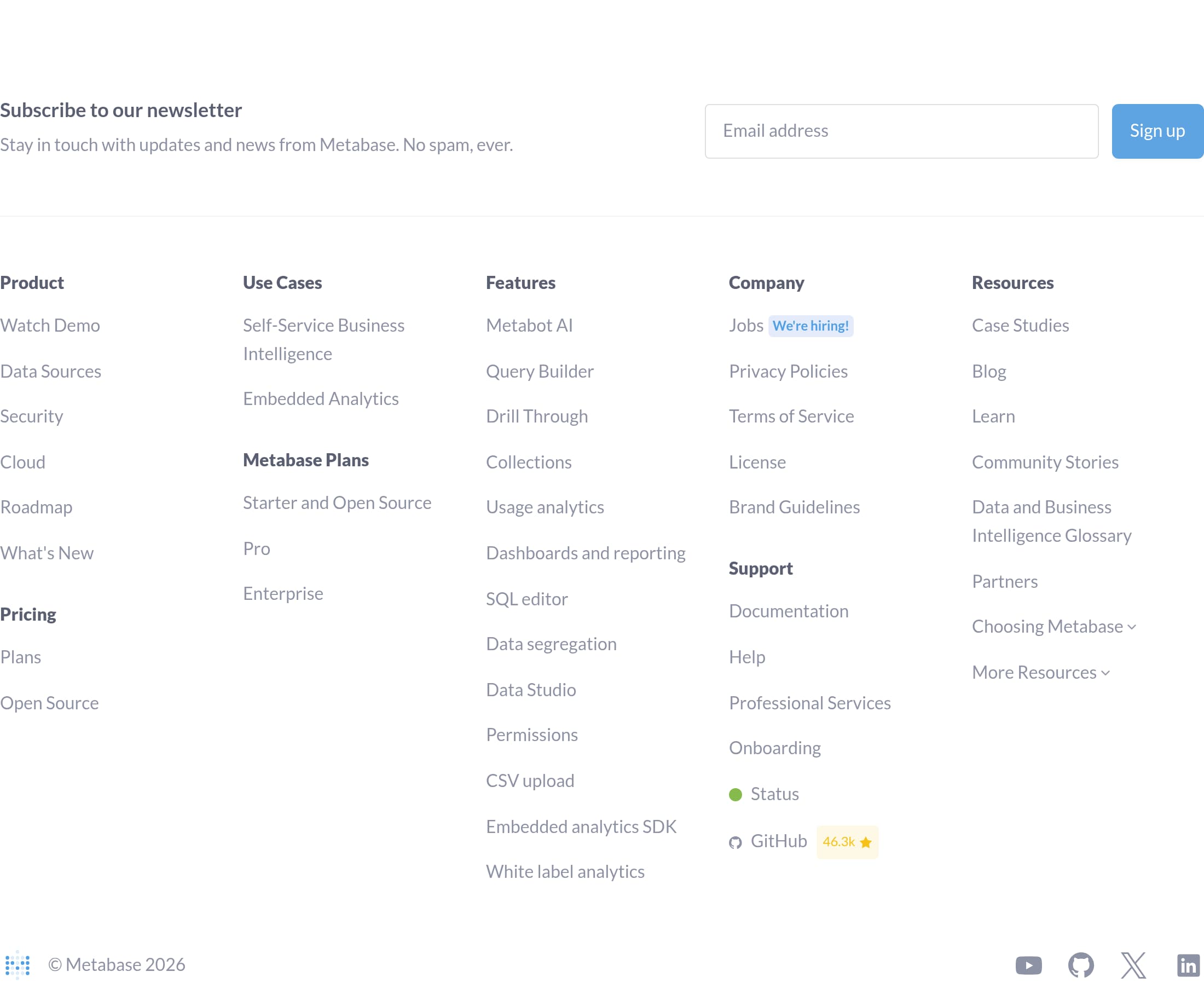
Metabase’s footer is built as a high-coverage navigation layer that supports both SEO and buyer reassurance, especially for a product with multiple audiences and deployment models. The screenshot shows dense, structured columns that include Product links (Demo, Data Sources, Security, Cloud, Roadmap, What’s New), plan links (Starter and Open Source, Pro, Enterprise), and deep feature links like Usage analytics, Data segregation, Embedded analytics SDK, and White label analytics.
For discovery and search intent coverage, the footer is unusually strong:
- It includes comparison pages such as Metabase vs. Tableau, Metabase vs. Looker, Metabase vs. PowerBI, and Metabase vs. Superset, which capture high-intent evaluators.
- It lists learning resources (SQL best practices, chart selection cheat sheet, embedded analytics explainer, learn SQL topics), which supports long-tail traffic and helps users succeed post-click.
For trust and compliance, the footer provides the expected legal and operational links: “Privacy,” “Policies,” “Terms of Service,” “License,” “Brand Guidelines,” and “Status.” This matters for enterprise buyers who often scroll specifically to validate that these pages exist before engaging sales.
The footer also reinforces ecosystem maturity. Links to “Professional Services,” “Onboarding,” “Metabase Experts,” and “Partners” create reassurance that help is available beyond community forums, while “GitHub” signals open source continuity.
One potential downside is choice overload, there are many links competing for attention. Metabase mitigates this by grouping by intent and repeating the product pillars (Business Intelligence, Embedded Analytics, Open Source). Net effect: the footer operates like a site map plus trust layer, improving both navigation depth and perceived legitimacy.
Detected tech stack
Tools and technologies we detected on Metabase's site. Detection is best-effort and may be incomplete.
Scores
Our framework scores for Metabase's website in terms of clarity, conversion, and trust. See our methodology for how we calculate these.
How clear the value prop and structure are.
How conversion-friendly signup and pricing are.
How well trust and compliance are surfaced.
FAQ
Metabase leads with a clear promise, “Open source analytics that answers back,” then immediately supports it with concrete outcomes like natural language querying and “connect to your database in minutes.” It uses dual CTAs, “Try Metabase Cloud free” and “Deploy Metabase Open Source,” to match different buyer preferences. A “Watch 5-minute demo” and a “zero to dashboard (in 5 minutes)” message reduce evaluation friction.
Metabase positions pricing around three plans: Starter and Open Source, Pro, and Enterprise. The surrounding site content frames Pro and Enterprise as upgrades for tighter security, governance, and control, not just more charts. This is reinforced by feature language elsewhere on the site like granular permissions, SSO options (SAML, LDAP, JWT, Google), and multi-tenant data segregation, which are typical triggers for paid tiers.
Metabase emphasizes two onboarding paths: a cloud trial (“Try Metabase Cloud free”) and a self-hosted open source deploy. The homepage includes a copy-pastable Docker command to start a local instance quickly, plus a “Watch 5-minute demo” option for low-commitment evaluation. Documentation is organized around real onboarding steps like installing Metabase, adding a database, asking questions, and creating dashboards.
Metabase calls out “Enterprise-grade security” and lists specific compliance frameworks, including SOC1, SOC2, GDPR, and CCPA. It also highlights governance and access controls like granular permissions, multi-tenant data segregation, and SSO integrations (SAML, LDAP, JWT, Google). The footer links to operational trust pages such as Status, Privacy, Terms, and License, plus GitHub for open source transparency.
Metabase dedicates a section to embedding that explains multiple implementation options: iframes for speed and a React SDK for customization and control. It also highlights product requirements for customer-facing analytics, including white-labeling, dynamic styling, and interactive controls. The page frames embedding as lower engineering overhead than building reporting from scratch and notes that non-dev teammates can manage permissions and iterate on dashboards.

The world's best-performing SaaS businesses share surprisingly similar patterns. We help you learn and apply them through our human-designed methodology, with AI-assisted research.