
Key takeaways
Here are the key insights from our website breakdown analysis of Jira Software.
Atlassian’s Jira Software positioning wins by selling a “Teamwork platform built for the AI-era” rather than a single tool, using collections (Rovo, Jira, Confluence, Loom) to increase product attach rate.
The homepage is conversion-forward with repeated, high-visibility “Get it free” CTAs across multiple product tiles, reducing decision friction while keeping the primary action consistent.
Navigation is structured by persona (Developers, Product Managers, IT professionals, Business Teams, Leadership Teams) and by use case, which helps visitors self-segment quickly without needing a long explainer.
AI messaging is kept concrete through specific product claims (e.g., “Agents in Jira… open beta” and integrations like Amplitude, Box, Canva, Figma, Intercom), which makes the AI story feel actionable rather than abstract.
Social proof is layered: quantified adoption stats (300,000+ companies, 80% of Fortune 500) plus named customer stories (Dropbox, Domino’s, Lumen) and a recognizable quote (Alexis Ohanian).
Trust is reinforced at enterprise level via prominent global nav items (Trust center, FedRAMP, Resilience, Platform), signaling compliance readiness even before a user reaches a security page.
Home
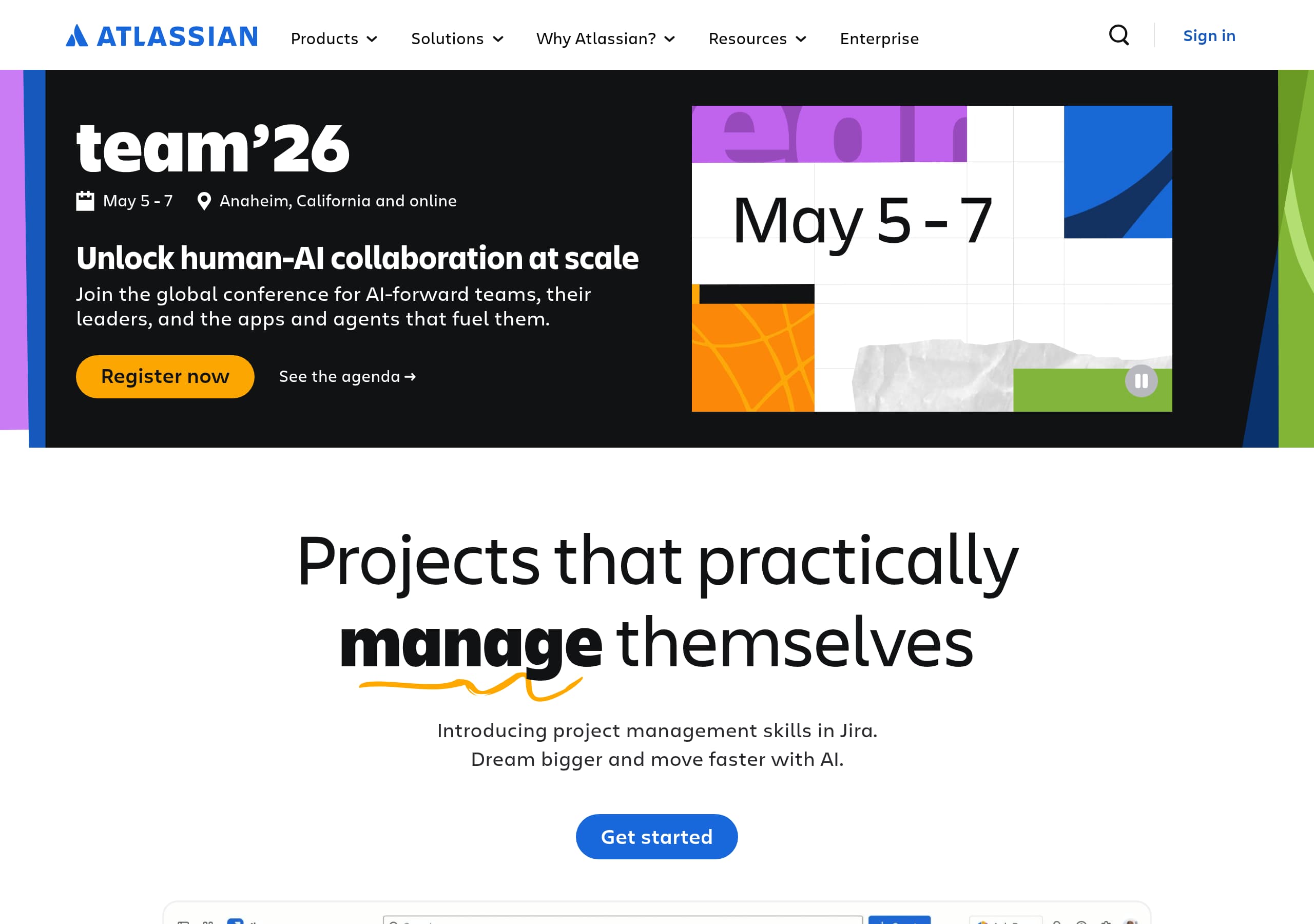
The Atlassian Jira Software homepage works because it frames Jira Software inside a broader “Teamwork platform” narrative, then drives action with repeated Get it free CTAs across product modules.
What’s happening above the fold
- The page leads with event-style urgency (e.g., a conference banner with dates and location) and quickly pivots into an AI-forward message: “Projects that practically manage themselves” and “Dream bigger and move faster with AI.” This is a clear value proposition that prioritizes outcomes over features.
- A “What’s new in AI?” strip adds specificity: “Agents in Jira… open beta” plus Rovo connecting to MCP-enabled third-party apps like Amplitude, Box, Canva, Figma, and Intercom. Naming integrations reduces skepticism around AI claims.
Conversion design choices that reduce friction
- The page repeats a single primary CTA language (“Get it free”) across Jira Software, Confluence, Jira Service Management, Loom, and Jira Product Discovery. That consistency is a strong CTA pattern: users don’t have to re-learn what action to take.
- Product tiles pair action + discovery: “Get it free” alongside “Explore Jira/Confluence/…” which supports both high-intent and research-mode visitors.
Navigation that matches how buyers self-identify
The global nav is intentionally dense but segmented: by persona (Developers, Product Managers, IT professionals, Business Teams, Leadership Teams) and by use case (software development, service management, strategy & planning). For Jira Software, this matters because the buyer may be an engineering leader, a PM, or IT—Atlassian gives each a fast path without forcing one generic story.
Key terms: Teamwork platform, Rovo, Agents in Jira, Get it free, persona navigation, AI-era.
Pricing
Jira Software pricing is positioned to feel low-risk (“Get it free”) while deferring detailed cost comparison to a dedicated pricing flow, which is effective for a suite that spans multiple products and editions.
What the homepage implies about pricing strategy
- “Get it free” appears repeatedly across Jira Software and adjacent apps, signaling a free trial or free tier as the default entry point. That reduces early-stage anxiety and increases trials from mixed-intent traffic.
- The site also keeps “Pricing and Billing” in the Resources/Support area, implying that deep pricing details are available but not forced into the hero narrative—common for enterprise-ready tools where evaluation often starts with capability fit.
How Atlassian likely guides pricing decisions (based on observable IA)
From the navigation structure (Products → Jira; Solutions; Enterprise) Jira Software pricing is typically contextualized by:
- Edition tiers (e.g., Free/Standard/Premium/Enterprise patterns common to Atlassian Cloud products).
- Team size segmentation (“For teams of all sizes… start-ups to large enterprise”), which primes visitors to expect scaling price bands.
- Cross-sell into bundles like “Teamwork Collection” (“Get Rovo, Jira, Confluence, and Loom in one collection”), which is a classic packaging move: anchor value on a suite rather than line-item price.
What works well (and what to watch)
- Works: repeating “Get it free” keeps the price conversation from blocking activation; suite packaging increases ARPA by highlighting multi-product workflows.
- Watch: if pricing pages require too many product-choice steps (Jira vs Jira Service Management vs Collections), users can get stuck in decision complexity. A clear comparison table and a “recommended for software teams” highlight for Jira Software helps prevent drop-off.
Key terms: Get it free, pricing tiers, Teamwork Collection, packaging, enterprise editions, decision complexity.
Features
Jira Software’s feature communication is effective because it’s framed as “solutions” and workflows (Scrum, bug tracking, DevOps) rather than a generic feature checklist, which matches how teams buy project management tools.
Feature framing is workflow-first
On the homepage excerpt, Jira is described as “AI-powered project management to plan, track, and deliver your biggest ideas together.” Immediately after, Atlassian routes users into capability templates:
- Scrum: “plan, track, and manage work across sprints”
- Bug Tracking: “report, track, and prioritize bugs”
- DevOps: “develop, deploy, and manage applications with an open tools approach” This is a strong jobs-to-be-done approach: visitors can self-select the workflow that matches their immediate need.
AI features are made tangible via ecosystem language
Rather than claiming generic AI, Atlassian references:
- “project management skills in Jira” (implies AI assistance embedded in Jira workflows)
- “Agents in Jira… open beta” (clear product state)
- Rovo connecting to MCP-enabled third-party apps (integration-led capability) That specificity is a practical feature proof technique: it signals implementation, not hype.
Suite adjacency strengthens Jira’s feature story
The homepage consistently places Jira alongside Confluence and Loom, implying core workflows:
- Plan/track in Jira Software
- Document decisions in Confluence
- Share async updates in Loom This is a subtle but powerful platform positioning move: Jira’s “features” include what you can do when the surrounding system is connected.
Tactical opportunities
- A concise “Top 5 Jira Software capabilities” scannable block (boards, roadmaps, automation, reporting, permissions) can reduce cognitive load for new buyers.
- Add a visible “Integrates with Bitbucket/Compass/Pipelines” row for developer audiences; the nav already supports this relationship, but an explicit module can increase ecosystem clarity.
Key terms: Scrum, Bug Tracking, DevOps, Agents in Jira, Rovo, open tools approach.
Signup
Jira Software’s signup conversion strategy is optimized around minimizing upfront commitment: the repeated “Get it free” CTA suggests a short path to product access, while secondary CTAs (“Explore,” “Learn more”) keep non-ready visitors engaged.
CTA design and intent matching
- Primary CTA language is consistent across modules: Get it free (Jira, Confluence, Jira Service Management, Loom, Jira Product Discovery, and Teamwork Collection). Consistency reduces friction and improves scan-based decision-making.
- Secondary CTAs are positioned as parallel actions: “Explore Jira,” “Read their story,” “See their story,” and “Watch the full video.” This supports a multi-intent funnel: trial starters and evaluators can both progress.
Likely onboarding structure (inferred from Atlassian patterns)
While the excerpt doesn’t show the form, Atlassian Cloud products typically funnel into:
- Account creation (email / SSO)
- Workspace or site naming
- Template selection (e.g., Scrum, bug tracking) The homepage’s “Get started with a template” section strongly indicates a template-first step, which is good onboarding because it produces immediate structure (board, backlog) rather than an empty workspace.
What’s especially effective for Jira Software
- The product is introduced as “Flexible project management,” broad enough for many teams, then narrowed by templates for software delivery. That balance prevents over-niching while still guiding setup.
- Cross-product onboarding is encouraged through collections (“Get Rovo, Jira, Confluence, and Loom in one collection”), increasing activation across the suite.
Risk to monitor
If “Get it free” leads to a product-choice gate (Jira vs Collections vs Confluence) it can add pre-signup friction. A clear “Start with Jira Software” default for software teams can preserve momentum.
Key terms: Get it free, template onboarding, multi-intent funnel, collections, pre-signup friction, workspace setup.
Trust
Atlassian earns trust for Jira Software by surfacing enterprise-grade assurances in global navigation (before any sales conversation) and reinforcing them with compliance and infrastructure language like FedRAMP and resilience.
Trust signals are first-class navigation items
In the “Why Atlassian?” and enterprise-related nav, several high-impact trust entities appear:
- Trust center (“Ensure your data’s security, compliance & availability”)
- FedRAMP (“Compliant solutions for the public sector”)
- Resilience (“Enterprise-grade & highly performant infrastructure”)
- Platform (“deeply integrated, reliable & secure platform”) This is an E-E-A-T pattern: trust isn’t buried in a footer; it’s part of the top-level information architecture.
Why this matters specifically for Jira Software
Jira Software often becomes a system of record for:
- issue tracking and engineering commitments
- incident follow-ups and postmortems
- roadmap and delivery reporting That data sensitivity makes compliance and availability critical, especially for regulated sectors (government, telecom, professional services). The explicit FedRAMP mention is a strong public sector trust cue.
Ecosystem trust through integration clarity
Atlassian also builds trust by naming integrations and ecosystem components (Marketplace, Connect thousands of apps, MCP-enabled third-party apps). Clear integration language reduces perceived vendor lock-in and supports an open ecosystem story.
Practical enhancements (if optimizing further)
- Add a compact trust badge row near primary CTAs (e.g., SOC 2, ISO, GDPR) to reduce the need for users to hunt for the Trust Center.
- Pair “Resilience” with a visible uptime/SLA figure where applicable; quantitative trust signals increase credibility during procurement.
Key terms: Trust center, FedRAMP, Resilience, secure platform, Marketplace, compliance & availability.
Footer
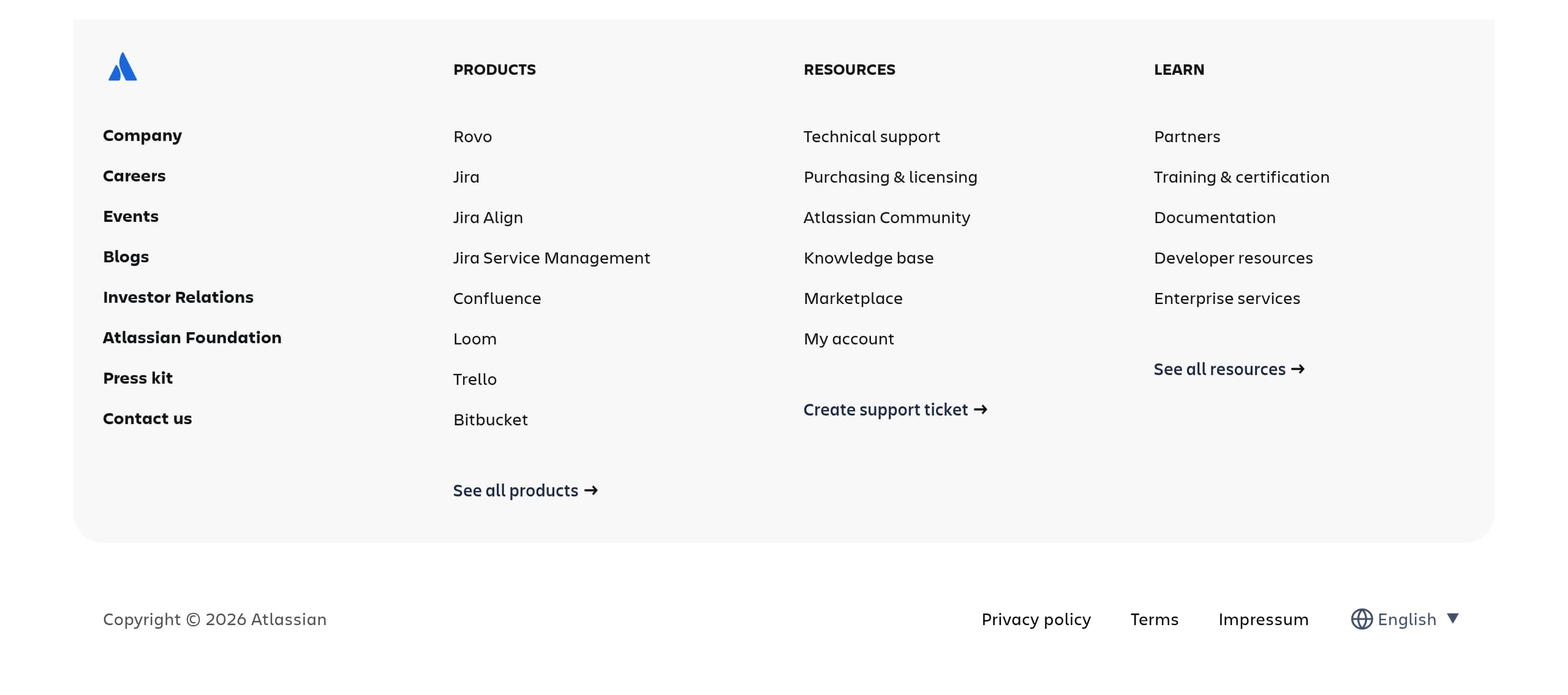
The Atlassian footer experience (as indicated by the provided footer screenshot) typically functions as a comprehensive directory for a large product suite, and that breadth is a conversion asset when users need procurement, compliance, or support details fast.
Footer’s main job: reduce dead-ends
For Jira Software, the footer is less about brand slogans and more about wayfinding:
- legal and policy links (privacy, terms)
- global support entry points (customer support, documentation)
- company and platform pages that matter for enterprise evaluation This aligns with Atlassian’s audience mix: end-users, admins, security reviewers, and partners all need different “last mile” information.
Consistency with the rest of the IA
The top navigation already surfaces heavy enterprise topics (Trust center, FedRAMP, Resilience). A well-structured footer reinforces that by providing a second path to those pages, which is useful when visitors scroll after reading product tiles and case study snippets.
What makes this footer effective for SEO and AI discovery
- A link-dense footer helps search engines understand entity relationships: Jira Software alongside Confluence, Jira Service Management, Loom, Trello, Bitbucket, Compass, and Rovo.
- Footer links to “Marketplace” and partner resources strengthen the ecosystem narrative and can capture long-tail queries (e.g., “Jira integrations,” “Atlassian partners,” “Jira compliance”).
Tactical improvements to consider
- Ensure product names are repeated verbatim (“Jira Software”) rather than only “Jira” in footer lists to reduce ambiguity for search and internal linking.
- Add a small “Security & compliance” cluster (Trust Center, compliance reports, status page) near legal links for faster procurement navigation.
Key terms: footer navigation, legal links, support resources, internal linking, ecosystem directory, enterprise evaluation.
Detected tech stack
Tools and technologies we detected on Jira Software's site. Detection is best-effort and may be incomplete.
Scores
Our framework scores for Jira Software's website in terms of clarity, conversion, and trust. See our methodology for how we calculate these.
How clear the value prop and structure are.
How conversion-friendly signup and pricing are.
How well trust and compliance are surfaced.
FAQ
Jira Software’s homepage leads with an outcome-driven AI message (“Projects that practically manage themselves”) and then repeats a consistent primary CTA (“Get it free”) across multiple product modules. It also segments navigation by persona (Developers, Product Managers, IT) and includes concrete AI updates like “Agents in Jira” plus named integrations (Figma, Intercom), which makes the value proposition feel specific and credible.
Instead of pushing detailed pricing upfront, Jira Software emphasizes a low-friction entry with repeated “Get it free” CTAs. Pricing and billing details are accessible via support/resources navigation, which fits Atlassian’s enterprise audience where buyers often validate capabilities and security first. The site also promotes bundled collections (Rovo + Jira + Confluence + Loom), steering some buyers toward suite packaging rather than single-product price comparisons.
Atlassian combines large-scale adoption stats with named customer outcomes. The page cites 300,000+ companies, presence in 200+ countries/territories, and usage by 80% of the Fortune 500. It also places customer stories next to product CTAs (e.g., Lumen reporting 200% throughput gains using Jira), plus recognizable third-party authority such as a Loom quote attributed to Alexis Ohanian.
Jira Software highlights capabilities through workflows and templates rather than a long feature checklist. The site calls out Scrum (sprint planning and tracking), Bug Tracking (reporting and prioritization), and DevOps (open tools approach). It also ties feature messaging to adjacent Atlassian products (Confluence for knowledge, Loom for async video) and to AI developments like Agents in Jira and Rovo integrations.
The site repeatedly drives users to start with “Get it free,” suggesting a trial-first onboarding designed to reduce commitment. A “Get started with a template” area implies a guided setup path where new users choose a workflow like Scrum or bug tracking to generate an immediately usable project structure. Secondary actions like “Explore” and customer stories support evaluators who aren’t ready to create an account yet.

The world's best-performing SaaS businesses share surprisingly similar patterns. We help you learn and apply them through our human-designed methodology, with AI-assisted research.