
Key takeaways
Here are the key insights from our website breakdown analysis of Calendly.
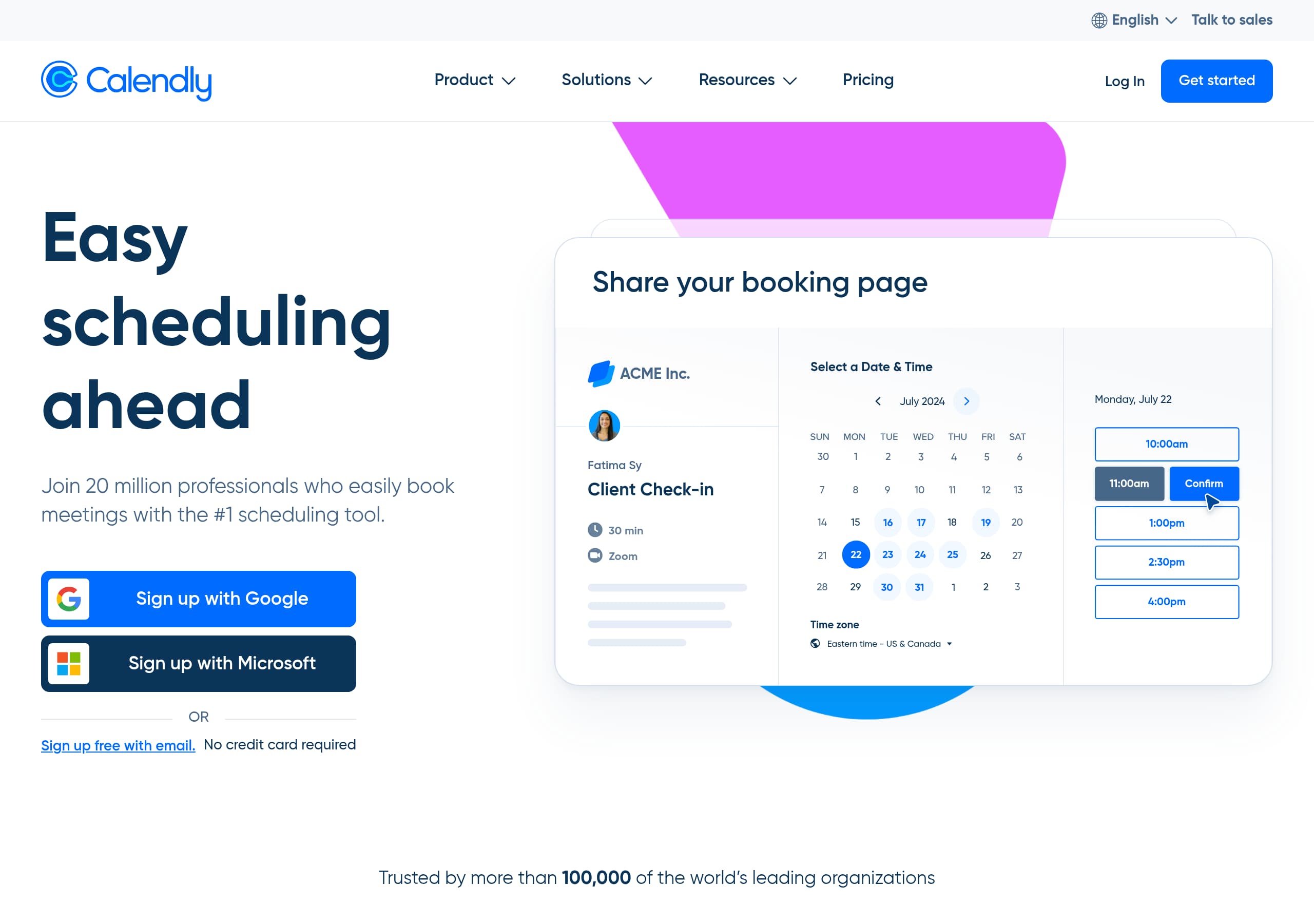
Calendly’s homepage leads with a plain-language promise, “Calendly makes scheduling simple,” and immediately supports it with a product-fit statement that spans individuals to enterprises, which reduces confusion for mixed audiences.
The site uses dual CTAs consistently, “Sign up for free” for self-serve and “Talk to sales” or “Get a demo” for enterprise, which keeps conversion paths clear without forcing one funnel.
Pricing is structured for fast scanning with four tiers, a billing toggle (yearly vs monthly), per-seat pricing on paid plans, and an explicit enterprise anchor (“Starts at $15k/yr”), which qualifies leads early.
Calendly strengthens credibility using two layers of proof: a large-scale adoption claim (“Trusted by more than 100,000…”) and customer outcome tiles (ROI, time-to-hire reduction, scheduling error decrease) that tie directly to business value.
Feature messaging is organized as a step-by-step workflow (connect calendars, set availability, connect conferencing, customize event types, share link), which makes the product feel immediately usable and lowers perceived setup effort.
Trust content is positioned as an enterprise-ready capability, highlighting admin management, governance, compliance audits, and privacy protections, which supports larger deal cycles and security reviews.
Home
Calendly’s homepage succeeds because it pairs a simple promise with immediate audience qualification, then walks visitors through a concrete “how it works” sequence.
Messaging and page structure
The hero line, “Calendly makes scheduling simple”, is short and literal, and the next sentence expands the market: easy for individuals, powerful for enterprise, including “86% of the Fortune 500 companies.” That combination reduces the common scheduling-tool objection of “Is this just for solo users?” A prominent “Sign up for free” CTA supports a low-friction start.
Clear, step-by-step product explanation
Instead of an abstract feature dump, the page presents a workflow that mirrors setup:
- Connect your calendars: explicitly states support for up to six calendars with real-time availability.
- Add your availability: calls out rules like buffers and scheduling settings, which signals depth beyond basic booking.
- Connect conferencing tools: supports video calls and in-person preferences.
- Customize your event types and share your scheduling link: highlights templates, embeds, and shareability.
This ordering functions like a lightweight onboarding preview, which makes Calendly feel approachable even before a user clicks “Get started.”
Navigation that matches multiple buyers
The top navigation is segmented by business size, team, and industry, and includes “Integrations,” “Security,” and “Admin controls.” That is a strong information scent for evaluators who need to confirm compatibility and governance early. The page also reinforces ecosystem value with a dedicated integrations section and a 100+ integrations claim, which supports a “fits our stack” decision quickly.
Pricing
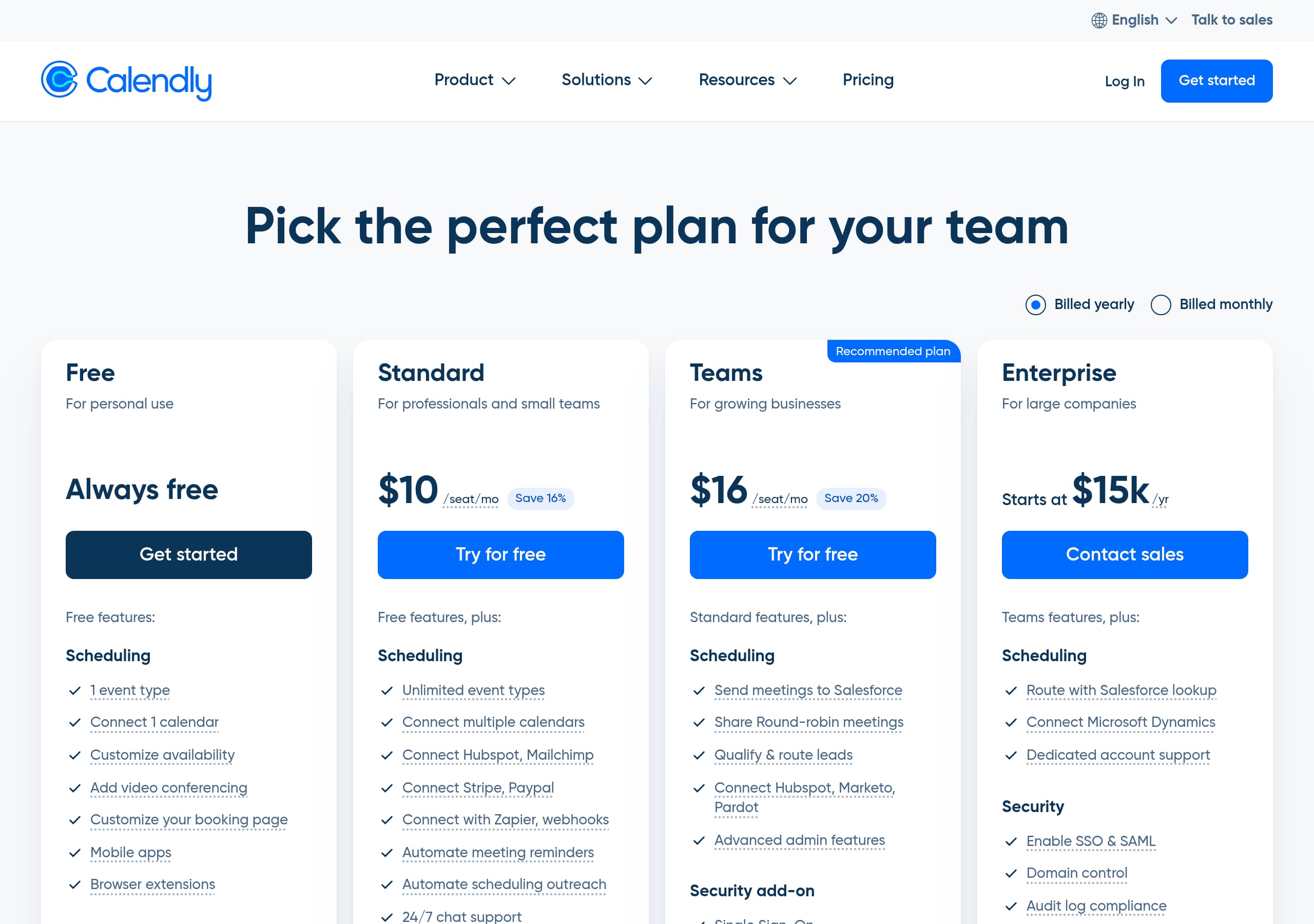
Calendly’s pricing section is optimized for fast qualification: clear tiering, visible unit economics, and a billing toggle that encourages commitment without hiding the monthly option.
Tier clarity and plan fit
The plans shown are Free, Standard, Teams (labeled Recommended plan), and Enterprise. Each tier includes a concise audience label, for example “For personal use” and “For growing businesses,” which helps visitors self-select without reading long feature tables. The Free plan uses a confidence-building phrase, “Always free,” and a direct “Get started” CTA.
Pricing mechanics that reduce surprises
The paid plans display per-seat pricing (for example $10/seat/mo for Standard and $16/seat/mo for Teams) and show explicit annual savings messages like “Save 16%” and “Save 20%.” This is effective because it frames annual billing as a deal, not a trap. Enterprise is anchored as “Starts at $15k/yr” with “Talk to sales,” which pre-qualifies budget expectations and reduces unproductive demo requests.
Conversion paths for different intent levels
Calendly mixes CTAs intelligently:
- Self-serve: Get started and Try for Free are repeated on relevant plans.
- Sales-led: Talk to sales appears only where it belongs, on Enterprise.
The inclusion of “Learn more on our pricing page” and the broader site pattern of “Get a demo” gives evaluators a next step if they are not ready to commit. Overall, the layout supports three common behaviors: price checking, plan comparing, and immediate trial creation, without requiring deep scrolling or hidden details.
Features
Calendly’s feature presentation is effective because it frames capabilities as scheduling building blocks, then expands into a broader platform story through integrations, embeds, and admin controls.
Product features grouped by workflow
The homepage sequence acts like a feature grid but in a narrative order: connect calendars, set availability settings, connect conferencing tools, create event types, then share your scheduling link via website, landing pages, or email. This is a practical framing that answers “What do I do first?” and highlights that scheduling is automated by real-time calendar availability.
Platform breadth shown without overwhelming
Calendly reinforces that it is more than a single booking page by listing product areas such as Meeting routing, Reminders and follow-ups, Meeting polls, and Analytics. Importantly, these are shown as discrete modules, which makes the product feel extensible without requiring the visitor to understand everything at once.
Integrations as a core value driver
A dedicated section states “Boost productivity with 100+ integrations” and spotlights two high-intent bundles:
- Google suite: Google Calendar, Meet, Analytics
- Microsoft suite: Microsoft Teams, Outlook, Azure SSO
This is a strong choice because calendar scheduling tools often win or lose on ecosystem fit. Calling out Azure SSO specifically signals enterprise readiness and reduces uncertainty for IT buyers.
Multi-surface distribution
Calendly repeatedly mentions distribution surfaces: email and website embeds, plus “Mobile app” and “Browser extension” in navigation and footer downloads. That combination suggests usage beyond a single scheduling link, including in-product workflows and prospecting. The net effect is a feature set that reads as both approachable for first-time users and deep enough for teams, which supports expansion from individual adoption into organization-wide rollout.
Signup
Calendly’s signup experience is designed to minimize friction by repeatedly emphasizing a free start, while keeping a parallel path open for buyers who need a demo or sales support.
Strong self-serve invitation
The site places “Sign up for free” and “Get started” prominently across the page and pricing tiers. The messaging, including “Get started in seconds, for free”, sets an expectation of a short setup cycle, which is important for a scheduling product where the first “aha” moment is creating and sharing a link.
Onboarding preview reduces uncertainty
Even before a user signs up, Calendly previews the core setup steps: connect calendars (up to six calendars), define availability rules (buffers and scheduling rules), connect video conferencing, and create event types. This functions as a checklist that makes the onboarding feel predictable, not mysterious. It also hints at the permissions and data access needed, which can reduce drop-off when users are asked to connect Google Calendar or Outlook.
Split paths for different buying motions
Calendly keeps two conversion routes visible:
- Self-serve: “Get started,” “Start for free,” and “Try for Free” on Standard or Teams.
- Sales-assisted: “Talk to sales” and “Get a demo” appear in navigation and the Enterprise tier.
This split avoids forcing all users into account creation, and it avoids hiding enterprise behind self-serve steps. The navigation also exposes “API and Developer tools,” which can be a critical pre-signup check for technical teams evaluating embedding, routing, or automation.
Practical distribution accelerates activation
Mentions of email and website embeds, plus browser extensions and mobile apps, indicate that Calendly is built for fast sharing. By making the post-signup outcome obvious (a shareable scheduling link), the site sets the user’s activation target clearly, which typically improves trial-to-usage conversion.
Trust
Calendly builds trust by positioning security as a product capability, not a footnote, and by aligning security language with what enterprise evaluators expect to see during vendor review.
Enterprise security message with concrete categories
The trust section states: “Built to keep your organization secure” and references enterprise-grade admin management, security integrations, data governance, compliance audits, and privacy protections. Even without naming specific frameworks in the excerpt, those categories map cleanly to typical security questionnaires: identity and access, auditability, and data handling.
Trust is reinforced through platform cues
Trust is not isolated to a single section. In navigation, Calendly exposes Security, Admin controls, and Integrations as top-level product areas. This is a subtle but meaningful UI signal: the company expects governance and control to be part of the evaluation, not an afterthought. Similarly, the integrations callout includes Azure SSO, which implies support for centralized authentication and enterprise identity management.
Reduced perceived risk through adoption proof
Trust is also supported by adoption claims, including “Trusted by more than 100,000” organizations and usage by “86% of the Fortune 500.” While these are social proof statements, they function as risk reducers for security-conscious buyers: large organizations typically require vendor security review, so the claim implies that Calendly has passed many procurement processes.
Clear next steps for security evaluators
The presence of “Learn more” near the security message indicates a deeper security page, and the footer includes a Status link, which is a common expectation for reliability transparency. Together, these elements create a trust narrative that supports both IT-led evaluation and day-to-day administrative control, which is essential for rolling Calendly out across departments and regions.
Footer
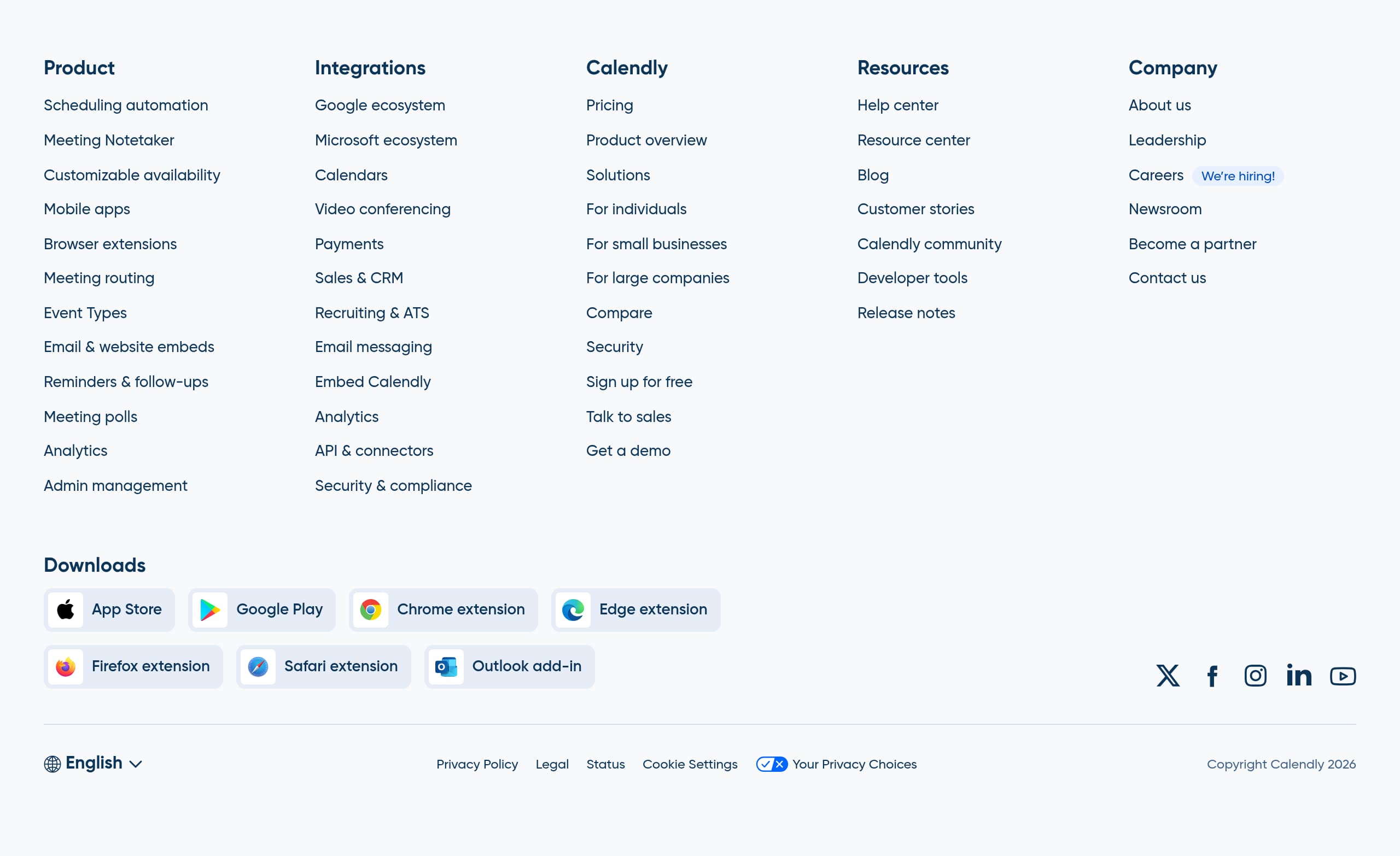
Calendly’s footer is structured like a mini site map, and it supports SEO, product discovery, and risk reduction by exposing key pages, downloads, and legal controls in one place.
Strong information architecture for discovery
The footer groups links into clear clusters: Product, Solutions, Resources, and Company. Under Product, it includes items like Integrations, Security and compliance, API and connectors, and Calendly Pricing. This helps both users and search engines understand the product surface area, and it provides direct access to high-intent pages that often close deals.
Multi-platform distribution links
Calendly includes explicit download destinations: App Store, Google Play, and multiple browser extensions (Chrome, Edge, Firefox, Safari), plus an Outlook add-in. This is a concrete trust and adoption signal because it shows the product is supported across environments. It also increases the chance a visitor finds their preferred entry point, for example installing an extension instead of starting on the web.
Compliance and transparency cues
The footer exposes Privacy Policy, Legal, Cookie Settings, and Your Privacy Choices, which supports compliance expectations for regulated buyers. A Status link is also present, which is an important operational trust element since scheduling is uptime-sensitive. Language selection is visible, with multiple languages listed (English, Français, Español, Deutsch, Português), reinforcing global readiness.
Conversion links remain present
Even at the bottom, key CTAs remain accessible: Sign up for free, Talk to sales, and Get a demo appear in the footer navigation cluster. This reduces dead ends on long-scroll pages and supports varied visitor intent. Overall, the footer balances deep navigability, platform availability, and legal transparency, which is exactly what a high-traffic SaaS like Calendly needs for both user experience and governance expectations.
Detected tech stack
Tools and technologies we detected on Calendly's site. Detection is best-effort and may be incomplete.
Scores
Our framework scores for Calendly's website in terms of clarity, conversion, and trust. See our methodology for how we calculate these.
How clear the value prop and structure are.
How conversion-friendly signup and pricing are.
How well trust and compliance are surfaced.
FAQ
Calendly uses a single-sentence value proposition, “Calendly makes scheduling simple,” then immediately qualifies who it is for, from individuals to enterprises, including “86% of the Fortune 500 companies.” The page explains the product in a practical setup order: connect calendars (up to six), set availability rules, connect conferencing tools, create event types, and share a scheduling link. This reduces ambiguity and supports quick self-serve adoption.
Calendly shows four tiers: Free, Standard, Teams (marked as the recommended plan), and Enterprise. It includes a billing toggle for yearly vs monthly and displays per-seat pricing on paid tiers, such as $10/seat/mo and $16/seat/mo, with explicit annual savings callouts. Enterprise pricing is anchored with “Starts at $15k/yr” and a “Talk to sales” CTA, which helps qualify leads before they request a demo.
Calendly repeatedly emphasizes a self-serve start with “Sign up for free,” “Get started,” and “Get started in seconds, for free.” Before signup, it previews the onboarding steps users can expect: connecting calendars, configuring availability settings like buffers and scheduling rules, connecting video conferencing tools, creating event types, and sharing a link or embed. For enterprise buyers, it provides parallel CTAs like “Get a demo” and “Talk to sales.”
Calendly combines adoption-scale proof with outcome-based proof. It states it is “Trusted by more than 100,000 of the world’s leading organizations” and used by “86% of the Fortune 500 companies.” It also highlights customer story metrics such as 169% ROI, a 20% decrease in scheduling errors, and an 8-day reduction in time-to-hire, with “Read now” links that push evaluators into deeper mid-funnel content.
Calendly positions security as an enterprise capability with messaging like “Built to keep your organization secure,” and it lists categories that match buyer checklists: enterprise-grade admin management, security integrations, data governance, compliance audits, and privacy protections. Trust is reinforced through navigation items like Security and Admin controls, and the footer includes legal links (Privacy Policy, Cookie Settings, Your Privacy Choices) plus a Status link for reliability transparency.

The world's best-performing SaaS businesses share surprisingly similar patterns. We help you learn and apply them through our human-designed methodology, with AI-assisted research.