
Key takeaways
Here are the key insights from our website breakdown analysis of Helpjuice.
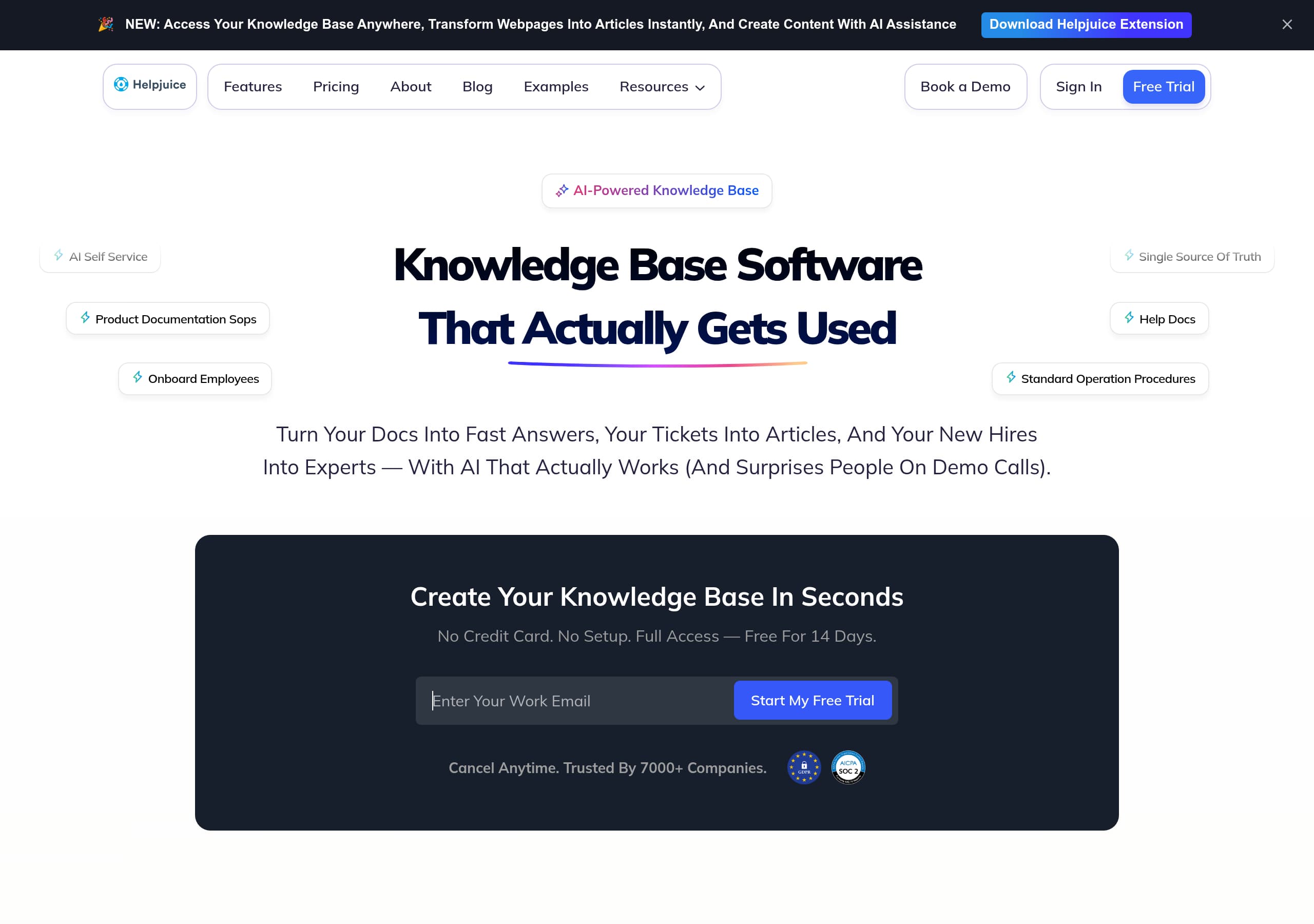
Helpjuice’s homepage wins on clarity by combining a blunt positioning line, “Knowledge Base Software That Actually Gets Used,” with concrete outcomes like fewer tickets and faster onboarding, which makes the product easy to understand within one screen.
Conversion is consistently reinforced through repeated, high-intent CTAs like “Start My Free Trial,” “Book a Demo,” and “Schedule a Demo,” plus explicit risk reducers such as “No Credit Card” and “Cancel Anytime.”
The site uses unusually deep social proof, including “SEE MORE (120+) CASE STUDIES” and multiple quantified results (for example, “30% decrease in support tickets,” “$100k annually”), which directly supports premium pricing expectations.
Helpjuice differentiates with an AI narrative that is shown, not just told: on-page UI snippets reference Swifty AI, AI Chat, “Generating AI Answer,” and an extension that turns webpages into articles, making the AI positioning feel tangible.
Pricing is positioned for serious teams: it highlights team size ranges, enterprise readiness, and annual versus monthly framing, which filters for higher-intent buyers but may require stronger guidance for smaller teams evaluating alternatives.
Trust signals are strong because the site pairs enterprise language like “SOC2, GDPR, enterprise-ready” with operational metrics (for example, search success rate and satisfaction rate), helping buyers justify adoption for internal knowledge and support use cases.
Home
Helpjuice’s homepage is optimized to make one point quickly: it is knowledge base software people actually use, not just a place to store docs. The hero combines category clarity (“Knowledge Base Software That Actually Gets Used”) with a specific promise, “Turn your docs into fast answers… with AI,” and then immediately reduces friction with “No Credit Card” and “Full Access, Free for 14 Days.”
Several conversion patterns show up above the fold:
- Dual intent CTAs appear repeatedly: “Start My Free Trial” for self-serve buyers and “Book a Demo” or “Schedule a Demo” for enterprise evaluators.
- The navigation includes “Features,” “Pricing,” “Examples,” “Resources,” “Case Studies,” which supports both product evaluation and SEO discovery.
- The page includes a product-led, demo-like feel with embedded UI snippets referencing “Ask Swifty AI,” “Generating AI Answer,” and “Works anywhere, on your site or kb,” which makes the AI claim more credible than a generic badge.
The copy uses concrete pain stacks to qualify the audience: ticket volume, onboarding delays, knowledge trapped in Slack, Notion sprawl, and support becoming a bottleneck. This is effective segmentation because it clearly targets support ops, enablement, onboarding, and high-growth teams. It also uses memorable phrasing like “type like a toddler” to communicate forgiving search without a technical explanation.
A notable strength is the density of proof and specificity: “Trusted By 7000+ Companies” appears near the core CTA, and later the site introduces metrics like “87.5% Avg, Search Success Rate” and “~2mins Support Response Time.” The homepage feels built to convert both buyers who want a quick trial and stakeholders who need enterprise-ready reassurance before committing.
Pricing
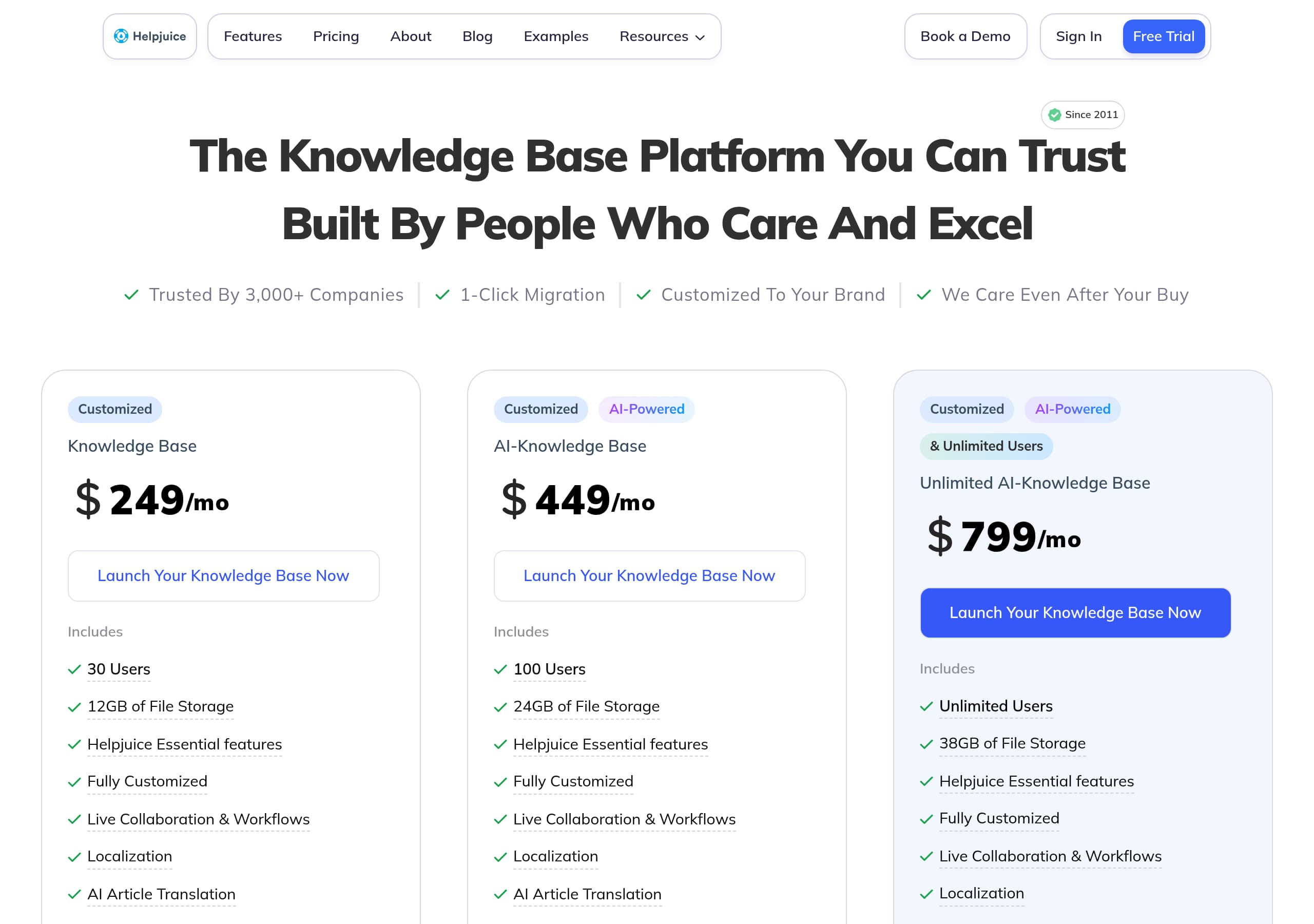
Helpjuice’s pricing presentation is designed to qualify serious teams and push conversations toward sales when complexity increases. In the pricing screenshot, the layout uses tiered plans aligned to team size, with clear anchors like “Up to 4 users”, “Up to 16 users”, and “Up to 60 users.” That structure makes the packaging logic easy to understand, even before comparing feature lists.
Conversion-wise, the page uses multiple levers to move buyers forward:
- A monthly versus annual toggle is visible, with annual pricing emphasized as a better value, which supports longer commitments without hiding monthly options.
- Each plan card includes a direct CTA (for example, a “Start Free Trial” style action on lower tiers and a more sales-led action like “Contact Us” or equivalent for larger deployments), creating self-serve and sales-assist lanes.
- The page reinforces that Helpjuice is not a lightweight FAQ widget by maintaining feature parity language around AI search and knowledge base capabilities, which helps justify higher price points.
The strongest element is that pricing matches the rest of the site’s narrative: it is built for scaling support, onboarding, and internal documentation, not a hobby wiki. The potential weakness is guidance: buyers comparing Helpjuice to Notion, Confluence, Document360, or Zendesk Guide often want a crisp “which plan for which team” mapping. The page would likely convert even better with 2 to 3 short use-case callouts per tier (Support KB, Internal wiki, Product docs) and explicit mentions of SSO and advanced permissions placement.
Still, the fundamentals are strong: plan tiers are scannable, there is a clear upgrade path, and the packaging uses a sizing model that tracks how knowledge bases expand across departments. The result is a pricing page that filters out low-fit customers while giving high-intent buyers a fast path to checkout or sales.
Features
Helpjuice’s features section is structured around outcomes first, then capability proof, which is a strong match for knowledge base buyers who care about adoption and deflection. The site repeatedly frames features as answers, for example, “Other platforms give you features. Helpjuice gives you answers,” and backs it with specific modules like AI Search, AI Chatbot, Powerful Editor, Analytics, Localization, and Integrations.
A key strength is that AI is not treated as a single checkbox. The page lists multiple AI components, including “AI Keyword Suggestions,” “AI Tag Manager,” “PDF & Image Search,” “AI Image Search,” “Wizardshot AI Step-By-Step Tutorials,” “Related Content Suggestions,” “Ask AI,” and “Swifty AI.” This breadth signals a platform approach to knowledge operations: creation, enrichment, retrieval, and measurement.
The site also provides UI-adjacent evidence through embedded snippets:
- “Ask Swifty AI, Generating AI Answer” suggests real-time response behavior.
- “Works anywhere, on your site or kb” aligns with the browser extension callout, “transform webpages into articles instantly.”
- Access control is described in product language: “Restrict specific content by user, or group, or make it public,” implying permissions and segmentation are first-class.
Feature positioning stays anchored in buyer pain points: forgiving search (“Type like a toddler”), documentation without heavy onboarding (“your team doesn’t need onboarding”), and migration help (“Go live in days, 24h migration help included”). Those are practical details that support switching from incumbents like Confluence or Notion.
Where it could improve is feature organization. The page repeats “Planner Localization Customization Analytics…” in a scrolling pattern, which creates visual emphasis but can feel redundant. A tighter hierarchy, grouped into “Create, Find, Manage, Measure” would help readers quickly validate fit.
Overall, Helpjuice communicates a full knowledge base stack, not just a help center editor, and it uses concrete modules and UI cues to make those claims believable.
Signup
Helpjuice’s signup path is designed to minimize perceived risk and give immediate product access, which aligns well with a knowledge base tool where users want to test search, structure, and editor workflows quickly. The homepage repeatedly pushes the self-serve CTA “Start My Free Trial” alongside “Book a Demo,” which is a strong dual-track motion for SMB and enterprise.
The clearest friction reducers are spelled out directly in the hero area: “No Credit Card”, “No Setup,” and “Full Access, Free for 14 Days,” plus “Cancel Anytime.” This combination addresses the three most common objections: billing risk, implementation effort, and lock-in. It also signals that the product expects users to be able to create value without a long onboarding sequence.
The site also demonstrates product usage within the marketing page, which functions like a soft onboarding preview:
- “Create your knowledge base in seconds” sets an expectation of a short time-to-first-article.
- Embedded UI examples show flows like selecting users/categories, article lists, and an “Ask Swifty AI” prompt, which implies the initial experience includes structure creation and AI-powered retrieval.
- The extension callout suggests another onboarding path: install extension, then convert webpages to articles, which could accelerate content seeding.
Where the signup experience may still have friction is decision complexity: knowledge bases often require choices about public vs internal, permissions, language support, and integrations. Helpjuice partially addresses this with “Restrict specific content,” “We support +50 languages,” and “Amazing Integrations,” but the signup would benefit from an explicit “3-step setup” style explanation (choose audience, import existing docs, customize theme) so evaluators know what happens after clicking trial.
Net result: the marketing site sets up a high-conviction expectation that trial users can reach “working KB with search” quickly, while enterprise buyers are consistently offered a demo-first alternative.
Trust
Helpjuice’s trust layer is built from three types of signals: enterprise readiness language, operational metrics, and security feature claims. The site explicitly states “SOC2, GDPR, enterprise-ready”, which is a high-impact shorthand for procurement and IT stakeholders evaluating internal knowledge bases.
Operational proof appears as a metric block with multiple numbers, including “87.5% Avg, Search Success Rate,” “~2mins Support Response Time,” and “99.95% Satisfaction Rate,” plus scale claims like “8500+ Knowledge Bases” and “Trusted by over 7,000,000 users.” Even without a dedicated trust center link in the excerpt, this quantification supports the core promise that search and self-service actually work in practice.
Security is also described in feature-level detail, not just a badge. The “Robust Security” bullet lists capabilities such as access control, SSO, encryption, firewalls, and backups. That specificity helps buyers map requirements to controls, especially for internal documentation, SOPs, and onboarding content that should not be public.
The trust narrative is strengthened by switching-cost assurances. The site mentions “Go live in days, 24h migration help included,” which addresses an often-overlooked risk: migrating content from Notion, Confluence, or legacy help centers. The presence of API references in the UI snippet (“Helpjuice API V3”) adds another trust layer for technical teams that need integration and data portability.
What is slightly missing, based on the provided content and screenshots, is a clear centralized destination for trust content: a security page, compliance documentation, data residency, or uptime status page link. Buyers in regulated industries often want a single page to share internally.
Even so, Helpjuice’s combination of compliance keywords, concrete security controls, and real customer outcomes creates credible trust for both customer-facing help centers and internal knowledge management deployments.
Footer

Helpjuice’s footer functions as a conversion support and credibility layer rather than a minimal legal bar. In the footer screenshot, the layout is column-based and includes multiple navigation clusters, which is important for a knowledge base product with several audiences (support, product documentation, SOPs, onboarding). A good footer in this category should reduce “dead ends,” and Helpjuice’s structure appears to do that by surfacing key destinations.
From the site’s header and repeated navigation patterns, users can reliably reach “Features,” “Pricing,” “Examples,” “Resources,” “Blog,” and “Case Studies.” The footer likely mirrors those, which is beneficial for SEO because it reinforces internal linking to high-intent pages like pricing and demos, and high-discovery pages like guides and ebooks.
Trust and procurement expectations are typically handled in the footer via links like Terms, Privacy, and security-related pages. While the screenshot is small, the presence of a robust, multi-link footer suggests Helpjuice is attempting to provide that completeness. Given the marketing copy includes “SOC2, GDPR,” a footer link to security or compliance resources would be a logical next-click for enterprise evaluators.
The footer also matters for conversion hygiene: when pages contain heavy scrolling content like feature grids, AI module lists, and case studies, users often scroll to the bottom to look for “Contact,” “Support,” “Sign In,” or “Book a Demo.” Helpjuice already repeats Book a Demo and Free Trial in-page, and a footer that includes these CTAs increases the chance of a final-step conversion after evaluation.
One improvement opportunity is tightening redundancy. The site has many repeated CTA lines in the excerpt (“Grab Your Free Copy Now” repeated), so the footer should prioritize a smaller set of decisive actions: trial, demo, pricing, and documentation.
Overall, the footer supports information scent and procurement readiness by offering a structured sitemap-like experience, which helps both evaluators and search engines understand Helpjuice’s breadth.
Detected tech stack
Tools and technologies we detected on Helpjuice's site. Detection is best-effort and may be incomplete.
Scores
Our framework scores for Helpjuice's website in terms of clarity, conversion, and trust. See our methodology for how we calculate these.
How clear the value prop and structure are.
How conversion-friendly signup and pricing are.
How well trust and compliance are surfaced.
FAQ
Helpjuice’s homepage combines a clear category headline, “Knowledge Base Software That Actually Gets Used,” with immediate friction reducers like “No Credit Card” and “Full Access, Free for 14 Days.” It also uses dual CTAs, “Start My Free Trial” and “Book a Demo,” to serve both self-serve and enterprise buyers. Embedded UI snippets referencing Swifty AI make the AI positioning feel tangible, not just marketing copy.
Helpjuice pricing is packaged by team size with tiers labeled by user ranges, such as “Up to 4 users,” “Up to 16 users,” and “Up to 60 users.” The page supports monthly and annual billing, encouraging annual commitments while still allowing comparisons. CTAs on the pricing cards guide smaller teams toward starting a trial, while larger deployments are nudged toward a sales conversation, which fits enterprise requirements.
Helpjuice heavily features quantified case studies and emphasizes volume, including “SEE MORE (120+) CASE STUDIES.” Examples include outcomes like reducing support tickets by 75%, increasing self-service by 40%, and saving $100k annually. Testimonials include roles like Head of Customer Care and Director of Customer Operations, making the proof easier to trust. The site also highlights scale metrics like thousands of companies and millions of users.
Helpjuice presents AI as a suite rather than a single feature. The site references Swifty AI for answering questions, AI Chat, and tools that help create and optimize content, including AI keyword suggestions, AI tagging, related content suggestions, and PDF or image search. It also promotes a browser extension that can transform webpages into articles instantly, which supports faster content seeding for new knowledge bases.
Helpjuice uses enterprise trust language like “SOC2, GDPR, enterprise-ready,” then backs it with security feature claims such as access control, SSO, encryption, firewalls, and backups. It also adds operational metrics like search success rate and support response time, plus large-scale usage numbers. Together, these signals help teams justify adopting Helpjuice for internal SOPs, onboarding documentation, and customer-facing self-service.

The world's best-performing SaaS businesses share surprisingly similar patterns. We help you learn and apply them through our human-designed methodology, with AI-assisted research.